Choosing a backup solution is not only about where your data is stored. It is also about who monitors the backups, verifies that recovery points are usable, and helps restore operations when something goes wrong.
NovaBACKUP is designed for small and midsize businesses, IT teams, and MSPs that want direct control over backup and recovery across Windows systems, virtual machines, and key Microsoft applications. Central Data Storage offers a more service-led approach through its UnisonBDR managed backup and disaster recovery service, with provider-managed backup oversight, recovery verification, private infrastructure, and guided restoration support.
NovaBACKUP may suit organizations with the expertise to manage their own backup environment. Central Data Storage may be the stronger fit for healthcare, dental, and Compliance-sensitive businesses that want greater recovery support and accountability.
What is NovaBACKUP and Who is it Designed For?
NovaBACKUP is a software-led backup platform for small and midsize businesses, IT teams, and managed service providers, focused on protecting Windows systems along with associated virtual machines and Microsoft applications.
Its main capabilities include:
- Windows PC and server backup
- File-level and image-based recovery
- Bare-metal system restore
- Hyper-V and VMware protection
- Microsoft SQL Server and Exchange backup
- Centralized backup monitoring
- Local, NAS, and cloud-based backup destination options
NovaBACKUP is best suited to organizations that want direct control over backup schedules, retention, storage, and restore workflows, with an internal IT team or MSP managing the environment.
Why Do Businesses Consider a NovaBACKUP Alternative?
NovaBACKUP suits organizations that want direct control, but some buyers need a more service-led backup and recovery model.
Common reasons include:
- Lower administrative burden: Lean IT teams may not want to manage backup jobs, failed alerts, retention settings, and routine maintenance.
- Hands-on recovery support: Some businesses want expert help selecting recovery points and restoring systems after an outage or cyberattack.
- Greater recovery confidence: A completed backup does not always confirm that the data is clean, complete, and usable. CDS explains why successful backups may still fail during recovery.
- Predictable recovery costs: Buyers may prefer clearer expectations around storage, retrieval, and restoration.
- Regulated-industry support: Healthcare and dental organizations may need a HIPAA-aligned backup service, BAA availability, recovery documentation, and sector-specific guidance.
For healthcare organizations, choosing a backup provider often requires evaluating how well a solution supports recovery needs beyond basic data protection. Reviewing the best backup services for healthcare providers can help teams compare options based on recovery capabilities, compliance considerations, and support requirements.
Central Data Storage vs. NovaBACKUP: Key Differences Compared
NovaBACKUP and Central Data Storage both protect business data, but they differ in how backups are managed, verified, and restored. The comparison below highlights the areas that matter most when choosing between a software-led platform and a more managed recovery service.
Backup Management and Recovery Responsibility
NovaBACKUP provides a software-led backup platform where businesses, IT teams, and MSPs administer backup schedules, storage, monitoring, and restores. Central Data Storage follows a more managed model, with provider-managed backup oversight and hands-on assistance during recovery.
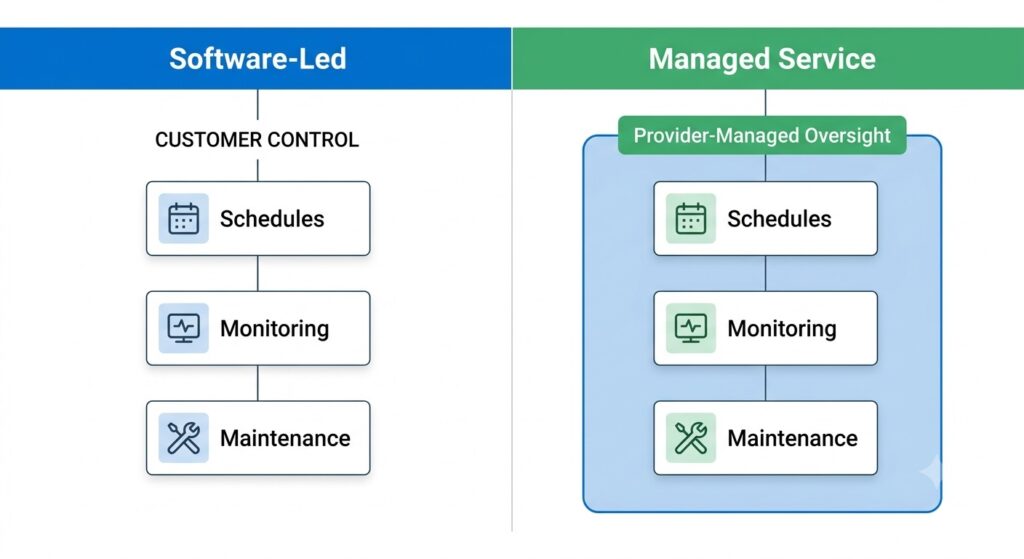
Visualizing daily workflow ownership between self-administered backup platforms and fully provider-managed recovery services.
Backup Verification and Recovery Readiness
NovaBACKUP provides file, image, virtual machine, and system recovery tools. CDS places greater emphasis on backup verification and recovery readiness through integrity checks and clean, boot-ready recovery points.
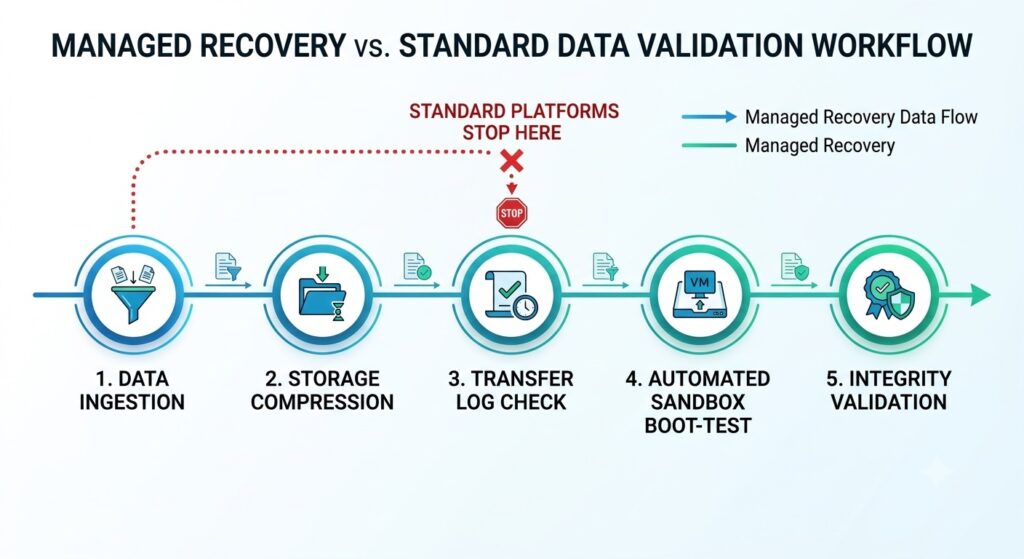
Why a successful backup log notification does not automatically equal a functional system restoration point.
Backup Infrastructure and Storage Options
NovaBACKUP supports local, cloud, and hybrid backup strategies. CDS operates on fully owned private infrastructure and protects data across local, cloud, and hybrid environments, with recovery from CDS or customer environments depending on the selected service.
Healthcare and Dental Backup Support
Both providers serve healthcare and dental organizations. NovaBACKUP offers encrypted backup options and solutions used by healthcare and dental practices, while CDS provides managed healthcare data backup and recovery with HIPAA-aligned services, BAA availability, and experience in regulated environments. CDS also offers dedicated backup and recovery support for dental practices and DSOs.
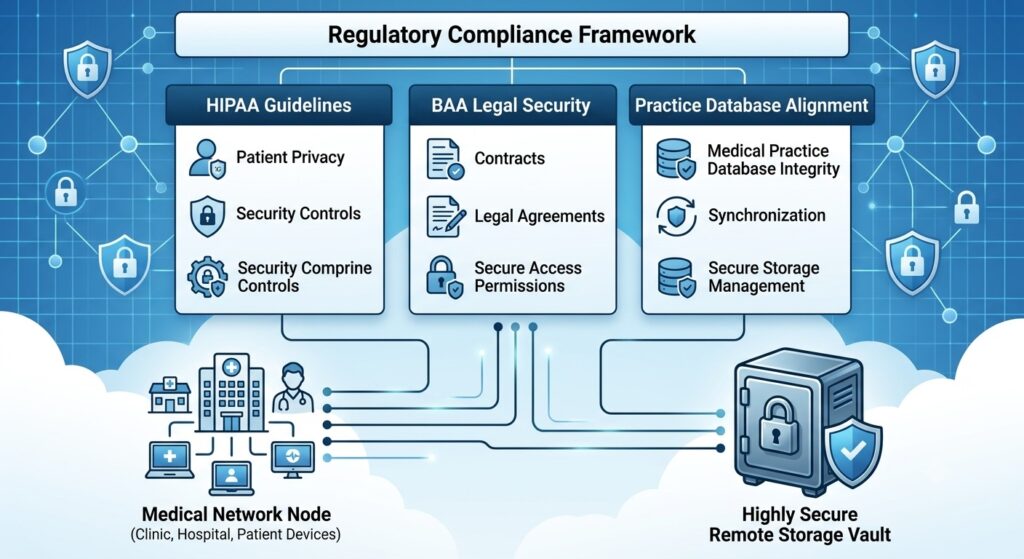
The structural compliance controls required to safely secure and recover sensitive healthcare and dental records.
Backup Pricing and Total Recovery Cost
NovaBACKUP costs depend on licensing, storage, deployment, and management requirements. CDS publishes storage-based backup and recovery pricing for UnisonBDR that includes verification, testing, and restores, reducing the risk of unexpected recovery or retrieval-related charges.
NovaBACKUP vs. Central Data Storage Comparison Table:
| Comparison Area | NovaBACKUP | Central Data Storage |
| Solution model | Software-led backup platform | Managed backup and recovery service with disaster recovery support |
| Best-fit users | Businesses, IT teams, and MSPs that want to administer backup and recovery themselves | Regulated SMBs and lean IT teams that prefer provider-managed backup oversight and recovery support |
| Management | Customer or MSP-administered backup policies, monitoring, and restores | Provider-managed backup oversight and recovery assistance |
| Recovery | Restore tools and technical support | Verified recovery and guided assistance |
| Infrastructure | Local, cloud, and hybrid options | Fully owned private infrastructure and support for local, cloud, and hybrid environments |
| Healthcare fit | Encrypted backup options used by medical and dental practices | Managed recovery with HIPAA-aligned services and BAA availability |
| Pricing | Varies by licensing, storage, and deployment | Storage-based, flat-rate plans for UnisonBDR that include verification, testing, and restores |
How We Evaluated Central Data Storage as a NovaBACKUP Alternative
We evaluated Central Data Storage against NovaBACKUP using the factors businesses should review when choosing a managed BDR service:
- Management model: How much responsibility stays with the customer, MSP, or provider
- Recovery readiness: Whether backups are only completed or also checked for usability
- Support: The level of help available during setup, monitoring, and restoration
- Infrastructure: Where backups are stored and how deployment can be configured
- Healthcare suitability: BAA availability, HIPAA-aligned regulated healthcare support, and recovery oversight
- Total cost: Licensing, storage, administration, retrieval, and recovery-related expenses
The evaluation focuses on buyer fit rather than declaring one solution universally better.
Why Choose Central Data Storage as a NovaBACKUP Alternative?
Central Data Storage is best suited to organizations that want to reduce the operational burden of managing backups and improve confidence in the recovery process.
Rather than leaving most monitoring and restoration tasks to an internal team or MSP, CDS provides a more service-led approach that connects backup with disaster recovery planning. This can help businesses respond faster when data is corrupted, systems fail, or ransomware disrupts operations.
CDS may be particularly valuable for:
- Healthcare and dental organizations with limited internal IT resources
- Regulated healthcare and other compliance-sensitive businesses that need stronger recovery oversight
- Teams that want direct assistance during restoration
- Buyers seeking clearer responsibility for backup health and recoverability
- Organizations that prefer predictable storage and recovery costs
NovaBACKUP may remain the better fit for businesses that want a software-led backup platform, greater configuration control, and an internal IT team or MSP to manage monitoring, storage, and recovery.
NovaBACKUP vs. Central Data Storage: Which Is Right for Your Business?
Choose NovaBACKUP if you:
- Want direct control over backup configuration and storage
- Have an internal IT team or MSP to manage the environment
- Need flexible Windows-focused backup software
Choose Central Data Storage if you:
- Want a managed backup and recovery service
- Need hands-on support during restoration
- Prioritize recovery verification, regulated-industry support, and predictable costs
Final Verdict: NovaBACKUP or Central Data Storage?
NovaBACKUP is a suitable option for organizations that want direct control over Windows-focused backup and already have the internal expertise or MSP support to manage monitoring, storage, and recovery.
Central Data Storage is the stronger choice for businesses that prefer a more managed approach, with greater support around backup oversight, recovery verification, and restoration. Its service model is particularly relevant for healthcare, dental, and other regulated organizations where downtime and data recovery carry higher operational risks.
Not sure whether your current backups are ready for a real recovery event? Request a data assessment from Central Data Storage to review your environment, recovery priorities, and compliance requirements.
FAQs About Best NovaBACKUP Alternative
Is Central Data Storage a Direct Alternative to NovaBACKUP?
Yes. Both protect business data, but they use different operating models. NovaBACKUP is a software-led backup platform administered by the customer or MSP, while Central Data Storage provides more hands-on monitoring, recovery verification, and guided restoration support.
What Is the Main Difference Between CDS and NovaBACKUP?
The main difference is operational responsibility. NovaBACKUP gives businesses and MSPs greater control over backup configuration and administration. CDS takes a more service-led approach focused on backup health, recoverability, and guided restoration.
Is NovaBACKUP a Good Backup Solution for Small Businesses?
Yes. NovaBACKUP can suit small businesses with Windows-based systems and access to internal IT expertise or an MSP that can configure, monitor, and maintain the backup environment.
Is Central Data Storage a Better NovaBACKUP Alternative for Healthcare?
CDS may be a stronger fit for healthcare organizations that want managed oversight, HIPAA-aligned services with BAA availability, recovery assistance, and support tailored to regulated healthcare environments. Suitability still depends on the organization’s systems and specific compliance requirements.
Which Backup Solution Is Better for Dental Practices?
NovaBACKUP may suit dental practices that want direct backup control. CDS may be better for practices that need managed monitoring, recovery guidance, and greater support during practice-management or imaging-system outages.

![10 Best Backup Services for Healthcare Providers [2026 Comparison]](https://centraldatastorage.com/wp-content/uploads/2026/08/Backup-Services-for-Healthcare-Providers-400x250.png)