Looking for a Barracuda Backup alternative with more hands-on recovery support?
Central Data Storage is a Barracuda Backup alternative for healthcare, dental, and other regulated organizations that need managed backup and disaster recovery, private infrastructure, verified recovery, and direct assistance during restoration. Barracuda Backup is an appliance-based platform for physical and virtual environments with off-site replication and centralized management.
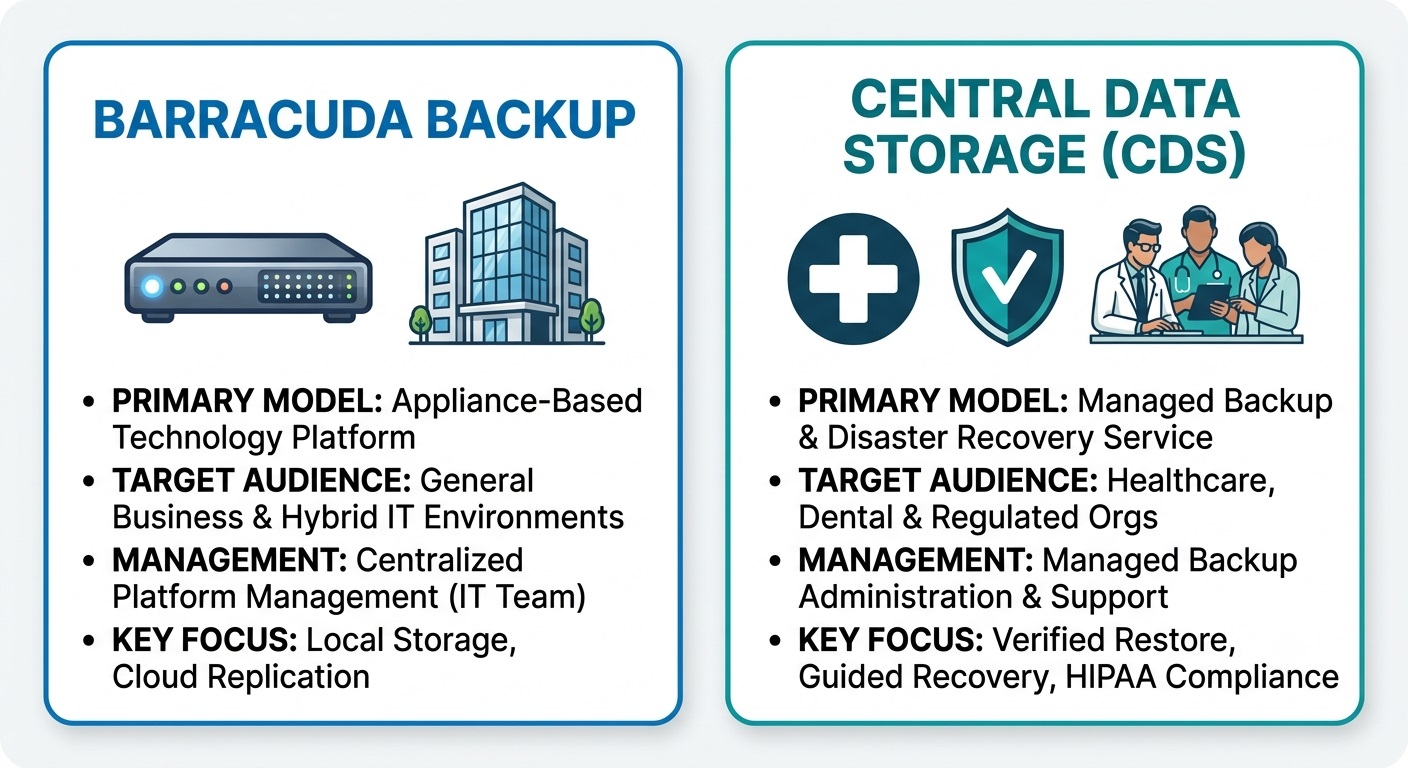
Barracuda focuses on IT-managed appliances for hybrid environments, while CDS provides fully managed backup built for healthcare.
The right choice depends on how your organization wants backup and recovery responsibilities to be handled. Barracuda may suit teams that prefer an established appliance platform, while Central Data Storage (CDS) may be a stronger fit for organizations prioritizing healthcare-focused support, recovery verification, flexible deployment options, and predictable pricing. This comparison examines the key differences to help you choose the right backup and recovery model.
Barracuda Backup vs Central Data Storage: Quick Comparison
The table below compares the two providers across deployment, management, recovery, healthcare specialization, pricing, support and other aspects.
| Comparison factor | Barracuda Backup | Central Data Storage |
| Primary model | Physical or virtual backup appliance | Managed backup and disaster recovery service |
| Best suited for | General businesses and hybrid IT environments | Healthcare, dental, and regulated organizations |
| Infrastructure | Local appliance with cloud or remote-site replication | CDS-hosted private infrastructure, self-hosted deployment, or licensed on-premises deployment |
| Backup management | Centralized platform management | Managed backup administration and recovery support |
| Recovery approach | File, directory, and system recovery | Guided recovery with restore-point verification |
| Ransomware recovery | Backup protection and restoration capabilities | Restore-point validation and clean recovery selection |
| Healthcare specialization | Supports multiple industries | Focused on healthcare, dental, and regulated environments |
| BAA availability | Confirm during vendor evaluation | Available for applicable CDS services |
| Pricing approach | Quote- or configuration-based | Published storage tiers and flat-rate options |
| Retrieval costs | Depends on the selected agreement | No egress or retrieval fees |
| Support model | 24/7 technical support | Managed support and direct recovery assistance |
| Healthcare alignment | Safeguards and BAA terms should be confirmed | HIPAA-aligned workflows and BAA availability for applicable services |
Key takeaway: Barracuda Backup is primarily an appliance-based technology platform managed through a centralized interface, while Central Data Storage places greater emphasis on managed recovery responsibility, verified restoration, and healthcare-focused support.
What is Barracuda Backup and How Does it Work?
Barracuda Backup is a data protection platform that stores backups on a local physical or virtual appliance and can replicate copies to Barracuda Cloud Storage or another Barracuda appliance. It supports centralized monitoring and recovery for physical servers, virtual machines, file shares, and other business workloads.
How Barracuda Backup Protects Business Data
Barracuda Backup follows a local-first backup model:
- Data is captured from supported servers, virtual machines, file shares, and storage systems.
- Backup copies are stored on a local Barracuda appliance for faster access.
- Copies can be replicated off-site to Barracuda Cloud Storage or another Barracuda appliance.
- Administrators use Barracuda Cloud Control to monitor jobs, alerts, retention, and recovery.
- Recovery options may include individual files, folders, virtual machines, or complete systems.
This approach combines local recovery access with an off-site copy for disaster recovery.
Who Should Choose Barracuda Backup?
Barracuda Backup may suit organizations that:
- Manage a mixture of physical and virtual workloads
- Prefer an appliance-based backup architecture
- Need centralized oversight across multiple locations
- Want local recovery combined with offsite replication
- Already use products within the Barracuda ecosystem
Barracuda Backup vs Central Data Storage: Key Differences
Barracuda Backup and Central Data Storage differ mainly in deployment, management responsibility, recovery verification, healthcare alignment, pricing, and support.
-
Backup Architecture and Deployment
Barracuda Backup uses a physical or virtual appliance to store backups locally, with optional replication to Barracuda Cloud Storage or another Barracuda appliance.
Central Data Storage offers deployment options, including fully managed hosting on CDS’s private infrastructure and customer-controlled deployment models.
Barracuda may suit organizations that want their IT team to manage an appliance-based platform. CDS offers greater flexibility for organizations that prefer managed backup or require infrastructure control.
-
Backup Management and Service Responsibility
Barracuda provides a centrally managed backup platform and technical support, while the customer’s IT team typically manages backup policies, monitoring, and recovery coordination.
CDS positions UnisonBDR as a managed backup and recovery partnership. Under the fully managed model, CDS helps oversee backup operations, recovery readiness, and restoration. Self-hosted and licensed customers retain greater operational responsibility.
Before choosing either provider, confirm who monitors failures, validates restore points, initiates recovery, and performs the final restoration.
-
Restore Verification and Data Integrity
A completed backup does not always mean the data is usable. Silent data corruption, missing files, or malicious content can remain inside a backup set until restoration is attempted.
This is why healthcare organizations often evaluate backup providers based on recovery confidence, not only storage capabilities. Understanding the best backup services for healthcare providers can help teams compare solutions based on restore readiness, data protection practices, and support available during critical recovery situations.
CDS emphasizes restore-point verification to confirm that backup data is readable, complete, and suitable for recovery. This helps organizations identify a usable restore point rather than relying solely on a “backup successful” status.
For healthcare and regulated organizations, this added verification supports data integrity, recovery confidence, and audit readiness.
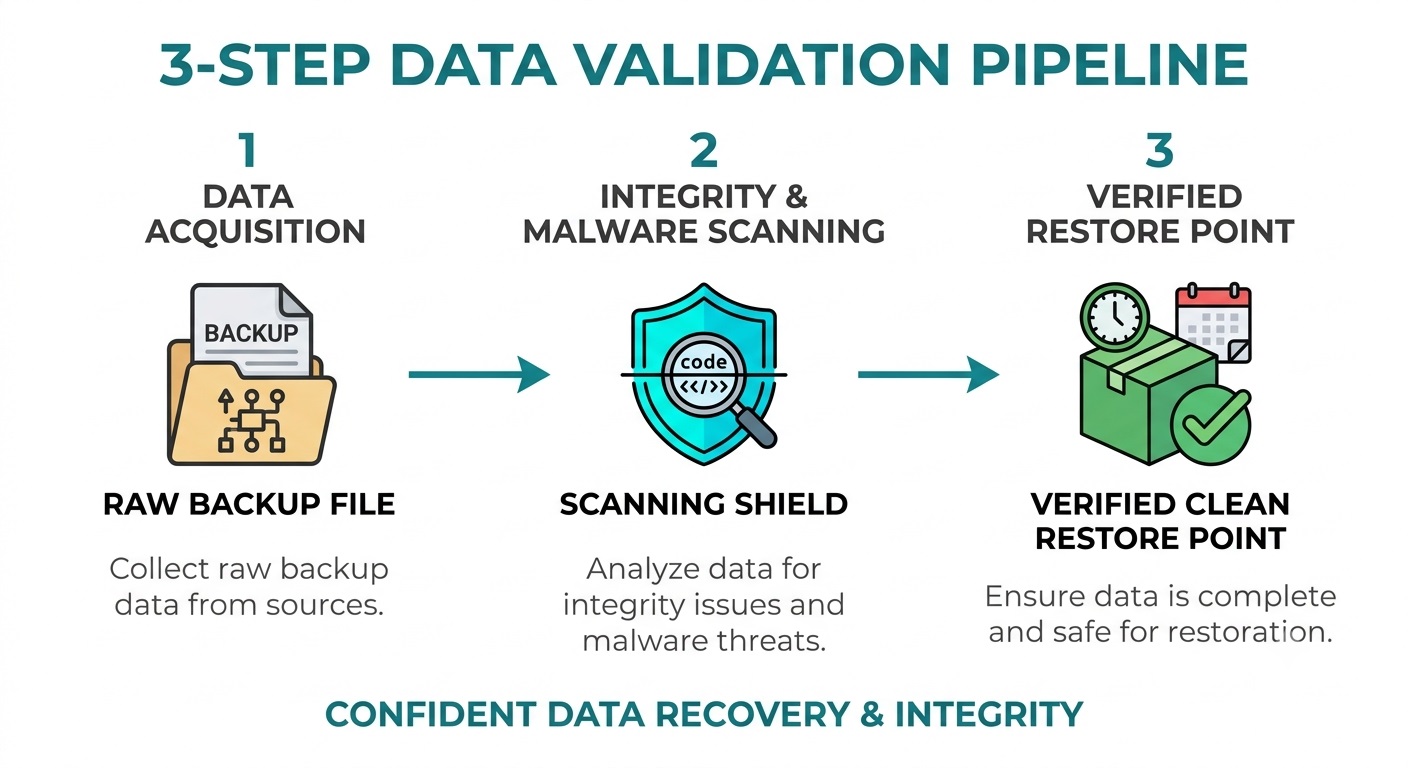
Restore-point verification ensures backup data is readable, complete, and free of silent corruption before you ever need it.
-
Ransomware Recovery and Clean Restore Selection
Both platforms support recovery after ransomware, but the key difference is how restore points are evaluated before data is returned to production.
CDS emphasizes distinguishing clean from infected restore points, checking for malware or corruption, and guiding recovery before restoration begins. This reduces the risk of returning compromised or damaged data to production.
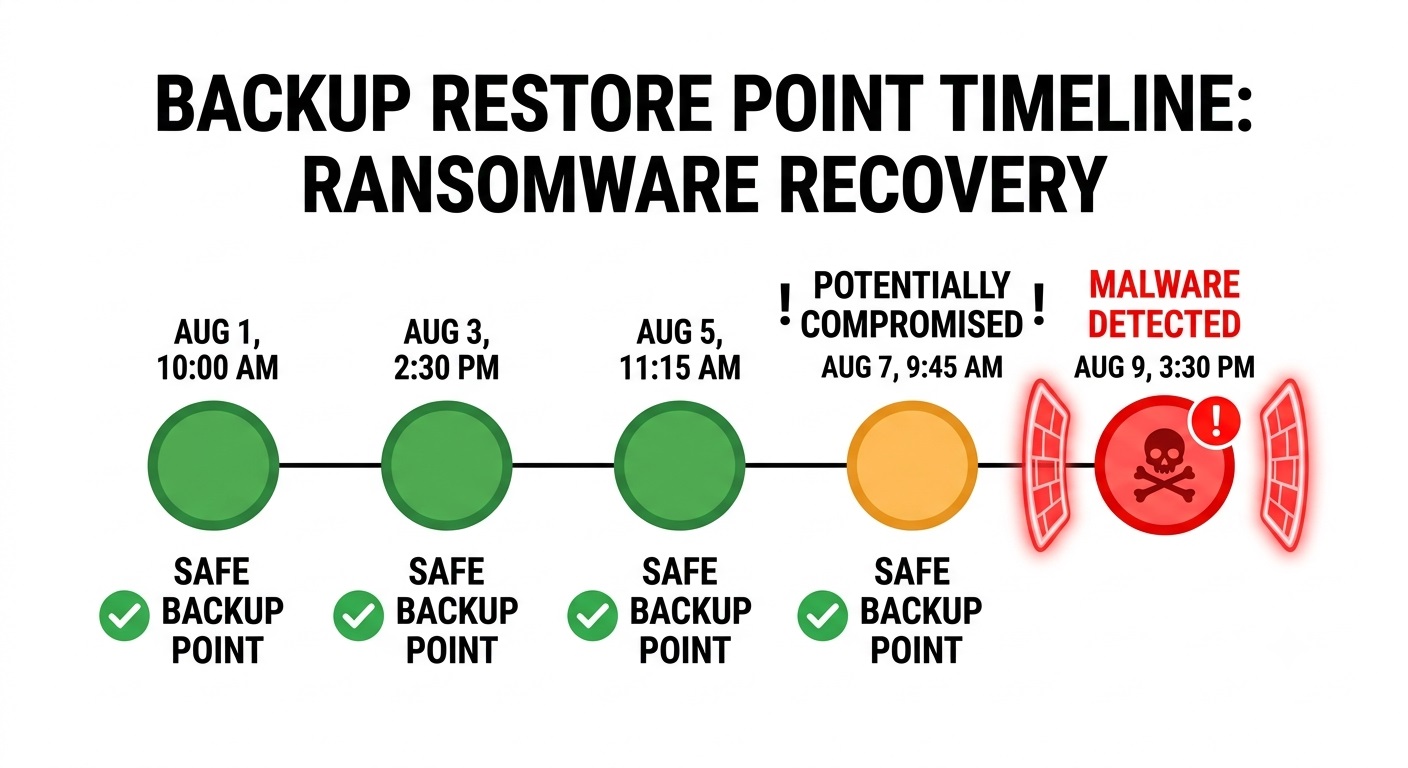
Guided ransomware recovery identifies clean restore points to prevent re-infecting production systems during a restore.
Barracuda or CDS: Which Is Better for Your Organization?
The better option depends on your infrastructure, available IT resources, recovery requirements, and healthcare data-protection needs.
Choose Barracuda Backup When
Barracuda Backup may be the better fit when your organization:
- Prefers a physical or virtual backup appliance
- Protects a mix of physical and virtual workloads
- Has internal or third-party IT resources to administer the platform
- Needs centralized backup oversight across multiple locations
- Prefers to remain within the broader Barracuda technology ecosystem
- Wants local backup with cloud or site-to-site replication
Choose Central Data Storage When
Central Data Storage may be the better fit when your organization:
- Operates a healthcare or dental practice
- Wants backup administration handled by a managed provider
- Prioritizes restore-point verification and guided recovery
- Requires a healthcare data backup and recovery approach designed for medical or dental environments
- Needs a Business Associate Agreement for the selected backup service
- Prefers predictable backup pricing without egress or retrieval fees under the applicable CDS plan
- Wants hands-on assistance during recovery
CDS offers fully managed, self-hosted, and licensed UnisonBDR deployment models, allowing organizations to select the level of infrastructure control and management responsibility that fits their environment.
This version preserves the commercial positioning without making absolute claims about Barracuda, CDS pricing, BAA coverage, or support responsibility.
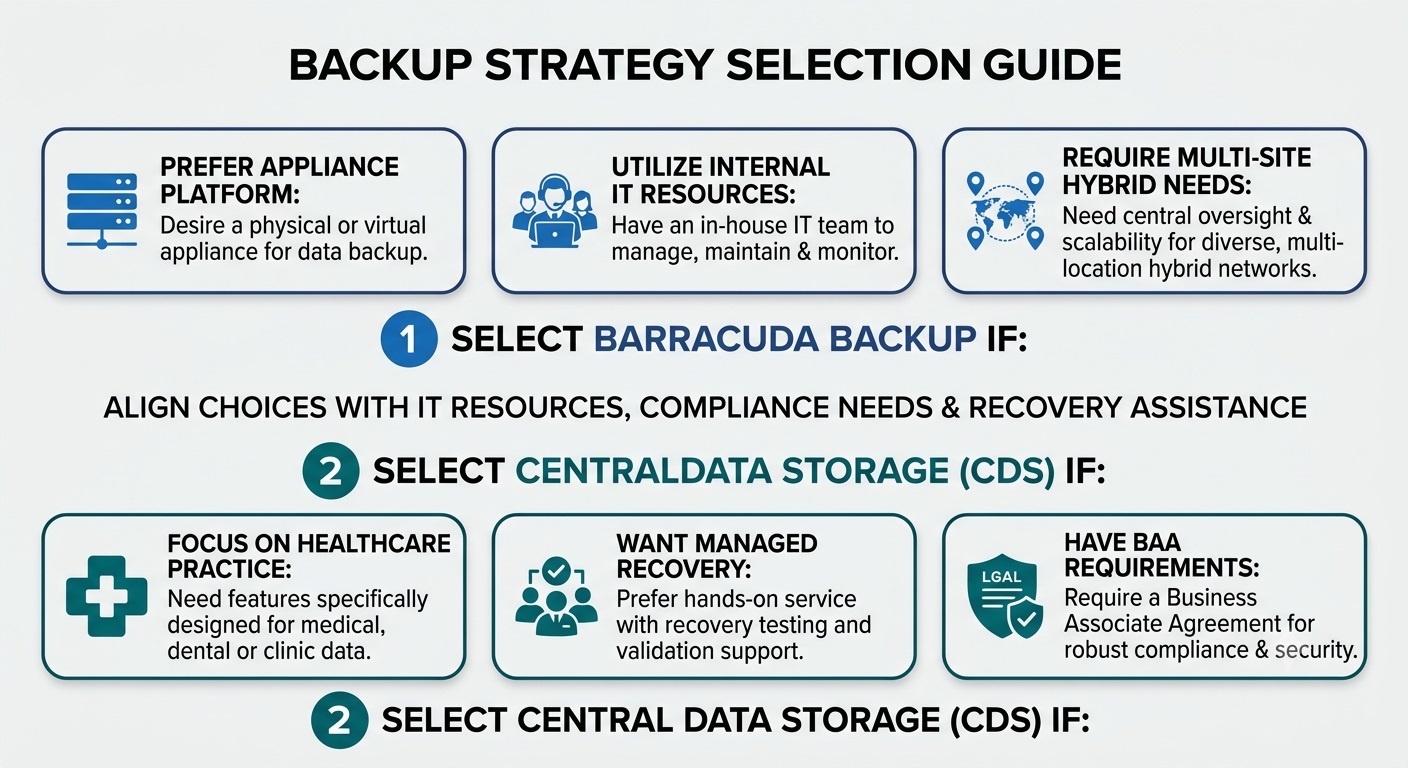
Align your choice with your IT resources, compliance requirements, and desired level of recovery assistance.
Questions to Ask Before Choosing a Barracuda Backup Alternative
Before selecting a backup provider, clarify who is responsible for monitoring, recovery, data verification, and ongoing support.
Ask each provider:
- Who monitors failed or incomplete backup jobs?
- How are restore points tested for readability and completeness?
- How are corrupted or suspicious files handled before restoration?
- Which physical, virtual, database, and application workloads are supported?
- Where is backup data stored and replicated?
- Does the provider offer a BAA for the selected healthcare backup service?
- Are egress, retrieval, or emergency recovery fees charged?
- How often are backup restore tests performed and documented?
- Who assists during ransomware or system-failure recovery?
- Can the service meet the organization’s required RPO and RTO targets?
The answers should clearly define recovery responsibility, expected costs, supported systems, and the evidence available to confirm that backups can be restored when needed.
Final Verdict: Is Central Data Storage a Good Barracuda Backup Alternative?
Barracuda Backup remains a suitable choice for organizations that want an established physical or virtual appliance platform with local protection, offsite replication, and centralized administration.
Central Data Storage may be a stronger Barracuda Backup alternative for healthcare and dental organizations that prefer managed backup, flexible deployment, restore-point verification, predictable pricing, and hands-on recovery assistance. UnisonBDR can be delivered as a fully managed service, deployed within a customer-controlled environment, or licensed for internal operation.
The right choice depends on workload compatibility, infrastructure control, recovery responsibility, pricing terms, and the level of support required during an incident. Before switching providers, verify that existing backups are usable and that the proposed solution can meet your recovery objectives.
Request a Data Risk and Recovery Assessment to evaluate your current backup environment and recovery readiness.
FAQs About Barracuda Alternative
What is the Best Barracuda Backup Alternative for Healthcare?
Central Data Storage may be a strong option for healthcare and dental organizations that need managed backup, restore-point verification, private deployment options, and direct recovery support.
Is Central Data Storage a Direct Replacement for Barracuda Backup?
It can replace Barracuda Backup in some environments, but compatibility depends on workloads, retention needs, recovery objectives, and deployment requirements. A technical assessment should be completed before migration.
Does Barracuda Backup Support On-Premises and Cloud Backup?
Barracuda Backup supports local backup through physical or virtual appliances and can replicate data to Barracuda Cloud Storage or another Barracuda appliance.
Does Central Data Storage Charge Egress or Retrieval Fees?
UnisonBDR plans do not include egress or retrieval fees. Pricing and included services should still be confirmed in the selected agreement.
Can CDS Help Migrate Data from Barracuda Backup?
CDS can assess the current environment, define backup requirements, and plan the transition. Existing restore points should be tested before the previous system is decommissioned.

![10 Best Backup Services for Healthcare Providers [2026 Comparison]](https://centraldatastorage.com/wp-content/uploads/2026/08/Backup-Services-for-Healthcare-Providers-400x250.png)