
If your CBCT imaging workstation failed tomorrow, could your existing backup recover years of 3D patient scans, implant planning files, and diagnostic images without disrupting patient care?
Unlike conventional dental records, Cone Beam Computed Tomography (CBCT) imaging data can be distributed across dedicated acquisition workstations, imaging servers, proprietary databases, and DICOM repositories. This makes imaging data vulnerable to incomplete backup configurations and recovery failures.
A 2019 survey of 56 CBCT users on imaging data management practices found that 53% of respondents utilized DICOM volumetric datasets for initial storage, 46% retained raw or native file formats, and 60% of storage locations were on-site servers. These findings highlight the complexity of protecting dental imaging data across different formats and storage environments (Source).
Effective CBCT backup and recovery requires more than copying scan files. Dental practices must protect associated databases, patient-image relationships, and application dependencies to restore clinically usable imaging data.
This guide explains what a complete CBCT backup should include, how to securely protect imaging datasets, and how to recover and verify them following hardware failure, data corruption, or ransomware attacks.
Quick Answer: What is CBCT Backup and Recovery?
CBCT (Cone Beam Computed Tomography) backup and recovery is the process of creating secure, recoverable copies of 3D dental imaging datasets, native imaging files, associated databases, and treatment planning records. It enables dental practices to restore patient scans, preserve patient-image associations, and resume imaging workflows after accidental deletion, hardware failure, data corruption, or ransomware attacks.
Where is CBCT Imaging Data Stored in Dental Practices?
CBCT imaging data is not necessarily stored within a dental practice management system (PMS). Depending on the manufacturer, software configuration, and network architecture, imaging datasets may reside across multiple storage locations:
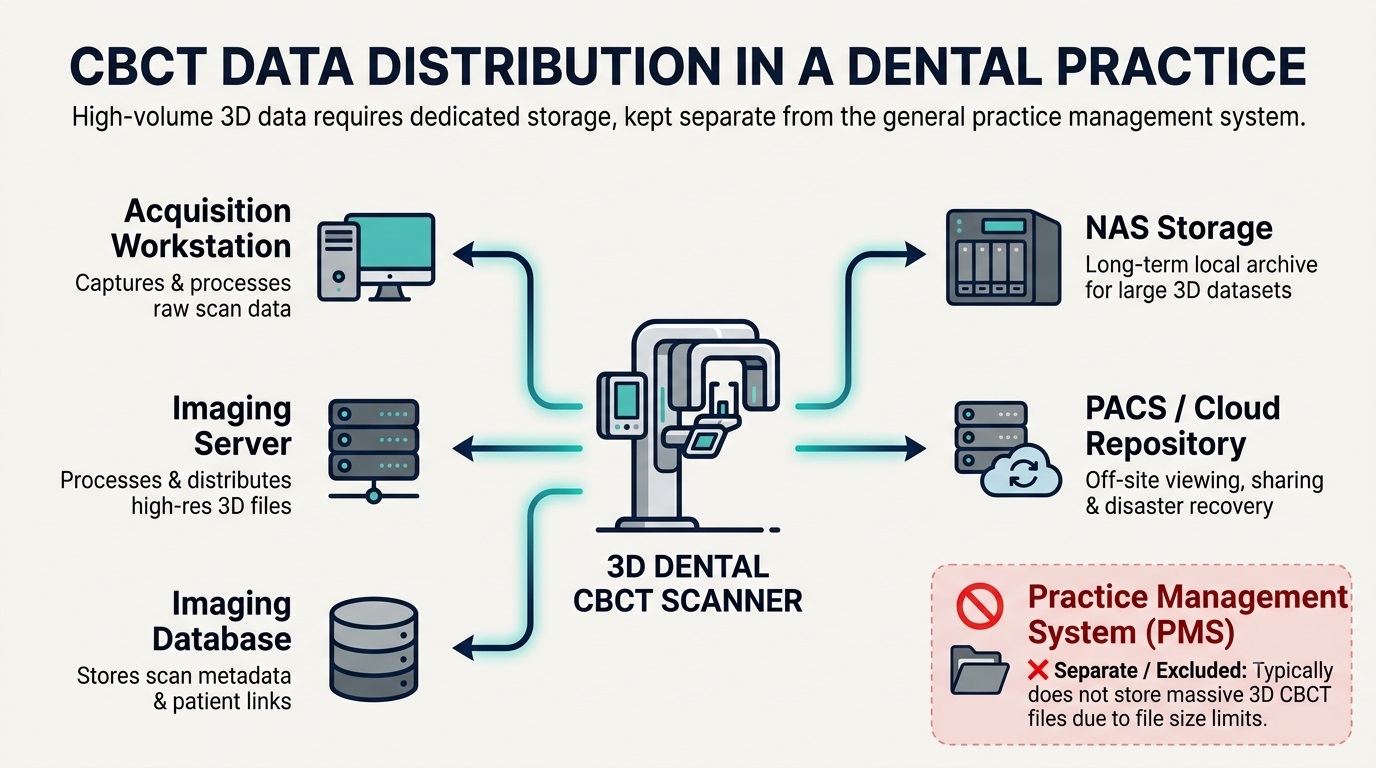
- Acquisition workstations: Computers connected to CBCT scanners that capture, process, and reconstruct 3D imaging datasets.
- Dedicated imaging servers: Centralized systems that store volumetric scans and provide access across multiple operatories or practice locations.
- Imaging databases: SQL or proprietary databases that maintain patient identifiers, examination records, and references to stored scans.
- Network-attached storage (NAS): Shared storage devices used to accommodate growing imaging archives.
- PACS and cloud repositories: Centralized environments used by some dental practices to archive and retrieve diagnostic images.
CBCT vs. PACS: Differences in Imaging Backup Requirements
CBCT (Cone Beam Computed Tomography) is an imaging modality that generates three-dimensional diagnostic datasets, whereas PACS (Picture Archiving and Communication System) is an infrastructure designed to store, manage, retrieve, and distribute medical images.
Not every dental CBCT system uses PACS. Many rely on dedicated acquisition workstations, proprietary imaging databases, or network-based storage. Consequently, backing up a PACS repository does not necessarily protect all CBCT data, particularly native imaging files and application-specific treatment planning projects stored outside the archive.
Dental practices using centralized imaging archives should consider PACS backup and recovery as a complementary component of their CBCT data protection strategy.
CDS helps dental practices identify imaging-specific backup gaps across workstations, servers, and associated databases. Its DEXIS backup service addresses the separate data protection requirements of dental imaging environments.
What Data Should a Complete CBCT Backup Include?
A complete CBCT backup should capture the following data components according to the imaging manufacturer’s supported backup procedures and the practice’s treatment workflows.
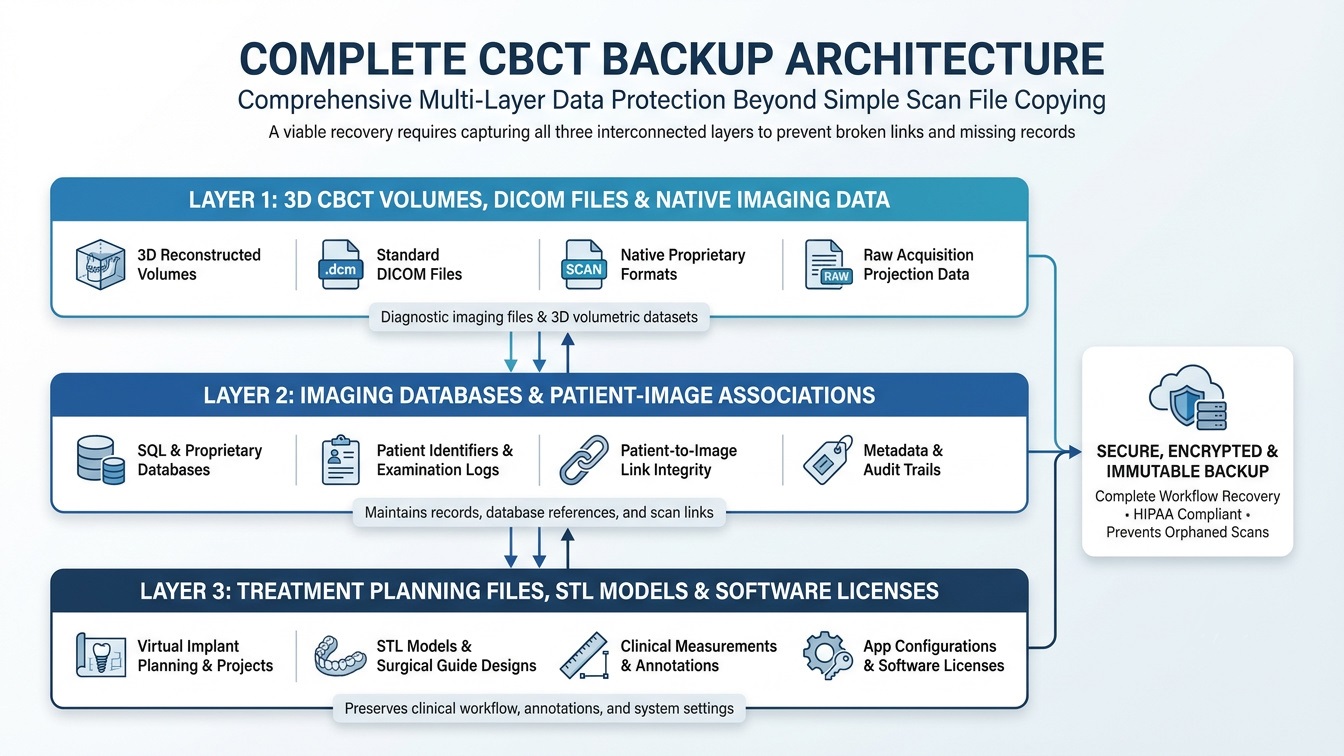
3D CBCT Volumes, DICOM Files, and Native Imaging Data
- Reconstructed 3D volumes: Processed datasets used for diagnostic assessments and treatment planning.
- DICOM files: Standardized imaging datasets containing image information and associated metadata.
- Native imaging files: Proprietary formats that may preserve additional imaging information unavailable in standard exports.
- Raw acquisition data: Original projection data, where retained and required for image reconstruction.
CBCT Imaging Databases and Patient-Image Associations
Database backups must remain consistent with their corresponding imaging datasets. Restoring files and databases from incompatible recovery points can result in orphaned images, broken file references, or missing examination records.
CBCT Treatment Planning Files and Software Dependencies
CBCT-based treatment workflows can generate additional digital assets that require protection:
- Implant planning projects and virtual implant positions.
- Anatomical annotations and clinical measurements.
- STL models and surgical guide design files.
- Application configurations and integration settings.
- Licensing information required for software reactivation.
Is DICOM Export Sufficient for Complete CBCT Backup?
Not necessarily. DICOM export supports imaging interoperability but may not preserve the complete editable state of an imaging application, including proprietary treatment planning data and application-specific settings. Importing exported scans into a replacement system is not equivalent to restoring the original imaging environment.
Therefore, backing up DICOM files should complement, rather than replace, a manufacturer-supported CBCT backup process.
How Much Backup Storage Do CBCT Imaging Systems Require?
CBCT backup storage requirements depend on scan frequency, dataset size, field of view (FOV), voxel resolution, compression, and retention policies. Larger imaging volumes and higher-resolution acquisitions generally increase storage consumption, while backup versioning adds further capacity requirements.
Dental practices can estimate their annual CBCT data growth using the following formula:
Annual storage = Daily scans × Average dataset size × Annual working days
For example, consider a dental practice performing 10 CBCT scans per working day:
| Storage parameter | Estimated value |
| Daily CBCT scans | 10 |
| Average dataset size (assumed) | 500 MB |
| Annual working days | 250 |
| Daily data growth | 5 GB |
| Annual data growth | 1.25 TB |
| Five-year data accumulation | 6.25 TB |
This illustrative calculation excludes existing imaging archives, backup versions, additional application files, compression, and deduplication. The five-year period is a storage planning example, not a regulatory retention requirement.
How Network Bandwidth Affects CBCT Backup and Recovery Times
Large imaging archives can extend backup windows and recovery times. Dental practices should evaluate available network bandwidth, effective transfer speeds, and storage throughput against their Recovery Time Objective (RTO).
Capacity planning should account for both ongoing imaging data growth and the time required to restore large CBCT archives without prolonged disruption to clinical operations.
How to Back Up CBCT Scans and Imaging Databases Securely
An effective CBCT backup strategy must account for imaging application requirements, database consistency, daily scan acquisition, and exposure to cyber threats. Dental practices can establish reliable imaging backups by following these steps.
1. Identify CBCT Data Sources and Configure Backup Paths
Review manufacturer documentation and system configurations to identify the exact data paths requiring protection. Check for custom storage directories, redirected network folders, and third-party treatment planning applications that may fall outside default backup settings.
Reassess these configurations whenever imaging software is upgraded, workstations are replaced, or storage locations change.
2. Automate Application-Consistent CBCT Backups
Use manufacturer-supported backup procedures to capture imaging databases and associated files in a consistent state. Simply copying active database files may produce incomplete or unusable backups.
Schedule automated backups according to the practice’s Recovery Point Objective (RPO), which defines how much recent imaging data the practice can afford to lose. Where supported, incremental backups can reduce transfer volumes by capturing changed data rather than repeatedly copying the entire imaging archive.
3. Protect CBCT Backups Against Ransomware and Storage Failure
Maintain encrypted offsite backups and immutable or offline copies to reduce the risk of ransomware compromising both production imaging data and its backups. Restrict administrative access and configure alerts for failed or incomplete backup jobs.
The CISA Stop Ransomware Guide recommends maintaining encrypted offline backups and regularly testing their availability and integrity.
Patient-identifiable CBCT scans also constitute electronic protected health information (ePHI) when maintained by HIPAA-regulated entities. Under the HIPAA Security Rule’s contingency planning requirements, covered dental practices must establish procedures for maintaining retrievable exact copies of ePHI and recovering lost data.
CDS supports these requirements through its HIPAA-aligned backup services, which provide encrypted offsite data protection, access controls, and applicable Business Associate Agreements (BAAs) to help dental practices safeguard patient imaging records.
How to Recover Lost, Deleted, or Corrupted CBCT Scans
Recovering CBCT imaging data requires a coordinated restoration process that accounts for the type of failure, imaging software compatibility, and dependencies between stored scans and application databases.
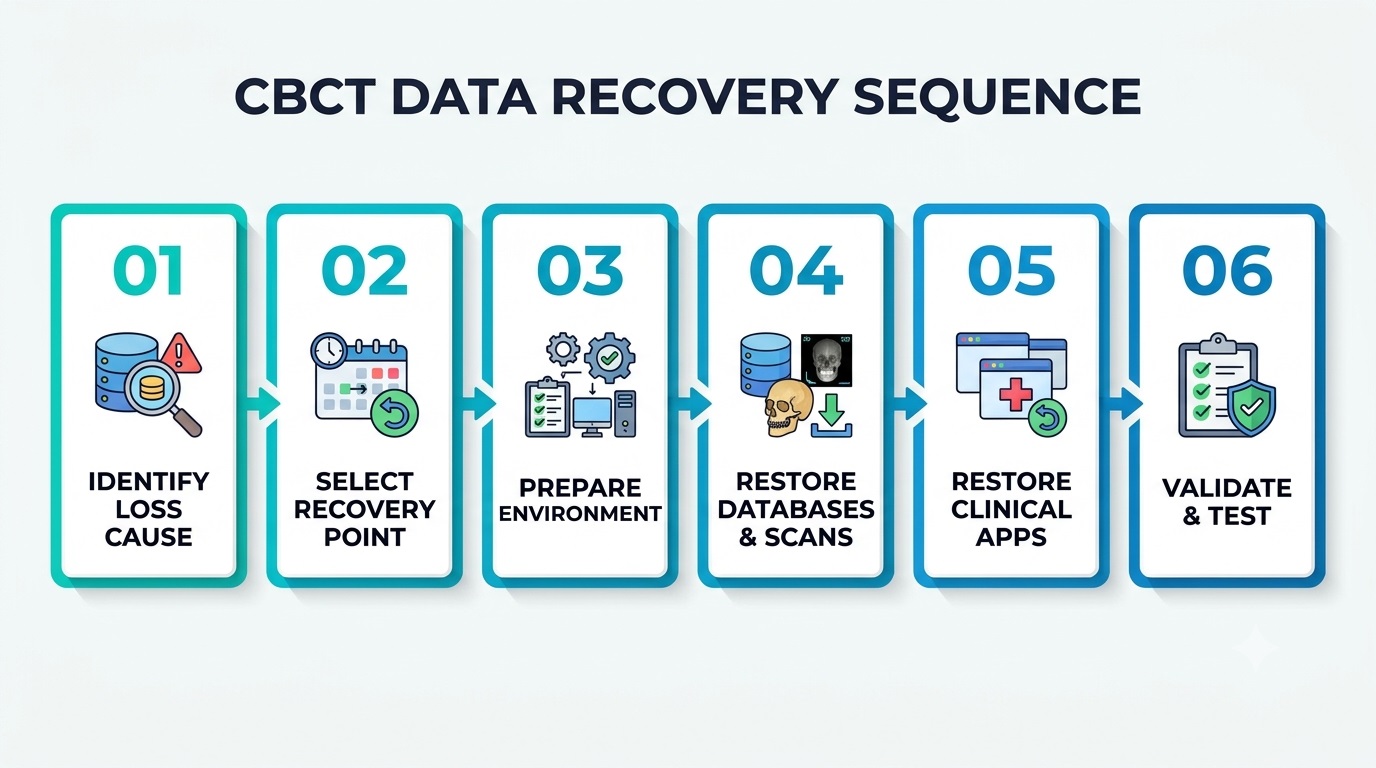
Dental practices should follow these recovery steps:
- Identify the source of data loss: Determine whether the issue involves deleted imaging files, database corruption, workstation failure, or ransomware. Isolate affected systems if a cyberattack is suspected.
- Select an appropriate recovery point: Identify an intact backup created before the data loss or compromise. Check its integrity and assess it for potential security threats.
- Prepare the recovery environment: Configure a replacement workstation or server with compatible imaging software, database versions, and required system settings.
- Restore imaging databases and scan repositories: Follow the manufacturer’s recommended recovery sequence to maintain consistency between database records and imaging files.
- Restore dependent clinical applications: Recover associated treatment planning projects and reestablish necessary software integrations and storage connections.
- Validate the restored imaging environment: Perform application-level testing before returning the system to clinical use.
Why are CBCT Scans Missing or Inaccessible After Restoration?
Even when imaging files are successfully restored, they may remain inaccessible within the CBCT application.
| Recovery issue | Potential cause |
| Scans missing from patient records | Inconsistent database and imaging restore points |
| Imaging files fail to open | Corrupted datasets or incompatible software versions |
| Incomplete 3D volumes | Missing image slices or incomplete volumetric datasets |
| Broken image references | Changes to storage paths or network configurations |
| Treatment plans unavailable | Missing proprietary project files |
| Imaging application fails to launch | Missing configurations, dependencies, or licensing information |
Resolving these issues may require manufacturer-supported database repair, image reindexing, or storage path reconfiguration. Avoid overwriting original imaging data or attempting unsupported database repairs, as these actions can complicate subsequent recovery efforts.
How to Verify CBCT Backup Integrity and Imaging Recoverability
A successful backup notification confirms that a backup job has completed, but it does not establish whether the recovered CBCT data is clinically usable. Dental practices should perform controlled test restorations and evaluate the recovered imaging environment against specific acceptance criteria.
CBCT Restore Testing and Clinical Usability Checklist
- Volume completeness: Confirm that restored 3D datasets contain all expected image slices or frames without missing sections.
- Patient identification: Verify patient identifiers, examination dates, and scan associations against original records.
- Image visualization: Test axial, coronal, sagittal, and 3D views within compatible imaging software.
- Metadata integrity: Confirm that image orientation, voxel dimensions, and relevant acquisition parameters are preserved.
- Clinical project accessibility: Open saved treatment plans and verify associated annotations and measurements.
- Security and integrity: Check restored data for corruption and potential malware before reconnecting production systems.
- Recovery performance: Document actual restoration time and data loss against established RTO and RPO targets.
Qualified dental personnel should confirm that the recovered images and associated clinical information are suitable for their intended use before resuming treatment workflows.
Maintaining documented results from periodic restore tests helps dental practices identify hidden recovery gaps before an actual data loss incident occurs.
HIPAA-Aligned CBCT Backup and Recovery With Central Data Storage
Central Data Storage (CDS) provides HIPAA-aligned backup and recovery solutions for dental practices and DSOs, helping protect critical imaging data alongside other patient records.
With UnisonBDR, CDS supports dental imaging data protection through:
- Managed backup services: Automated backup processes tailored to the practice’s data protection requirements.
- Encrypted offsite storage: Secure data protection through CDS’s U.S.-based private cloud infrastructure.
- Verified recovery: Backup integrity checks and recovery verification to identify potential corruption and security threats.
- Predictable pricing: Flat-rate pricing without egress or retrieval fees under applicable service plans.
- 24/7 U.S.-based support: Expert assistance when data loss or system failures disrupt dental operations.
- HIPAA alignment: Data protection safeguards and Business Associate Agreements (BAAs) that support regulatory obligations.
CDS helps practices assess their existing imaging infrastructure, identify backup gaps, and establish recovery strategies based on their specific CBCT software and storage configurations.
Explore our dental data backup and recovery solutions to determine whether your CBCT imaging data is adequately protected and recoverable.
Conclusion: Ensure CBCT Imaging Data is Recoverable Before a Disaster
CBCT imaging data represents years of diagnostic records, treatment planning, and clinical investment. Losing access to these assets can interrupt ongoing procedures, delay treatment decisions, and potentially require patients to undergo repeat scans.
Dental practices should treat CBCT backup and recovery as a distinct component of their data protection strategy rather than assume that routine practice management backups cover their imaging environment.
With Central Data Storage, dental practices can strengthen their imaging data protection through HIPAA-aligned backups, secure offsite storage, and verified recovery.
Don’t wait for a workstation failure or ransomware attack to discover gaps in your imaging backups. Request an assessment to evaluate your CBCT backup and recovery readiness.
CBCT Backup and Recovery FAQs
How Often Should Dental Practices Back Up CBCT Scans?
Dental practices should back up CBCT data at least daily, with more frequent backups for high-volume imaging environments. Backup frequency should reflect scan acquisition rates, changes to treatment plans, and the amount of imaging data the practice can afford to lose.
Can CBCT Scans and Imaging Databases Be Backed Up to the Cloud?
Yes. CBCT imaging data can be backed up to secure cloud infrastructure, provided the backup solution supports the required file formats, database dependencies, storage capacity, and applicable HIPAA safeguards.
Can CBCT Scans Be Recovered Without the Original Imaging Software?
Standard DICOM datasets can often be accessed through compatible third-party viewers. However, proprietary imaging files, editable treatment plans, and application-specific features may require the original software or a compatible manufacturer-supported application.
Can CBCT Scans Be Recovered From a Failed Hard Drive Without a Backup?
Recovery may be possible if the storage device remains partially readable and the imaging data has not been overwritten. However, recovering complete CBCT volumes, associated databases, and treatment planning files is not guaranteed. Avoid using the affected drive and seek professional data recovery assistance.
Does a CBCT Backup Provider Need a Business Associate Agreement (BAA)?
Yes, when the provider creates, receives, maintains, or transmits ePHI on behalf of a HIPAA-covered dental practice as a business associate. A Business Associate Agreement establishes the provider’s responsibilities for protecting that information.
Are Your CBCT Backups Actually Recoverable?
Protect your 3D dental scans and imaging databases with HIPAA-aligned backup and verified recovery from CDS.