What happens when a radiologist needs to review a patient’s previous MRI or CT scan, but the PACS system is down, even though the imaging data has been backed up?
For hospitals and diagnostic imaging centers, a PACS outage can disrupt image retrieval, delay diagnostic decisions, and interrupt clinical workflows. The challenge becomes more serious when DICOM images are intact, but corrupted databases, missing indexes, or failed system integrations prevent clinicians from accessing them.
This is why PACS backup and recovery requires more than storing copies of medical images. A reliable recovery strategy must account for the imaging archive, databases, configurations, and supporting systems needed to restore clinical access.
This guide explains what needs protection, how PACS recovery works, and how healthcare organizations can verify that their imaging systems are truly recoverable.
Quick Answer: What is PACS Backup and Recovery?
PACS backup and recovery is the process of protecting and restoring the medical imaging data and supporting systems used by a Picture Archiving and Communication System (PACS). This includes DICOM images, databases, indexes, application configurations, and system integrations.
What Data and Systems Need to Be Backed Up in PACS?
A complete PACS backup must protect both medical imaging files and the supporting components needed to retrieve and display them. For hospitals and diagnostic imaging centers, a reliable radiology and imaging backup and recovery strategy should account for DICOM images, PACS databases, indexes, and system configurations. Backing up DICOM images alone may not be sufficient if the databases or integrations required to access those images are lost.
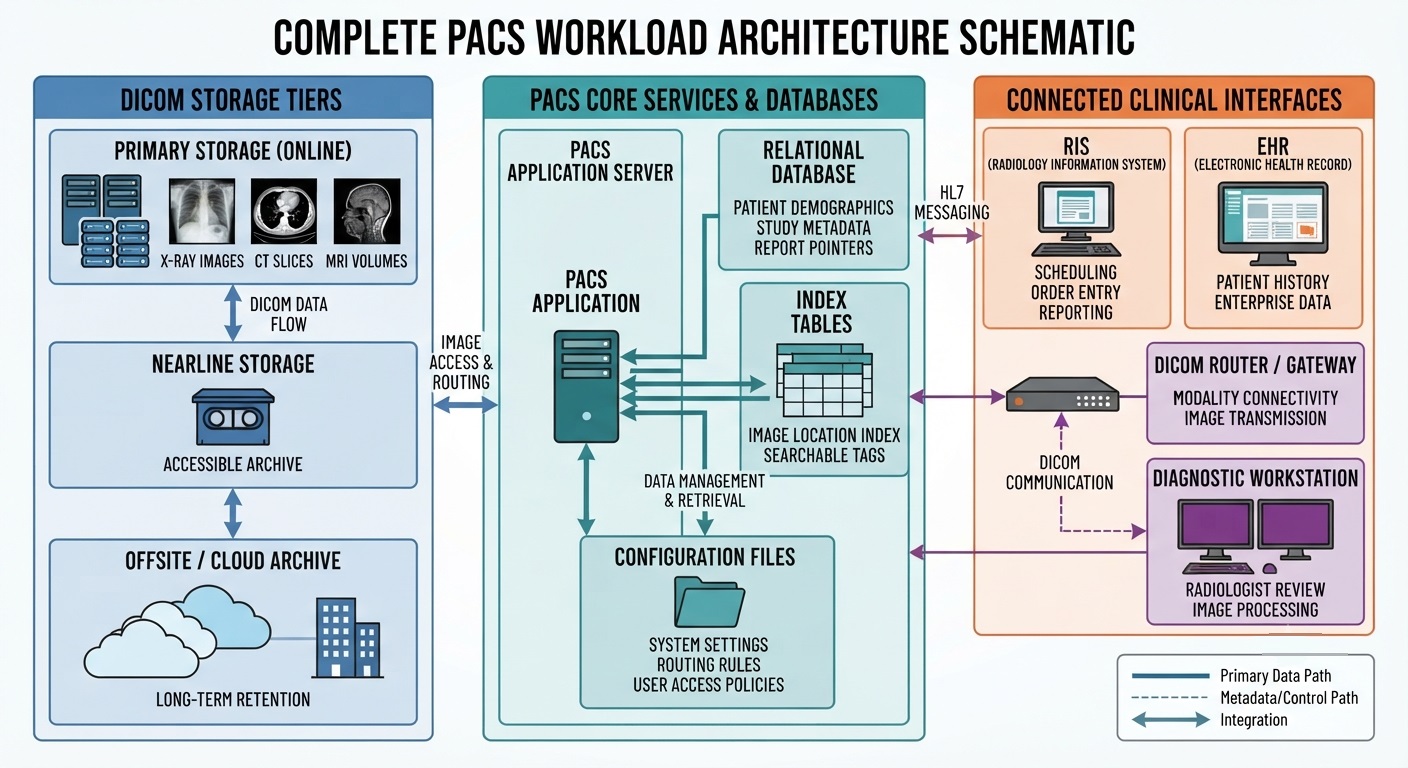
The exact backup scope depends on the PACS vendor, storage architecture, and integrations used by the healthcare organization.
DICOM Images, Studies, and Imaging Archives
PACS stores medical imaging data using the Digital Imaging and Communications in Medicine (DICOM) standard. This information is commonly organized into a hierarchy of patients, studies, series, and individual imaging instances.
A backup strategy should account for:
- DICOM imaging objects: X-rays, CT scans, MRIs, ultrasound images, and associated information.
- Study and series information: Data that organizes images into examinations and helps maintain their clinical context.
- Imaging archives: Primary, nearline, and secondary repositories, including vendor-specific archive metadata and storage tiers, where current and historical imaging studies are stored.
Healthcare organizations must ensure that backed-up studies remain complete and accessible, particularly when imaging data is distributed across multiple storage locations.
PACS Databases, Indexes, and System Integrations
PACS also relies on databases and application services to locate, retrieve, and display diagnostic studies.
Depending on the system, critical components may include:
- PACS databases and indexes: Maintain references between patient records, examinations, and stored images.
- Application configurations: Preserve settings required for PACS services and image access.
- RIS and EHR integrations: Support the exchange of patient and examination information across clinical systems.
- DICOM routing configurations: Enable communication between imaging modalities, archives, and viewing systems.
These components must be protected using backup methods appropriate to their consistency and recovery requirements.
For example, restoring DICOM files without the corresponding database may leave images physically available but inaccessible through normal PACS search and retrieval functions.
The key requirement is recoverability of the complete PACS workload, not simply the existence of backed-up image files.
What are the Best Practices for PACS Backup?
An effective PACS backup strategy must account for the volume of medical imaging data, the frequency of new examinations, and how quickly radiology teams need access to restored studies. As part of a comprehensive healthcare backup and recovery plan, organizations should protect imaging files, databases, and application dependencies while minimizing disruption to clinical operations.
Set RPO and RTO for Medical Imaging Workloads
Healthcare organizations should establish two recovery objectives based on their clinical and operational needs:
- Recovery Point Objective (RPO): The maximum acceptable period of data loss. For example, a one-hour RPO means the backup strategy should enable recovery to a point no more than one hour before the disruption.
- Recovery Time Objective (RTO): The target time for restoring PACS functionality after an outage.
These objectives may differ between active imaging workflows and historical archives. Recently acquired studies needed for urgent diagnosis may require faster recovery than older examinations.
Backup schedules and recovery capabilities should be designed around these priorities rather than applying the same requirements to every imaging dataset.
Choose On-Premises, Cloud, or Hybrid PACS Backup
PACS environments generate large volumes of imaging data, making storage capacity, network bandwidth, and recovery speed important considerations.
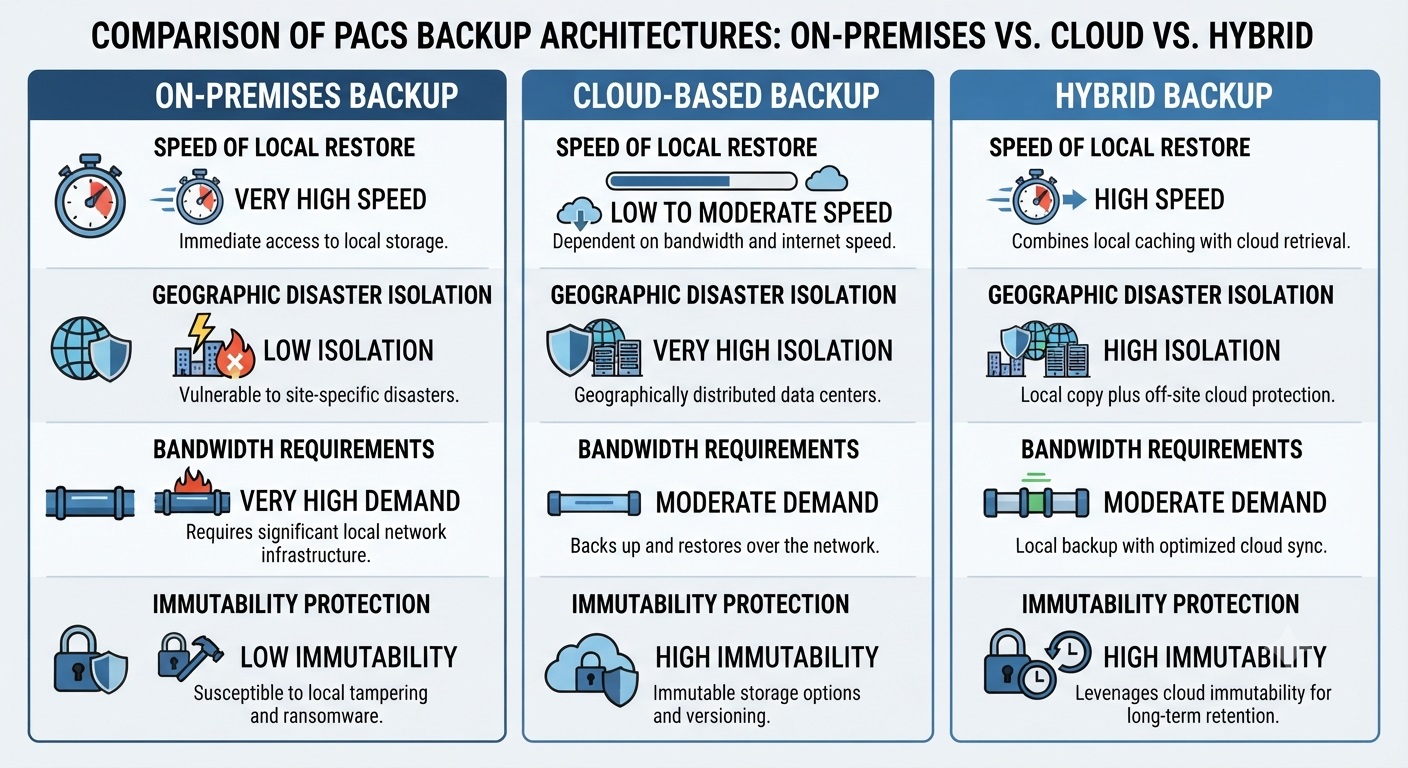
Organizations can evaluate several approaches based on recovery speed, storage capacity, and operational requirements. Understanding the broader types of backup solutions for healthcare can help IT teams assess which architecture best suits their PACS environment.
- On-premises backups: Support local restoration but may remain vulnerable to incidents affecting the primary facility.
- Offsite or cloud backups: Provide geographic separation, although large-scale restoration can depend on network capacity and data retrieval speeds.
- Hybrid backups: Combine local recovery options with separate offsite copies for broader disaster protection.
Regardless of the architecture, application-consistent backups are important for PACS databases and other components that change during normal operations. Backup processes should preserve a recoverable state across related systems.
Replication may improve availability, but it should not replace independently recoverable backups because corrupted or encrypted data can also be replicated.
The objective is to select a backup architecture that can meet the organization’s recovery targets while preserving the integrity and accessibility of its medical imaging data.
How to Recover a PACS System After Data Loss or Failure
Recovering a PACS environment requires identifying the cause of the disruption and restoring the affected components in the correct sequence. The recovery approach depends on whether the failure involves stored imaging data, the PACS database, application services, or supporting infrastructure.
Common Causes of PACS Data Loss and System Failure
Different failures affect medical imaging access in different ways:
- PACS database corruption: DICOM images may remain intact, but damaged indexes or database records can prevent radiologists from locating and retrieving studies.
- Imaging archive failure: Storage hardware faults or repository corruption can make current or historical imaging studies unavailable.
- Ransomware attacks: Malware may encrypt PACS servers, databases, or accessible storage. Maintaining separate, protected recovery copies, including immutable backups for healthcare, can help preserve recovery options when production systems are compromised.
- Network or infrastructure outages: Failed servers, connectivity issues, or power disruptions can interrupt imaging workflows even when the underlying data remains intact.
Identifying which components are affected helps IT teams determine what must be recovered and which clinical functions should receive priority.
Steps to Restore PACS Data and Clinical Imaging Access
A PACS disaster recovery plan should establish a restoration sequence based on system dependencies and clinical urgency.
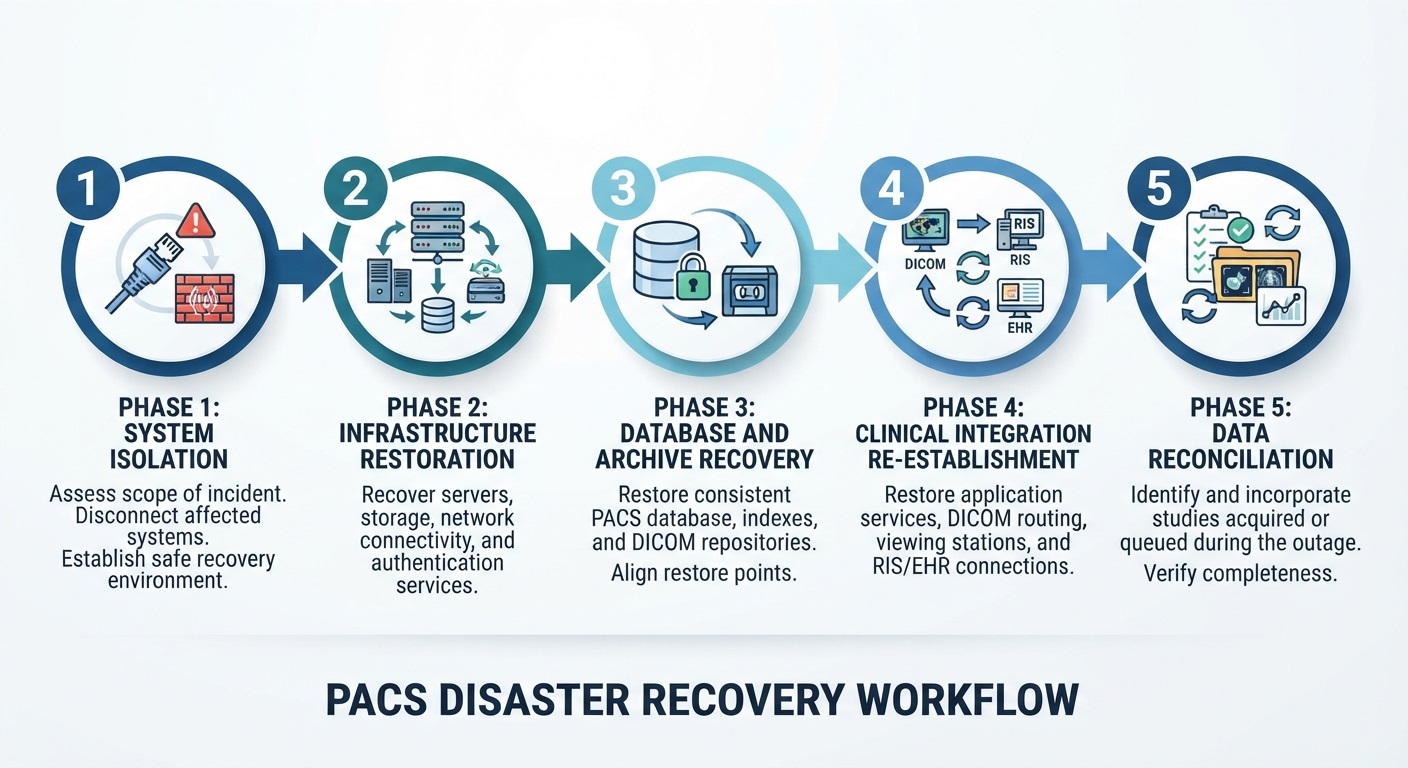
- Assess and isolate affected systems: Determine the scope of the incident and establish a safe recovery environment, particularly after a cyberattack.
- Restore supporting infrastructure: Recover the required servers, storage, network connectivity, and authentication services.
- Recover PACS databases and imaging archives: Restore compatible, application-consistent versions of the databases, indexes, and DICOM repositories. Database and image-store restore points should align to avoid orphaned, missing, or unretrievable studies.
- Reestablish clinical integrations: Restore PACS application services, DICOM routing, viewing systems, and relevant RIS/EHR connections.
- Reconcile imaging data: Identify missing studies, incomplete transfers, or examinations acquired during the outage and ensure they are properly incorporated.
For large imaging archives, recovery priorities may favor recently acquired or clinically urgent studies before less time-sensitive historical data, depending on the system’s capabilities.
Restoring the PACS server alone does not guarantee clinical recovery. The process must reestablish the connections and functionality that allow authorized clinicians to retrieve and review diagnostic images.
How to Verify PACS Recovery and DICOM Data Integrity
A successful PACS restoration does not automatically mean radiologists can access and use the recovered imaging studies. PACS recovery verification must confirm both data integrity and the functionality of clinical imaging workflows.
Healthcare IT teams should validate the following:
- DICOM study completeness: Confirm that restored studies contain the expected image series and instances, without missing or corrupted files.
- Database and archive consistency: Verify that PACS indexes correctly reference the recovered imaging data.
- Patient and examination accuracy: Check that restored images remain associated with the correct patient records and examinations.
- Image search and retrieval: Test whether authorized users can locate, open, and review both recent and historical studies.
- Clinical system connectivity: Confirm that PACS viewers, imaging modalities, and relevant RIS/EHR integrations function correctly.
- Imaging data reconciliation: Verify that studies acquired or queued during the outage have been transferred and indexed correctly.
Recovery testing should include representative clinical workflows rather than relying solely on backup completion reports or file integrity checks. The appropriate testing schedule depends on system criticality and operational risk; organizations can also review guidance on how often healthcare providers should test backup restores.
Organizations should document test results, identify unresolved issues, and repeat validation after corrective actions.
This distinction between successful backup jobs and functional restoration is central to backup verification and recovery.
A PACS environment should be considered successfully recovered only when its required imaging data and clinical functions have been validated against the organization’s recovery criteria.
What are the HIPAA Requirements for PACS Backup and Recovery?
Healthcare organizations that use PACS environments to create, receive, maintain, or transmit electronic protected health information (ePHI) may be subject to the HIPAA Security Rule. Covered entities and business associates must protect the confidentiality, integrity, and availability of ePHI.
Under 45 CFR §164.308(a)(7), covered entities and business associates must implement contingency-plan policies and procedures to protect ePHI.
Required implementation specifications include:
- Data backup plan: Establish and implement procedures to create and maintain retrievable exact copies of ePHI.
- Disaster recovery plan: Establish, and implement as needed, procedures to restore any loss of data.
- Emergency mode operation plan: Establish, and implement as needed, procedures to enable continuation of critical business processes for protection of the security of ePHI while operating in emergency mode.
Addressable implementation specifications include:
- Applications and data criticality analysis: Assess the relative criticality of specific applications and data in support of other contingency-plan components.
- Testing and revision procedures: Periodically test and update contingency plans as appropriate.
HIPAA does not prescribe a universal PACS backup frequency or recovery timeframe. Healthcare organizations must determine appropriate safeguards through their risk analysis and operational requirements.
A HIPAA-aligned PACS backup strategy should therefore support secure data protection, documented recovery procedures, and the ability to restore access to essential medical imaging information.
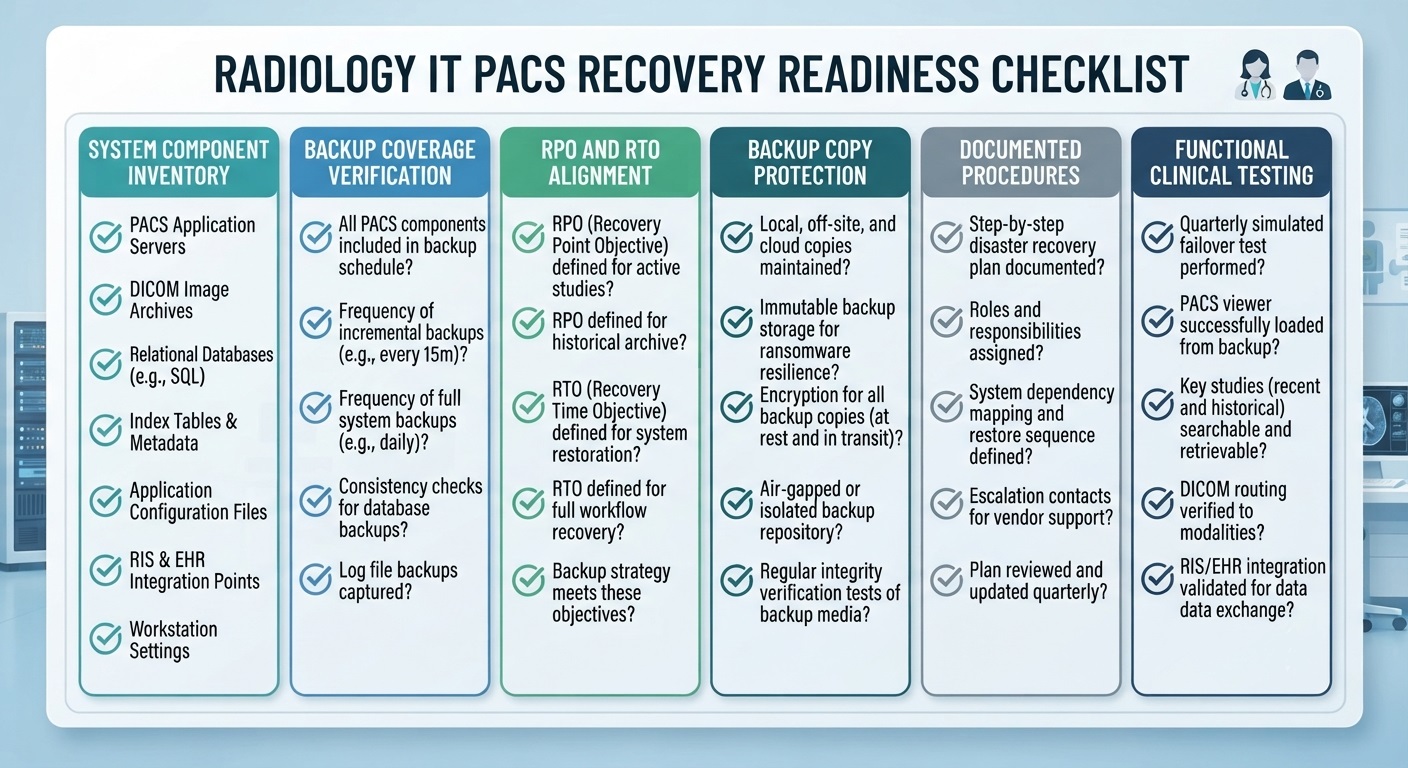
PACS Backup and Disaster Recovery Checklist for Radiology IT Teams
Before relying on an existing backup strategy, radiology IT teams should assess whether the entire PACS environment can be restored following a system failure, cyberattack, or data loss incident.
Use this checklist to evaluate recovery readiness:
- Inventory PACS components: Identify imaging repositories, databases, indexes, application configurations, and connected systems.
- Verify backup coverage: Confirm that all critical PACS components are included in scheduled backups and that related data is captured consistently.
- Review recovery objectives: Ensure backup frequency and restoration capabilities align with the organization’s RPO and RTO.
- Protect recovery copies: Maintain appropriately secured, separate backups to reduce exposure to ransomware and infrastructure failures.
- Document restoration procedures: Establish recovery responsibilities, system dependencies, and the order in which services must be restored.
- Test clinical functionality: Confirm that restored studies can be located, retrieved, and viewed through the PACS application.
- Maintain recovery evidence: Record test outcomes, identified issues, corrective actions, and subsequent verification results.
The objective is to confirm that PACS backups can restore usable imaging services, not simply that backup jobs have completed successfully.
How CDS Supports PACS Backup and Recovery for Radiology Centers
Protecting medical imaging data requires reliable backups and the ability to recover critical information when PACS servers, imaging archives, or supporting systems fail.
Central Data Storage (CDS) provides HIPAA-aligned backup and disaster recovery services for hospitals, radiology departments, and diagnostic imaging centers. Its solutions support on-premises PACS servers, RIS databases, and DICOM imaging archives, helping healthcare organizations reduce data loss risks and strengthen recovery readiness.
How CDS Helps Protect Radiology Imaging Data
- Encrypted, offsite backup: CDS protects imaging data in transit and at rest, with backup storage on its private U.S.-based infrastructure.
- Backup integrity and recovery verification: CDS checks backed-up data for corruption and other integrity risks, helping organizations identify recoverable restore points before restoration.
- Ransomware-resilient storage: Isolated and immutable backup storage helps protect recovery copies from unauthorized modification and ransomware incidents.
- Flexible backup deployment: UnisonBDR offers fully managed, self-hosted Docker, and licensed on-premises deployment options to accommodate different infrastructure requirements.
- HIPAA-aligned data protection: Encryption, access controls, audit logging, recovery documentation, and Business Associate Agreement (BAA) support help healthcare organizations address applicable ePHI protection responsibilities.
CDS emphasizes verified data recovery rather than relying solely on successful backup notifications. PACS application restoration and clinical workflow validation should be planned according to the imaging environment’s specific systems, integrations, and recovery requirements.
Conclusion: Building a Reliable PACS Backup and Recovery Strategy
A reliable PACS backup and recovery strategy must protect more than DICOM images. Databases, imaging archives, system configurations, and clinical integrations must also be recoverable to restore essential radiology workflows.
For hospitals and diagnostic imaging centers, the priority is not simply completing backups but ensuring that diagnostic studies remain accessible after an unexpected disruption.
Central Data Storage helps healthcare organizations strengthen imaging data protection through secure backups and verified recovery.
Request a data assessment to evaluate your organization’s recovery readiness.
PACS Backup & Recovery FAQs
How Often Should PACS Backups Be Performed?
PACS backup frequency should reflect imaging data volumes, acquisition rates, and the organization’s recovery point objective (RPO). Facilities handling time-sensitive diagnostic studies may require more frequent backups than those primarily storing historical imaging records.
Can a PACS System Be Recovered Without the Original Server?
Yes, provided that compatible infrastructure, PACS software versions and licensing, vendor support, and recoverable copies of the required PACS components are available. Recovery may require restoring databases, imaging archives, application configurations, and integrations, depending on the PACS vendor and system architecture.
Is PACS Replication the Same as Backup?
No. PACS replication copies data or system changes to another location to support availability. However, corruption, accidental deletion, or ransomware-related changes may also propagate. Independent, versioned backups provide additional recovery options.
Can Radiologists Access Images During PACS Recovery?
Potentially. Access depends on the organization’s infrastructure and downtime arrangements. Redundant PACS environments, local imaging caches, alternative viewers, or temporary workflows may allow authorized clinicians to access certain studies while primary systems are restored.
Can a PACS Backup Be Successful but Still Fail During Recovery?
Yes. A PACS backup may complete successfully while containing inconsistent databases, missing DICOM studies, or incomplete application configurations. These issues can prevent normal image retrieval after restoration. Regular, application-level recovery testing helps verify that the backed-up data can restore functional imaging workflows.
Your PACS is Backed Up.
But is it Ready to Recover?
Protecting DICOM images is only part of the challenge.
Make sure your backup and recovery strategy accounts for
PACS databases, imaging archives, and critical clinical workflows.
Explore your next step with Central Data Storage.
Secure backup • Recovery readiness • Healthcare-focused data protection