If you are evaluating an N-able Cove alternative, the decision should go beyond whether both providers can create backups.The more important questions are whether your backup can be restored cleanly, how quickly critical systems can return, who is responsible for managing recovery, where protected data is stored, and whether the service supports the compliance requirements of your organization.
- N-able Cove Data Protection is a cloud-first backup and disaster recovery platform designed primarily for MSPs and IT teams managing servers, workstations, Microsoft 365, and recovery operations from a centralized environment.[1]
- Central Data Storage (CDS) is built around a different operating model. UnisonBDR combines managed backup and disaster recovery with verified clean recovery, ransomware-isolated storage, private U.S. infrastructure, HIPAA-aligned safeguards, BAA support, predictable recovery costs, and direct human assistance.
For healthcare, dental, and other regulated organizations, that difference matters because backup is only useful when the systems supporting patient care and business operations can actually be restored.
Explore how UnisonBDR manages backup and recovery.
N-able Cove vs Central Data Storage: Quick Comparison
| Area | N-able Cove | Central Data Storage |
| Best suited for | MSPs and IT teams wanting centralized backup administration | Healthcare, dental, regulated organizations, and lean IT teams wanting managed recovery |
| Service model | Primarily IT/MSP-administered backup and DR platform | Fully managed backup and disaster recovery |
| Recovery approach | File, system, and disaster recovery capabilities | Verified clean recovery with guided restore support |
| Infrastructure | N-able cloud infrastructure | CDS-operated private U.S. infrastructure |
| Healthcare focus | Can be used within regulated environments depending on configuration and agreements | Healthcare-focused backup with HIPAA-aligned safeguards and BAA support |
| Backup validation | Recovery testing capabilities | Restore verification and recovery-readiness checks built into the service |
| Ransomware recovery | Protected backup and recovery capabilities | Ransomware-isolated storage, file scanning, corruption isolation, and clean restore validation |
| Pricing model | Commercial pricing based on protected workloads | Storage-based pricing with no egress or retrieval fees |
| Primary value | Administrative control and broad MSP backup capabilities | Recovery accountability, healthcare specialization, and managed support |
Cove remains a capable product. The reason to consider CDS is not that Cove cannot perform backup or recovery. It is that some organizations need a different division of responsibility between their internal team and their backup provider.
Why Healthcare Organizations Need an N-able Cove Alternative
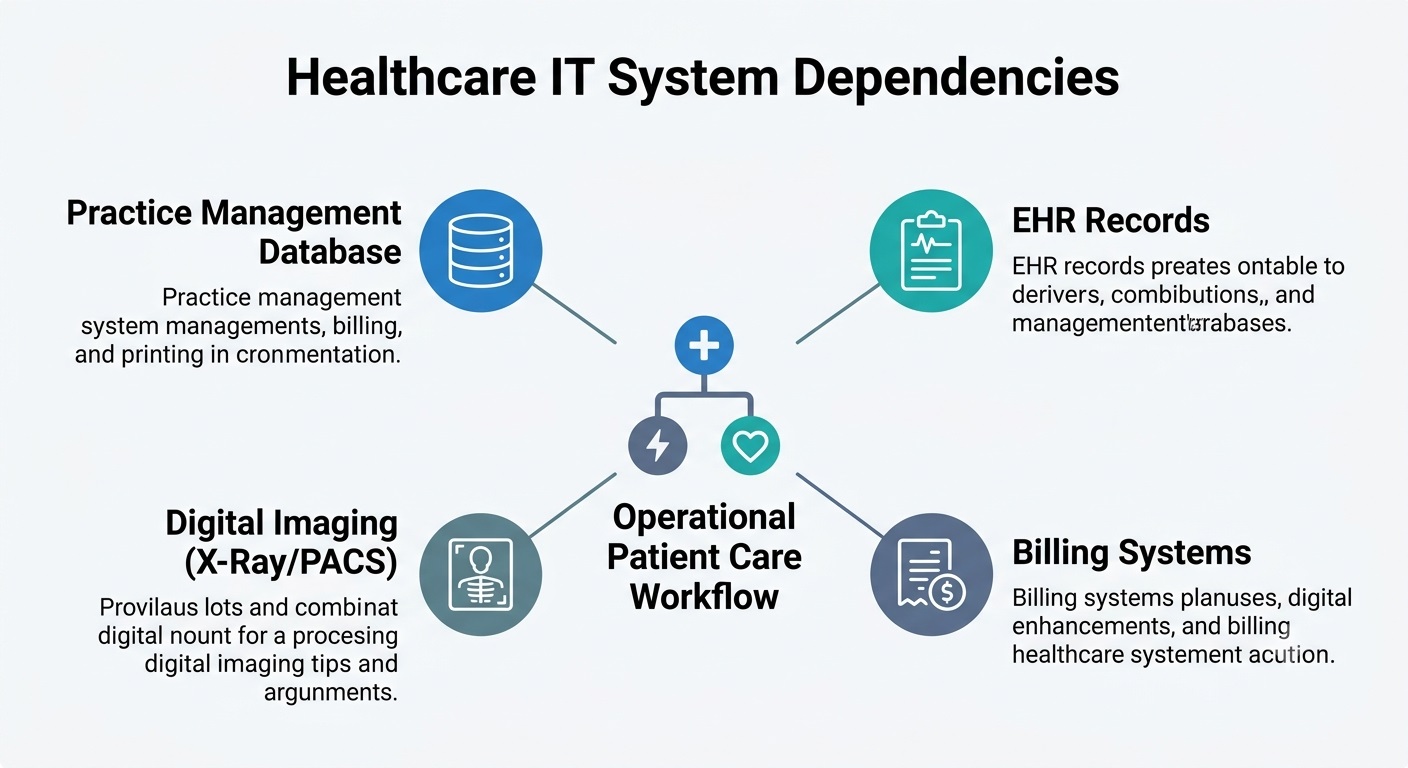
Restoring healthcare operations requires recovering interdependent databases, imaging files, and configurations together.
Healthcare backup has to protect more than stored files.
A dental or medical practice may depend on practice-management software, EHR data, SQL databases, patient records, imaging systems, X-rays, billing information, insurance records, scheduling systems, document stores, local servers, virtual machines, and workstations.
These systems frequently depend on one another.
Restoring an imaging folder without the database that maps those images to patients may not restore the clinical workflow. Recovering a database without the application configuration it depends on may still leave employees unable to work.
The backup strategy therefore needs to answer an operational question:
Can the systems the practice actually depends on be restored in a usable state?
This is why healthcare organizations often compare backup providers based on recovery outcomes rather than backup features alone. Reviewing the best backup services for healthcare providers can help teams understand how different solutions approach healthcare data protection, restore readiness, and operational continuity.
CDS has built its service around that recovery problem. The company reports protecting data for 1,000+ organizations worldwide, while UnisonBDR is currently used across 700+ healthcare and dental practices nationwide.
Its healthcare focus includes dental practices and DSOs, medical practices, imaging environments, specialty clinics, patient-management systems, and other regulated workloads.
Organizations with these requirements can review CDS’s healthcare backup and recovery model to see how those workflows are addressed.
Why Verified Recovery Matters More Than Backup Completion
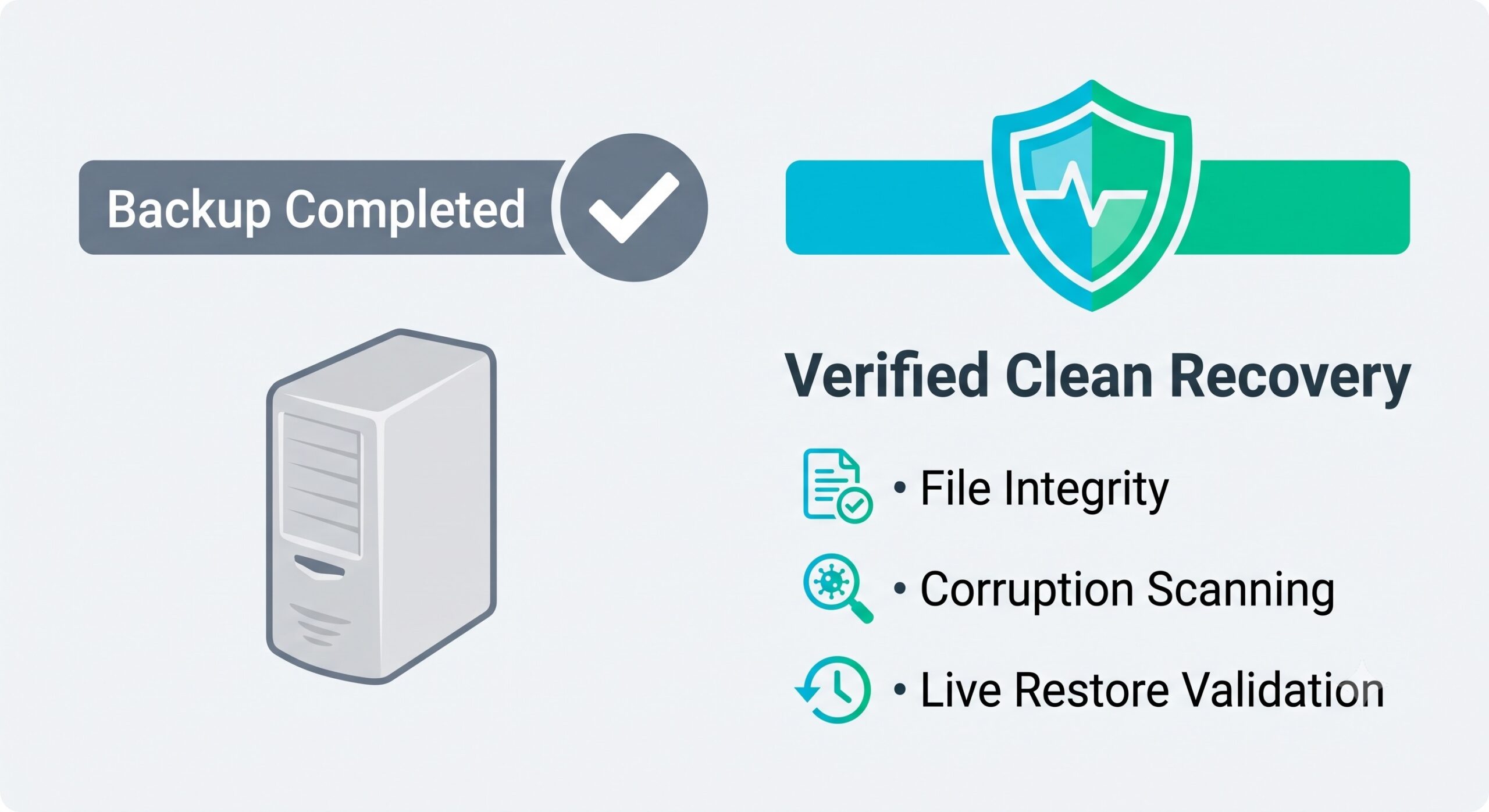
A successful backup job confirms completion, while verified recovery ensures data is uncorrupted and ready for production.
One of the most important distinctions in backup is the difference between backup completion and recoverability.
A green backup status tells you that a backup process completed. It does not automatically prove that the data is complete, uncorrupted, correctly sequenced, compatible with the application that needs it, or ready to restore within the time available.
CDS makes recovery verification a central part of UnisonBDR.
The service includes integrity checking, pre-storage file scanning, corrupted-file isolation, recovery-point validation, backup-health monitoring, and guided restore assistance.
That changes the measurement from:
Did the backup run?
to:
Can this recovery point actually return the system to operation?
For organizations that need evidence of recovery readiness, CDS also provides verification and restore documentation. See how CDS validates backup recoverability.
How RPO and RTO Shape Healthcare Backup and Disaster Recovery
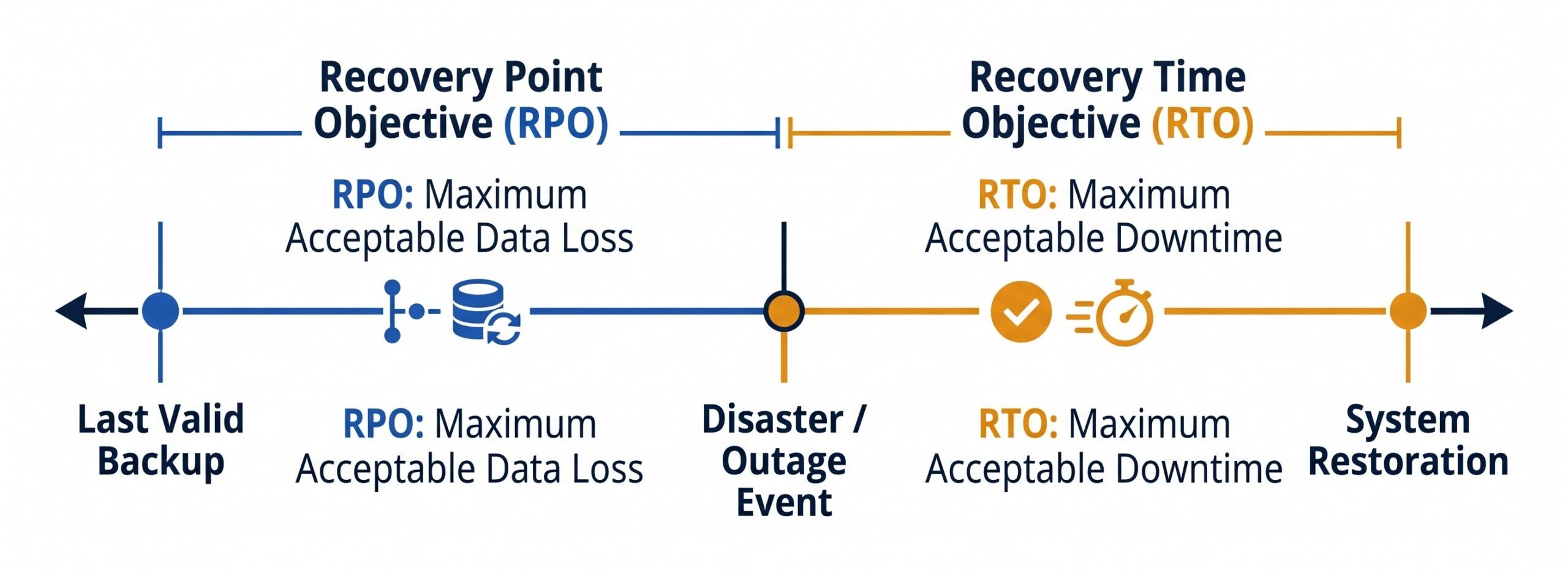
Aligning RPO and RTO defines how much data a practice can afford to lose and how quickly systems must return.
A backup strategy should be designed around two recovery objectives.
- Recovery Point Objective (RPO) defines how much recent data the organization can afford to lose. If the RPO is four hours, losing an entire day of database changes is unacceptable even if an older backup restores successfully.
- Recovery Time Objective (RTO) defines how long a system can remain unavailable before the outage causes unacceptable operational impact.
Different workloads can have very different requirements.
A scheduling system used throughout the day may need to return before an archive that employees access once a month. A practice-management database may need a different recovery process from a large dental imaging repository.
RPO and RTO affect backup frequency, storage architecture, retention, bandwidth, recovery testing, infrastructure capacity, and the order in which systems should be restored.
This is why comparing backup providers by storage capacity alone gives an incomplete picture. The better comparison is whether the provider can support the organization’s actual recovery objectives.
Why Ransomware Recovery Requires Verified Clean Restore Points
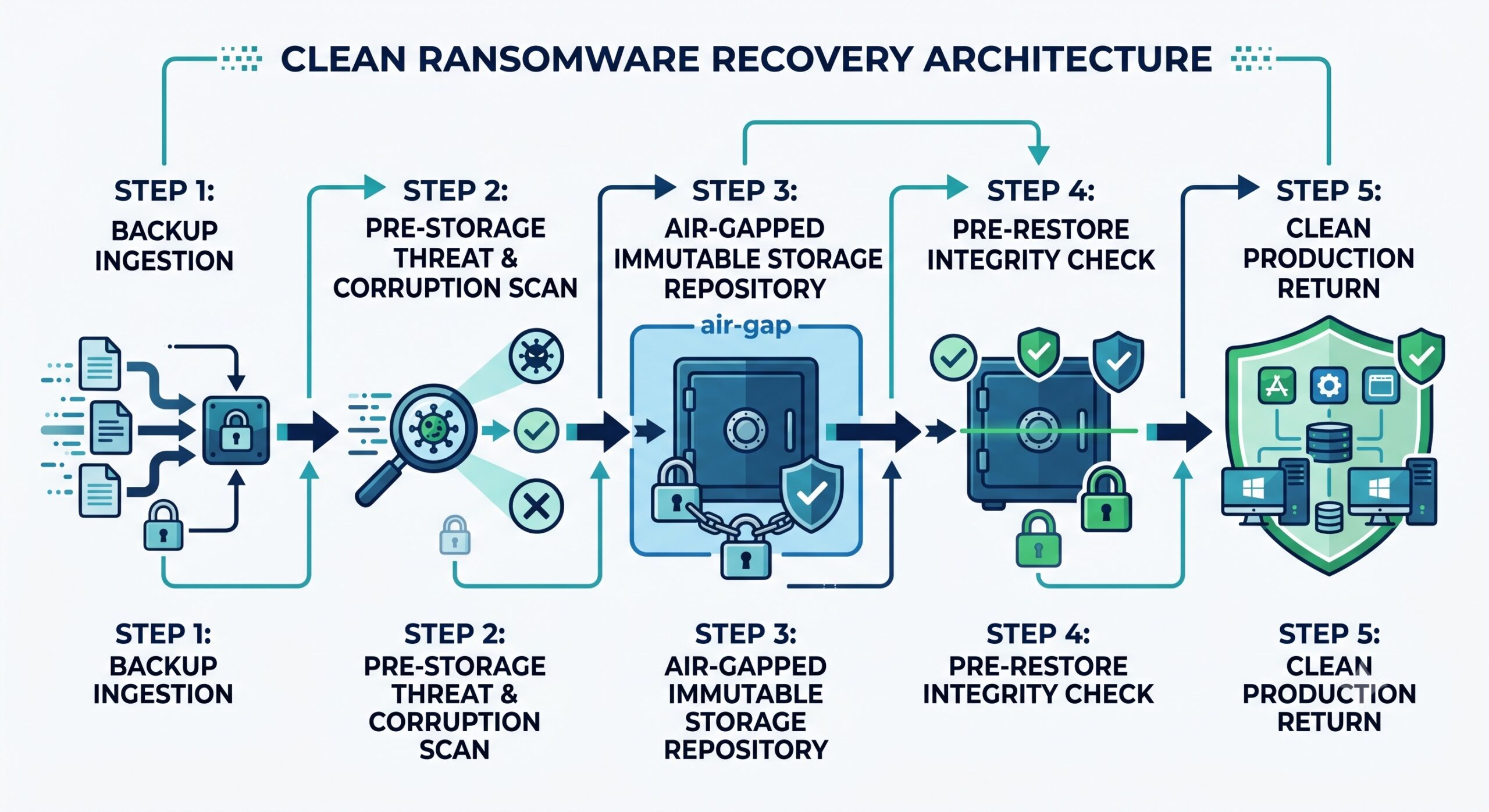
Ransomware recovery requires isolated immutable storage and pre-restore validation to prevent reinfection.
Ransomware creates a different recovery problem from accidental deletion or hardware failure.
The objective is not simply to locate the newest backup. It is to identify a recovery point that can be returned to production without reintroducing corruption or malicious data.
CISA recommends maintaining protected backups and regularly testing their availability and integrity in disaster recovery scenarios. It also warns that ransomware operators may attempt to locate, encrypt, or delete accessible backup copies.[3]
CDS addresses this recovery problem through several layers.
UnisonBDR uses ransomware-isolated storage, immutable retention, pre-storage scanning, corrupted-file isolation, and recovery validation before data is returned to production.
That process is particularly relevant when the newest available copy cannot automatically be assumed to be the safest one.
A mature ransomware recovery plan should establish:
- which restore points existed before the incident;
- whether those recovery points are complete and usable;
- how suspicious or corrupted data is handled;
- whether backup credentials were exposed;
- which systems should return first;
- and how recovered data is validated before reconnecting it to production.
The cost of getting that process wrong can be substantial. IBM’s 2026 Cost of a Data Breach Report places the global average cost of a data breach at $4.99 million, a 12% year-over-year increase.[4]
Backup cannot prevent every security incident. It can determine whether a damaging incident also becomes a prolonged operational outage.
Managed Backup vs Self-Managed Recovery: Who Owns the Restore Process?
This is one of the most useful questions for separating a backup product from a managed recovery service.
With an administrator-led backup environment, the IT department or MSP generally retains responsibility for monitoring, policy management, troubleshooting, testing, and recovery coordination.
That model works well when the organization has the necessary expertise.
CDS is designed for organizations that want more of that operational responsibility included in the service.
UnisonBDR includes backup monitoring, daily health visibility, restore verification, failure alerts, and guided recovery support. When restoration is required, the objective is not to hand the customer a software interface and leave the recovery process entirely to them.
This difference is particularly significant for small and mid-sized healthcare organizations. A practice manager, dentist, physician, or office administrator should not need to become a disaster recovery engineer during a ransomware event.
Why U.S. Data Residency Matters for Healthcare Backup
Data residency is another reason some organizations evaluate their backup provider.
CDS operates private U.S.-based infrastructure for its hosted UnisonBDR environment rather than requiring customer backup data to be stored on AWS, Microsoft Azure, or Google Cloud.
For organizations with policies, contracts, cyber-insurance requirements, customer expectations, or governance standards that favor U.S.-resident data, this provides a clearer answer to two important questions:
Where is our recovery data stored?
Who operates the infrastructure behind it?
U.S.-based infrastructure should not be confused with automatic regulatory compliance or superior security. Data location is one part of a larger security and governance model.
The value is accountability and alignment with an organization’s specific data-residency requirements.
HIPAA Backup Requirements: Protecting ePHI During Recovery
Healthcare organizations also need to evaluate backup through the requirements surrounding electronic protected health information.
The HIPAA Security Rule requires regulated entities to use reasonable and appropriate administrative, physical, and technical safeguards to protect the confidentiality, integrity, and availability of ePHI.[2]
Availability is particularly relevant to backup and disaster recovery because protected health information must remain accessible and usable by authorized users when required.
However, no backup provider can make an organization HIPAA compliant by itself.
Compliance depends on the complete environment, including access controls, workforce procedures, risk analysis, technical safeguards, contracts, audit activity, documentation, incident response, and relationships with Business Associates.
For a healthcare organization evaluating a backup provider, key questions include:
- Does the provider sign a Business Associate Agreement?
- How is backup data encrypted?
- Where is ePHI stored?
- Who can access recovery data?
- Are restore activities logged?
- Can the provider supply recovery evidence for audits or risk reviews?
CDS provides HIPAA-aligned safeguards with BAA support and recovery documentation. For organizations reviewing these requirements, the HIPAA-aligned backup framework explains how CDS connects backup controls with healthcare recovery requirements.
Healthcare Application Recovery Requires More Than File Backup
Healthcare environments often contain application-specific backup problems that generic file protection does not fully address.
Consider a dental practice.
An Open Dental environment can include databases, image files, configuration data, file shares, and connected imaging systems. Other practices may rely on Eaglesoft, DEXIS, PACS data, SQL databases, or additional line-of-business applications.
Backing up only the obvious folder can leave part of the operational workflow unprotected.
CDS’s healthcare model is designed to account for these dependencies. Its Open Dental protection, for example, includes the database and associated data required to support recovery rather than treating the environment as an ordinary collection of documents.
Practices using that platform can review the dedicated Open Dental recovery approach for workload-specific details.
The same principle applies to any clinical application: identify the database, application data, imaging repositories, configuration, permissions, and dependencies required to restore usable operations.
N-able Cove vs CDS Pricing: Compare Total Backup and Recovery Costs
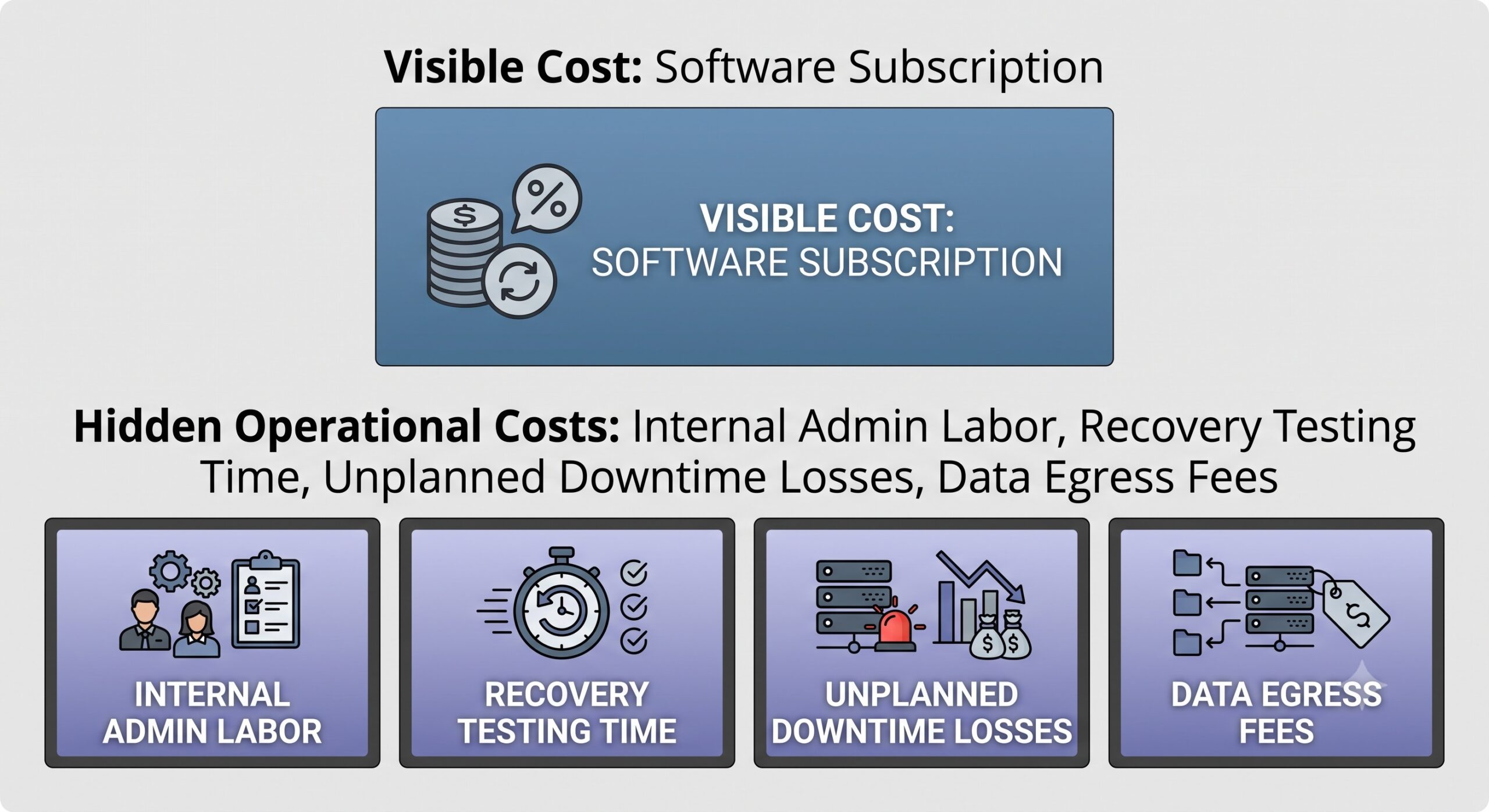
Evaluating total backup costs requires accounting for administrative labor, egress fees, and potential downtime impact.
Backup pricing becomes misleading when the comparison stops at the monthly subscription.
CDS currently prices standalone UnisonBDR according to protected data volume. Published plans start at $64.99 per month or $599.88 per year, with the full managed backup feature set included across storage tiers.
The service includes verified clean recovery, ransomware-isolated storage, BAA support, U.S.-based support, and no egress or retrieval fees.
The wider cost comparison should also include:
- Internal administration. Who monitors jobs, handles failures, maintains policies, and investigates alerts?
- Restore testing. Is validation included, or does the organization need to create its own process?
- Recovery support. What happens when a full server, database, or application must be restored?
- Retrieval charges. Does moving data out of backup storage generate additional costs?
- Downtime. How much does each hour without the affected system cost the organization?
For an MSP with backup engineers already on staff, administrator-led software may offer efficient economics.
For a healthcare practice without those resources, a fully managed service can reduce costs that never appear on the software invoice.
Current UnisonBDR storage tiers and inclusions are available on the managed backup pricing page.
When N-able Cove Data Protection May Be the Better Choice
Cove may remain the better option if your organization or MSP already manages backup effectively and wants direct administrative control across many customer or internal environments.
If existing processes already provide acceptable recovery testing, qualified technical staff, documented RPOs and RTOs, incident-response ownership, and satisfactory data-residency controls, replacing a functioning platform simply because another provider exists can introduce unnecessary migration risk.
The case for CDS becomes stronger when the existing backup environment leaves unanswered questions around recovery ownership, healthcare specialization, clean-restore validation, U.S. infrastructure, or the operational effort required from the customer.
That is the decision point—not which vendor can list more features.
How to Migrate From N-able Cove Without Losing Recovery Protection
A backup migration should not begin by uninstalling the existing product.
- Start by documenting every protected workload: servers, workstations, virtual machines, databases, Microsoft 365 data, application folders, imaging repositories, file shares, and any specialized systems that need to survive an outage.
- Next, define the required RPO, RTO, and retention period for each critical workload. This establishes what the replacement service actually has to deliver.
- The new backup environment should then be established before the previous recovery path is retired. That allows the new system to build valid recovery points while the existing backup remains available.
- Before cutover is complete, perform a meaningful restore test. Recover the systems the business depends on rather than proving only that a single sample file can be downloaded.
- Finally, determine whether historical backup logs, retention records, recovery evidence, contracts, BAA documentation, or older restore points need to be preserved before the former service is decommissioned.
This creates a controlled transition rather than a period in which the organization assumes the new backup works but has never tested it.
Request a free assessment of your current backup environment before changing providers.
How to Evaluate the Best N-able Cove Alternative
A provider comparison should finish with evidence rather than feature claims.
Before making the decision, make sure you can answer these questions:
- Which servers, databases, applications, imaging systems, workstations, and SaaS workloads are actually protected?
- How frequently are recovery points created?
- What RPO and RTO can the environment realistically support?
- How does the provider detect corrupted or suspicious backup data?
- Are recovery copies isolated or immutable?
- How is restore readiness verified?
- What evidence is available after a recovery test?
- Where is backup data stored and who operates that infrastructure?
- Is a BAA available when ePHI is involved?
- Are there egress, retrieval, recovery-testing, or restore-support fees?
- Who leads restoration during ransomware, hardware failure, or a major outage?
If a provider cannot answer those questions clearly, the organization does not yet have enough information to evaluate its recovery risk.
Should You Replace N-able Cove? Final Backup and Recovery Recommendation
N-able Cove remains a credible option for MSPs and technically mature IT departments that want to administer backup and recovery across multiple workloads.
Central Data Storage is the stronger fit when the organization wants to shift the emphasis from managing backup software to maintaining a verified recovery capability.
That distinction is particularly relevant for healthcare, dental, imaging, and other regulated environments where data loss can interrupt patient access, billing, scheduling, clinical workflows, and compliance operations.
CDS combines managed backup with clean-recovery verification, ransomware-isolated storage, U.S.-based private infrastructure, BAA support, predictable recovery costs, and direct human assistance. The company is trusted by 1,000+ organizations worldwide, while UnisonBDR is proven across 700+ healthcare and dental practices nationwide.
If your current backup reports successful jobs but you cannot clearly explain how critical systems would recover, the next step is to test the recovery model rather than assume it works.
Schedule a CDS data and recovery assessment to identify what is currently protected, where the recovery gaps are, and whether UnisonBDR is a better fit.
N-able Cove alternatives FAQs
What is the best N-able Cove alternative for healthcare?
The best alternative is one that protects the healthcare organization’s actual workloads and can demonstrate recoverability. Central Data Storage is designed for practices that prioritize managed recovery, HIPAA-aligned safeguards, BAA support, private U.S. infrastructure, ransomware-isolated backup, and verified restore points.
Is Central Data Storage an alternative to N-able Cove?
Yes. Both can protect business data and support disaster recovery, but they use different service models. Cove is primarily designed around IT/MSP administration, while CDS emphasizes fully managed backup, recovery verification, healthcare specialization, and guided restoration.
Why is verified recovery different from backup verification?
Backup monitoring confirms that data protection jobs are running as expected. Verified recovery goes further by determining whether a recovery point is complete, usable, and suitable for restoration. This helps expose corruption, broken recovery chains, or other problems before an actual outage requires the backup.
Can CDS support HIPAA-regulated healthcare data?
CDS provides HIPAA-aligned safeguards, private infrastructure, access controls, recovery documentation, and Business Associate Agreement support. The healthcare organization still remains responsible for its overall HIPAA compliance program.
What should be tested before leaving Cove?
Test the workloads that matter to operations: databases, practice-management applications, imaging repositories, system data, permissions, servers, and other dependencies. The old backup should not be retired until the replacement has created valid recovery points and completed an appropriate restore test.
References Used:
- N-able – Cove Data Protection: Used only to verify Cove’s core positioning and workload coverage.
- U.S. Department of Health and Human Services – Summary of the HIPAA Security Rule
- Cybersecurity and Infrastructure Security Agency – #StopRansomware Guide
- IBM – Cost of a Data Breach Report 2026