Does having automated backups mean your healthcare organization meets HIPAA’s data backup requirements?
Not necessarily. A completed backup doesn’t guarantee that critical patient records can be retrieved when needed.
According to the U.S. Department of Health and Human Services (HHS), 81% of reported healthcare data breaches affecting 500 or more individuals that occurred in 2024 involved hacking or IT incidents, highlighting the cybersecurity risks healthcare organizations face (Source).
Under 45 CFR §164.308(a)(7)(ii)(A), HIPAA requires covered entities and business associates to establish and implement procedures for creating and maintaining retrievable exact copies of electronic protected health information (ePHI).
This guide explains what a HIPAA data backup plan must address, how to document backup procedures, and how to verify that protected information remains retrievable.
Quick Answer: What Does a HIPAA Data Backup Plan Require?
A HIPAA data backup plan should define which electronic patient records need protection, how frequently backups are created, where copies are stored, who manages the process, and how their retrievability is verified.
HIPAA does not prescribe a universal backup frequency or storage method. Organizations must establish appropriate procedures based on their operational needs and risk assessment.
HIPAA Data Backup Plan: Required vs. Addressable Specifications
The Data Backup Plan is one of five implementation specifications under HIPAA’s Contingency Plan standard. It focuses specifically on maintaining backup copies of electronic protected health information (ePHI), while the other specifications address recovery, emergency operations, testing, and system criticality.
Is a HIPAA Data Backup Plan Mandatory?
The Data Backup Plan is a required implementation specification, meaning covered entities and business associates must implement it. Unlike addressable specifications, organizations cannot decide to omit it based on their size, infrastructure, or available resources.
However, HIPAA allows flexibility in how organizations implement appropriate backup procedures based on their risk assessments and operational environments.
What Are Retrievable Exact Copies of ePHI?
A retrievable exact copy preserves electronic patient information accurately and allows authorized personnel to recover it when needed.
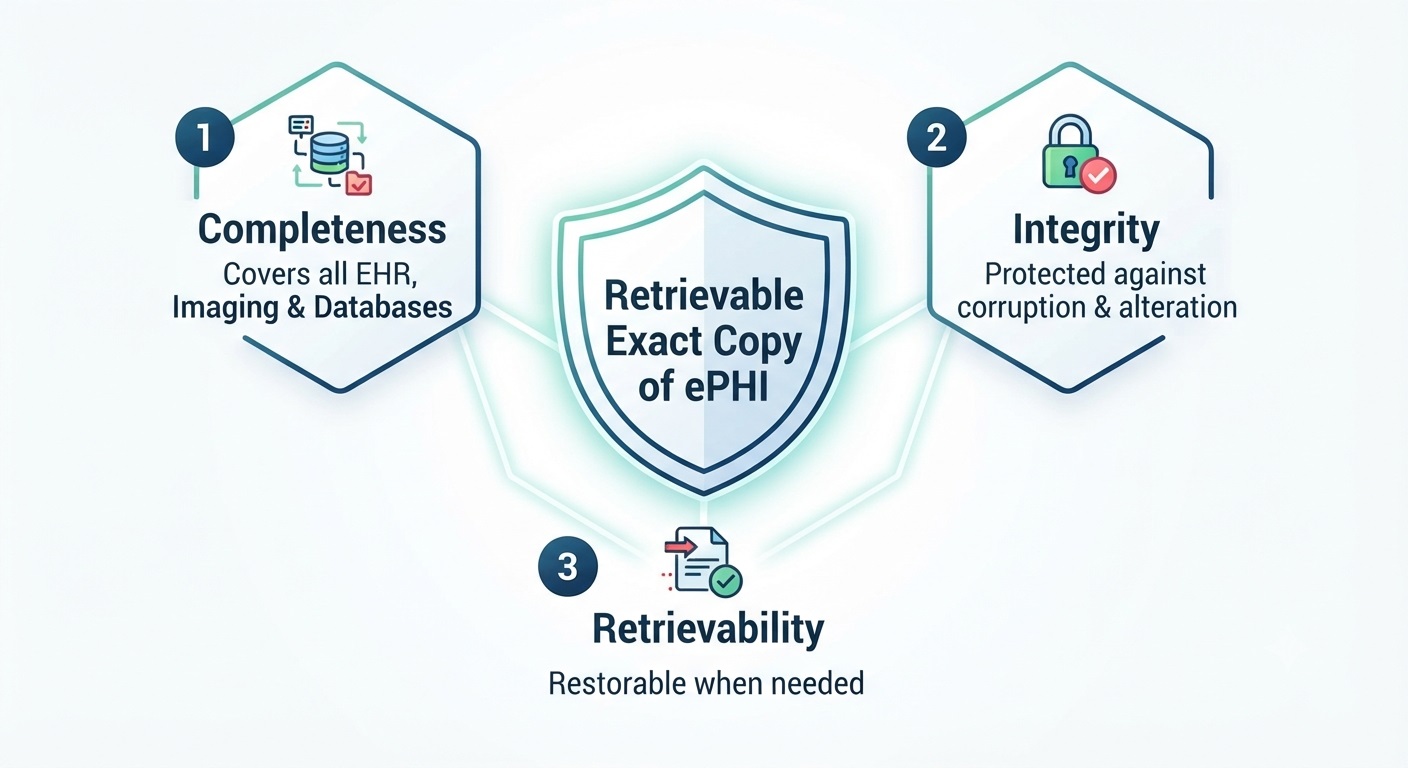
In practice, this involves three considerations:
- Completeness: Backups cover relevant ePHI, including databases, attachments, and imaging records.
- Integrity: Backup copies remain accurate and protected against corruption or unauthorized alteration.
- Retrievability: Protected information can be recovered when needed.
For example, a dental practice may store patient records in its practice management software while keeping digital X-rays in a separate imaging system. Backing up only the practice management database could leave important ePHI unprotected.
What Should a HIPAA Data Backup Plan Include?
A HIPAA data backup plan must establish procedures for maintaining retrievable copies of electronic protected health information (ePHI). The HHS OCR Audit Protocol identifies key areas for evaluating these procedures, including backup coverage, frequency, methods, storage locations, security, and personnel responsibilities.
Identify ePHI Sources and Backup Coverage
Start by identifying every system that stores ePHI. Backing up only the primary server may leave patient information in separate applications or storage environments unprotected.
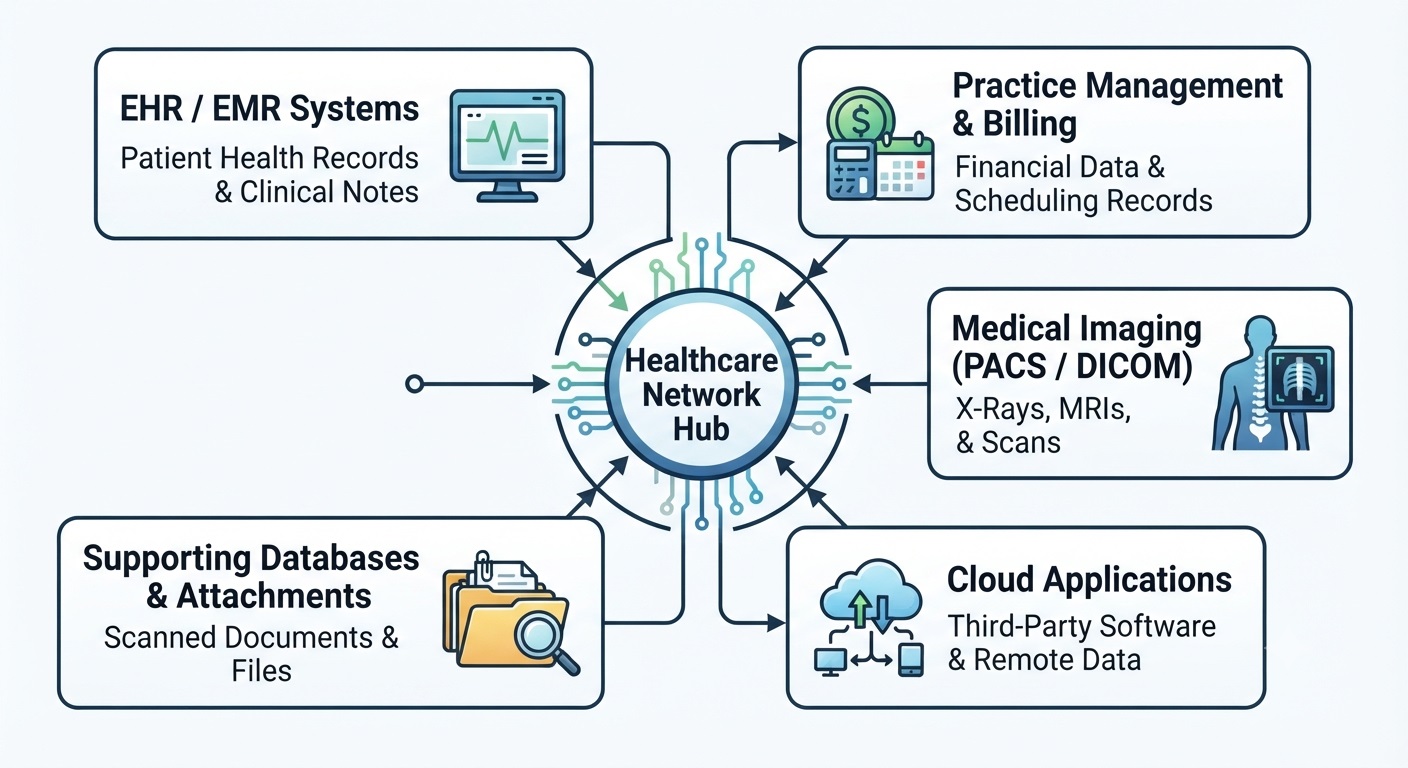
Depending on the healthcare setting, backup coverage may include:
- EHR/EMR systems: Patient histories, clinical notes, prescriptions, and treatment records.
- Practice management software: Patient billing information, scheduling records, and administrative data containing ePHI.
- Medical imaging systems: PACS, DICOM files, digital X-rays, and associated patient information.
- Cloud applications: ePHI maintained through third-party software platforms.
- Supporting databases and files: Scanned documents, attachments, and other patient-related information.
Document which systems are covered, where their data is stored, and whether any ePHI falls outside existing backup procedures.
Define Backup Frequency, Methods, and Storage Locations
HIPAA does not prescribe a universal daily or weekly backup schedule. Organizations should determine backup frequency based on their risk analysis, the rate at which patient information changes, and the potential consequences of data loss.
The backup plan should document:
- Backup frequency: How often copies are created for each relevant system.
- Backup methods: Whether full, incremental, or application-aware backups are used.
- Storage locations: Where backup copies are maintained and how authorized personnel can retrieve them.
- Backup retention: How long copies are preserved based on recovery needs and applicable legal or contractual obligations.
For example, a medical practice that updates patient records throughout the day may need more frequent backups than a system containing rarely modified archival information.
Backup storage should also account for incidents that could affect both production data and backup copies. HIPAA does not mandate one specific cloud, offsite, or hybrid backup architecture. Organizations evaluating their options can explore the broader process of building a healthcare backup and recovery plan.
Importantly, HIPAA’s six-year documentation retention requirement does not establish a universal six-year retention period for backup data. Organizations should determine backup retention according to their recovery needs and other applicable requirements.
Back Up ePHI Before Moving Equipment
HIPAA also includes a separate, addressable Data Backup and Storage specification under 45 CFR §164.310(d)(2)(iv). It addresses creating a retrievable exact copy of ePHI, when needed, before equipment is moved. Healthcare organizations should consider this requirement when relocating servers, replacing hardware, or transferring systems that contain patient information.
Document Backup Security and Responsibilities
Backup copies contain sensitive patient information and must be protected through appropriate administrative, physical, and technical safeguards.
Organizations should document how access is restricted, how backup integrity is protected, and how data is secured during storage and transfer. Encryption at rest and in transit should be evaluated under HIPAA’s addressable encryption specifications, with the selected safeguards and any appropriate alternative measures documented.
The plan should also identify:
- Who manages backup schedules and configuration.
- Who monitors backup operations and investigates failures.
- Who is authorized to access or retrieve backup copies.
- Who maintains backup documentation and reviews procedures.
When backup services are outsourced, responsibilities must remain clearly defined. A third-party provider that creates, receives, maintains, or transmits ePHI on behalf of a covered entity or business associate generally qualifies as a business associate and requires an appropriate Business Associate Agreement (BAA).
As explained in the HHS Cloud Computing Guidance, this applies even when a cloud service provider maintains only encrypted ePHI without access to the decryption key.
Outsourcing backup operations does not eliminate the healthcare organization’s responsibility to implement applicable HIPAA safeguards. Clearly documented roles help ensure that backup coverage, security, and operational expectations are understood by both parties.
How to Verify HIPAA Backup Integrity and Retrievability
A completed backup job does not guarantee that patient information can be recovered. Healthcare organizations should verify that their backup copies remain accurate, accessible, and usable when needed.
Verify Backup Integrity Through Restoration Testing
Backup verification helps identify corrupted files, incomplete copies, and restoration failures before they disrupt patient care.
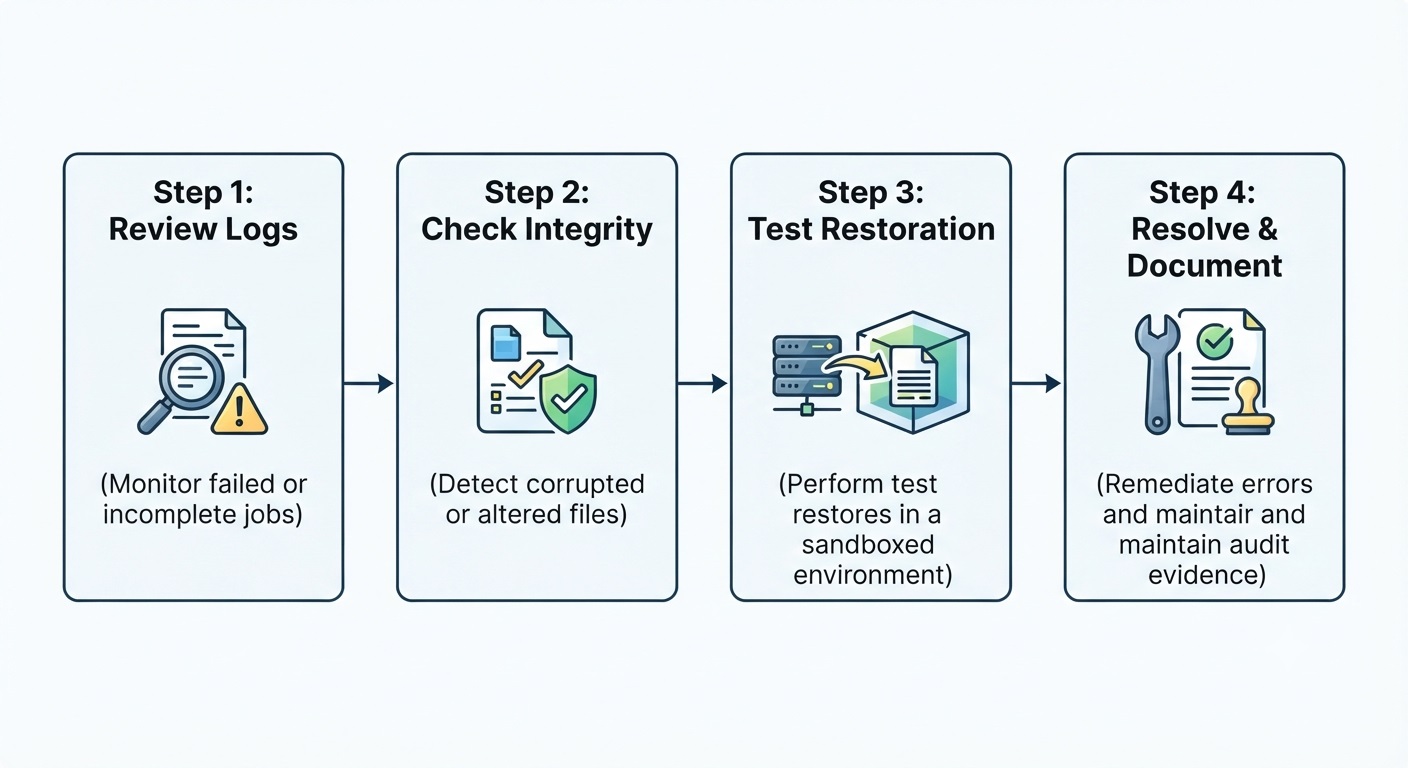
Healthcare organizations should:
- Review backup results: Monitor logs for failed, incomplete, or missed backup jobs.
- Check data integrity: Use appropriate verification methods to identify corrupted or improperly altered data.
- Test restoration: Restore representative files or databases in a controlled environment to confirm they can be accessed and used.
- Resolve failures: Investigate unsuccessful backups or restoration tests and document corrective actions.
For organizations evaluating their existing processes, backup verification and recovery services can provide additional support with restore validation and recovery-readiness reporting.
Example: Successful Backup, Incomplete Recovery
A dental practice automatically backs up its practice management database every night. However, its imaging software stores X-rays and associated records in a separate location that is not included in the backup schedule.
The backup logs show successful completion, but the practice cannot recover its complete patient imaging records.
This illustrates why healthcare organizations should verify both backup coverage and the ability to retrieve the information their systems depend on.
How Central Data Storage Supports Verified Recovery
UnisonBDR combines managed backup with verification and clean recovery capabilities, helping healthcare organizations evaluate backup reliability rather than relying solely on successful backup notifications.
Maintain Backup Verification Records and Audit Evidence
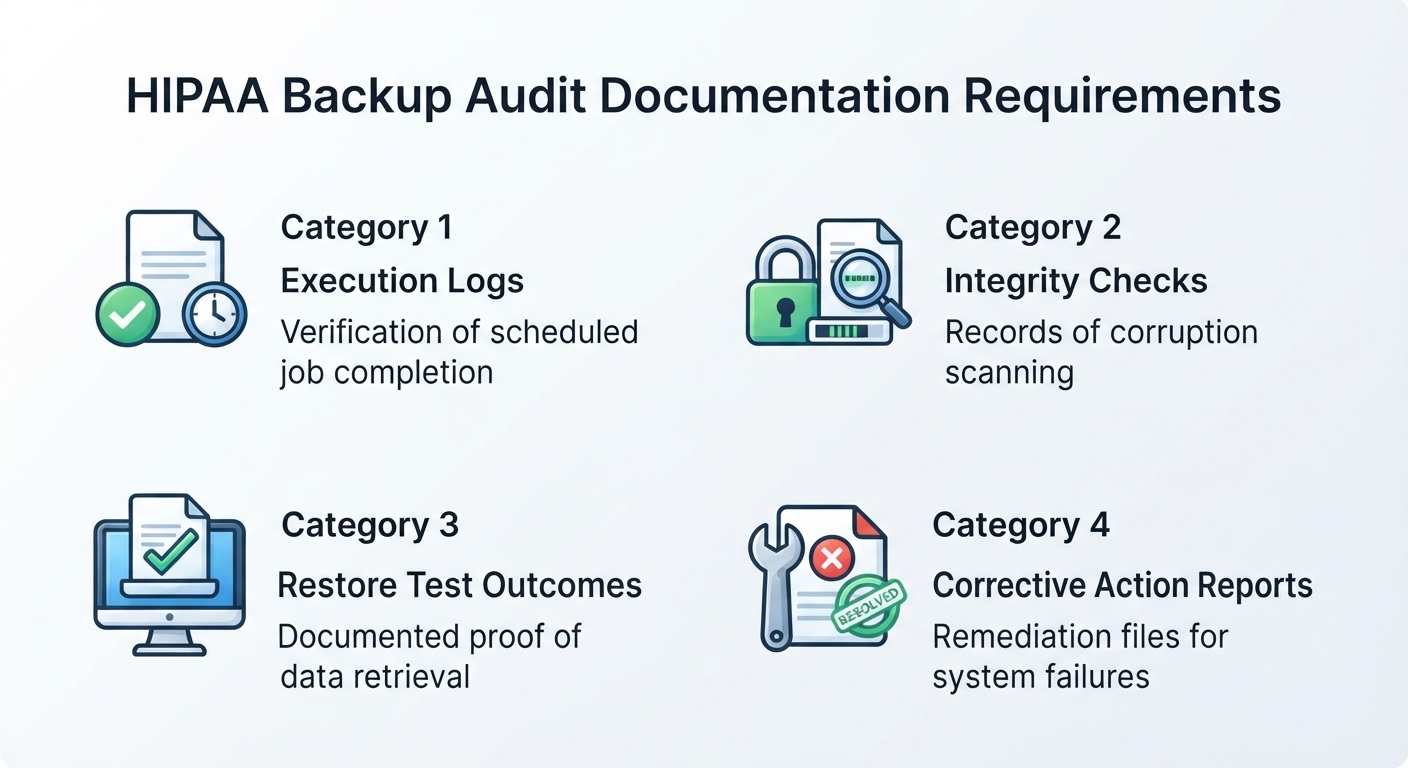
Healthcare organizations should maintain records demonstrating that their backup procedures are being followed and that identified problems are addressed.
The HHS OCR Audit Protocol includes backup reliability, data integrity, restoration testing, management review, and corrective actions among its audit considerations.
The following records can help demonstrate implementation:
| Backup activity | Supporting evidence | What it demonstrates |
| Backup execution | Logs showing successful and failed backup jobs | Whether scheduled jobs ran |
| Integrity verification | Results of backup reliability and integrity checks | Whether corruption was detected |
| Restoration testing | Documented restore tests and outcomes | Whether sample data was retrievable |
| Management review | Records of test-result reviews | Whether results were evaluated |
| Corrective actions | Failure reports and remediation records | Whether identified failures were addressed |
These records help organizations identify recurring problems, assess recovery readiness, and demonstrate how their backup procedures operate in practice. They are examples of useful supporting evidence, not a separate list of documents individually mandated by the Data Backup Plan specification.
HIPAA Data Backup Plan Checklist
Use this checklist to assess whether your healthcare organization’s backup procedures address the essential HIPAA requirements and relevant implementation considerations.
- Identify ePHI sources: Confirm that patient records, databases, imaging files, and other relevant electronic information are included in backup coverage.
- Document backup procedures: Establish written procedures for creating and maintaining retrievable copies of ePHI.
- Set appropriate backup schedules: Determine backup frequency and methods based on risk analysis and operational needs.
- Protect backup copies: Apply appropriate access controls, security safeguards, and storage protections.
- Assign responsibilities: Identify personnel and third-party providers responsible for managing backup operations.
- Monitor backup performance: Review backup results and investigate failed or incomplete jobs.
- Verify retrievability: Perform appropriate integrity checks and restoration tests to evaluate whether copies can be recovered.
- Maintain supporting records: Keep relevant policies, execution logs, test results, and corrective-action documentation.
This checklist is a practical self-assessment tool, not a substitute for a complete HIPAA Security Rule evaluation.
Strengthen Your HIPAA Backup Plan with Verified Recovery
Meeting HIPAA’s data backup requirements means ensuring that your backup procedures are documented, implemented, and capable of maintaining retrievable copies of ePHI. Regular verification and clear accountability help identify gaps before data loss disrupts patient care.
Central Data Storage helps healthcare organizations strengthen backup reliability through managed data protection and verified recovery solutions.
Not sure whether your current backups are fully recoverable? Request a Data Assessment to identify potential gaps in your backup coverage and recovery readiness.
Need expert guidance? Talk With a Backup Expert to discuss your HIPAA backup requirements and recovery needs.
Ready to get started? Start Your UnisonBDR Onboarding to begin setting up your backup and recovery solution.
HIPAA Data Backup Requirements FAQs
How Often Does HIPAA Require Data Backups?
HIPAA does not specify a universal daily, weekly, or hourly backup frequency. Healthcare organizations should establish schedules based on their risk analysis, how frequently patient information changes, and the potential impact of data loss.
Does HIPAA Require Encrypted or Offsite Backups?
HIPAA does not mandate offsite storage or a specific backup architecture. Encryption is an addressable safeguard, meaning organizations must evaluate its appropriateness and document their decisions. Backup copies must be protected through appropriate security measures.
How Long Must HIPAA Backup Data Be Retained?
HIPAA does not establish a universal retention period for backup copies. Organizations should determine retention periods based on recovery needs and applicable laws. HIPAA’s six-year documentation retention requirement applies to specified compliance records, not automatically to all backup data.
Does Cloud Backup Automatically Meet HIPAA Requirements?
Not automatically. Cloud backup providers handling ePHI generally require a Business Associate Agreement (BAA). Healthcare organizations must also evaluate the provider’s safeguards, confirm backup coverage, and establish appropriate procedures for maintaining retrievable copies.
What’s the Difference between HIPAA Data Backup Plan and Disaster Recovery Plan?
A data backup plan establishes procedures for creating and maintaining retrievable copies of ePHI. A disaster recovery plan defines how lost data will be restored. Both are required components of HIPAA’s contingency planning standard.