What happens if ransomware gets into your network and your backups aren’t ready to restore your data?
That scenario is increasingly relevant for businesses.
According to the 2026 Verizon Data Breach Investigations Report, ransomware was involved in 48% of breaches in its dataset, and exploitation of software vulnerabilities accounted for 31% of all breaches as an initial access vector (Source).
These numbers show why ransomware should not be viewed as a single moment when files suddenly become inaccessible.
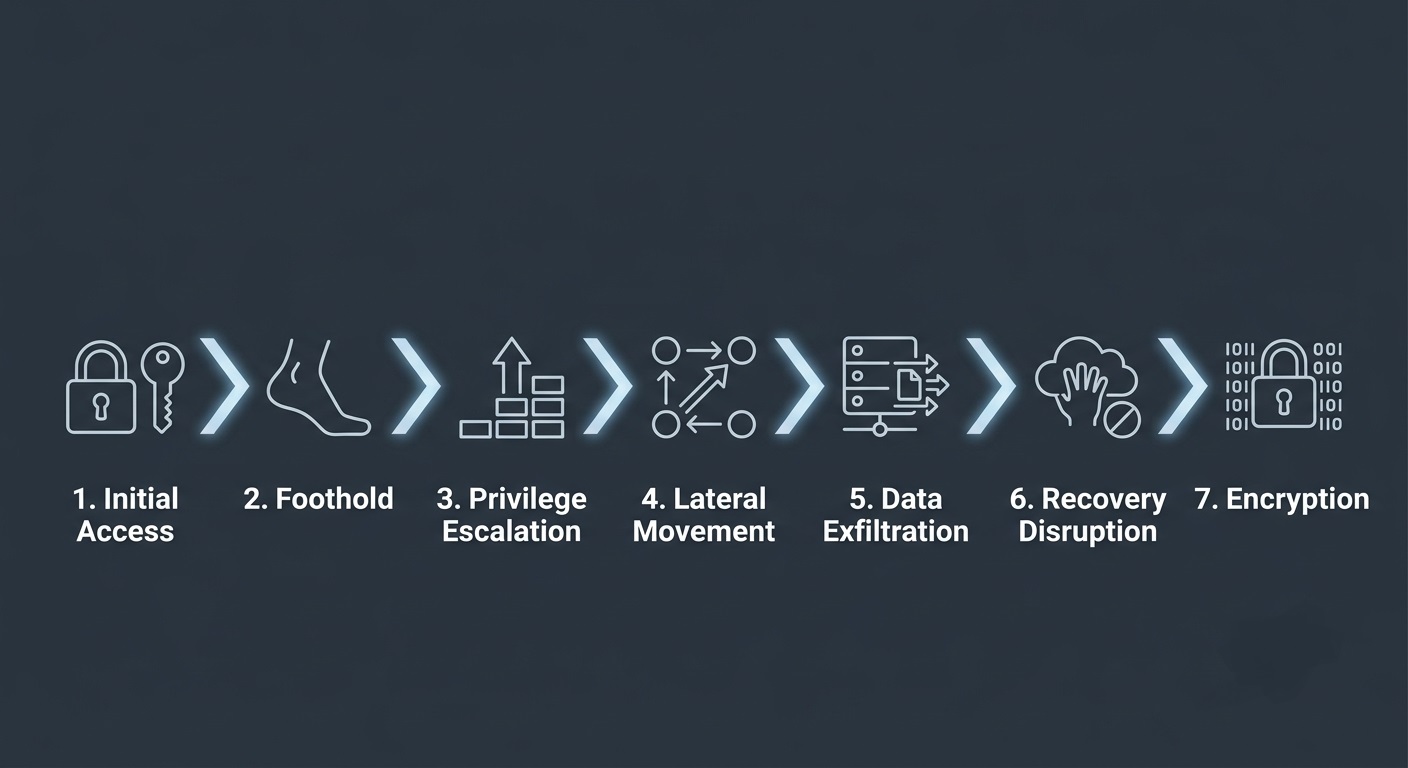
A ransomware attack can unfold through several stages. Attackers may gain initial access through phishing, stolen credentials, malicious downloads, or vulnerable software, then establish persistence, escalate privileges, move across the network, identify valuable data, interfere with backups, and eventually encrypt systems or demand payment.
Understanding how ransomware works across the entire attack lifecycle helps organizations recognize where risk develops and why maintaining a trustworthy recovery path matters if production systems are compromised.
What is Ransomware and What Does it Do?
Ransomware is a type of malicious software designed to block access to files, systems, or entire networks until a ransom is paid. In many cases, it works by encrypting data so users can no longer open or use it without a decryption key controlled by the attacker.
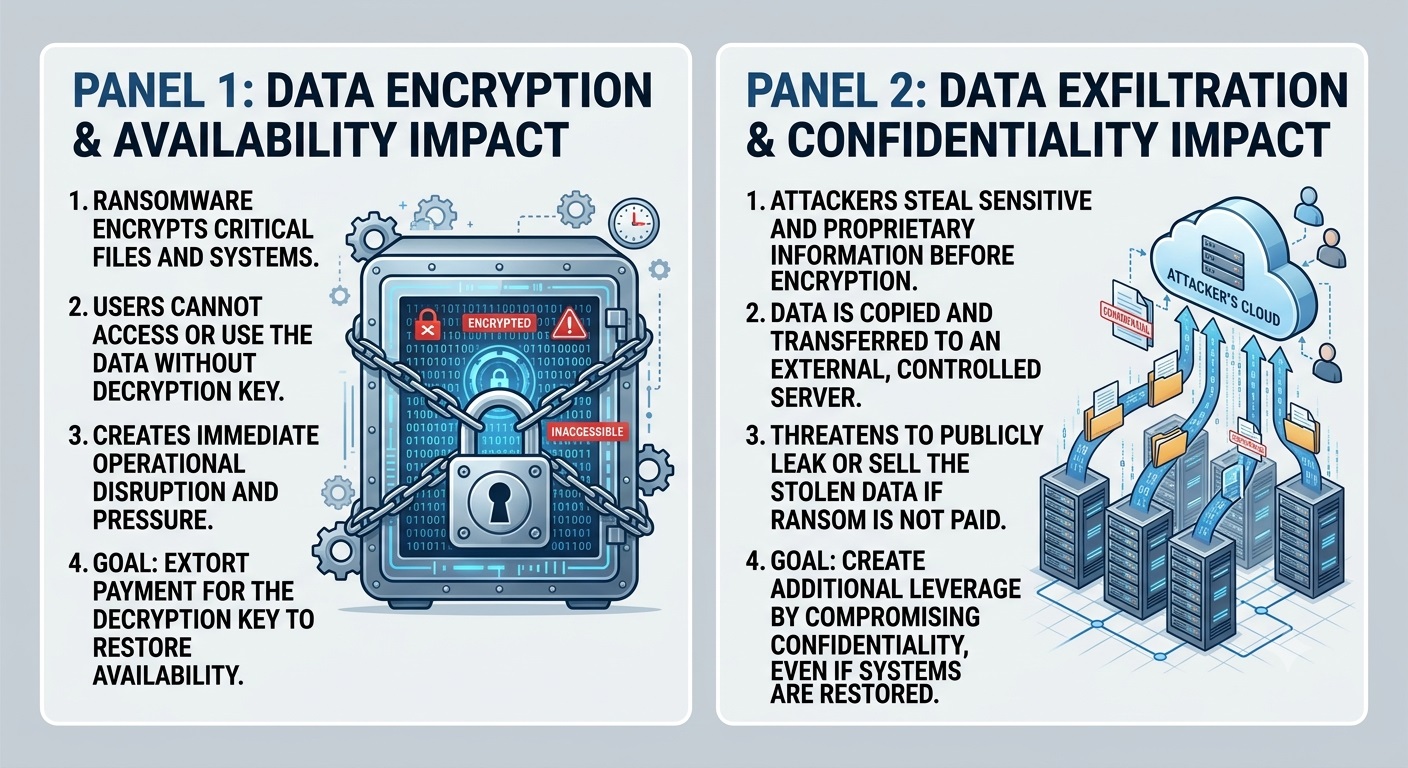
Modern ransomware attacks often go beyond encryption. Attackers may first gain access to a network, search for sensitive information, steal valuable data, and identify systems that could help the organization recover. This can include file servers, shared storage, backup systems, snapshots, and other recovery resources.
The attacker’s goal is to create pressure. If critical systems are unavailable, sensitive data has been stolen, or recovery options have been disrupted, the affected organization has fewer ways to restore normal operations quickly.
This is why ransomware should not be viewed only as malware that “locks files.” It is better understood as a broader extortion attack that can affect:
- Data availability by encrypting files and systems
- Data confidentiality by stealing sensitive information
- Business operations by making critical applications unavailable
- Recovery readiness by targeting backups, restore points, or recovery systems
Understanding these effects makes the ransomware attack lifecycle easier to follow, because encryption is often only the final visible stage of a much longer attack.
How Does Ransomware Work?
Ransomware typically works as a sequence of attacker actions rather than a single event. The visible encryption stage often comes near the end, after the attacker has already established enough access and control to increase the impact of the attack.
The exact sequence can vary, but most ransomware incidents follow a similar progression.
The Ransomware Attack Lifecycle at a Glance
| Stage | What Happens |
| 1. Initial Access | The attacker finds a way into the device, account, or network. |
| 2. Foothold | Access is maintained so the attacker can continue operating inside the environment. |
| 3. Privilege Escalation | Higher-level permissions are obtained to reach more systems and resources. |
| 4. Discovery and Lateral Movement | The attacker maps the environment and moves to other systems. |
| 5. Data Exfiltration | Valuable or sensitive information may be collected and transferred outside the organization. |
| 6. Recovery Disruption | Backup, snapshot, or recovery resources may be identified or interfered with. |
| 7. Encryption and Extortion | Files or systems are encrypted, operations are disrupted, and the attacker issues a ransom demand. |
These stages do not always happen in a perfectly linear order. Some may overlap, be skipped, or occur at the same time depending on the attacker, the ransomware operation, and the environment being targeted.
The important point is that encryption is often the outcome of the attack lifecycle, not the beginning of it. The next section looks at how attackers gain that initial access in the first place.
Stage 1: How Ransomware Gets In (Initial Access)
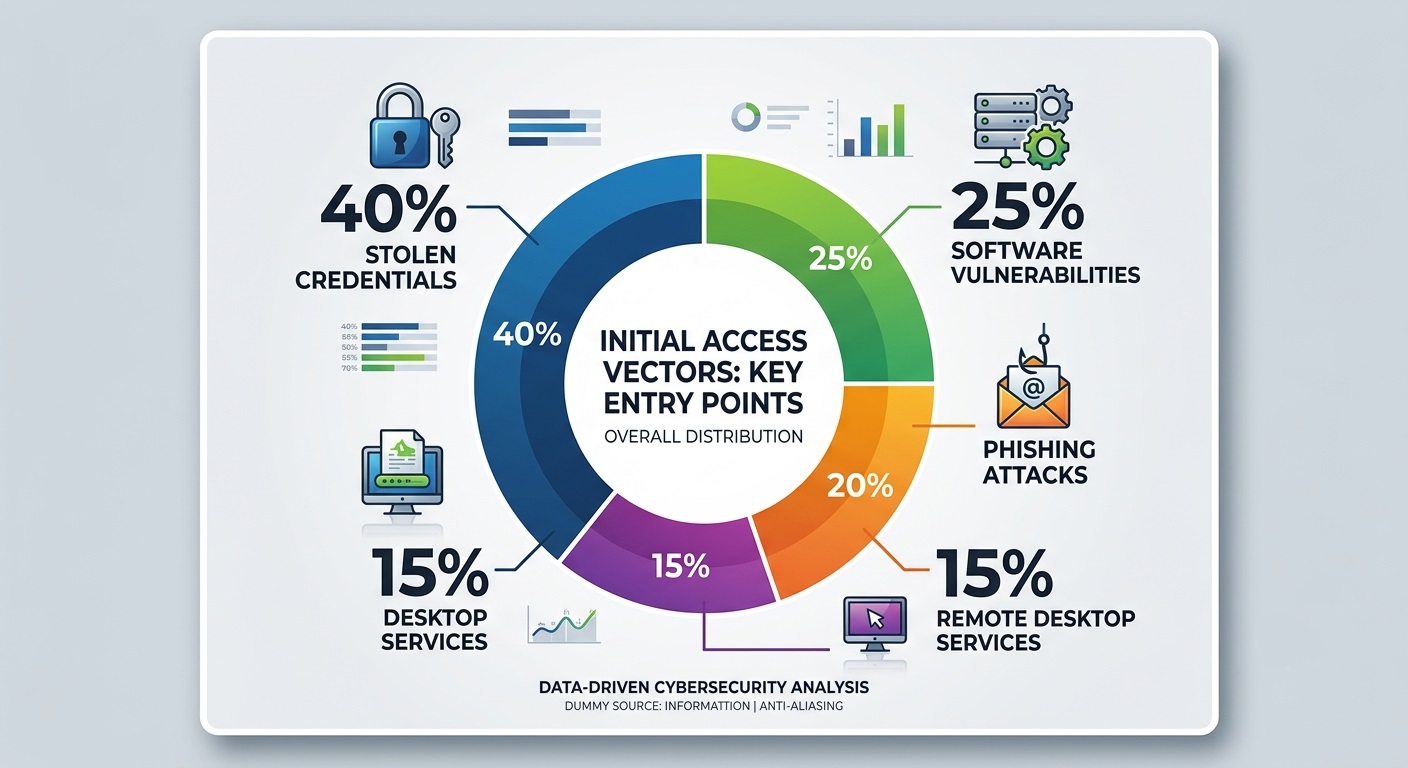
Before a ransomware operation can progress, attackers need an initial way into the environment. This may involve tricking a user, exploiting an exposed system, or using credentials that have already been compromised.
Phishing, Malicious Links and Downloads
Phishing attacks often impersonate trusted people or services to persuade users to open an attachment, visit a malicious website, or enter credentials into a fake login page.
The immediate goal may be to:
- steal login credentials
- install malware that provides remote access
- establish an initial foothold on the device
The ransomware itself does not necessarily appear at this stage. Attackers may use the access they gain to continue operating quietly before causing visible disruption.
Software Vulnerabilities, Stolen Credentials, and Remote Access
Attackers can also enter without requiring a user to open a malicious file. Unpatched internet-facing systems are one reason organizations should regularly review exposed weaknesses through a cyber vulnerability assessment. Common routes include:
- exploiting unpatched vulnerabilities in internet-facing software
- using stolen usernames and passwords
- accessing poorly secured VPN or remote desktop services
- signing in to compromised cloud or business accounts
Stolen credentials can be particularly useful because the activity may initially resemble a legitimate user logging in.
Once initial access is established, the attacker typically focuses on maintaining that access and building a more persistent foothold inside the environment.
This version is tighter because the bullets provide additional detail rather than simply restating the paragraph above them.
Stage 2: Persistence and Maintaining Access
After gaining initial access, attackers may try to preserve their ability to return to the environment, even if the original entry point is discovered or closed.
This is the persistence stage. Instead of triggering encryption immediately, attackers may create or retain additional ways to access the environment while preparing for later stages of the attack.
At a high level, persistence may involve:
- maintaining access through compromised accounts
- using remote-management or remote-access tools
- leaving malware or other access mechanisms in place
- establishing more than one route back into the environment
The purpose is simple: losing the original entry point should not necessarily end the attack.
Not every ransomware incident includes a long persistence phase. Some attackers move quickly, while others remain undetected for days or longer before ransomware is deployed.
Once reliable access is established, the next objective is often to gain greater permissions and control, leading to credential theft and privilege escalation.
Stage 3: Credential Theft and Privilege Escalation
Once attackers have reliable access, they may try to obtain more powerful credentials or higher-level permissions. The access gained in Stage 1 may be limited to a single user, device, or application, so attackers often look for ways to expand what they can reach.
Two activities commonly appear at this stage:
- Credential theft: Obtaining usernames, passwords, session tokens, or other authentication information.
- Privilege escalation: Gaining permissions that allow access to systems or functions unavailable to a standard user account.
These activities do not always happen in the same order. An attacker may already enter with privileged credentials, steal additional accounts without increasing permissions, or exploit a system weakness to gain elevated access.
When higher privileges are obtained, attackers may be able to reach more valuable resources, such as:
- file servers and shared storage
- business-critical applications
- identity and directory services
- administrative consoles
- backup or recovery systems
The risk is that a compromise that began with one account can expand into broader control over the environment.
Once attackers have enough access, the next priority is often to determine what systems exist, where valuable data is stored, and how different parts of the network are connected. That leads to discovery and lateral movement.
Stage 4: Network Discovery and Lateral Movement
Once attackers have sufficient access, they often begin mapping the environment to understand how systems are connected and where valuable resources are located.
During discovery, attackers may identify:
- network segments and connected devices
- shared resources and server locations
- user and administrator relationships
- business-critical applications
- systems that support backup or recovery
The objective is to understand the environment well enough to decide where to move next and which systems would create the greatest impact if compromised.
How Attackers Move Through a Network
In many ransomware incidents, the malware does not simply spread automatically from one device to another. Instead, attackers may use compromised accounts, remote administration tools, or legitimate management functions to access additional systems.
This movement between systems is known as lateral movement.
For example, an attacker may move from an employee workstation to a server, management console, or other system that provides access to additional parts of the environment.
The wider the attacker’s reach, the more systems can potentially be affected when ransomware is deployed.
How Attackers Identify Critical Systems and High-Value Targets
Attackers may prioritize systems that contain sensitive data or support essential business operations. Understanding these dependencies is also an important part of disaster recovery planning, because recovery priorities depend on which systems the business needs first. They may also look for recovery resources that could reduce their leverage later.
This helps them determine:
- Which data may be worth stealing?
- Which systems would cause the most disruption if encrypted?
- Which recovery resources could help the organization restore operations?
Once those targets have been identified, attackers may begin collecting and preparing valuable data for exfiltration. That leads to the next stage: data discovery, staging, and exfiltration.
Stage 5: Data Collection, Staging, and Exfiltration
After valuable data has been identified, attackers may begin collecting and transferring it outside the organization. Not every ransomware incident includes data theft, but exfiltration has become an important part of many modern ransomware operations.
Before sending data out of the environment, attackers may stage it by gathering information from multiple locations, organizing it, or compressing it to make transfer easier.
A typical sequence may look like:
Collection → Staging → Exfiltration
Exfiltration occurs when data is transferred from the victim’s environment to infrastructure controlled by the attacker or another external location.
Why Ransomware Attackers Steal Data Before Encryption
Stealing information gives attackers additional leverage beyond making systems unavailable.
They may threaten to:
- publish sensitive data
- sell or release stolen information
- expose confidential business records if payment is refused
When attackers combine data theft with encryption-based extortion, this is commonly referred to as double extortion.
The two forms of pressure are different:
- Availability pressure: files or systems become inaccessible.
- Confidentiality pressure: stolen information may be exposed or misused.
This distinction matters because restoring encrypted systems can help recover operations, but it cannot reverse the fact that data has already been copied outside the organization.
At another point in the attack, adversaries may also try to reduce the victim’s ability to recover independently by targeting backup or recovery mechanisms.
Stage 6: Targeting Backup and Recovery Systems
Some ransomware operators try to reduce the victim’s ability to recover independently before or during ransomware deployment. The objective is to remove alternatives that could allow the organization to restore operations without relying on the attacker.
Why Ransomware Attackers Target Recovery Systems
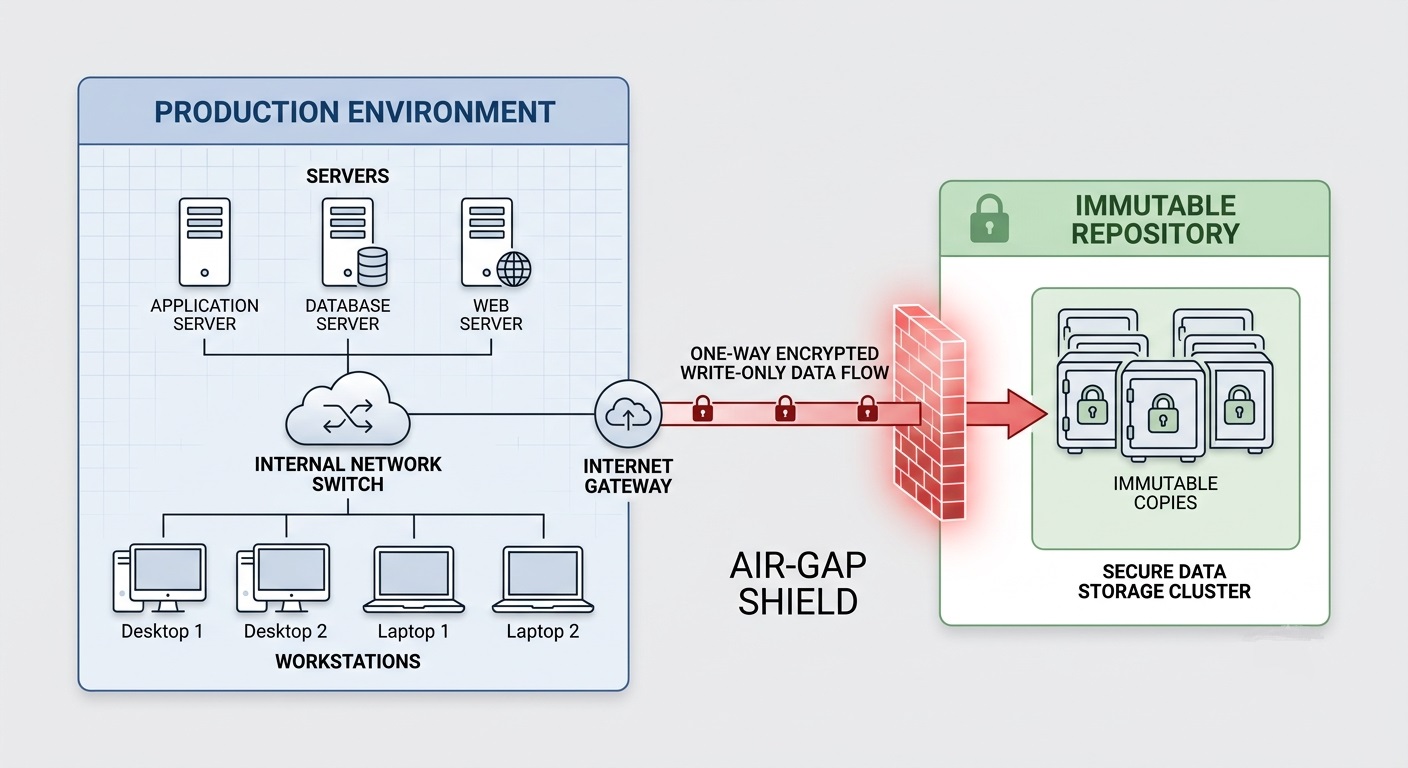
Reliable recovery reduces an attacker’s leverage. If clean systems and data can be restored quickly, encryption has less power to disrupt the business.
For that reason, attackers may try to interfere with:
- backup repositories
- snapshots and restore points
- backup management systems
- recovery configurations
- administrative credentials used for backup infrastructure
This behavior is commonly described as inhibiting system recovery.
How Attackers Disrupt Backups, Restore Points, and Recovery Systems
If attackers obtain sufficient access, they may be able to:
- delete snapshots or restore points
- encrypt or erase reachable backup data
- alter retention or backup settings
- disable recovery-related services
- misuse privileged backup credentials
The level of exposure depends on how recovery systems are designed. A resilient business backup strategy should consider not only where copies are stored, but also how easily those copies can be reached or altered from the production environment. . Backup copies that are isolated, immutable, or separately protected are generally harder for attackers to alter than recovery resources that remain continuously reachable from the production environment.
Why Backups Alone Don’t Guarantee Ransomware Recovery
A backup job that appears successful does not, by itself, prove that recovery will succeed after ransomware.
Organizations still need to determine:
- whether the backup remains intact and accessible
- whether the selected restore point is appropriate for the incident timeline
- whether the data can actually be restored
- whether restored systems can be brought back into operation reliably
This is where backup verification and restore-point validation become important. For Central Data Storage, the relevant value is not simply storing another copy of data, but helping organizations maintain a recovery path that can be assessed and trusted when production systems are compromised.
Stage 7: Encryption, Extortion, and Operational Impact
This is the stage where ransomware usually becomes visible to the organization. Attackers may deploy ransomware across selected systems to make files, applications, or devices unavailable and create immediate operational pressure.
What Does Ransomware Do to Files and Systems?
Ransomware commonly encrypts data so it can no longer be accessed normally without the required decryption mechanism.
Depending on the attack, encryption may affect:
- documents and shared folders
- application and database data
- workstations and file servers
- virtual machines
- other systems required for daily operations
The impact depends heavily on which systems are encrypted. Losing access to a few files may be disruptive, but losing access to core applications, databases, or shared infrastructure can interrupt entire business processes.
How Ransomware Encryption Disrupts Business Operations
Once critical systems become unavailable, organizations may experience:
- interrupted workflows
- system downtime
- delayed customer service
- loss of access to operational data
- recovery and restoration costs
The severity of the incident is therefore tied not only to the amount of encrypted data, but also to the business importance of the affected systems.
What Happens When Attackers Demand a Ransom?
Attackers typically leave a ransom note or other message containing instructions for payment or communication.
The message may include:
- a payment demand
- a deadline
- contact instructions
- a threat to publish stolen data
- an offer of a decryption tool or key after payment
Paying the ransom does not guarantee that systems will be restored successfully or that stolen data will not be exposed.
By this stage, the technical attack has translated into a business problem: critical systems may be unavailable, operations may be disrupted, and the organization must determine how to begin data recovery safely and in the right order.
Conclusion: Build a Trusted Ransomware Recovery Path
Understanding how ransomware works helps organizations see that the attack can begin long before files are encrypted. From initial access and lateral movement to data theft, recovery disruption, and extortion, each stage can increase the impact of an incident.
A strong ransomware strategy should therefore include more than prevention. Organizations also need protected backups, appropriate restore points, and a recovery process that can be trusted when production systems are compromised.
Central Data Storage helps businesses strengthen ransomware recovery readiness with protected backups, recovery verification, and managed recovery capabilities designed to support dependable restoration after an attack.
Would your current backups support a reliable recovery after ransomware?
Request a Data Assessment to evaluate your backup and recovery readiness and identify potential gaps in your recovery strategy.
Ransomware Attacks Lifecycle FAQs
Do Ransomware Attacks Always Follow the Same Stages?
No. Attack stages can overlap, occur in a different order, or be skipped entirely. The lifecycle is a framework for understanding common attacker behavior, not a rigid sequence.
How Long Can a Ransomware Attack Last Before Encryption?
There is no fixed timeline. Some attacks move quickly, while others remain undetected for days or longer before ransomware is deployed.
Can Ransomware-Encrypted Files Be Recovered Without Paying?
Sometimes. Recovery may be possible through protected backups, usable restore points, unaffected copies, or specific decryption tools, depending on the ransomware involved.
Does Paying a Ransom Guarantee Data Recovery?
No. Payment does not guarantee a working decryption key, complete restoration, or deletion of stolen data.