Are you confident your current backup provider can do more than copy data and can help you recover cleanly when ransomware, corruption, or downtime strikes?That question is increasingly important.
Verizon’s 2026 Data Breach Investigations Report found that ransomware was involved in 48% of breaches, up from 44% the previous year (Source).
IBM’s 2026 Cost of a Data Breach Report found that the global average cost of a data breach reached a record $4.99 million. The report also found that one in four malicious breaches were AI-enabled and that these breaches cost organizations an average of $6 million (Source).
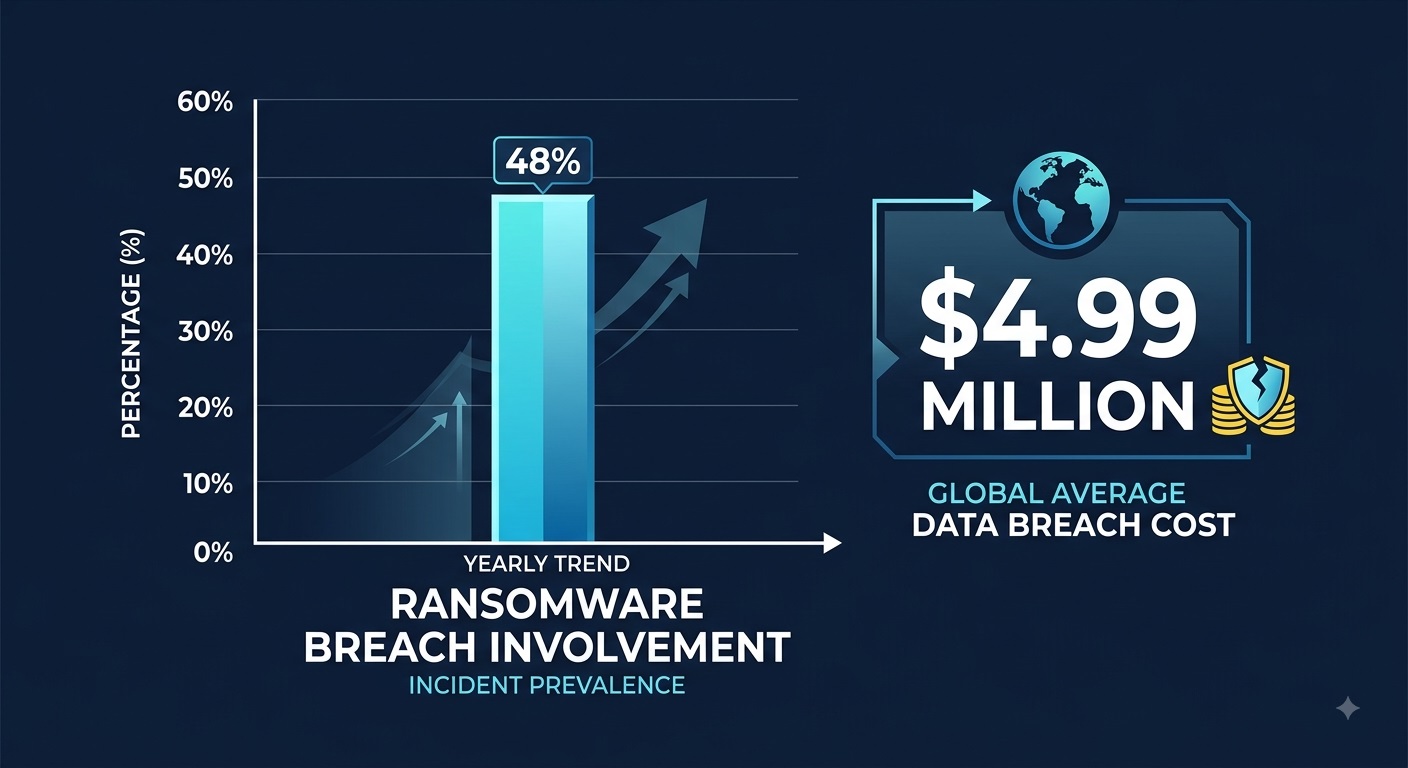
Recent industry data shows both the frequency of ransomware involvement and the financial impact of data breaches reaching unprecedented levels.
For businesses considering a Carbonite alternative, the decision therefore goes beyond storage capacity or subscription price. Recovery reliability, backup integrity, ransomware resilience, deployment control, and hands-on support also matter.
This guide compares Carbonite with Central Data Storage (CDS) and examines where CDS’s managed, verified-recovery approach may better fit organizations that need dependable business backup and recovery.
Why Do Businesses Look for a Carbonite Alternative?
Carbonite remains a practical backup option for many small businesses, particularly those that need straightforward cloud backup and file recovery. Businesses usually start comparing alternatives when their environment becomes more complex or their recovery expectations increase.
Common triggers include:
- More demanding recovery requirements: Businesses may need stronger assurance that restore points are usable after ransomware, corruption, or system failure.
- Greater operational support: Some teams prefer a provider that helps manage backup health, recovery testing, and restoration rather than relying mainly on software-led recovery.
- Healthcare or regulated-data needs: Organizations handling ePHI may require BAA support, detailed recovery documentation, and stronger operational safeguards.
- More infrastructure control: Private, hybrid, self-hosted, or on-premises deployment may become important as security or governance requirements grow.
- Changing cost priorities: Predictable backup and recovery expenses can matter more as data volumes, servers, and endpoints increase.
For these businesses, the decision is less about replacing Carbonite simply for the sake of switching and more about finding a backup model that better matches their recovery, compliance, and operational needs.
This evaluation is particularly important for healthcare organizations where backup decisions must account for data availability, recovery expectations, and long-term protection requirements. Reviewing the best backup services for healthcare providers can provide additional context on how different solutions approach healthcare data protection and recovery.
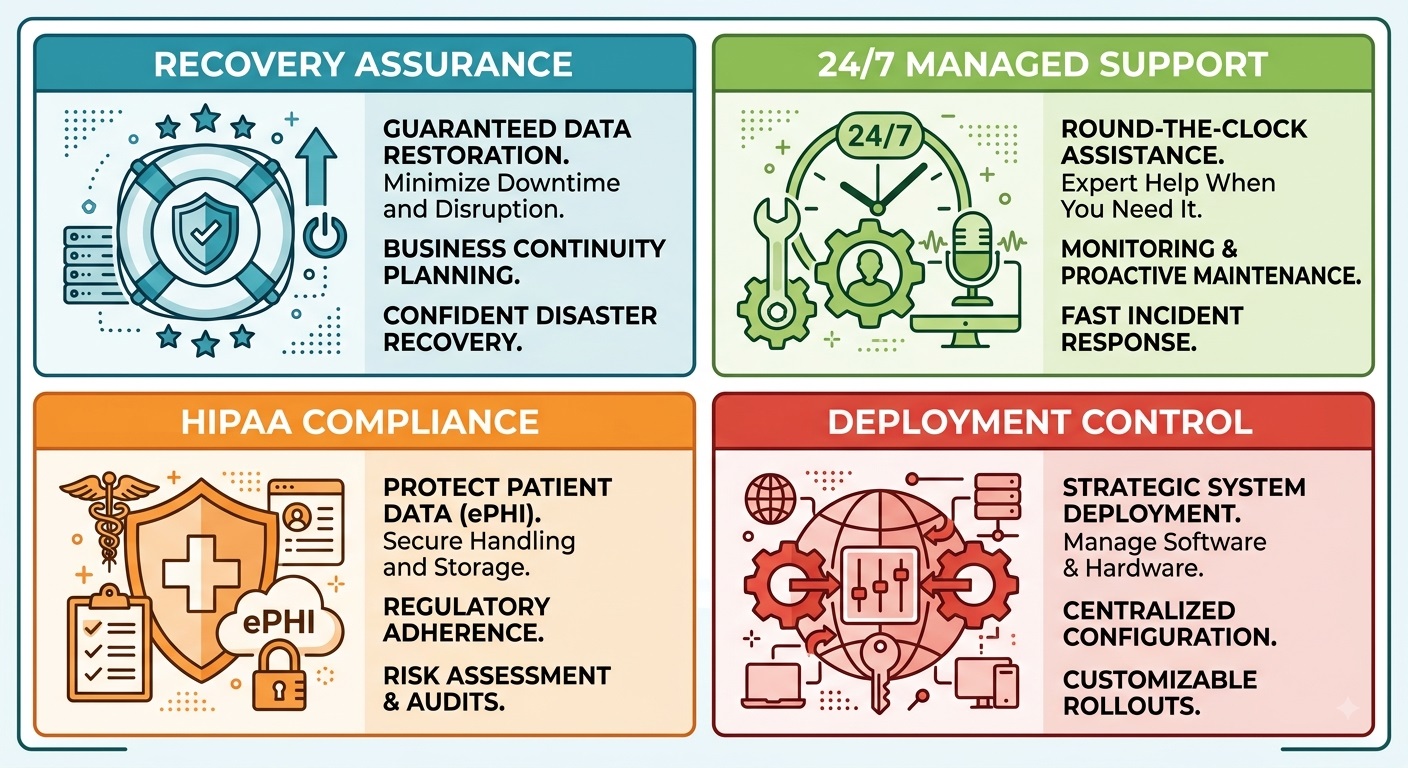
Evolving compliance needs, recovery demands, and the need for hands-on assistance drive businesses toward managed backup solutions.
Carbonite vs Central Data Storage: Key Differences
Carbonite Professional and CDS UnisonBDR both support business backup and recovery, but they differ most in service responsibility, recovery verification, deployment control, and pricing structure.
| Comparison Area | Carbonite Professional | CDS UnisonBDR |
| Backup model | Automated cloud backup; server backup on eligible plans | Fully managed backup and disaster recovery |
| Recovery approach | File, server, and system recovery depending on plan | Managed recovery with guided restore assistance |
| Restore verification | Backup-set and server archive integrity checks | Automated integrity checks plus clean-recovery verification |
| Ransomware recovery | Restore backed-up files from before infection | Scanning, corruption isolation, immutable storage, and verified restore points |
| Recovery support availability | In-house phone/email support during published business hours | 24/7 recovery assistance with expert-led guidance |
| Deployment | Carbonite cloud plus onsite server backup on eligible plans | CDS private infrastructure, self-hosted Docker, or licensed on-premises |
| Infrastructure control | Primarily provider-managed | Provider-managed or customer-controlled |
| Recovery assistance | Technical support for backup and restore | Managed monitoring and guided recovery |
| Pricing model | Tiered plans with defined storage allowances | Storage-tier pricing with no egress or retrieval fees |
1. Backup and Recovery Models
Carbonite Professional uses an automated, encrypted cloud-backup model. Depending on the selected plan, it can protect computers, external drives, NAS devices, and Windows servers. Eligible configurations also support bare-metal image backup and restore. Database and application coverage should be confirmed for the specific plan and workload.
CDS UnisonBDR combines backup technology with a managed recovery service. Its approach includes:
- Daily backup-health monitoring
- Automated integrity checks
- Restore testing and verification
- Guided restore assistance
- Protection for physical, virtual, and cloud workloads
The main difference is who takes responsibility for recovery readiness. Carbonite provides backup and restore capabilities; Central Data Storage places greater emphasis on actively monitoring and verifying whether recovery can be completed successfully.
2. Ransomware Protection and Backup Integrity
Carbonite supports ransomware recovery by allowing customers to restore backed-up data, including versions created before an infection. Carbonite’s support team can assist with restoring uninfected files after a virus or malware event, subject to its product and support conditions.
CDS UnisonBDR includes controls focused on restore-point integrity:
- Pre-storage file scanning
- Corrupted-file isolation
- Ransomware-isolated or immutable backup storage
- Automated integrity checks
- Clean-recovery verification
- Guided restore assistance
These controls are designed to help identify suitable restore points after a ransomware incident. This distinction matters because a completed backup confirms that data was copied; recovery verification helps establish whether the selected copy is suitable to restore.
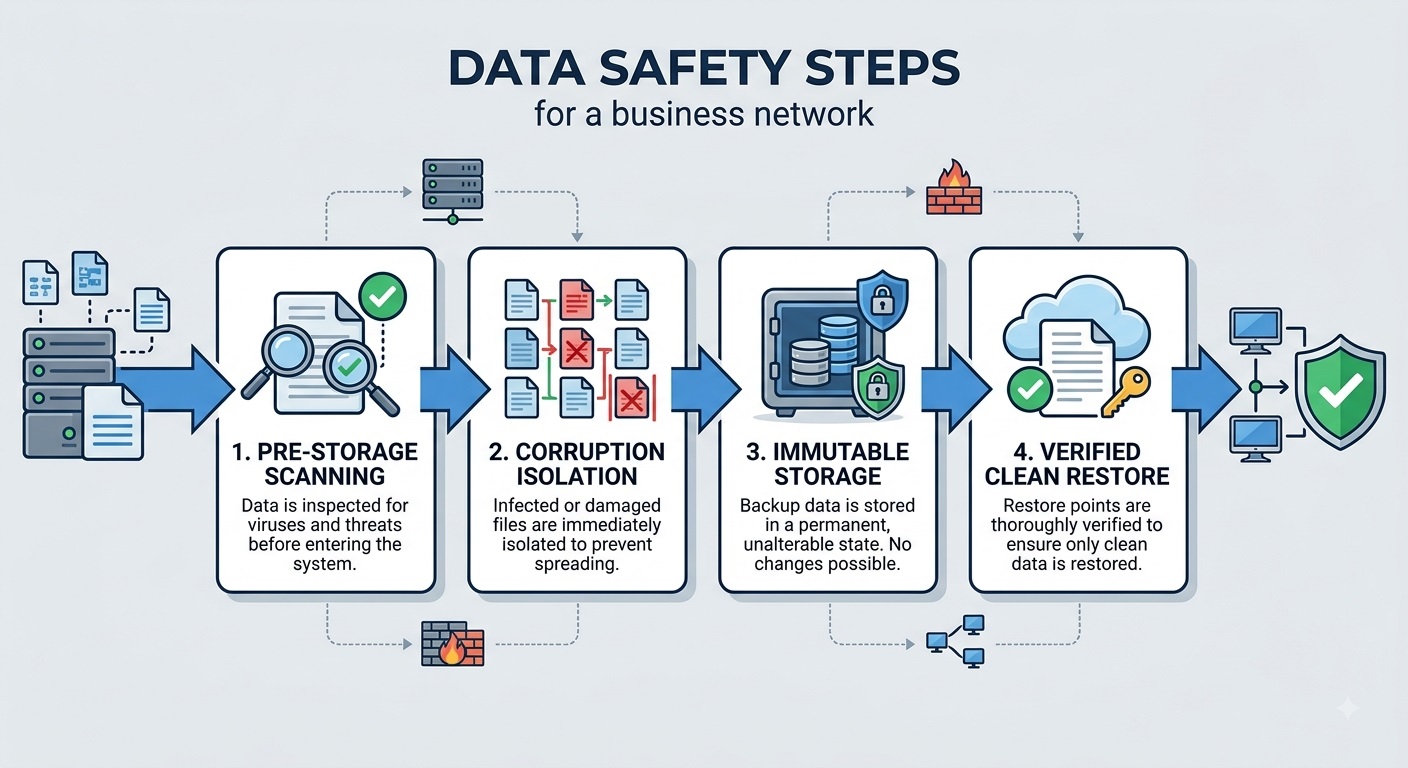
Clean-recovery verification ensures that restored data is free from corruption and dormant ransomware infection.
3. Recovery Support and Availability
Recovery incidents can occur at any time, making support availability an important consideration.
Carbonite Professional provides in-house phone and email support during its published business hours of Monday through Friday, 9 a.m. to 6 p.m. EST.
Central Data Storage provides 24/7 recovery assistance, including expert-led guidance during restore and recovery events.
For organizations with limited tolerance for downtime, the key difference is straightforward: CDS provides recovery assistance outside standard business hours, including nights and weekends.
4. Deployment Options and Infrastructure Control
Carbonite Professional primarily operates through Carbonite’s cloud, while eligible server plans can also use on-site backup targets.
CDS provides three deployment models:
- Fully managed: Hosted on CDS private infrastructure
- Self-hosted: Deployed through Docker in a private or hybrid environment
- Licensed/on-premises: Operated on customer-controlled infrastructure
This gives organizations more choice when private hosting, internal security policies, or infrastructure ownership are part of the backup strategy.
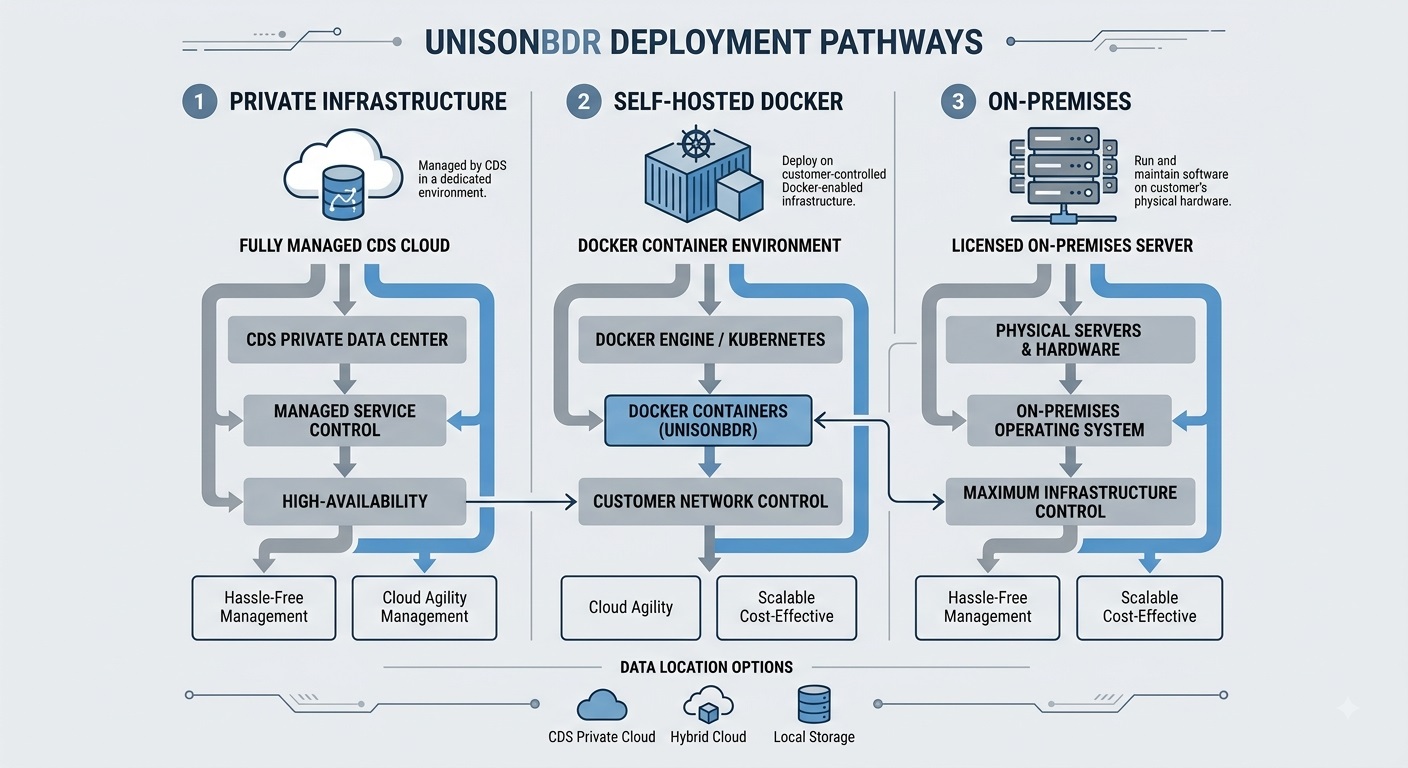
Flexible deployment options allow organizations to maintain control over data location and security governance.
5. Pricing and Recovery Costs
Carbonite Professional uses tiered Core, Power, and Ultimate plans. Its published plans differ by included storage, number of protected computers, and server coverage.
CDS UnisonBDR uses storage-based pricing and currently starts at $64.99 per month, or $599.88 per year when billed annually. UnisonBDR does not charge egress or retrieval fees.
When comparing total cost, consider:
- Storage required
- Number of endpoints and servers
- Workloads protected
- Additional storage charges
- Recovery assistance
- Retrieval or egress fees
- Infrastructure requirements
The better-value option depends on whether the organization needs straightforward automated backup or a more managed recovery model with verification built into the service.
Why Choose Central Data Storage as a Carbonite Alternative?
CDS makes the most sense as a Carbonite alternative for organizations that want more than automated backup and restore tools. Its UnisonBDR model combines managed backup with recovery verification, flexible deployment, and hands-on recovery support.
CDS may be a better fit when you need:
- Verified recovery: Restore points are checked for integrity so recovery focuses on usable, clean data rather than backup completion alone.
- Managed recovery support: CDS provides ongoing backup oversight and human-assisted recovery when restoration is required.
- Ransomware recovery controls: UnisonBDR emphasizes immutable backup storage, file scanning, corruption isolation, and clean-recovery verification.
- Greater deployment flexibility: Organizations can choose CDS-hosted private infrastructure, a self-hosted Docker deployment, or a licensed on-premises model.
- Predictable recovery costs: CDS positions UnisonBDR around flat-rate pricing with no egress or retrieval fees.
Carbonite can still suit businesses primarily looking for straightforward cloud backup and standard restore capabilities. CDS becomes more relevant when recovery verification, managed assistance, healthcare requirements, or infrastructure control carry greater weight in the buying decision.
How We Compared Carbonite and Central Data Storage
To evaluate CDS fairly as a Carbonite alternative, we compared the two using current product information published by Carbonite/OpenText and Central Data Storage. The assessment focused on practical factors that affect backup and recovery decisions rather than marketing claims alone.
We reviewed:
- Backup model: What systems and workloads each service protects and how backups are managed.
- Recovery approach: Available file, server, system, and assisted-recovery capabilities.
- Restore verification: How each provider checks backup integrity and recovery readiness.
- Ransomware recovery: Protection of backup copies, restore-point selection, corruption handling, and recovery after infection.
- Healthcare requirements: BAA availability, encryption, ePHI safeguards, and HIPAA-related support.
- Deployment flexibility: Provider-hosted, private, self-hosted, hybrid, and on-premises options.
- Infrastructure control: How much control customers retain over where backup data and software operate.
- Recovery assistance: Whether the service primarily provides tools or includes hands-on recovery support.
- Pricing model: Storage allowances, protected systems, additional capacity, and potential recovery or retrieval costs.
This evaluation is based on documented product capabilities and service models, not independent performance testing. Where Carbonite and CDS offer similar capabilities, the comparison reflects that rather than treating every difference as an advantage for CDS.
Is Central Data Storage the Best Carbonite Alternative for Your Business?
The right Carbonite alternative depends on what your organization expects from backup and recovery. Carbonite may suit businesses seeking straightforward cloud backup and file recovery.
CDS suits organizations that place greater importance on managed oversight, recovery verification, flexible deployment, and guided recovery support. The better choice depends on the organization’s workloads, recovery requirements, compliance needs, and budget.
For healthcare and other recovery-sensitive environments, the deciding factor should be more than whether backups are running. It should be whether critical data can be recovered reliably when operations depend on it.
Want to see whether your current backup environment is actually recovery-ready? Request a Data Assessment from Central Data Storage to identify potential backup, recovery, and resilience gaps before they become operational problems.
FAQs About Carbonite Alternative
Is Central Data Storage a Carbonite Alternative?
Yes. CDS UnisonBDR is a business backup and disaster recovery option for organizations comparing Carbonite with a more managed, recovery-focused service model.
What Is the Main Difference Between Carbonite and CDS?
Carbonite primarily provides automated cloud backup and restore capabilities, while CDS combines backup with managed oversight, restore verification, and guided recovery support.
Is CDS Suitable for Healthcare Backup and Recovery?
Yes. CDS supports healthcare organizations with HIPAA-aligned safeguards, BAA availability, encryption, recovery documentation, and managed backup and recovery support.
How Does CDS Support Ransomware Recovery?
UnisonBDR uses immutable backup storage, integrity checks, corrupted-file isolation, and clean-recovery verification to help identify suitable restore points after an incident.
Does CDS Support Private, Self-Hosted, or On-Premises Deployment?
Yes. CDS supports fully managed private infrastructure, Docker-based self-hosting, and licensed on-premises deployment for organizations that need greater infrastructure control.

![10 Best Backup Services for Healthcare Providers [2026 Comparison]](https://centraldatastorage.com/wp-content/uploads/2026/08/Backup-Services-for-Healthcare-Providers-400x250.png)