What happens when your Radiology Information System (RIS) suddenly goes offline, leaving your team unable to access patient schedules, imaging orders, or radiology reports?
A database failure, ransomware attack, or server outage can disrupt diagnostic imaging workflows, delay patient care, and compromise access to electronic protected health information (ePHI).
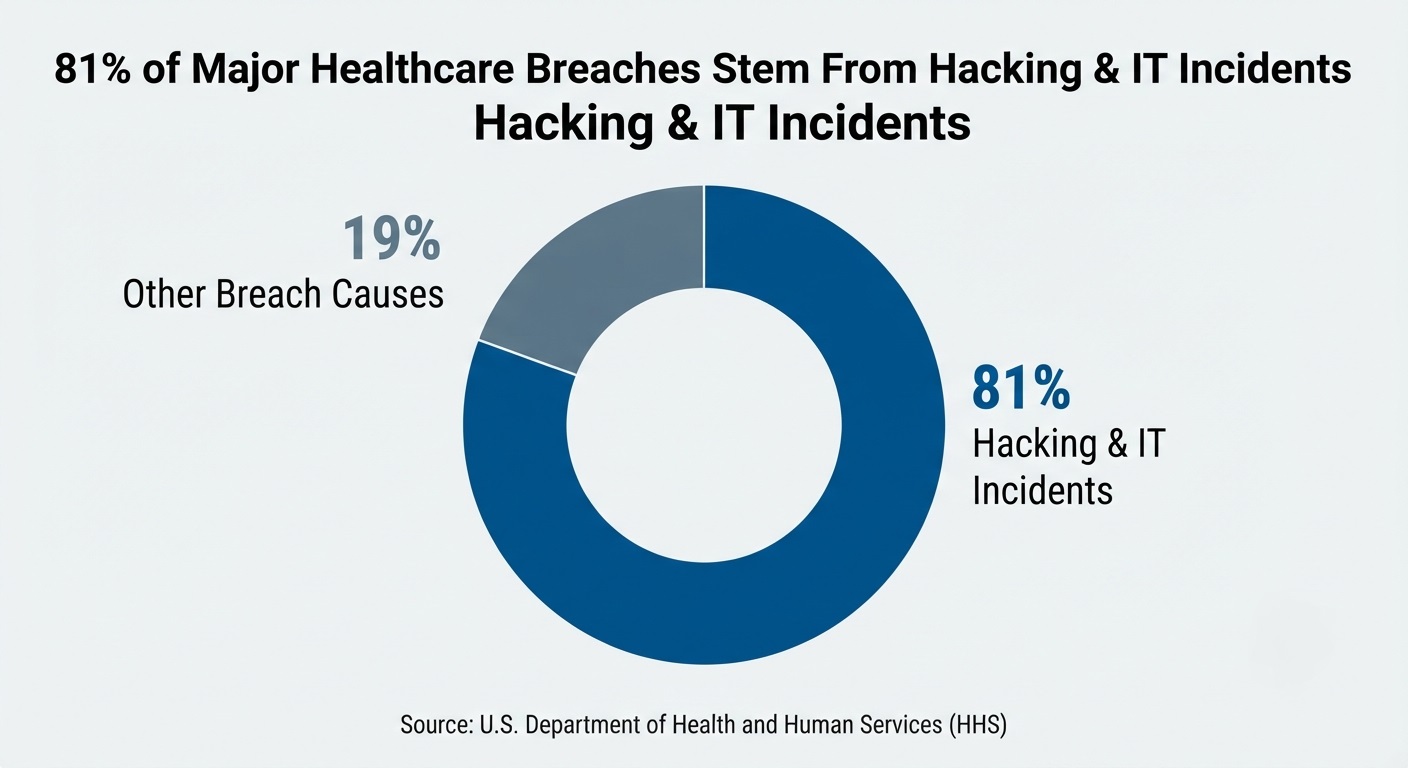
According to the U.S. Department of Health and Human Services (HHS), hacking and IT incidents accounted for 81% of reported breaches of unsecured protected health information affecting 500 or more individuals in 2024 (Source).
For hospitals and diagnostic imaging centers, RIS backup and recovery involves more than saving database copies. It requires protecting critical radiology records, restoring application functionality, and verifying connections with Picture Archiving and Communication Systems (PACS) and Electronic Health Records (EHRs).
What is RIS Backup and What Data Needs to Be Protected?
RIS backup and recovery involves protecting and restoring the databases, operational records, and application components of a Radiology Information System (RIS) after data loss, corruption, hardware failure, or cyberattacks.
An RIS coordinates essential radiology operations, including patient scheduling, imaging orders, examination tracking, and reporting. Its recovery requirements extend beyond patient records to the application settings and technical components needed to resume these activities.
RIS Database Backup: Patient Records, Imaging Orders, and Reports
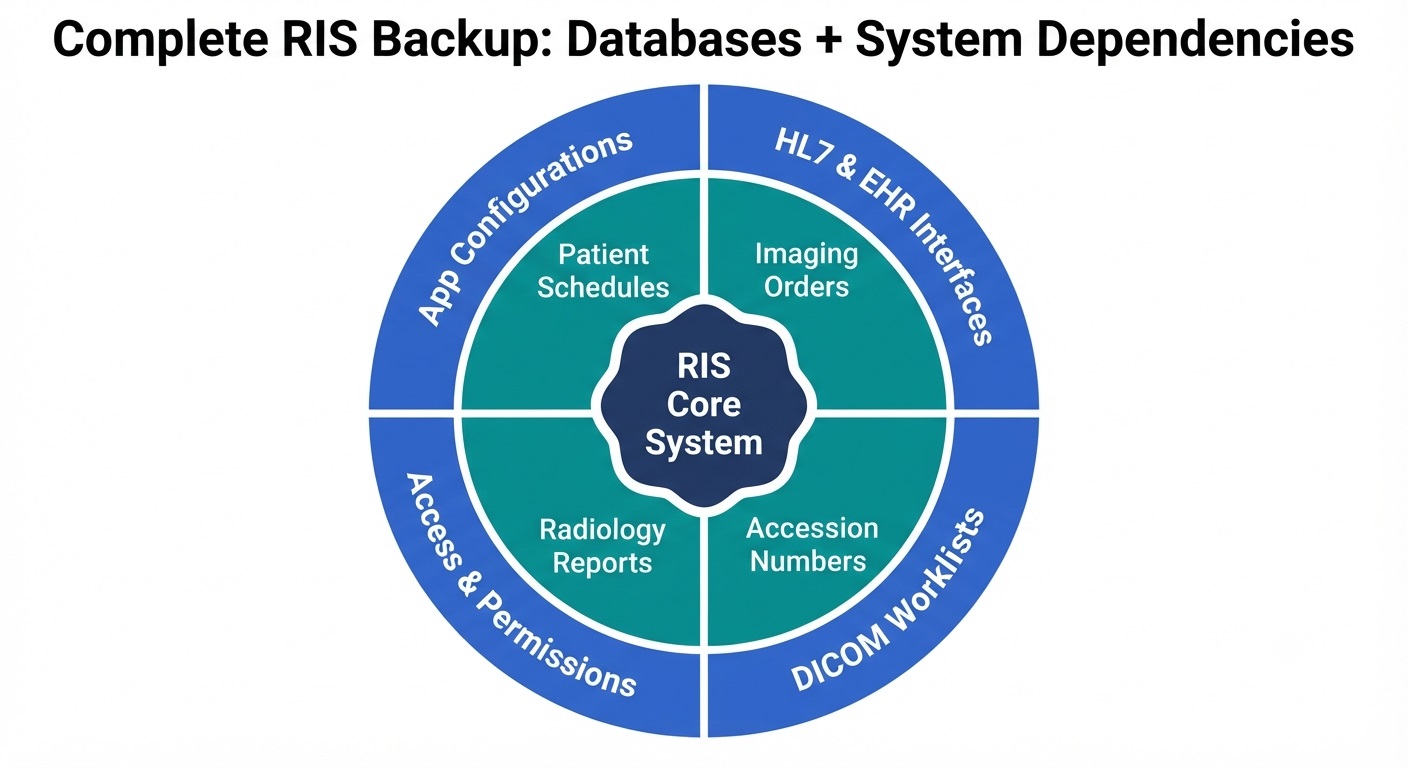
RIS databases contain clinical and operational information used throughout the diagnostic imaging process. Depending on the software platform, essential backup data may include:
- Patient demographics and scheduling records: Patient identifiers, appointment details, examination dates, and scheduling information.
- Imaging orders and accession numbers: Examination requests and identifiers linking patients, procedures, and imaging studies.
- Examination tracking records: Procedure status, workflow updates, and examination completion information.
- Radiology reports: Where reports are maintained in the RIS, diagnostic findings, report status, and finalized reports.
- Administrative records: Operational information and application-managed data supporting radiology department activities.
The exact records requiring protection depend on how the healthcare organization uses and configures its RIS.
RIS Application Configurations and System Dependencies
Beyond clinical records, an RIS relies on supporting configurations and services that must be considered during backup planning.
Key components include:
- Application configurations: RIS software settings, workflow rules, and system parameters.
- Database structures: Schemas, supported database versions, and related application dependencies.
- HL7 interface configurations: Settings governing information exchange with Electronic Health Records (EHRs) and other healthcare applications.
- DICOM workflow configurations: Settings supporting imaging processes, including DICOM modality worklist and related imaging-workflow interfaces where applicable.
- Authentication and access settings: User roles, permissions, and authentication configurations.
The components that require separate protection vary depending on whether the RIS is deployed on-premises, hosted in the cloud, or managed by a third-party software provider.
RIS vs. PACS Backup: Key Differences and Recovery Requirements
RIS backup protects radiology workflow data, while PACS backup protects medical imaging archives and related information. Although both systems support diagnostic imaging, they manage different types of data and have distinct recovery requirements.
A Radiology Information System (RIS) manages patient scheduling, examination orders, procedure tracking, and, depending on the platform, reporting workflows. A Picture Archiving and Communication System (PACS) primarily stores, retrieves, and distributes medical images, including X-rays, CT scans, MRIs, and ultrasound studies.
| Comparison | RIS Backup | PACS Backup |
| Primary purpose | Protect radiology workflow and operational data | Protect medical images and imaging archives |
| Data protected | Patient schedules, examination orders, accession numbers, and reports | DICOM images, imaging studies, and associated metadata |
| System dependencies | RIS databases, application services, and HL7 interfaces | Image archives, storage systems, DICOM services, and PACS databases |
| Recovery priority | Restore scheduling, order management, examination tracking, and reporting | Restore image integrity, availability, retrieval, and viewing |
| Validation requirements | Verify database records, application functions, and workflow integration | Verify image integrity, study retrieval, and viewing functionality |
Backup Requirements for Integrated RIS and PACS Systems
Backing up a PACS archive does not automatically protect the RIS database, even when both systems operate within the same radiology environment. An imaging center may successfully restore its medical images after a server failure but still lack access to patient schedules, examination orders, or reporting records if the corresponding RIS data was not protected.
In integrated RIS/PACS platforms, backup coverage depends on the underlying database architecture, shared infrastructure, and vendor configuration. Healthcare IT teams must identify which components are included in each backup to avoid gaps in recovery coverage.
For healthcare organizations managing both systems, a coordinated backup strategy is essential. CDS offers radiology and imaging backup and recovery solutions designed to help protect critical imaging environments and support data recovery when disruptions occur.
How to Back Up a Radiology Information System (RIS)
A reliable RIS backup strategy must account for the database architecture, application dependencies, and operational requirements of the radiology department. The appropriate backup method depends on the RIS vendor, underlying database platform, and whether the system operates on-premises, in the cloud, or within a hybrid environment.
Identify RIS Database, Server, and Integration Dependencies
Before configuring backups, healthcare IT teams should document the infrastructure supporting their Radiology Information System. This ensures that critical components are not excluded from the recovery plan.
The assessment should identify:
- Database platform: The database management system, its version, storage locations, and vendor-supported backup procedures.
- Application servers: Servers, services, and software components required to operate the RIS.
- Integration services: HL7 interface engines, message queues, and other services connecting RIS with EHR, PACS, and imaging systems.
- External dependencies: Authentication services, network configurations, licensing requirements, and other components necessary for application availability.
For vendor-hosted RIS platforms, healthcare organizations should clarify which components the provider backs up, what recovery responsibilities remain with the customer, and whether independent data exports or recovery options are available.
Create Application-Consistent RIS Backups and Secure Recovery Copies
RIS databases may process scheduling updates, examination status changes, and reporting transactions throughout the day. Backup methods must therefore preserve a recoverable database state rather than simply copy files while transactions are active.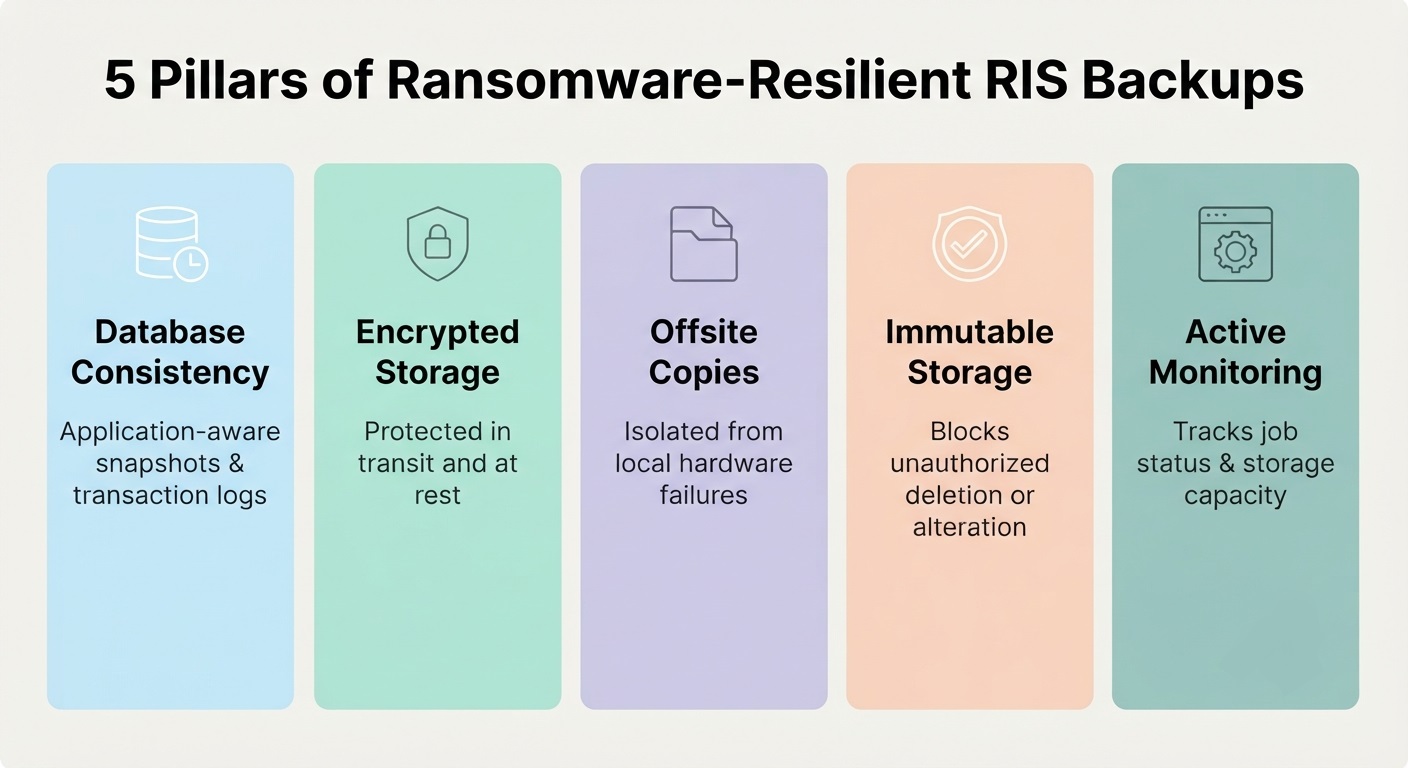
Depending on the RIS platform, suitable approaches may include database-native backups, transaction log backups, or application-aware snapshots supported by the software vendor.
A secure backup configuration should incorporate:
- Database consistency: Use supported backup procedures that preserve transactional integrity and allow the database to be restored to a valid state.
- Encrypted backup storage: Protect sensitive patient information in stored copies and during transfer using appropriate encryption safeguards.
- Offsite backup copies: Maintain protected copies outside the primary infrastructure to reduce exposure to localized hardware failures and disasters.
- Immutable and/or isolated storage: Where supported, restrict unauthorized modification or deletion of recovery copies and limit network access to backup repositories, including during ransomware incidents.
- Backup monitoring: Track execution status, failed jobs, storage capacity, and other conditions that could affect backup availability.
These measures reduce recovery risks but do not independently establish that an RIS can be restored. Backup integrity and application functionality must also be validated through recovery testing.
Set RIS Backup Frequency and RPO/RTO Recovery Objectives
RIS backup frequency should reflect how much recent information a radiology department can afford to lose and how long critical workflows can remain unavailable.
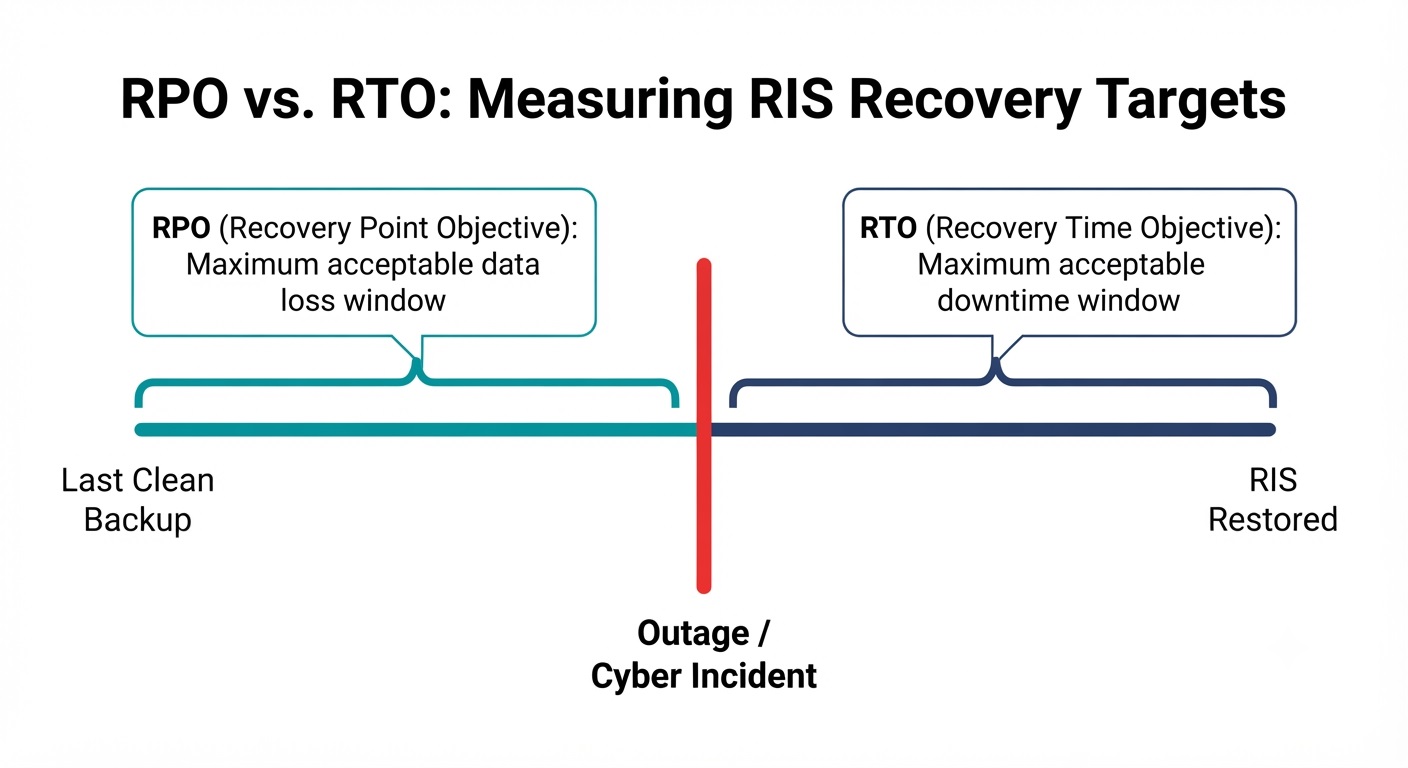
Two recovery objectives guide these decisions:
- Recovery Point Objective (RPO): The maximum acceptable period of data loss, measured backward from an incident. For example, a 15-minute RPO means the recovery strategy should be designed to limit lost transactions to approximately 15 minutes.
- Recovery Time Objective (RTO): The targeted maximum duration for restoring a system or service following an interruption.
An imaging center processing frequent patient appointments and examination orders may require shorter recovery objectives than a facility with lower transaction volumes. However, actual RPO and RTO targets should be established through operational risk assessments and validated against the RIS platform’s recovery capabilities.
Backup schedules should also account for database activity, transaction log management, network capacity, available storage, and vendor requirements.
How to Restore RIS After Data Loss or Ransomware
Restoring a Radiology Information System (RIS) after a server failure, database corruption, or ransomware attack requires more than retrieving the latest backup. Healthcare IT teams must identify the cause of the disruption, restore a trustworthy database and application environment, and re-establish the connections supporting radiology operations.
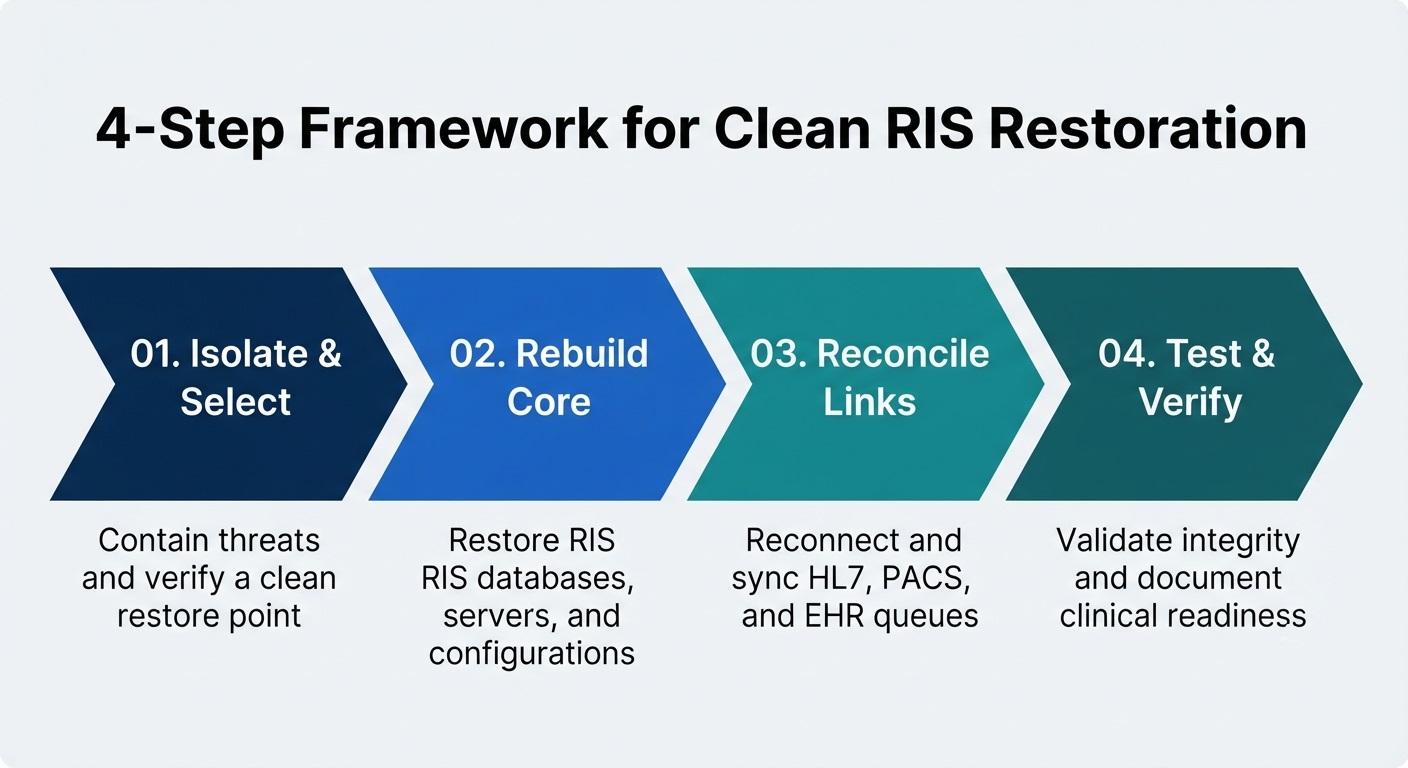
The recovery process varies by RIS platform, infrastructure, and incident severity, but the following steps provide a practical framework.
Identify the RIS Failure and Select a Clean Restore Point
Before initiating recovery, determine which RIS components are affected and whether the disruption involves hardware failure, accidental deletion, database corruption, or malicious activity.
For suspected ransomware incidents, compromised systems should be isolated and assessed before restoration begins. Otherwise, restoring data into an infected environment could expose the recovered system to further compromise.
Recovery teams should:
- Identify the affected components: Determine whether the disruption involves the RIS database, application server, storage infrastructure, or connected services.
- Establish the incident timeline: Identify when the failure or suspicious activity began to help select an appropriate recovery point.
- Evaluate backup integrity: Check available backup copies for corruption, missing data, or signs of compromise.
- Select a trusted restore point: Choose a backup that meets recovery requirements without knowingly reintroducing compromised information.
This is where Central Data Storage (CDS) emphasizes clean recovery rather than backup completion alone. Its backup verification and recovery approach focuses on identifying compromised or corrupted backup data before restoration, helping organizations reduce the risk of returning unsafe information to production systems.
Restore RIS Databases, Application Services, and Configurations
After selecting a suitable recovery point, the next step is restoring the RIS application and its underlying database using procedures supported by the software and database vendors.
Depending on the deployment architecture, recovery may involve rebuilding a failed server, restoring a database to a compatible environment, or recovering application services within an existing infrastructure.
Key restoration activities include:
- Rebuild the application environment: Restore the supported operating system, RIS software version, and necessary system dependencies.
- Recover database records: Restore patient scheduling information, examination orders, reporting records, and other protected data from the selected recovery point.
- Restore application configurations: Reapply the settings, services, and permissions required for the RIS to operate.
- Confirm database accessibility: Verify that the application can establish a connection to the restored database and that essential services start correctly.
For database corruption incidents, transaction logs or point-in-time recovery capabilities may help limit data loss when supported by the underlying database platform.
Healthcare organizations using CDS’s UnisonBDR backup and disaster recovery platform can evaluate its recovery capabilities against their RIS infrastructure, database requirements, and application compatibility. A successful restoration still requires validation of the recovered RIS environment.
Restore RIS Connectivity With PACS, EHR, and HL7 Interfaces
Once the RIS database and application are operational, healthcare IT teams must restore communication with connected clinical systems. An RIS may be accessible to users while imaging orders, patient updates, or reporting messages remain interrupted because an integration has not recovered correctly.
Important recovery tasks include:
- HL7 interface connectivity: Confirm that patient registration updates, examination orders, and reporting messages are exchanged correctly between RIS and connected systems.
- RIS-to-PACS communication: Verify that imaging studies and examination identifiers remain correctly associated with their corresponding workflow records.
- DICOM workflow services: Check applicable modality worklist and related imaging workflow functions.
- Report synchronization: Confirm that completed reports and relevant examination status updates reach their intended destinations.
- Transaction reconciliation: Identify messages or updates that were queued, delayed, or missed during the outage and reconcile them using supported application procedures.
Replaying interface messages without checking their processing status can create duplicate records or conflicting updates. Recovery teams should therefore follow vendor-supported reconciliation procedures before resuming normal message processing.
Restoring these connections helps re-establish the flow of clinical information across the imaging environment. However, the recovered RIS should not be considered fully operational until its database, application functions, and critical radiology workflows have been tested successfully.
RIS Recovery Verification: Database, Application, and Workflow Testing
RIS recovery verification confirms that restored data and application services meet defined integrity, functionality, and clinical workflow requirements. Rather than relying solely on successful restore notifications, healthcare IT teams should perform controlled acceptance tests and document the results before returning the affected system to normal operation.
Verify RIS Database Integrity and Restored Record Accuracy
Database verification should use supported consistency checks and representative record comparisons to identify potential errors following restoration.
Key validation activities include:
- Integrity checks: Run database-specific validation tools to detect structural inconsistencies or corrupted records.
- Record reconciliation: Compare restored patient, examination, and reporting records against trusted reference information where available.
- Recovery point validation: Confirm that the restored database corresponds to the intended recovery point and identify any unrecovered transactions.
- Error analysis: Review database logs for failed operations, unresolved transactions, or unexpected inconsistencies.
Any discrepancies should be investigated and resolved according to documented recovery procedures.
Test Restored RIS Application Functionality
Application acceptance testing determines whether essential RIS functions operate as expected after restoration.
Authorized personnel should execute representative test scenarios, including user authentication, patient lookup, examination scheduling, procedure status updates, and report retrieval.
Each test should have a defined expected outcome. Failures should be recorded with their associated error messages, affected functions, and corrective actions.
Testing should use approved test records or controlled procedures that protect patient information and avoid unintended changes to clinical data.
Verify RIS-to-PACS Integration and Radiology Workflows
Integration testing verifies that information moves correctly through the recovered radiology environment.
The National Institute of Standards and Technology (NIST SP 1800-24) documents a simulated workflow involving RIS scheduling, imaging modality operations, PACS storage, and image viewing. This provides a useful reference for evaluating connected imaging processes.
Recovery acceptance tests should confirm:
- Message delivery: Expected HL7 messages reach their destinations and are processed successfully.
- Identifier consistency: Patient and examination identifiers remain correctly associated across connected systems.
- Workflow completion: Representative imaging orders and reporting transactions progress through their expected stages.
- Exception handling: Failed, duplicate, or delayed transactions are identified and reconciled.
Successful tests should be documented before the affected workflows are approved for normal operation.
Document RIS Recovery Test Results and Evidence
A recovery test should produce evidence that healthcare IT teams can review when evaluating backup reliability and operational readiness.
Useful documentation includes the selected restore point, test date, database validation results, application acceptance outcomes, identified exceptions, corrective actions, and recovery duration compared with established objectives.
Central Data Storage (CDS) emphasizes this distinction through its Backup Verification & Recovery approach, which focuses on backup integrity and clean restoration. For RIS environments, this backup-level assurance should be complemented by application-specific acceptance testing conducted with the relevant software vendor or healthcare IT team.
HIPAA Backup and Disaster Recovery Requirements for RIS
Radiology Information Systems (RIS) may contain electronic protected health information (ePHI), making their backup and recovery processes subject to applicable HIPAA Security Rule requirements.
Under 45 CFR §164.308(a)(7), healthcare organizations must establish contingency planning procedures that address:
- Data Backup Plan (Required): Procedures for creating and maintaining retrievable exact copies of ePHI.
- Disaster Recovery Plan (Required): Procedures for restoring lost data following an emergency.
- Emergency Mode Operation Plan (Required): Procedures for continuing critical operations while protecting ePHI during disruptions.
- Testing and Revision Procedures (Addressable): Periodic evaluation and updates of contingency plans, or appropriately documented alternative measures.
- Applications and Data Criticality Analysis (Addressable): Assessment of which systems and information are essential for recovery planning.
For RIS environments, these requirements make it important to document system recovery responsibilities, assess the criticality of radiology applications, and maintain appropriate evidence of contingency planning activities.
Business Associate Agreements (BAAs) and RIS Recovery Documentation
When an external backup provider creates, receives, maintains, or transmits ePHI on behalf of a healthcare organization, a Business Associate Agreement (BAA) is generally required.
Healthcare organizations should maintain relevant agreements, contingency plans, risk assessments, and documented recovery procedures to support HIPAA compliance reviews.
Central Data Storage (CDS) supports these responsibilities through its HIPAA-aligned backup services and Business Associate Agreement for applicable services.
CDS provides infrastructure and safeguards that support HIPAA requirements, while healthcare organizations retain responsibility for their overall compliance programs.
Conclusion: Strengthen RIS Backup and Recovery Readiness
Reliable RIS backup and recovery helps radiology departments protect critical patient information, minimize downtime, and maintain continuity of care. However, the true measure of a backup strategy is whether essential data and systems can be restored when needed.
Central Data Storage (CDS) supports healthcare organizations with encrypted backups, offsite data protection, and clean, verified recovery through its UnisonBDR platform.
Request a Data Assessment to identify potential backup vulnerabilities and strengthen your organization’s recovery readiness.
RIS Backup and Recovery FAQs
Can You Restore an RIS Database Without Losing Patient Data?
Yes, if a valid backup or point-in-time recovery mechanism covers the required transactions. However, the amount of recoverable data depends on the backup frequency, recovery point objective (RPO), and database capabilities. Zero data loss cannot be guaranteed without an appropriately designed replication, journaling, or continuous data protection architecture.
How Often Should RIS Backups Be Tested?
RIS recovery tests should follow a risk-based schedule considering system criticality, clinical operations, and changes to infrastructure. Healthcare IT teams should also test recovery after significant software upgrades, database migrations, or backup configuration changes.
Can Radiology Departments Operate During RIS Downtime?
Yes, some operations may continue using approved downtime procedures, depending on available systems and organizational policies. However, patient scheduling, order management, reporting, and information exchange may be limited until RIS functionality is restored.
Who is Responsible for Cloud-Hosted RIS Backups?
Responsibility depends on the service agreement, shared responsibility model, and services actually provided by the vendor. The RIS vendor may manage infrastructure and database backups, while the healthcare organization remains responsible for reviewing the business associate agreement, service-level agreement, backup schedule, retention terms, documented recovery procedures, data protection obligations, recovery commitments, and applicable HIPAA requirements.
Can RIS Backups Be Restored to Another Server or Cloud Environment?
RIS backups may be restored to alternative infrastructure if the database platform, software versions, licensing, system dependencies, and vendor requirements support the migration. Compatibility should be confirmed before an incident through documented recovery procedures and testing.
Is Your Radiology Data Recovery-Ready?
Protect critical RIS data with secure backup and verified recovery.