What happens when a radiology center loses access to critical CT scans, MRI studies, or X-ray images because of ransomware, data corruption, or system failure?
Missing or inaccessible medical imaging data can delay diagnoses, disrupt patient care, and compromise sensitive patient records.
According to IBM’s 2026 Cost of a Data Breach Report, the average cost of a healthcare data breach was $6.64 million in 2026, making healthcare the costliest industry for breaches for the 13th consecutive year (Source).
A reliable DICOM backup strategy helps healthcare organizations protect diagnostic images, patient metadata, imaging studies, and archives against data loss. However, successful backups alone do not guarantee recovery. Preserving file integrity, maintaining complete imaging records, and verifying restoration are essential to keeping medical images accessible when needed.
For radiology centers and medical imaging facilities, backup providers like Central Data Storage (CDS) help safeguard critical imaging records through encrypted, offsite backups and verified recovery solutions, reducing data-loss risks and supporting continuity of patient care.
Quick Answer: What is the Best Way to Back Up DICOM Files?
The best way to back up DICOM files is to create encrypted, independent backup copies of medical images, patient metadata, and complete imaging studies. Healthcare organizations should use automated backup schedules, secure offsite storage, access controls, and regular integrity checks. Periodic restoration testing helps verify that DICOM files remain accessible and recoverable after data loss, ransomware, or system failure.
What is DICOM Backup?
DICOM backup is the process of creating secure, recoverable copies of medical imaging files and their associated metadata to protect against accidental deletion, data corruption, ransomware, and system failures.
DICOM (Digital Imaging and Communications in Medicine) is an international standard for storing, transmitting, and exchanging medical imaging information. It supports diagnostic images generated by CT scanners, MRI machines, digital radiography (DR) and computed radiography (CR) systems, ultrasound equipment, and other imaging devices.
A DICOM backup helps healthcare organizations preserve:
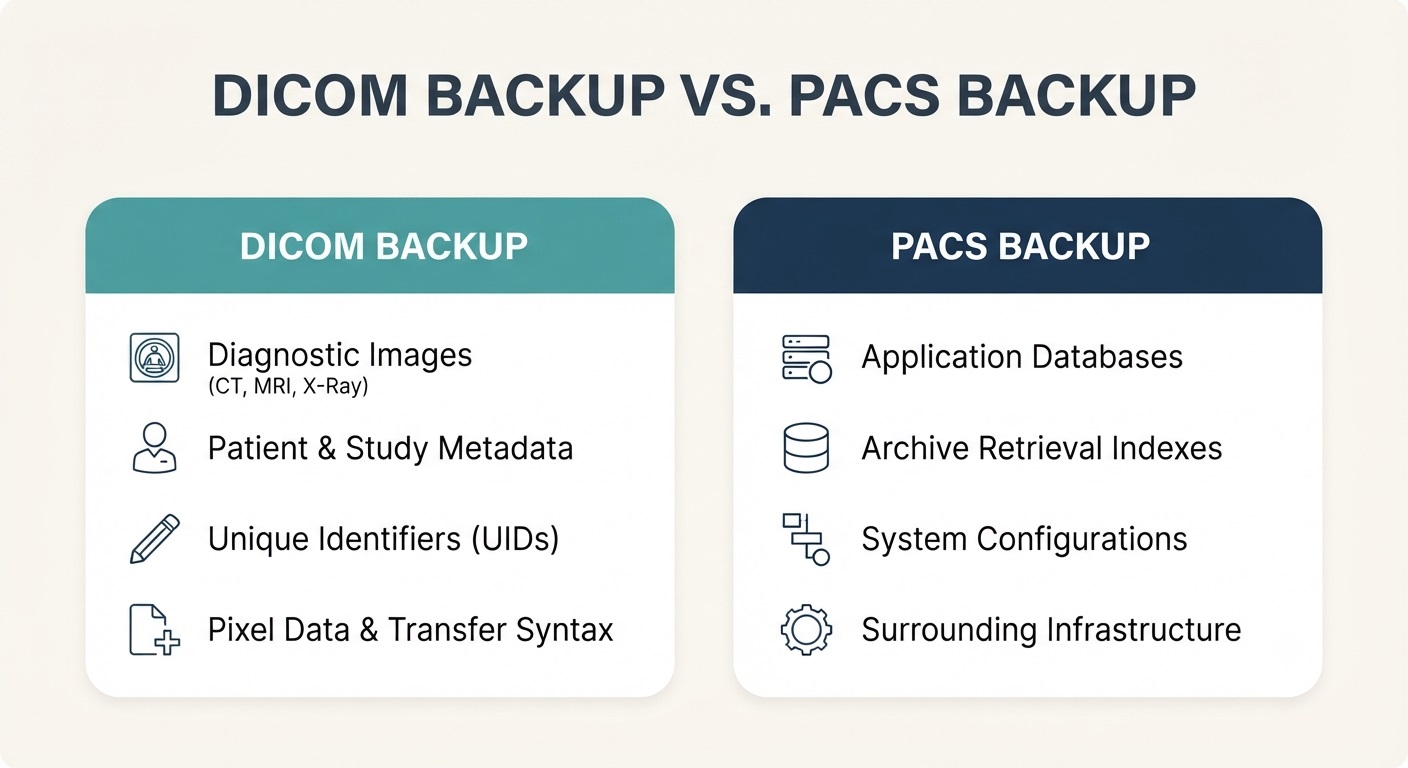
- Diagnostic images: CT, MRI, X-ray, and other medical images used for diagnosis and treatment.
- Patient metadata: Patient identifiers, examination details, acquisition information, and other relevant attributes.
- Imaging studies: Related images and series organized through unique DICOM identifiers.
- Medical imaging archives: Stored DICOM objects and the associated information required to locate and retrieve them.
DICOM Backup vs. PACS Backup: What’s the Difference?
DICOM backup protects medical imaging files and their associated information. In contrast, PACS (Picture Archiving and Communication System) backup protects the broader imaging environment, including application databases, system configurations, indexes, and supporting infrastructure.
Although PACS systems store and manage DICOM images, storing images in a PACS or imaging archive does not automatically provide an independent backup. Healthcare organizations need separate, protected copies and tested restoration procedures to ensure medical imaging data remains recoverable after an incident.
For additional technical details, see our PACS backup and recovery guide.
What Does a Complete DICOM Backup Include?
A complete DICOM backup preserves medical imaging files, their associated metadata, and the information needed to identify and retrieve imaging studies. Depending on the recovery requirements, organizations may also need to protect related archive databases and indexes.
The goal is to ensure diagnostic images remain intact, identifiable, and accessible after data loss or system failure.
CT, MRI, X-ray, and Other Medical Images
DICOM supports diagnostic imaging data generated by computed tomography (CT), magnetic resonance imaging (MRI), digital radiography (DR), computed radiography (CR), ultrasound, mammography, and other medical imaging systems.
For DICOM image files, a reliable backup should preserve:
- Pixel data: The image’s pixel values and related encoding.
- Image attributes: Dimensions, resolution, acquisition settings, imaging modality, and other relevant technical details.
- Transfer syntax: The information describing how the DICOM dataset is encoded, including applicable compression.
For example, a CT study may contain hundreds of image instances organized into one or more series. Missing instances can result in an incomplete examination, even if the remaining images are readable.
DICOM Metadata, Imaging Studies, and Identifiers
DICOM metadata contains information used to identify, organize, and interpret medical imaging records, including patient details, examination information, imaging parameters, and unique identifiers.
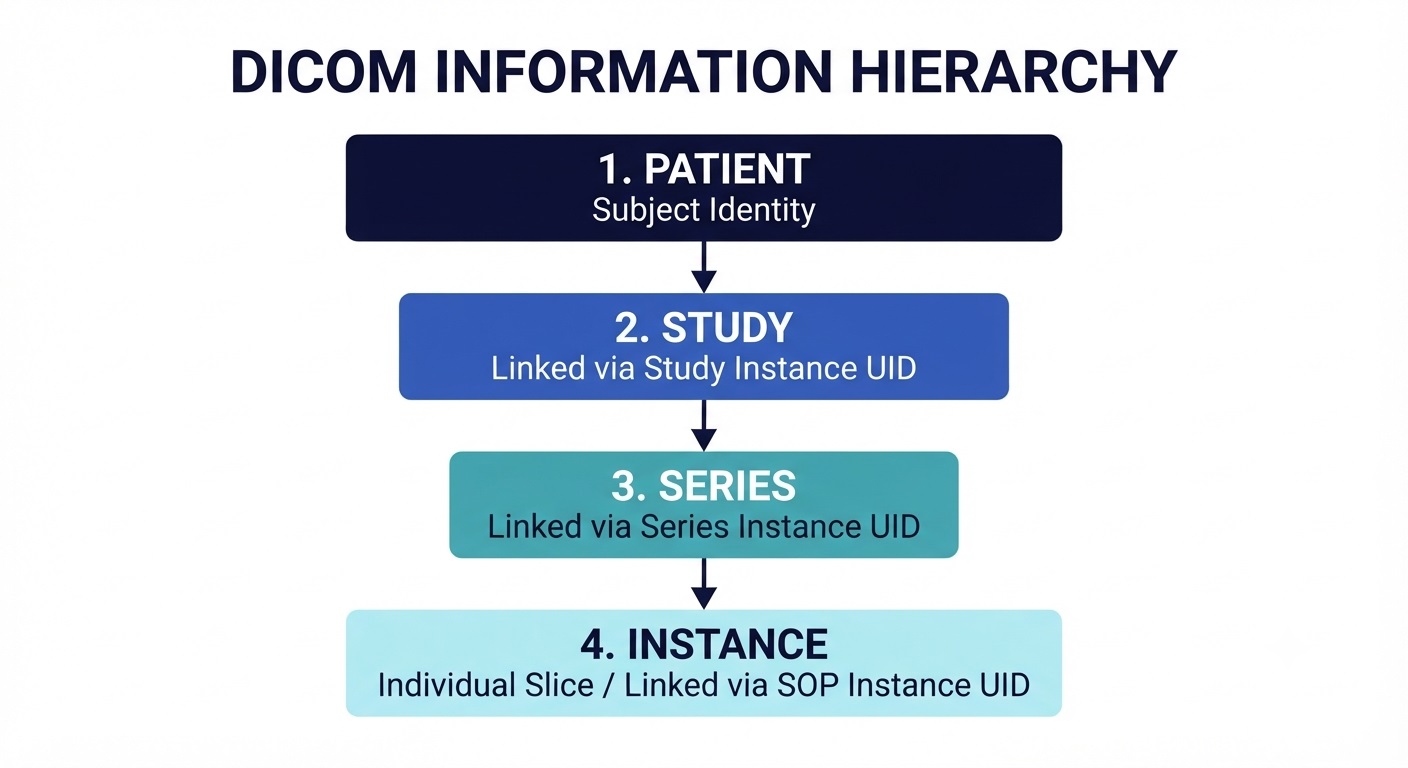
The DICOM information model organizes imaging objects into four levels:
- Patient: Identifies the subject associated with one or more imaging studies.
- Study: Represents an imaging examination containing one or more related series.
- Series: Groups related DICOM instances within a study.
- Instance: Represents an individual DICOM object, such as an image, presentation state, or structured report.
Three important identifiers maintain these relationships:
- Study Instance UID: Uniquely identifies an imaging study.
- Series Instance UID: Uniquely identifies a series.
- SOP Instance UID: Uniquely identifies an individual DICOM instance.
Preserving these identifiers and the associated metadata helps maintain accurate relationships between images and imaging studies during backup and recovery.
DICOM Archives, Databases, and Indexes
Healthcare organizations commonly manage DICOM imaging data through Picture Archiving and Communication Systems (PACS), Vendor Neutral Archives (VNAs), and other medical imaging repositories.
These systems may use databases and indexes to organize stored DICOM instances and support image retrieval.
Depending on the backup and recovery objectives, organizations should protect:
- Archived DICOM objects: Medical images and other DICOM instances required for patient care.
- Archive indexes: References used to identify and locate stored imaging objects.
- Related databases: Information needed to support the archive’s organization and retrieval functions.
- Recovery information: Records and references necessary to locate and access imaging studies after restoration.
The DICOM standard also describes Inventory objects that can provide an independent record of stored imaging instances. These records can help organizations assess study completeness and support recovery planning when an archive’s primary database becomes unavailable.
Protecting both the DICOM data and the information required for its retrieval reduces the risk of recovering files that cannot be located or accessed through the intended imaging workflow.
How to Back Up DICOM Files Securely
A reliable DICOM backup strategy requires more than copying medical imaging files to another storage location. Healthcare organizations must identify critical imaging data, maintain consistent backup copies, and protect those copies against corruption, unauthorized access, and ransomware.
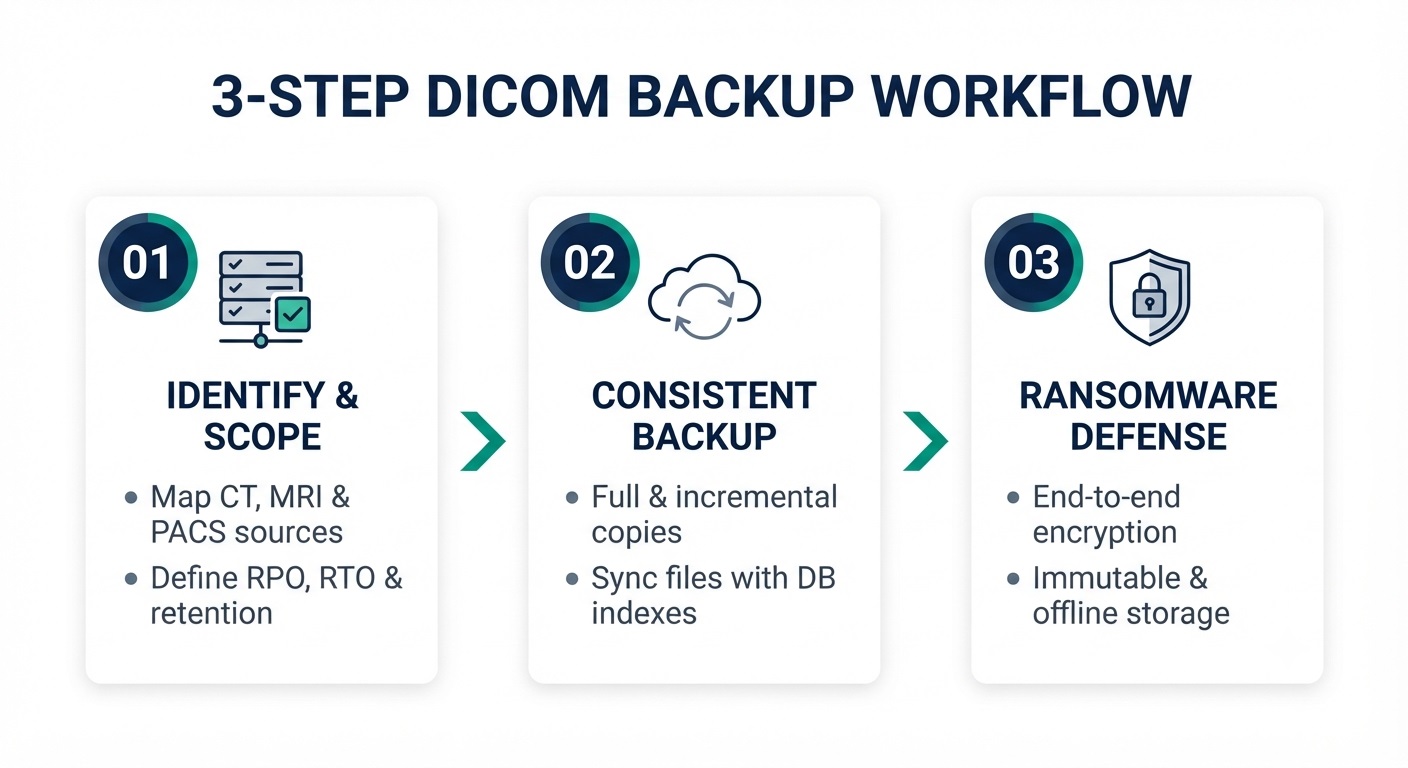
The following three steps help establish a secure and recoverable backup process.
Step 1: Identify DICOM Data Sources and Backup Requirements
Begin by identifying where DICOM images are generated, stored, and archived. These may include CT, MRI, and X-ray systems, DICOM servers, PACS repositories, and long-term imaging archives.
Before configuring backups:
- Identify data sources: Locate DICOM files, imaging studies, metadata, and repositories containing essential imaging records.
- Determine backup frequency: Establish how often new and modified imaging data must be backed up based on acceptable data loss.
- Define recovery objectives: Set recovery point objectives (RPO) and recovery time objectives (RTO) according to clinical priorities and operational requirements.
- Establish retention policies: Determine how long medical images and backup versions must be retained under applicable laws, organizational policies, and clinical requirements.
The HHS HIPAA Audit Protocol identifies backup frequency, data selection, backup security, and restoration testing as important considerations when evaluating an organization’s data backup plan.
Step 2: Create Consistent and Independent DICOM Backups
Once the required imaging data is identified, configure backup procedures that preserve DICOM files and associated information while maintaining consistency across related systems.
Common backup approaches include:
- Full backups: Create a complete copy of the selected DICOM dataset.
- Incremental backups: Capture new or modified data since the preceding backup.
- Offsite or cloud backups: Store independent copies in a separate environment to reduce exposure to localized failures.
- Application-consistent backups: Coordinate the protection of DICOM files and associated databases or indexes when required by the imaging system.
Consistency is particularly important when imaging repositories are actively receiving new studies. If DICOM files and their associated database records are captured at different times, restored data may contain missing file references or inconsistent records.
Independent backups should also maintain appropriate historical recovery points. Unlike simple synchronization or replication, they allow organizations to recover earlier versions when current files have been deleted, corrupted, or compromised.
Step 3: Protect DICOM Backups Against Ransomware and Data Loss
DICOM backups may contain electronic protected health information (ePHI), making confidentiality, access control, and recovery protection essential.
Healthcare organizations should consider these safeguards:
- Encryption: Protect backup data at rest and during transmission using appropriate encryption methods and secure key management.
- Access controls: Restrict access through least-privilege permissions, role-based access, and multi-factor authentication.
- Immutable or offline backups: Maintain protected recovery copies that reduce exposure to unauthorized modification, deletion, or ransomware.
- Backup monitoring: Track backup completion, investigate failures, and confirm that newly generated imaging data is included in the backup schedule.
- Separate recovery access: Protect backup administration accounts and recovery infrastructure from compromised production credentials.
The HHS ransomware guidance emphasizes maintaining reliable backups, considering offline storage, and periodically testing restoration capabilities.
For healthcare organizations managing large volumes of diagnostic imaging data, Central Data Storage (CDS) provides specialized backup and recovery solutions for radiology and imaging centers. These solutions help protect DICOM imaging archives, PACS systems, and sensitive patient records through encrypted backups, offsite data protection, and verified recovery practices.
How to Verify and Restore DICOM Backups
A completed backup does not guarantee that every DICOM image can be recovered. Files may become corrupted, imaging studies may be incomplete, or missing metadata may prevent restored images from being correctly identified and retrieved.
Healthcare organizations should verify both DICOM file integrity and study completeness, then perform test restorations to confirm that medical images remain accessible.
Verify DICOM File Integrity, Metadata, and Study Completeness
Backup verification should confirm that DICOM files remain unchanged and that all required imaging instances are present.
Key validation checks include:
- File integrity: Compare cryptographic checksums, such as SHA-256 hashes, against trusted values to detect unexpected changes in backed-up files.
- DICOM structure: Use compatible DICOM validation tools to check file structure, required attributes, and transfer syntax compatibility.
- Metadata consistency: Confirm that Study Instance UIDs, Series Instance UIDs, and SOP Instance UIDs remain intact and correctly associate related imaging objects.
- Study completeness: Compare backed-up instances against a reliable source inventory to identify missing images or series.
- Backup inventory: Check backup records to confirm that the intended DICOM files and imaging studies were captured.
These checks help identify incomplete or damaged backup datasets before an actual recovery is required.
Test DICOM Restoration and Image Accessibility
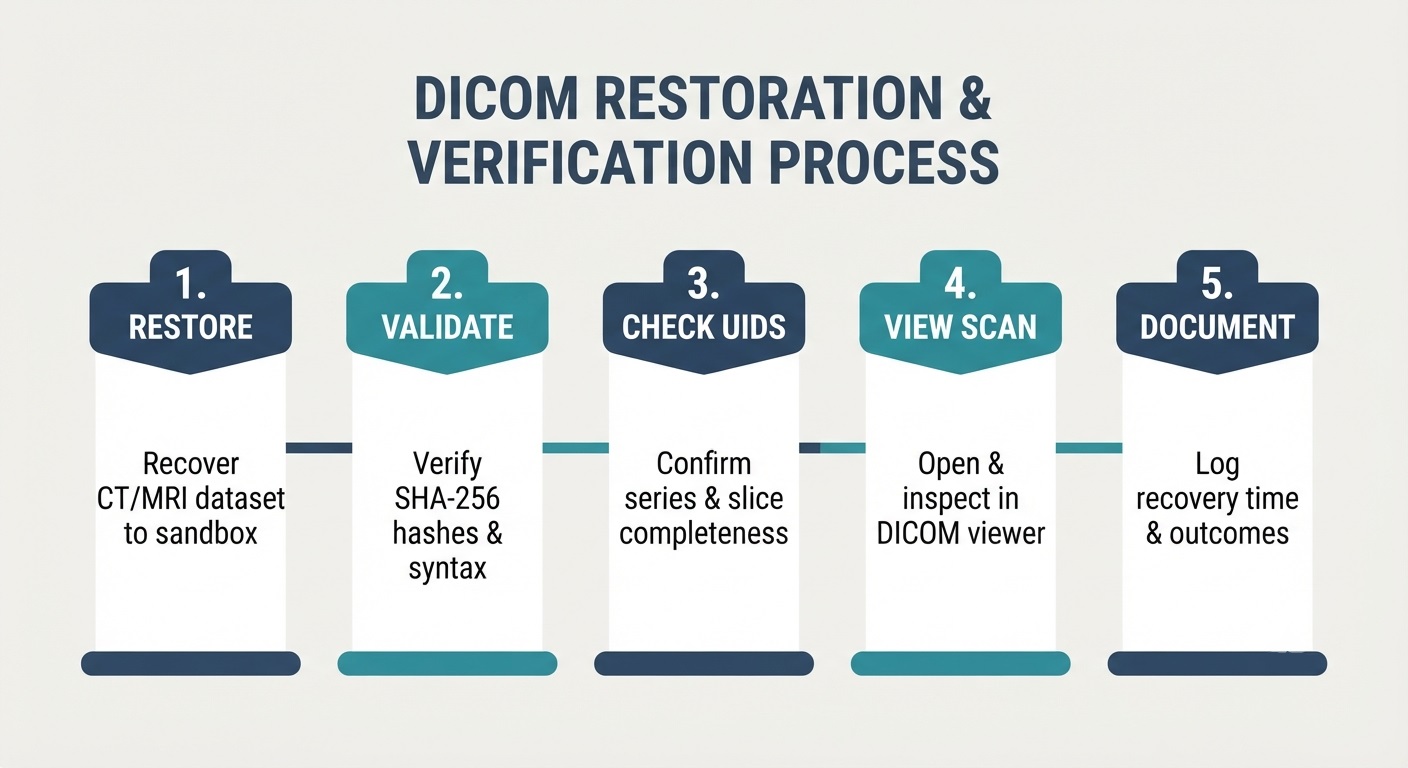
After verifying backup integrity, healthcare IT teams should periodically restore representative DICOM studies in a secure test environment.
A recovery test should include:
- Restore imaging studies: Recover selected CT, MRI, X-ray, or other DICOM datasets from the backup.
- Validate restored files: Confirm file integrity, DICOM structure, and preservation of essential metadata.
- Check study completeness: Verify that the expected series and instances are present after restoration.
- Test image accessibility: Open restored images in a compatible DICOM viewer and confirm that supported images display correctly.
- Document recovery results: Record restoration outcomes, failures, recovery duration, and corrective actions.
Testing should include different imaging modalities, file sizes, and backup recovery points to identify problems that might otherwise remain undetected.
A successful recovery requires more than restoring individual files. The recovered DICOM data must retain the required imaging objects, metadata, and study relationships so healthcare professionals can locate and use the information through the intended clinical workflow.
For a broader understanding of how organizations assess backup integrity and restore readiness, see CDS’s approach to backup verification and recovery.
The DICOM standard identifies unique Study, Series, and SOP Instance UIDs, which are useful for checking relationships between restored imaging objects.
HIPAA Security Requirements for DICOM Backups
DICOM files that contain individually identifiable patient health information and are created, received, maintained, or transmitted electronically by a HIPAA covered entity or business associate generally constitute electronic protected health information (ePHI) under HIPAA. Healthcare organizations must protect this information against unauthorized access, alteration, and loss while ensuring it remains available for patient care.
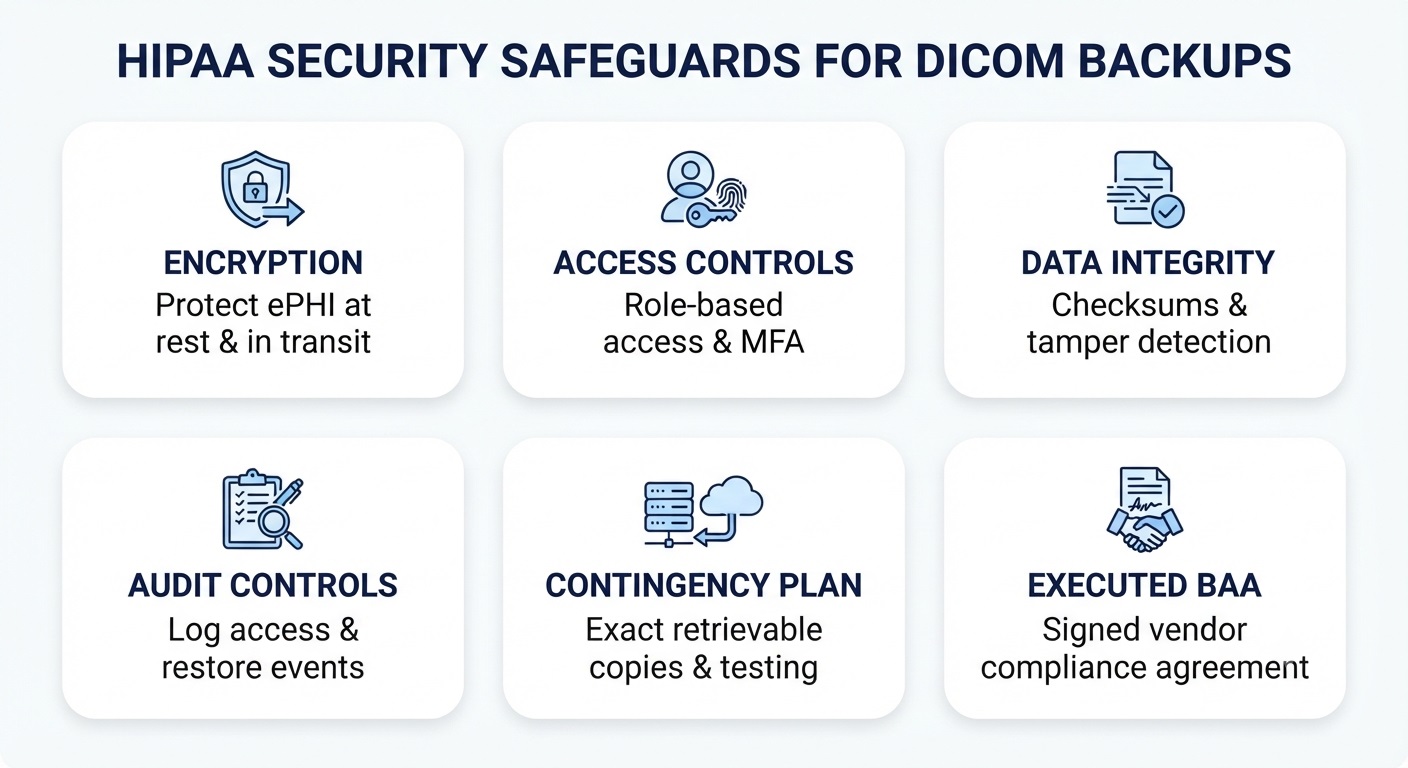
The HIPAA Security Rule requires appropriate administrative, physical, and technical safeguards. For DICOM backups, the key considerations include:
- Encryption: Protect DICOM files during storage and transmission using appropriate encryption methods. Encryption is an addressable HIPAA Security Rule implementation specification. Organizations must assess whether it is reasonable and appropriate for their environment; if they use an alternative measure, they must document why encryption is not reasonable and appropriate and how the alternative achieves the required protection.
- Access controls: Restrict access to authorized personnel through unique user identification, role-based permissions, and appropriate authentication measures.
- Data integrity: Implement controls to detect unauthorized changes or damage to stored medical imaging data, including integrity checks and backup verification.
- Audit controls: Maintain records of relevant access, administrative activities, and backup or restoration events to support monitoring and investigations.
- Contingency planning: Establish and implement procedures for responding to events that damage systems containing ePHI. This includes maintaining retrievable exact copies of ePHI, restoring lost data, and continuing critical business processes during an emergency. Organizations should also periodically test and revise recovery procedures as appropriate.
- Business Associate Agreements (BAAs): Execute a BAA with third-party backup providers when they create, receive, maintain, or transmit ePHI on behalf of a HIPAA-covered entity or business associate.
The HHS HIPAA Security Rule guidance explains the requirements for protecting the confidentiality, integrity, and availability of ePHI.
For medical imaging environments, these safeguards should apply not only to DICOM images but also to patient metadata, imaging studies, and backup copies stored in external repositories. A documented HIPAA security risk assessment can help healthcare organizations identify potential vulnerabilities affecting this information and determine whether existing safeguards adequately address identified risks.
Healthcare IT teams can also refer to our guide on building a HIPAA-ready healthcare backup and recovery plan for broader guidance on contingency planning, recovery objectives, and restore testing.
The HHS HIPAA Audit Protocol also identifies backup frequency, protection of backup media, data integrity checks, restoration testing, and documentation as relevant audit considerations.
Important: HIPAA does not mandate a specific encryption configuration, backup technology, backup frequency, or recovery-time target for every organization. Safeguards must be selected and implemented based on a documented risk analysis and the organization’s size, complexity, technical infrastructure, costs, and the risks to ePHI.
DICOM Backup Best Practices Checklist
Healthcare organizations should regularly review their DICOM backup procedures to ensure medical imaging data remains secure, complete, and recoverable.
Use this checklist to evaluate your existing backup strategy:
- Identify all DICOM data sources: Include CT, MRI, X-ray, and other imaging systems, along with DICOM repositories and archives.
- Preserve images and metadata: Back up diagnostic images, patient information, study identifiers, series, and required DICOM instances.
- Set backup schedules and retention policies: Define backup frequency, recovery objectives, and retention periods based on clinical needs and applicable regulations.
- Maintain independent backup copies: Use separate, offsite, or isolated storage to reduce exposure to local failures and ransomware.
- Encrypt and restrict access: Protect DICOM backups with appropriate encryption, access controls, and secure authentication.
- Monitor backup operations: Review backup logs, investigate failures, and confirm that newly created imaging studies are protected.
- Verify DICOM data integrity: Check file integrity, metadata consistency, and the completeness of backed-up imaging studies.
- Test DICOM restoration: Periodically restore representative imaging studies and confirm that their images and metadata remain accessible.
- Document recovery results: Maintain records of backup verification, restoration tests, identified issues, and corrective actions.
Key takeaway: A reliable DICOM backup strategy should protect medical images throughout their lifecycle, from initial storage and backup to integrity verification and successful restoration. Regular testing helps identify recovery gaps before they affect clinical operations.
Conclusion: Protect Medical Imaging Data With Reliable DICOM Backups
Protecting DICOM images requires more than maintaining copies of CT scans, MRI studies, and X-rays. Healthcare organizations need secure backup infrastructure and reliable recovery processes to minimize data loss and maintain access to critical imaging records.
With secure backup infrastructure and verified recovery practices, Central Data Storage helps healthcare organizations strengthen the protection of diagnostic images, patient metadata, and medical imaging archives while supporting HIPAA-aligned data protection.
Are your medical imaging backups ready for a real recovery event?
Request a Data Assessment to identify potential gaps in your healthcare backup and recovery strategy.
DICOM Backup FAQs
Can You Recover DICOM Files Without the Original PACS System?
Yes. DICOM files can be opened using compatible DICOM viewers or imported into another imaging system, provided the files and required metadata are intact. However, restoring the original PACS workflows may require additional databases, indexes, and configurations.
Can You Back Up DICOM Files While an Imaging System is Running?
Yes, if the system supports consistent online backups. Active DICOM repositories may require snapshots or coordinated database backups to prevent inconsistencies between stored images and their indexes. Follow the imaging system vendor’s backup procedures.
Does DICOM File Compression Affect Diagnostic Image Quality?
Lossless compression preserves the original pixel values, while lossy compression can permanently alter image information. Healthcare organizations should preserve the original DICOM encoding or use validated, clinically acceptable compression methods when creating backups.
Can You Transfer DICOM Backups to Another Imaging System?
Generally, yes. DICOM supports interoperability between compatible medical imaging systems. However, successful migration depends on supported DICOM objects, transfer syntaxes, metadata compatibility, and the receiving system’s import capabilities.
Is DICOM Storage Commitment the Same as DICOM Backup?
No. DICOM Storage Commitment allows a receiving system to confirm responsibility for storing specified DICOM instances. It does not independently guarantee backup copies, ransomware protection, historical recovery points, or successful restoration after data loss.
HEALTHCARE DATA PROTECTION
Protect Your Medical Imaging Data Before Disaster Strikes
Strengthen the security and recoverability of DICOM files,
radiology images, and sensitive patient records with
healthcare-focused backup and recovery solutions.
Radiology & Imaging Backup
Explore backup and recovery solutions for DICOM archives, PACS systems, and diagnostic imaging data.
HIPAA Security Risk Assessment
Identify potential security risks involving patient information, medical imaging records, and healthcare data.
Data Backup Assessment
Evaluate potential backup vulnerabilities and strengthen recovery readiness for critical healthcare information.