Reliable recovery requires more than storing backup copies. Organizations comparing Druva alternatives also need clean restore points, clear recovery responsibility, predictable recovery costs, and expert support during ransomware, hardware failure, data corruption, or cloud-service disruption.
Druva backup is a cloud-native data security platform for organizations that protect SaaS applications, endpoints, cloud workloads, data center systems, and digital identities. Central Data Storage provides a more recovery-focused Druva backup alternative through UnisonBDR, a managed backup and disaster recovery service built for healthcare organizations, regulated businesses, and lean IT teams.
This comparison reviews Druva vs Central Data Storage across backup capabilities, recovery verification, ransomware response, pricing, deployment options, and organizational fit.
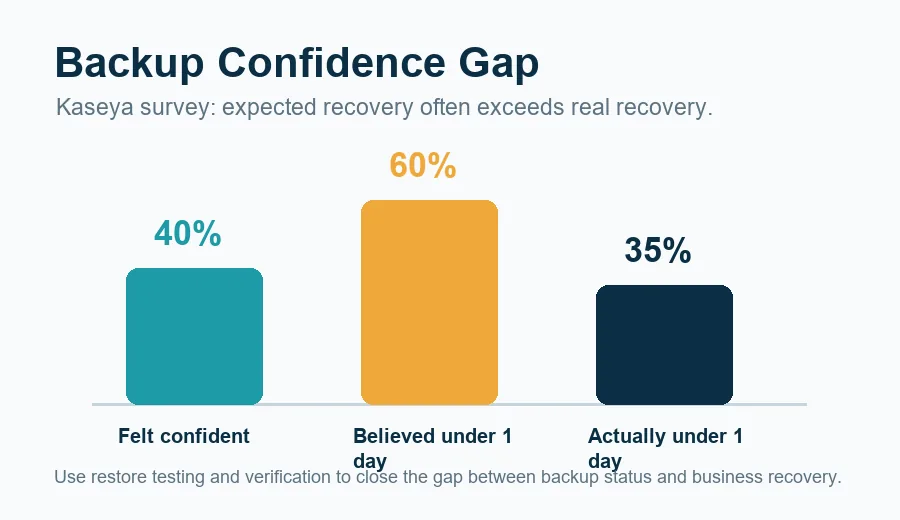
The Backup Confidence Gap. Survey data highlights a significant discrepancy between expected and actual data recovery times, emphasizing the necessity of regular restore testing.
Quick Verdict: Is Central Data Storage the Best Druva Alternative?
Central Data Storage is a strong Druva alternative for organizations that want more direct recovery support, flexible deployment options, clean recovery verification, and predictable backup costs.
Druva remains a better fit for businesses that need broad SaaS, endpoint, identity, cloud, governance, and data-security capabilities within a centralized cloud-native platform.
Choose Central Data Storage if your priority is managed recovery, verified restore points, healthcare readiness, and hands-on support during backup failures or recovery events.
Choose Druva if your priority is a broad data security platform for distributed SaaS, cloud, endpoint, identity, and data-center environments.
What is Druva Backup?
Druva backup is part of Druva’s cloud-native data security platform. It is designed to protect data across SaaS applications, endpoints, public cloud workloads, data-center systems, and identity environments.
Druva is commonly evaluated alongside backup and data protection platforms such as Veeam, Cohesity, Rubrik, Commvault, Acronis, and NAKIVO.
Who Druva is Designed For
Druva is well suited to organizations that want broad workload protection through a centralized SaaS platform. It can be a strong fit for complex, distributed environments where IT teams need one cloud-native control plane for multiple data sources.
Druva may be less aligned with organizations that want private infrastructure, local or hybrid deployment flexibility, or a provider that participates more directly in restore planning and recovery execution.
Key Druva Backup Capabilities
Druva’s public positioning emphasizes:
- Backup and recovery for SaaS applications, endpoints, cloud workloads, and data-center systems
- Cloud-native SaaS infrastructure
- Centralized policy management and monitoring
- Immutable and air-gapped backup capabilities
- Ransomware recovery and cyber resilience workflows
- Data governance, retention, eDiscovery, and compliance-related features
- Reduced dependence on customer-managed backup servers and appliances
Why Businesses Compare Druva Competitors and Alternatives
Businesses usually compare Druva competitors when they are not only asking “Can this vendor back up our data?” They are asking whether the recovery model, cost structure, deployment options, and support experience match the way their organization actually operates.
This evaluation becomes even more important for healthcare organizations, where backup decisions must account for patient data availability, recovery timelines, and regulatory expectations. Comparing the best backup services for healthcare providers can help teams understand how different solutions approach protection, recovery, and ongoing support.
That distinction matters. A backup job can complete successfully while the recovery plan still fails because the restore point is corrupted, incomplete, infected, untested, or too slow for the business to tolerate.
Recovery Support Can Matter More Than Backup Storage
Backup storage is only one part of resilience. During a real outage, the bigger questions are:
- Which restore point is clean?
- Which systems should come back first?
- Who is responsible for guiding the recovery?
- How quickly can the organization validate recovered data?
- What happens if ransomware or corruption affected the backup chain?
Central Data Storage focuses on these recovery questions through its managed backup service and backup verification and recovery approach.
Pricing Predictability Matters During Large Restores
Druva’s documentation explains that many workloads use a credit-based consumption model tied to protected deduplicated backup data, retention, change rate, and restore scenarios. Druva also lists plans across enterprise data, public cloud, Microsoft 365, Google Workspace, endpoints, and other workload categories.
Central Data Storage uses storage-tier pricing for UnisonBDR with no egress or retrieval fees. Buyers should compare total recovery cost, not only monthly subscription cost. That means reviewing storage, retention, administration, restore testing, retrieval, incident support, and downtime exposure.
Healthcare and Regulated Teams Need Compliance-Aware Recovery
For healthcare, dental, and regulated businesses, recovery is not just an IT workflow. It affects patient access, billing, imaging, scheduling, claims, operations, and compliance readiness.
Central Data Storage is better aligned with organizations that need HIPAA-aligned backup support, Business Associate Agreement availability, healthcare workflow familiarity, and guided restoration support.
Druva vs Central Data Storage: Feature and Service Comparison
| Comparison Area | Druva | Central Data Storage |
| Service model | Cloud-native SaaS data security platform | Managed backup and disaster recovery service |
| Best suited for | Complex and distributed data environments | Healthcare, regulated businesses, and lean IT teams |
| Infrastructure | Fully managed cloud-native SaaS infrastructure | CDS-managed private U.S. cloud; other deployment options vary by product |
| Protection scope | SaaS, endpoints, identity, cloud, and data-center workloads | Physical, virtual, cloud, application, and database workloads |
| Recovery approach | Recovery orchestration with optional managed support | Clean recovery verification and guided restoration |
| Pricing model | Consumption-based plans for many workloads | Flat-rate storage tiers with no egress or retrieval fees |
Features, workload support, security services, and pricing may vary by product tier, deployment, and contract. Buyers should verify current plan details with each provider before making a decision.
-
Service Model: SaaS Platform vs Managed Recovery Partner
Druva is built as a cloud-native SaaS data security platform. Its value is breadth: one platform for many workloads, policies, governance needs, and recovery use cases.
Central Data Storage is built around a managed service relationship. The value is closer provider participation in backup monitoring, restore planning, clean recovery verification, and recovery support.
This is the core buyer decision: do you need a broad platform to manage many data sources, or do you need a recovery partner that helps make sure critical systems can actually come back?
-
Workload Coverage: Broad Platform vs Critical System Recovery
Druva provides centralized protection across SaaS applications, endpoints, cloud workloads, data centers, and identity systems. It also offers capabilities such as legal hold, eDiscovery, compliance monitoring, and data governance.
Central Data Storage concentrates on protecting and recovering critical systems, including physical servers, virtual machines, databases, applications, and hybrid environments. Its service model is designed for organizations that want backup monitoring and recovery assistance without managing the process alone.
-
Recovery Verification and Ransomware Response
Both providers emphasize backup protection and cyber recovery capabilities. Druva emphasizes cloud-native resilience, threat monitoring, recovery orchestration, and validation workflows, with additional security services depending on the plan.
Central Data Storage emphasizes pre-storage file scanning, corrupted-file isolation, integrity checks, clean recovery verification, and hands-on restore assistance.
The key difference is not whether recovery is available. The difference is how directly the provider participates in validating and completing recovery. This matters because a successful backup can still fail during recovery if the data is corrupted, incomplete, infected, or never tested.
-
Infrastructure and Deployment Options
Druva’s SaaS architecture reduces the need for customer-managed backup infrastructure. That can simplify operations for organizations that want a cloud-native platform and centralized management.
Central Data Storage offers infrastructure and deployment options that may include managed, self-hosted, or licensed arrangements. UnisonBDR uses CDS-managed private infrastructure, which can appeal to organizations that want a more direct relationship with the provider responsible for storing and helping recover their data.
Organizations comparing deployment models should also consider the operational differences between on-premises and cloud backup, especially when critical healthcare systems must remain available during an outage.
-
Support Model and Restore Assistance
Druva can be a strong fit for organizations with internal teams that want centralized controls, policy management, and platform-level recovery capabilities.
Central Data Storage is stronger for lean IT teams that want a provider to help monitor backup health, isolate recovery problems, and assist directly during restores. That support model is especially useful for healthcare and dental organizations that may not have a large internal infrastructure team.
-
Druva Backup Pricing vs CDS Backup Pricing
Druva’s pricing documentation describes a credit-based model for many enterprise workloads, where usage can be influenced by protected data size, retention, change rate, and restore activity. Druva’s pricing page also separates plans by workload category, including data center, public cloud, Microsoft 365, Google Workspace, and endpoints.
Central Data Storage offers storage-based backup and recovery pricing for UnisonBDR with no egress or retrieval fees.
When comparing Druva backup pricing with CDS pricing, buyers should ask:
- How is protected data measured?
- What happens as retention increases?
- Are restores, archive restores, retrieval, or egress billed separately?
- Are disaster recovery tests included?
- How much internal administration is required?
- What is the likely downtime cost if recovery takes longer than expected?
Why CDS is the Best Druva Backup Alternative for Healthcare and Lean IT Teams?
Central Data Storage is a strong Druva backup alternative for healthcare providers, dental practices, regulated businesses, and lean IT teams that prioritize verified recovery points, guided restoration, deployment flexibility, and predictable pricing.
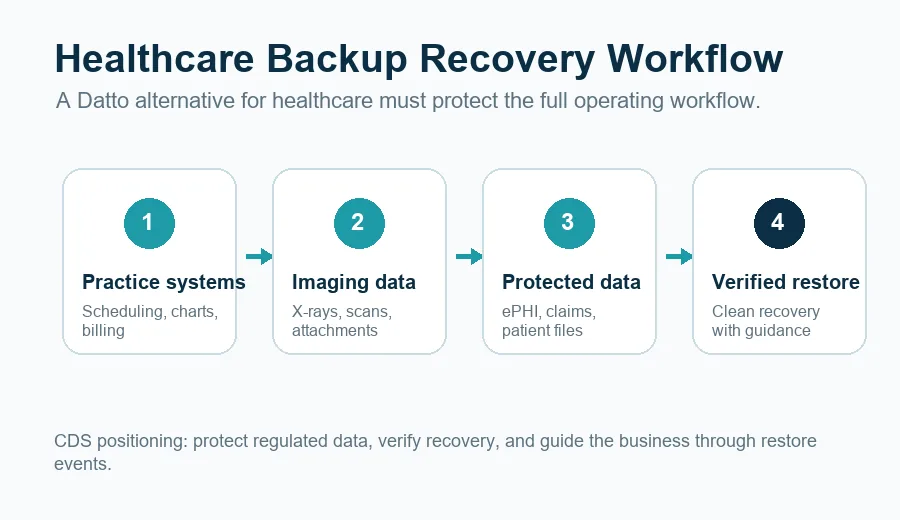
Healthcare Backup Recovery Workflow. A step-by-step process demonstrating how healthcare systems protect regulated data and verify clean recovery across operational phases.
Why Healthcare Recovery Requires More Than Backup Completion
Healthcare organizations need more than stored copies of data. They need usable recovery points for EHR systems, imaging systems, billing platforms, scheduling tools, file servers, databases, and patient-related workflows.
For these organizations, backup failure can quickly become an operational, financial, and compliance problem. CDS is positioned aroundhealthcare backup and recovery because healthcare recovery requires planning around systems, people, timelines, and compliance expectations.
Why Lean IT Teams Need Hands-On Restore Support
Lean IT teams often do not have spare capacity to manage complex backup infrastructure, troubleshoot failed restores, validate clean recovery points, and coordinate incident response alone.
Central Data Storage gives these teams a more service-led option. Instead of only providing backup software, CDS helps with monitoring, recovery verification, and restore support. That makes CDS a better fit when the buyer wants a backup partner rather than only a backup platform.
How to Evaluate Any Druva Backup Alternative?
Before switching from Druva or choosing a Druva alternative, compare providers across recovery outcomes, not only product features.
Questions to Ask Before Switching Backup Providers
- Does the provider verify that backups are recoverable, or only report that backup jobs completed?
- Can the provider identify clean restore points after ransomware or corruption?
- What workloads are supported today, and which require special configuration?
- Where is backup data stored?
- Who controls the backup infrastructure?
- Are there egress, retrieval, archive restore, or disaster recovery testing fees?
- Is a Business Associate Agreement available if your organization handles ePHI?
- What support is available during an active recovery event?
- How are RTO and RPO expectations documented?
- How often are restore tests performed?
Recovery Requirements to Confirm Before You Buy
Every buyer should verify:
- Workload coverage
- Retention policies
- Recovery time objective
- Recovery point objective
- Ransomware recovery workflow
- Restore testing process
- Support response expectations
- Compliance documentation
- Pricing model
- Contract limitations
The best Druva alternative is not the vendor with the longest feature list. It is the vendor whose recovery model fits your risk, workload, compliance, support, and cost requirements.
Final Verdict: Should You Choose Druva or Central Data Storage?
Druva is a strong choice for organizations that need broad cloud-native data protection across SaaS, endpoints, identity, cloud workloads, and data-center systems. It is especially useful when the buyer wants centralized policy management, governance features, and platform-wide visibility across distributed environments.
Central Data Storage is the stronger choice for organizations that want a managed recovery partner. CDS is best aligned with healthcare providers, dental practices, regulated businesses, and lean IT teams that prioritize clean recovery verification, hands-on restoration assistance, flexible deployment options, and predictable storage-tier pricing.
- If your organization mainly needs a broad cloud-native data security platform, Druva may be the better fit.
- If your organization needs verified, usable recovery points and direct support when recovery becomes urgent, Central Data Storage is the Druva alternative worth evaluating.
Not sure which backup model is right for your organization? Request a data assessment from Central Data Storage to review your environment, recovery priorities, workload requirements, and compliance needs.
FAQs About Druva Alternatives
What is the best Druva alternative?
The best Druva alternative depends on your environment. Central Data Storage is a strong option for healthcare, regulated businesses, and lean IT teams that need managed backup, clean recovery verification, predictable pricing, and hands-on restore support.
Is Central Data Storage a Druva backup alternative?
Yes. Central Data Storage is a Druva backup alternative for supported physical, virtual, cloud, application, and database workloads. Organizations should confirm workload coverage, retention, RTO, RPO, compliance needs, and restore requirements before switching.
What is the main difference between Druva and Central Data Storage?
Druva provides broad cloud-native data protection across SaaS, endpoint, identity, cloud, and data-center environments. Central Data Storage focuses on managed backup, clean recovery verification, flexible deployment, predictable pricing, and direct restoration support.
How does Druva backup pricing compare with CDS pricing?
Druva uses a consumption-based model for many backup workloads. Central Data Storage offers storage-tier plans for UnisonBDR with no egress or retrieval fees. Buyers should compare total recovery cost, including storage, retention, restore testing, retrieval, incident support, administration, and downtime risk.
Do Druva and Central Data Storage support ransomware recovery?
Both providers support ransomware recovery use cases. Druva emphasizes platform-based cyber resilience, monitoring, orchestration, and clean recovery workflows. Central Data Storage emphasizes clean recovery verification, corrupted-file isolation, integrity checks, and provider-assisted restoration.
Is Central Data Storage a good Druva alternative for healthcare organizations?
Central Data Storage may be a good Druva alternative for healthcare and dental organizations that need HIPAA-aligned backup support, BAA availability, verified recovery points, and guided restoration. Each organization should verify its specific compliance, workload, retention, RTO, and RPO requirements.
What should businesses look for in Druva competitors?
Businesses comparing Druva competitors should look beyond backup storage. They should evaluate workload coverage, ransomware recovery, clean restore verification, support model, deployment options, pricing structure, compliance readiness, and restore testing.
Does a Druva alternative need clean recovery verification?
Yes, especially for organizations concerned about ransomware, data corruption, or regulated operations. Clean recovery verification helps confirm that restore points are usable and not infected, incomplete, or corrupted before the business depends on them.

![10 Best Backup Services for Healthcare Providers [2026 Comparison]](https://centraldatastorage.com/wp-content/uploads/2026/08/Backup-Services-for-Healthcare-Providers-400x250.png)