Which backup model fits healthcare best for EHR systems: on-prem or cloud?
Neither model is universally better.
Cloud backup often fits healthcare organizations that need easier scalability, centralized management across locations, and less on-site infrastructure burden. On-prem backup often fits organizations that need tighter infrastructure control, stronger policy oversight, and more internal ownership of backup operations.
Many healthcare environments do not fit neatly into one model. A blended recovery design can make sense when teams need both local recovery advantages and off-site resilience.
The right decision depends on:
- recovery speed requirements
staffing capacity
infrastructure control needs
tolerance for operational downtime
For EHR systems, the best backup model is the one that supports reliable recovery during a real outage, not simply the one that stores backup data in a preferred location.
This article compares both models from a recovery-first perspective.
Why EHR Backup Architecture Matters More Than Storage Location
1. EHR Downtime Disrupts Clinical Access, Scheduling, and Operations
When clinicians lose access to charts, medication history, orders, or scheduling systems, the problem is not simply where backup data is stored. The problem is how quickly the organization can restore working access to critical systems.
For hospitals, clinics, and multi-site care groups, EHR downtime often leads to:
- delayed authorizations and claims activity
- slower registration, scheduling, and check-in workflows
- manual workarounds for clinical and administrative staff
- disrupted communication between locations and departments
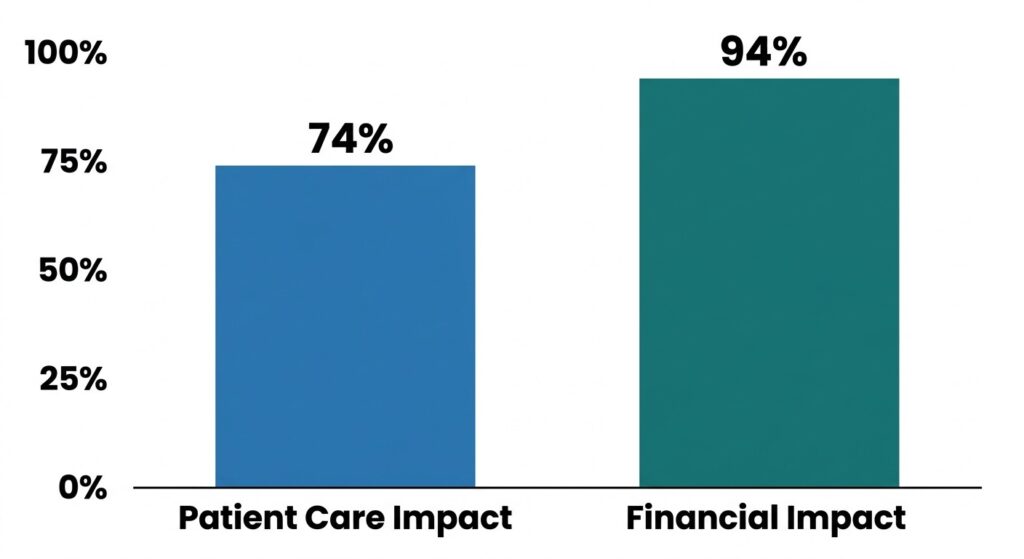
The consequences of EHR downtime extend far beyond the IT department, affecting both patient safety and financial health.
The operational impact is not theoretical. In the AHA survey, 74% of hospitals reported direct patient care impact and 94% reported financial impact after the Change Healthcare cyberattack. (American Hospital Association)
2. Backup Architecture Determines How Quickly EHR Systems Can Be Restored
A backup is only useful when it supports an actual restore path during an outage.
Healthcare teams usually need answers to questions such as:
- How quickly can the EHR environment be brought back online?
- Who owns the restore process during an outage?
- What happens if the local site is affected?
- Can multiple locations recover in a coordinated way?
- Does the design match the organization’s staffing and infrastructure capacity?
Those are architecture questions. Storage location is only one part of them.
3. EHR Downtime Disrupts Clinical Access, Scheduling, and Operations
Healthcare organizations do not choose backup models in a vacuum. They choose between tradeoffs in control, resilience, staffing burden, cost structure, and recovery speed.
The real decision is: Which model fits the EHR environment, the care footprint, and the organization’s recovery expectations?
Organizations that are still defining core backup priorities can start with the importance of data backup in healthcare before comparing deployment models
What On-Prem Backup Means for EHR Systems?
How On-Prem Backup Infrastructure Is Deployed in Healthcare
In an EHR environment, on-prem backup usually means backup infrastructure is deployed inside the organization’s own environment rather than being fully managed offsite by a provider.
That often includes:
- backup storage located in the hospital, clinic, or private data center
- backup software managed by the internal IT team or a contracted partner
- restore workflows controlled through internal policies and access rules
- tighter alignment with existing network, security, and operational standards
2. Where On-Prem Backup Works Best for Healthcare Organizations
On-prem backup can be a strong fit when fast local access and tighter operational control matter most.
It often works well for:
- hospitals with established infrastructure and dedicated IT teams
- healthcare environments with strict internal policy requirements
- organizations that prefer to manage backup access, retention, and restore workflows directly
- settings where local recovery speed is a major operational priority
3. Operational Limits of On-Prem Backup for Healthcare Teams
On-prem backup shifts more responsibility to the healthcare organization.
Teams need to account for:
- hardware lifecycle management
- storage capacity planning
- monitoring and maintenance effort
- local-site dependency during outages or facility disruption
- internal ownership of restore execution and testing
More control can be valuable, but it also increases operational burden.
What Cloud Backup Means for EHR Systems
1. How Cloud Backup Works for Healthcare Organizations
In an EHR environment, cloud backup means backup data is stored offsite and managed through provider-hosted infrastructure rather than being kept only inside the organization’s local environment.
This model usually includes:
- backup copies transmitted to a remote platform
- centralized backup management across one or more sites
- provider-managed storage infrastructure
- restore access controlled through defined roles, policies, and workflows
2. Where Cloud Backup Offers the Most Practical Advantages
Cloud backup is often a better fit when healthcare organizations need offsite resilience without expanding on-site infrastructure.
It can work well for:
- multi-site healthcare groups that want more centralized oversight
- clinics that do not want to maintain more local backup hardware
- organizations planning for growth across locations
- teams that want less dependence on a single facility for backup storage
3. Cloud Backup Tradeoffs That Affect Restore Planning
Cloud backup changes how restore planning should be evaluated.
Healthcare teams need to consider:
- how restore access is handled during an outage
- how quickly data can be recovered into working systems
- how much control the organization has over backup policies and infrastructure decisions
- how dependent the model is on the provider’s environment and processes
For EHR environments, the key question is whether the cloud design supports the organization’s continuity needs, staffing model, and restore expectations.
On-Prem vs Cloud Backups for EHR Systems: The Key Differences Explained
1. Recovery Speed During an EHR Outage
The most important difference is not where backup data lives. It is how quickly the organization can restore usable access to EHR systems when operations are disrupted.
Healthcare teams should compare:
- how quickly backup data can be accessed
- how restore workflows are initiated
- who owns restore execution
- whether recovery depends on one site, one platform, or one provider process
HHS has described cyber incidents affecting hospitals and health systems as causing extended care disruptions, multi-week outages, patient diversion, canceled appointments, and delayed procedures. (PSQH)
A local model may support faster restore access in some environments. A cloud-based model may reduce single-site dependency. The better option is the one that supports the organization’s actual recovery target during an outage.
Restore readiness also depends on whether the organization can identify issues such as silent data corruption in EHR systems before a recovery event.
2. Infrastructure Control and Backup Policy Management
On-prem backup usually gives healthcare teams more direct control over infrastructure, access rules, retention settings, and operational policies.
Cloud backup usually shifts more of the underlying storage and platform management outside the local environment.
The real comparison point is not control versus no control. It is:
- how much infrastructure authority the organization wants to keep
- how much policy management it wants to own internally
- how much provider dependence it is willing to accept
3. Scalability Across Hospitals, Clinics, and Multiple Locations
Multi-site environments place more pressure on backup architecture.
Healthcare teams should compare whether the model can support:
- centralized oversight across sites
- consistent backup policies
- easier expansion to new locations
- coordinated recovery planning across facilities
Cloud-based models often make multi-location coordination easier. On-prem models can still support scale, but they usually require more local infrastructure planning and operational management.
4. Budget Structure and Long-Term Backup Costs
The cost difference is usually structural, not just numerical.
On-prem backup often involves:
- more upfront infrastructure investment
- ongoing hardware refresh and storage planning
- more internal ownership of maintenance
Cloud backup often shifts spending toward ongoing operating cost, with less local hardware burden.
Healthcare teams should compare:
- how predictable long-term costs are
- whether restore-related costs are clear
- whether growth across sites changes the cost model
- whether the organization is paying for convenience, control, or both
5. Internal Staffing and Day-to-Day Backup Management
Backup architecture changes how much operational work stays inside the organization.
On-prem models usually require more internal involvement in:
- system administration
- monitoring
- storage planning
- maintenance
- restore coordination
Cloud-based models can reduce some of that local burden, but they still require internal ownership of access, oversight, testing, and recovery planning.
6. Offsite Resilience and Care Continuity Planning
Healthcare organizations should also compare how each model supports continuity when a site is disrupted.
Key questions include:
- Is backup protection tied too closely to one facility?
- Can the organization recover if the local environment is affected?
- Does the design support continuity across multiple locations?
- Is offsite recovery built into the model or added later?
This is where cloud-based backup often has an advantage. It can reduce dependence on a single physical site. On-prem backup can still support resilience, but it usually requires more deliberate continuity planning beyond the local environment.
Backup architecture should also be aligned with broader disaster recovery solutions planning so restore order, recovery ownership, and downtime sequencing are clear before an incident happens
On-Prem EHR Backups vs Cloud EHR Backups Comparison
| Decision factor | On-prem backup | Cloud backup |
| Recovery speed during an outage | Can support fast local restore access when infrastructure is well managed | Can support recovery without depending only on the local site |
| Control over infrastructure | More direct internal control over systems, policies, and access | More provider-managed infrastructure with less direct local control |
| Scalability across locations | Possible, but usually requires more internal planning and deployment effort | Often easier to extend across hospitals, clinics, and distributed environments |
| Budget structure | More upfront infrastructure and lifecycle costs | More ongoing operating cost with reduced local hardware burden |
| Staffing and management effort | Higher internal administration and maintenance responsibility | Lower on-site infrastructure burden, but still requires governance and recovery ownership |
| Offsite resilience | Needs deliberate planning beyond the local environment | Offsite protection is usually more built into the model |
If your organization is still defining backup ownership, recovery priorities, and restore sequencing, use this comparison alongside how to build a healthcare backup plan.
When On-Prem Backup Is the Better Fit for Healthcare Organizations
Healthcare Organizations With Strong Internal Infrastructure Resource
On-prem backup is often the better fit when a healthcare organization already has the people, systems, and operational discipline to manage backup infrastructure internally.
This usually applies to teams that can handle:
- storage planning and lifecycle management
- backup monitoring and maintenance
- access control and policy enforcement
- restore coordination during outages
2. Healthcare Environments That Need Fast Local Recovery
Some healthcare settings place a high priority on local restore access because operational disruption needs to be addressed quickly inside the environment itself.
This can matter when:
- core workflows depend on immediate access to local systems
- clinical operations are tightly tied to one facility or campus
- teams want restore processes kept close to internal infrastructure
- local recovery execution is already built into internal response planning
3. Healthcare Settings That Need Tighter Operational Control
On-prem backup also fits organizations that want more direct control over backup infrastructure, policy management, and administrative oversight.
That can be important for healthcare teams that prefer to:
- keep backup operations inside their own environment
- manage access and retention under internal processes
- reduce reliance on outside infrastructure decisions
- align backup management with internal security and operational standards
When Cloud Backup is the Better Fit for Healthcare Organizations
1. Multi-Site Healthcare Organizations That Need Easier Centralization
Cloud backup is often the better fit when a healthcare organization operates across multiple locations and needs backup oversight from one place.
This usually matters when teams need to:
- manage backup policies across hospitals, clinics, or remote sites
- reduce location-by-location infrastructure variation
- simplify backup visibility across the organization
- support more consistent recovery planning between sites
2. Healthcare Teams That Want Less On-Site Hardware Overhead
Cloud backup also fits healthcare teams that want to reduce the burden of owning and maintaining more local backup infrastructure.
That can be useful when the organization wants to:
- avoid expanding storage hardware at each site
- reduce local maintenance responsibility
- shift part of the infrastructure burden away from internal teams
- keep backup protection from being tied too closely to one facility
3. Healthcare Environments That Prioritize Flexibility and Growth
Cloud backup is often a stronger fit for healthcare organizations planning to expand, add locations, or support more distributed operations over time.
It can work well for environments that need:
- easier extension to new sites
- more flexible backup coverage as systems grow
- less friction when infrastructure needs change
- continuity planning that is not centered on one local environment
How to Choose the Right Backup Model for Your Healthcare Environment
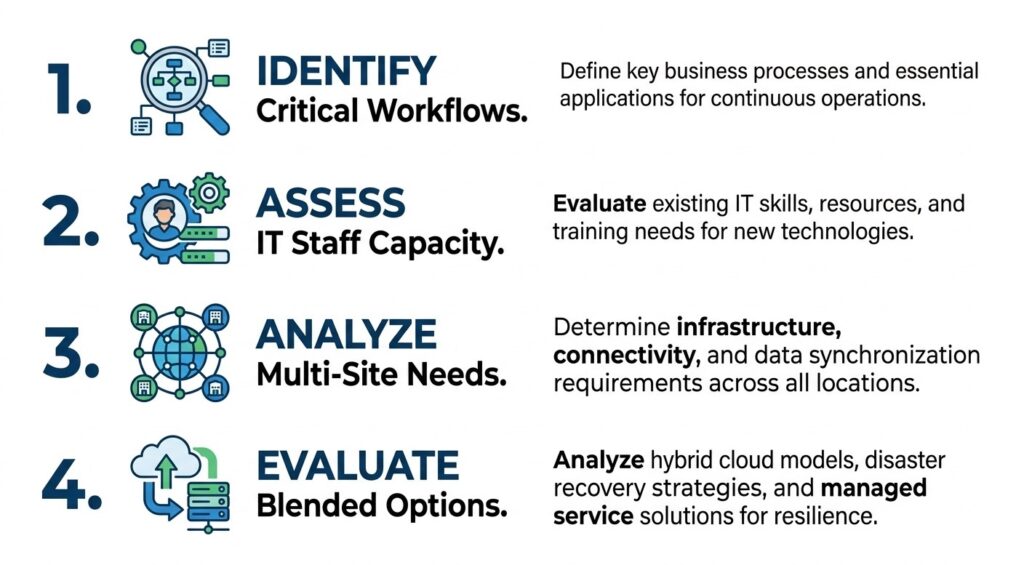
Use this framework to align your backup architecture with your organization’s recovery goals.
1. Start With Recovery Expectations for Critical EHR Workflows
Choose the backup model based on what needs to come back first when the EHR environment goes down.
Focus on questions like:
- Which workflows cannot stay offline for long?
- Which systems need the fastest restore path?
- Which departments are affected first during downtime?
- What level of disruption can the organization tolerate?
2. Assess Internal IT Capacity and Backup Management Ownership
The right model also depends on who will own backup operations day to day.
Assess whether the organization has the capacity to manage:
- backup monitoring
- infrastructure maintenance
- storage planning
- access control
- restore coordination during outages
If the team wants tighter internal control and can support the operational burden, on-prem may fit. If the goal is to reduce local infrastructure demands while maintaining offsite protection, cloud may fit better.
3. Consider Site Footprint, Growth Plans, and Access Needs
A single-site environment and a distributed care network do not have the same backup requirements.
Healthcare teams should compare the model against:
- number of sites
- expected expansion
- central oversight needs
- dependence on local infrastructure
- access requirements across facilities
Teams reviewing these questions in a broader healthcare data backup strategy should evaluate architecture and recovery workflow together, not as separate decisions.
4. Why Some Healthcare Organizations Choose a Blended Backup Model
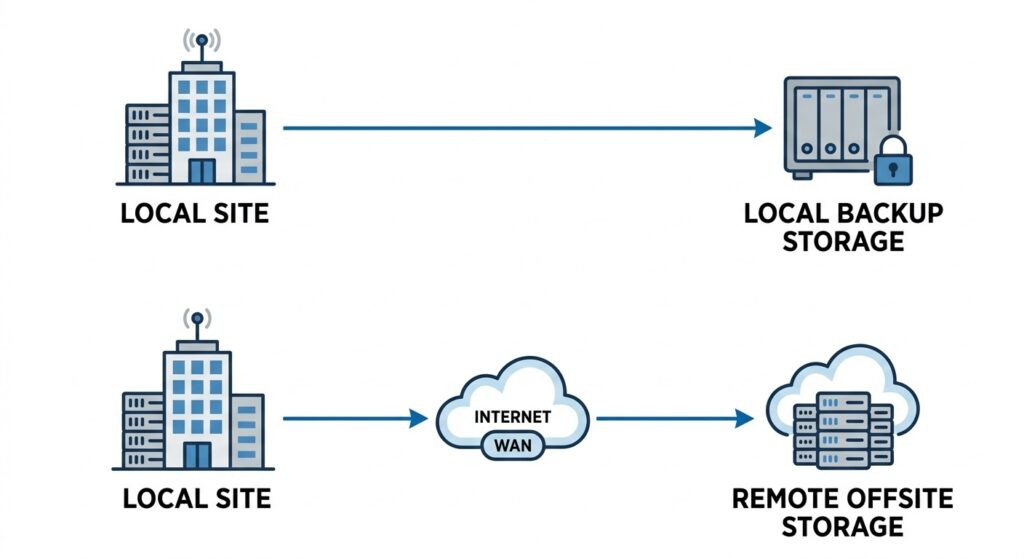
A blended model offers the best of both worlds: local recovery speed and offsite protection.
Some organizations do not fit neatly into one side of the comparison.
A blended model can make sense when a healthcare team wants:
- local recovery advantages for selected systems
- offsite protection beyond one facility
- more flexibility across locations
- a balance between control and infrastructure burden
Common Mistakes Healthcare Teams Make When Comparing On-Prem and Cloud Backups
Mistake #1 – Treating Backup Model Selection as Only a Cost Question
The comparison breaks down when teams focus only on purchase cost or monthly spend.
The more useful question is:
- What does this model require to operate well over time?
- What internal effort comes with it?
- What happens to cost when storage needs grow?
- Are restore-related costs clear before an outage happens?
Mistake #2 – Ignoring Restore Conditions During Operational Downtime
Backup decisions often look fine until a real outage happens.
Healthcare teams should evaluate:
- how restore access works under pressure
- who is responsible for initiating recovery
- whether the model supports recovery across affected systems and sites
- how quickly the environment can return to usable operation
Many teams compare storage location but fail to validate whether restores are clean, usable, and operationally ready, which is why backup verification and recovery matters as much as backup completion.
Mistake #3 – Choosing a Backup Model That Does Not Match Internal Capabilities
A backup model is only a good fit if the organization can support it.
That means matching the design to:
- available IT staff
- operational ownership
- infrastructure maturity
- response capacity during downtime
The better decision is the one the healthcare team can operate reliably, not the one that sounds best in theory.
How CDS Support Different Healthcare Backup Architectures
1. Managed Private Cloud for Healthcare Organizations That Want Less Infrastructure Overhead
We support healthcare organizations that want offsite backup protection without adding more on-site infrastructure to manage.
Our managed private-cloud model is designed for teams that want to:
- reduce local hardware burden
- keep backup protection outside the primary site
- support multi-site continuity with centralized oversight
- simplify operational ownership during recovery planning
For healthcare environments, this approach can be a practical fit when offsite resilience matters, but internal teams do not want the added burden of expanding and maintaining more local backup infrastructure.
2. Self-Hosted Deployment for Teams That Need More Infrastructure and Policy Control
We also support healthcare teams that want backup architecture to stay closer to internal infrastructure and internal policy management.
Our self-hosted deployment model is a stronger fit for organizations that want more direct control over:
- infrastructure decisions
- administrative access
- policy enforcement
- recovery workflow ownership
For teams with stronger internal IT resources or stricter operational requirements, this model supports a more controlled backup environment without forcing a fully provider-managed approach.
3. Licensed Deployment for Healthcare Systems That Require Full Internal Ownership
Some healthcare systems need backup technology that aligns with stricter internal ownership requirements.
We support that need by giving healthcare organizations deployment flexibility based on how much control they want to keep inside their own environment.
That matters when your team needs to align backup architecture with:
- operational responsibility
- continuity requirements
- internal governance
- restore expectations
When healthcare teams compare on-prem and cloud models, the real goal is not choosing a label. It is choosing a backup design that fits the way the organization operates and recovers.
Healthcare organizations evaluating deployment models should also understand the difference between clean vs infected restore points in healthcare before relying on any recovery chain.
Evaluate Your Healthcare Backup Architecture with CDS
Use CDS to evaluate which EHR backup model fits your environment based on recovery priorities, infrastructure control, and operational continuity needs. Explore the healthcare data backup page to compare deployment options and align backup architecture with the way your organization actually restores systems during downtime.
EHR Model Comparison FAQs
What backup retention period should healthcare organizations use for EHR systems?
Healthcare organizations should set EHR backup retention by recovery needs, legal requirements, and storage policy. Retention must support recent restores, historical recovery, and audit readiness.
Should EHR backups be encrypted in transit and at rest?
Healthcare organizations should encrypt EHR backups in transit and at rest because encryption protects PHI during transfer, storage, and recovery operations.
Who should have access to EHR backups during an outage?
Healthcare organizations should limit EHR backup access to authorized admins and recovery owners because role-based access reduces security risk and supports controlled restores.
How often should healthcare organizations test EHR backup restores?
Healthcare organizations should test EHR backup restores regularly because restore testing confirms backup integrity, recovery speed, and operational readiness during downtime.
What is the difference between EHR backup and EHR archival storage?
EHR backup protects recoverability, while EHR archival storage preserves long-term records. Backup supports restore after disruption; archival storage supports retention, reference, and compliance access.
Last updated on April 17, 2026