
What should you look for when choosing a data storage company?
You should look for a company that can store your data securely, support reliable access, provide backup and recovery options, offer clear pricing, and scale with your business over time.
Choosing a data storage company is not only about capacity. It is about whether your business can keep critical data protected, available, and recoverable when systems fail, files are lost, or operations are disrupted.
A strong storage provider should help you answer a few practical questions early. Does the company fit the type of data you store? Can it protect sensitive information with the right security controls? Will it support stable performance, clear recovery processes, and long-term growth without hidden costs?
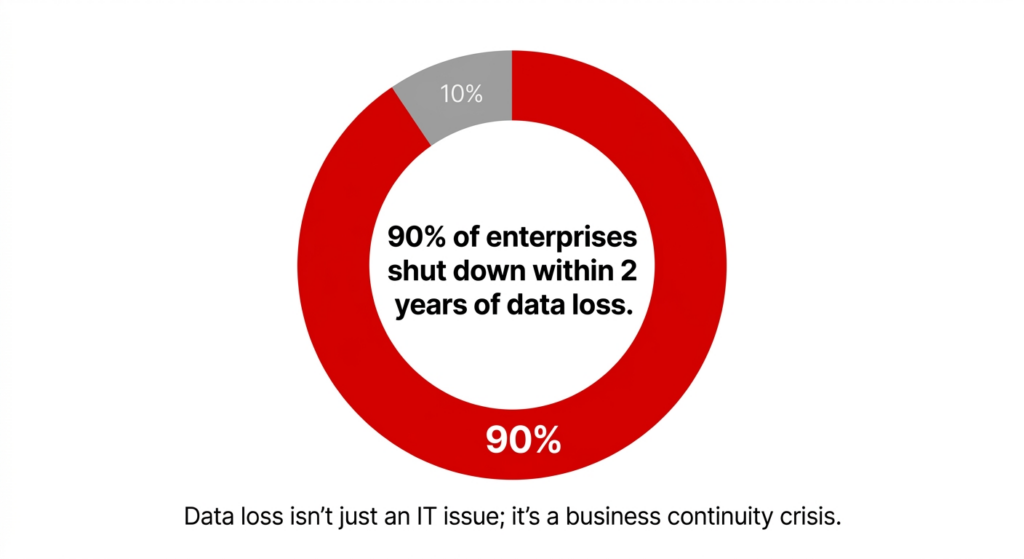
Data loss isn’t just an IT issue; it’s a business continuity crisis.
That matters because data loss can have long-term business impact. Less than half of businesses recover all their data after a disaster, and around 90% of enterprises that lose data from a disaster shut down within two years.[source]
The tips below focus on the areas that matter most when comparing vendors, so you can make a more informed decision before signing with a storage company.
1. Define Your Business Storage Needs First
Start by identifying what data you need to store, how quickly it must be accessed, how long it needs to be retained, and how much it is likely to grow over time.
A data storage provider may look strong on paper but still be the wrong fit if your requirements are unclear. Before comparing vendors, define the practical demands your environment places on storage.
Identify the Data Types Your Business Needs to Store
Most businesses do not manage one kind of data. They usually need to store a mix of operational files, application data, backups, long-term records, and archived information.
| Data type | Example | What it affects |
| Structured data | Databases, ERP records, CRM data | Performance, query speed, uptime |
| Unstructured data | Documents, images, videos, email | Capacity, searchability, storage growth |
| Archival data | Old records, compliance files, inactive data | Retention, cost, retrieval expectations |
Estimate Current and Future Storage Requirements
Do not size a storage vendor only for what you need today. Review your current storage volume, growth rate, retention requirements, and whether older data must stay readily accessible or can be archived.
Determine How Often Your Data Needs to Be Accessed
Not all data needs the same access speed. Some systems require fast, frequent retrieval. Other data may only need to be restored occasionally or retained for compliance purposes.
The next step is to check whether a storage provider can protect that data properly through security and compliance controls.
2. Review Security and Compliance Requirements Early
A data storage provider should provide encryption, access controls, monitoring, backup protection, and support for compliance requirements relevant to your business.
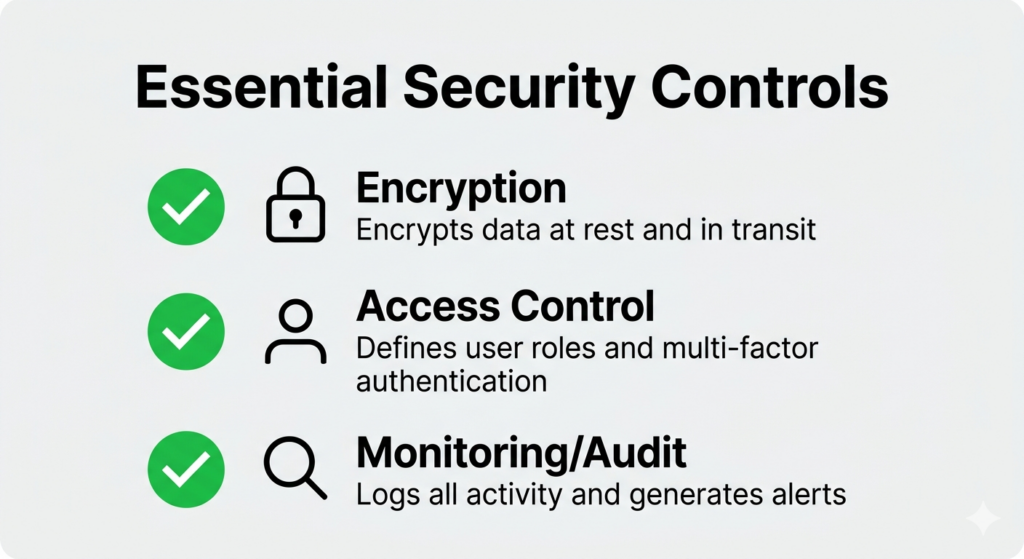
Security should be a primary filter for choosing a vendor, not an afterthought.
Security should be reviewed early, not after you narrow your vendor list. A storage company may offer enough capacity and acceptable pricing, but weak controls can create larger long-term risk.
Confirm Encryption at Rest and in Transit
Ask vendors whether data is encrypted at rest, encrypted in transit, how encryption keys are managed, and whether encryption settings are standard or optional.
Check Access Controls, Monitoring and Auditability
| Security area | What to confirm |
| Access control | Role-based access, least-privilege access, MFA |
| Monitoring | Logging, alerting, visibility into suspicious activity |
| Administrative access | Who can access storage environments and under what conditions |
| Auditability | Whether access and changes can be reviewed later |
These controls matter because security failures are often caused by poor access management, not only external attacks.
Make Sure the Storage Provider Supports Your Compliance Requirements
If your business handles regulated, confidential, or customer-sensitive data, compliance cannot be treated as secondary. Confirm whether the company can support retention requirements, audit expectations, documentation needs, and recovery processes tied to regulated data.
For organizations handling regulated records, provider selection should also be viewed through the lens of healthcare data backup requirements.
Once security and compliance are clear, the next step is to evaluate whether the storage provider can deliver the performance and reliability your business depends on.
3. Compare Performance, Uptime, and Reliability
A reliable storage provider should offer consistent uptime, stable performance, predictable access to data, and support that helps reduce operational disruption when issues occur.
Performance and reliability affect more than convenience. If users cannot access files, applications slow down, or recovery takes too long, storage becomes a business risk.
Review Uptime Commitments and Availability
Ask vendors how they define availability and what level of uptime they commit to in practice. Check whether uptime commitments are written into the service agreement, how outages are communicated, and what happens when service levels are not met.
Evaluate Speed, Latency, and Access Performance
| Performance factor | Why it matters |
| Access speed | Affects productivity, workflows, and system responsiveness |
| Latency | Important when data supports business-critical applications |
| Retrieval time | Matters when data must be restored or accessed quickly |
| Consistency | Helps avoid workflow disruption during busy periods |
Choose Storage Provider That Supports Business Continuity
A strong storage vendor should be able to explain how data remains accessible during disruption, what support is available when access is affected, and how recovery expectations are handled.
The next step is to compare storage models and deployment options so you can judge which setup best matches your environment.
4. Compare Storage Models and Deployment Options
The best storage setup depends on how your business uses data, how quickly it needs access, what security controls are required, and how much flexibility you need as your environment grows.
Not every storage company offers the same model. Before choosing one, make sure its setup fits your operational needs instead of forcing your business into a model that creates unnecessary cost or complexity.
Understand Cloud, Hybrid, Private, and On-Premise Storage Models
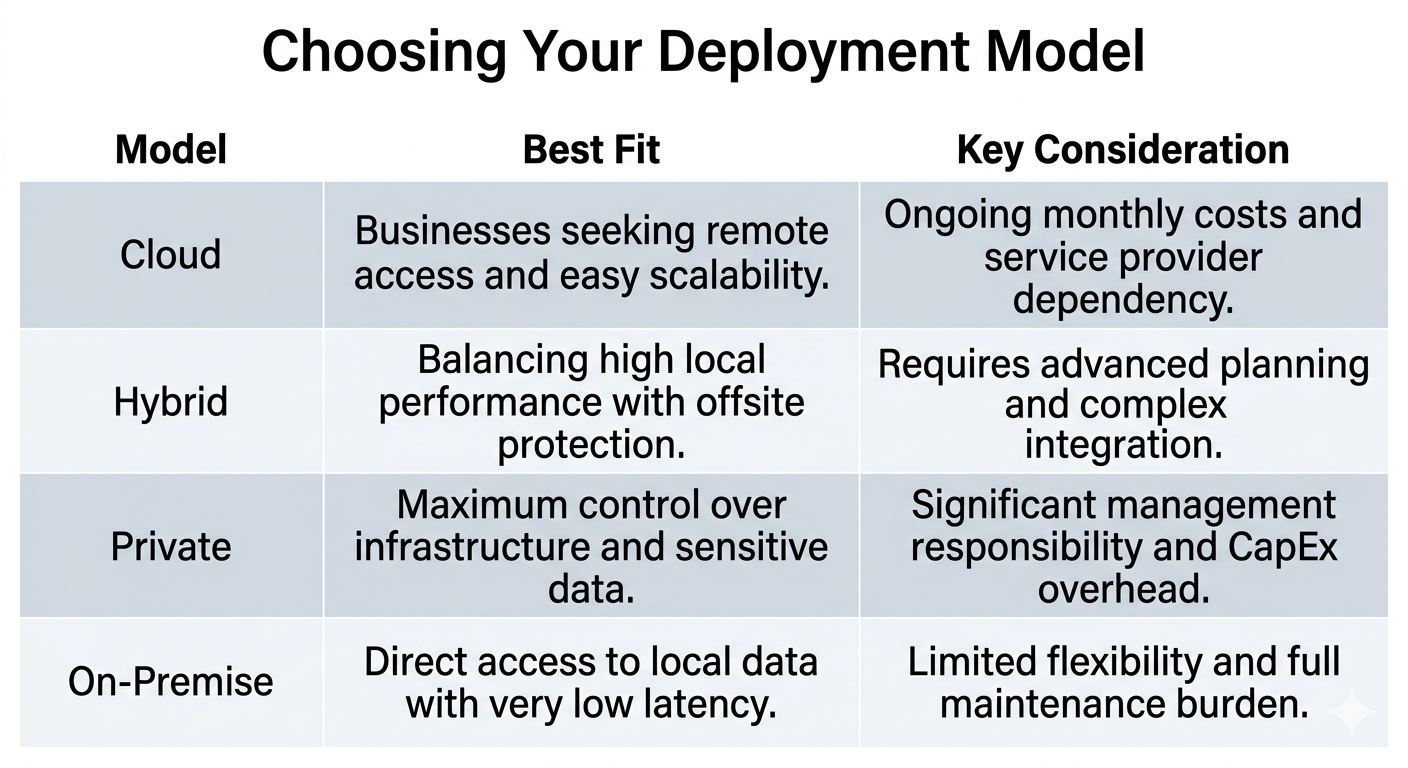
Choosing the right model depends on your need for control versus your need for scalability.
Match the Storage Model to Your Business Environment
Ask whether users need frequent, real-time access, whether the business has remote teams or multiple locations, whether some data is active while other data is mainly archived, and whether regulatory or internal control requirements affect hosting decisions.
If you are comparing protected environments, it also helps to understand the different types of backup solutions in healthcare and how they support different operational needs.
Plan for Flexibility and Future Growth
Look for a storage solutions provider that can support changing capacity needs, shifts in performance requirements, evolving backup and recovery expectations, and migration without major disruption.
Once the deployment model is clear, the next step is to compare cost more carefully and look beyond the lowest advertised price.
5. Look Beyond Price and Compare Total Cost
You should compare total cost of ownership, retrieval fees, support quality, backup and recovery capabilities, and the long-term fit of the service model.
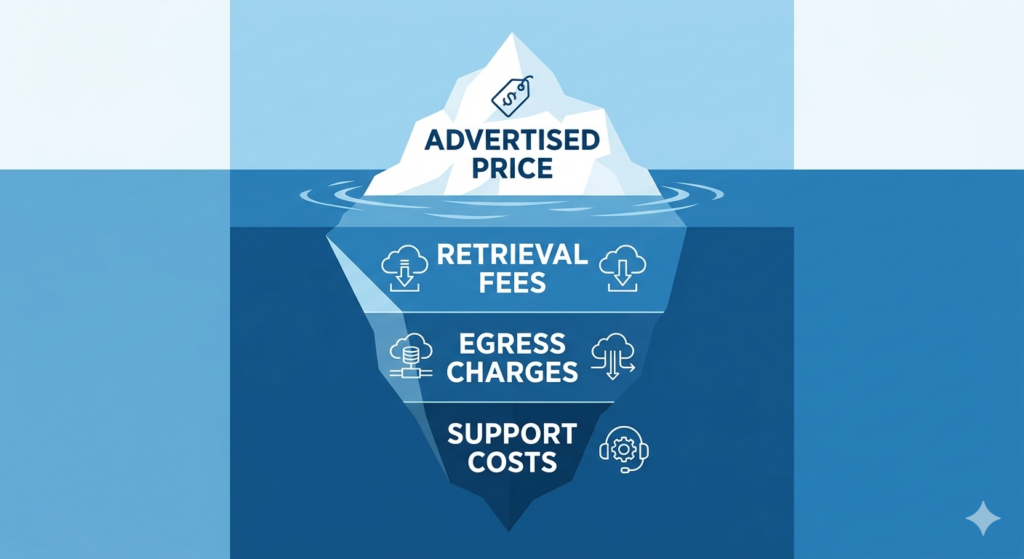
Look beyond the sticker price to understand the true cost of moving and accessing your data.
Low pricing can look attractive early, but it does not always reflect the real cost of using a storage vendor over time.
Compare Upfront Costs and Long-Term Costs
Review setup or onboarding fees, monthly or annual service cost, growth-related pricing as storage needs increase, and charges tied to support, migrations, or add-on services.
Ask About Hidden Fees, Retrieval Charges, and Support Costs
| Cost area | What to ask |
| Retrieval fees | Is there a charge to access or restore stored data? |
| Transfer fees | Are there costs for moving data in or out of the environment? |
| Support fees | Is urgent support included or billed separately? |
| Growth costs | How does pricing change as storage volume increases? |
This matters because CDS positions flat-rate pricing with no egress or retrieval fees as a meaningful differentiator, noting that many providers charge retrieval fees during recovery.
Evaluate Total Cost of Ownership
The better question is not which company is cheapest, but which one creates the best long-term value for the way your business stores, protects, and recovers data.
The next section explains why choosing storage alone is not enough and why backup and recovery should be reviewed as part of the same decision.
6. Understand the Difference Between Storage, Backup, and Recovery
Storage keeps data available for use, backup creates protected copies of that data, and recovery is the process of restoring data after loss, corruption, or disruption.
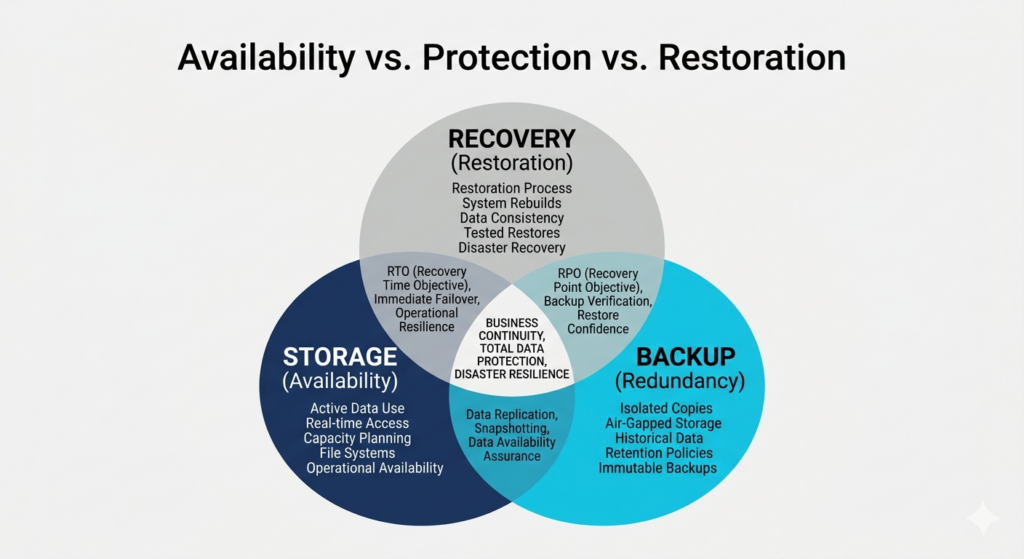
While often used interchangeably, storage, backup, and recovery serve three distinct business needs.
These terms solve different problems. Choosing a data storage provider without understanding that difference can leave important gaps in protection.
Why Storage Alone is Not Enough
Storage helps keep files, systems, and records accessible during normal operations. It does not guarantee that data can be restored after deletion, corruption, ransomware, or system failure.
How Backup Improves Business Resilience
Backup creates additional copies of data so it can be restored if the original version becomes unavailable or unusable.
Why Recovery Readiness Matters Before an Incident
Recovery is where the real test happens. A backup service provider should be able to explain how data is restored, how long recovery takes, whether restore points are checked, and what support is available during an incident.
Storage helps keep data available, but recovery confidence comes from testing and validation. CDS’s approach to backup verification and recovery explains why backup success alone does not prove restore readiness. CDS’s internal strategy also treats backup verification, verified restore, and clean restore validation as a core moat.
The next section looks at how vendors actually handle backup access, restores, and recovery verification.
7. Ask How the Backup Service Provider Handles Recovery
A backup service provider should clearly explain how data is backed up, how quickly it can be restored, whether backups are tested, and what support is available during an incident.
This is where many companies start to look different. Storage capacity alone does not tell you how well a vendor can protect data when systems fail, files are deleted, or records become corrupted.
Find Out How Data is Backed Up and Retained
You should know how often backups run, where backup copies are stored, how long backups are retained, and whether backup copies are isolated from production data.
Ask How Backup Restores Are Managed
| Restore question | Why it matters |
| How long does restore take? | Helps set realistic recovery expectations |
| Can individual files be restored? | Important for smaller incidents and user error |
| Can full systems or environments be restored? | Important during larger outages |
| Who helps during recovery? | Determines whether support is practical during disruption |
Check Whether Backups Are Tested, Verified, and Usable
A backup job can complete successfully and still fail when data is needed. That is why testing and verification matter.
This is especially important because CDS’s practical guide notes that as much as 90% of data loss can be attributed to human error. Risks such as silent data corruption in EHR systems show why backup success alone is not enough.
Businesses comparing vendors should also understand what modern backup and disaster recovery software includes beyond basic storage, especially when restore speed, isolation, and recovery options matter. UnisonBDR is positioned to own terms like backup and disaster recovery software, BDR solution, verified backup recovery, and clean restore backup.
The next step is to look beyond the technical setup and evaluate support quality and reputation.
8. Research Support Quality and Provider Reputation
Support and reputation matter because storage problems are not only technical issues. They affect access, recovery, downtime, and how quickly your business can respond when something goes wrong.
A storage provider may offer acceptable pricing and capacity, but weak support can still create serious operational risk.
Look for Responsive Support and Clear Escalation Paths
| Support area | What to look for |
| Availability | Whether support is available when urgent issues happen |
| Response time | How quickly the vendor responds to critical requests |
| Escalation | Whether there is a clear path for more serious incidents |
| Recovery help | Whether support includes practical restore guidance |
Review Customer Feedback, Experience, and Credibility
Look beyond testimonials on the provider’s own site. Review third-party reviews, case studies, industry experience, and consistency in how the company is described by users.
Understand Service Commitments Before Signing
Check whether the storage vendor clearly defines service coverage, response expectations, responsibilities during incidents, and limits around support and recovery help.
Once support and credibility are clear, the final step is to compare vendors side by side before making a decision.
9. Use a Final Checklist Before Choosing a Storage Provider
Before choosing a data storage company, compare vendors on security, performance, deployment fit, pricing transparency, backup and recovery readiness, and support quality.
Compare Storage Providers Side by Side
| Decision area | What to confirm |
| Storage fit | The company supports your data types, access needs, and growth expectations |
| Security | Encryption, access control, monitoring, and compliance support are clearly defined |
| Performance | Uptime, availability, and retrieval expectations match business requirements |
| Deployment model | Cloud, hybrid, private, or on-premise fit your environment and control needs |
| Pricing | Ongoing costs, retrieval charges, and support fees are clear |
| Backup and recovery | Backup frequency, restore process, and verification methods are explained |
| Support | Response expectations, escalation paths, and recovery help are clearly available |
Confirm Backup and Recovery Readiness Before Signing
Before signing, confirm how backups are created and retained, how restore requests are handled, whether backup testing is performed, and what support is available during a recovery event.
If your organization is formalizing continuity planning, it also helps to review how to build a healthcare backup plan so provider selection supports a broader protection strategy.
Choose the Backup Provider That Best Fits Your Business Goals
The best option is not always the cheapest or the largest. It is the company that best matches how your business stores, protects, accesses, and recovers data over time.
Common Questions About Choosing a Data Storage Company
What is the difference between storage and backup?
Storage keeps data available for normal use. Backup creates extra copies so data can be restored after deletion, corruption, or failure.
How do you choose the right storage solution for your business?
Start with what data you store, how often it is accessed, how quickly it needs to be restored, and how much it is likely to grow. Then compare companies based on security, reliability, deployment fit, recovery readiness, and long-term cost.
What should you ask a data storage provider before signing?
Ask how data is protected, how backups are handled, how restores work, what support is included, how pricing changes over time, and whether hidden access or retrieval fees apply.
Why are compliance and recovery capabilities important?
Compliance matters because some businesses must protect sensitive data under stricter operational and documentation requirements. Recovery matters because business impact usually appears when data must be restored, not when it is simply being stored.
How to Make the Right Final Decision
The most important factors are fit, security, reliability, pricing transparency, backup readiness, recovery capability, and support quality.
The right storage provider should match how your business stores and accesses data today while also supporting growth, protection, and recovery over time. A low price or large storage capacity does not matter much if the company cannot protect data properly or help restore it when needed.
If your review goes beyond storage alone, compare vendors in the context of broader disaster recovery solutions so capacity, protection, and continuity are evaluated together. CDS’s strategy treats disaster recovery solutions as a core commercial investigation page and positions it alongside backup verification, healthcare data protection, and UnisonBDR in its authority flow.
For businesses weighing these decisions carefully, CDS can help assess storage fit, recovery readiness, and long-term protection needs.