Healthcare organizations must protect electronic Protected Health Information (ePHI), maintain clinical operations, and comply with HIPAA. Backup strategy in this environment must ensure recoverability during ransomware or system failure — not just data storage.
Each year, hundreds of healthcare data breaches affecting 500+ records are reported to federal regulators, and ransomware remains one of the leading causes of operational disruption. When EHR, imaging, or scheduling systems become unavailable, patient care and revenue operations are directly affected.[source]
Under HIPAA §164.308(a)(7), covered entities must maintain:
- A data backup plan
- A disaster recovery plan
- An emergency mode operations plan
- Testing and revision procedures
These requirements establish a clear standard: data must be recoverable, and recovery processes must be tested and documented.
Modern ransomware now:
- Targets backup repositories
- Encrypts connected storage
- Deletes retention snapshots
- Attempts to disrupt recovery chains
Healthcare backup strategy must therefore include:
- Offsite redundancy
- Immutable protection
- Restore validation
- Documented recovery testing
For broader context on regulatory and operational risk, review our breakdown of the importance of data backup in healthcare.
What are the Main Types of Backup Solutions in Healthcare?
Healthcare backup solutions fall into four primary categories based on storage location and protection design.
1. Use On-Premise Backup for Local System Recovery
On-premise backup stores data within the healthcare facility using:
- Local backup servers
- Network-attached storage (NAS)
- Direct-attached storage
Strengths
- Fast local restore
- No internet dependency
Limitations
- Vulnerable to ransomware spreading across the network
- Susceptible to physical disasters
- No geographic redundancy unless paired with offsite replication
On-premise backup alone does not meet modern ransomware resilience requirements.
2. Use Cloud Backup for Encrypted Offsite Redundancy
Cloud backup transmits encrypted data to an offsite data center.
Strengths
- Geographic redundancy
- Reduced on-site hardware management
- Scalable storage
Limitations
- Restore speed depends on bandwidth
- Does not automatically ensure clean restore validation
Cloud improves redundancy but must be configured correctly to prevent backup compromise.
3. Use Hybrid Backup for Combined Local and Offsite Protection
Hybrid backup combines:
- Local backup for rapid recovery
- Offsite cloud replication for disaster protection
Strengths
- Faster minor-incident recovery
- Site-level disaster resilience
Limitations
- Requires segmentation
- Requires restore testing
- Increased configuration complexity
Hybrid reduces single points of failure but does not eliminate ransomware risk without immutability.
4. Use Immutable and Air-Gapped Backup to Prevent Backup Tampering
Immutable backup prevents modification or deletion during a defined retention period. Air-gapped backup isolates storage from production networks.
Strengths
- Prevents encryption of restore points
- Preserves clean recovery copies
- Reduces insider tampering risk
Immutable layered models provide the strongest ransomware protection when paired with restore validation.
Which Backup Type Protects Against Ransomware in Healthcare?
No storage model alone guarantees ransomware protection. Protection depends on architectural controls.
Healthcare ransomware attacks are designed to:
- Encrypt production systems
- Target backup repositories
- Delete snapshots
- Disrupt recovery sequencing
Ransomware-resistant environments require:
- Immutable Storage: Prevents backup alteration during an attack.
- Isolated Backup Copies: Uses segmentation or air-gapping to block lateral movement.
- Verified Restore Testing: Confirms that data is:
-
- Not corrupted
- Malware-free
- Operationally usable
Structured restore validation practices are detailed in our guide to backup verification and recovery.
- Encrypted Offsite Redundancy: Protects ePHI confidentiality and availability.
Architecture — not storage location — determines survivability.
Identify Common Healthcare Backup Failures During Ransomware Incidents
Healthcare organizations often believe daily backups guarantee protection. In practice, failures commonly occur due to:
- Encrypted local backup repositories
- Corrupted incremental chains
- Deleted retention snapshots
- Untested restore points
- Reinfection during recovery
A detailed breakdown of these failure mechanisms is covered in why “backup successful” does not mean recoverable in healthcare.
That analysis explains why job completion logs do not equal operational recovery.
Align Backup Architecture with HIPAA Security Rule Requirements
Backup architecture directly affects HIPAA compliance posture.
Encrypt Backup Data at Rest and in Transit
Backup systems must provide:
- Encryption at rest
- Encryption in transit
- Controlled access permissions
- Audit logging
Without encryption controls, ePHI exposure risk increases.
Define and Document RTO and RPO Targets
Backup design affects:
- Recovery Time Objective (RTO)
- Recovery Point Objective (RPO)
- Geographic redundancy
- Incident response readiness
On-premise-only backups increase outage risk.
Hybrid and immutable layered models strengthen availability posture.
Conduct and Record Restore Testing for Audit Defense
HIPAA requires documented restore testing and contingency plan revision.
Organizations must maintain:
- Restore test logs
- Recovery documentation
- Validation records
Restore validation processes are outlined in backup verification and recovery best practices.
Build a Layered Healthcare Backup Architecture Model
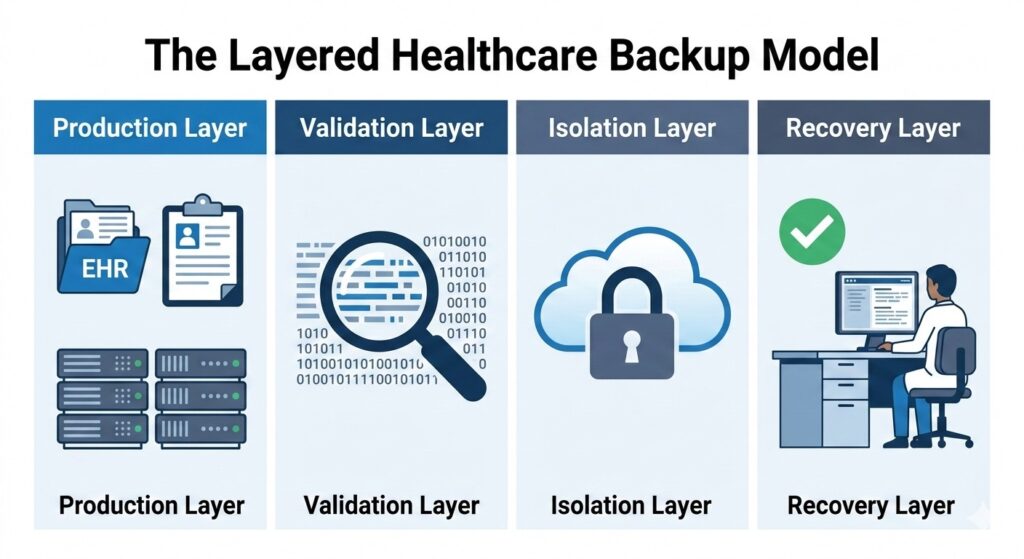
A recovery-focused architecture separates systems to prevent ransomware from spreading to backup repositories.
A recovery-focused architecture separates production, validation, isolation, and recovery layers.
– Production Layer
EHR, PACS, billing systems, file servers, virtual machines.
– Backup & Validation Layer
- Immutable storage
- Integrity checks
- Scheduled restore testing
- Malware scanning
– Isolated Storage Layer
- Segmentation
- Credential separation
- Offsite replication
- Retention controls
– Verified Recovery Layer
- Defined RTO/RPO
- Recovery sequencing
- Clean recovery environment
- Documented incident response
Layered architecture reduces ransomware recovery uncertainty.
Backup Types for Healthcare Comparison Table:
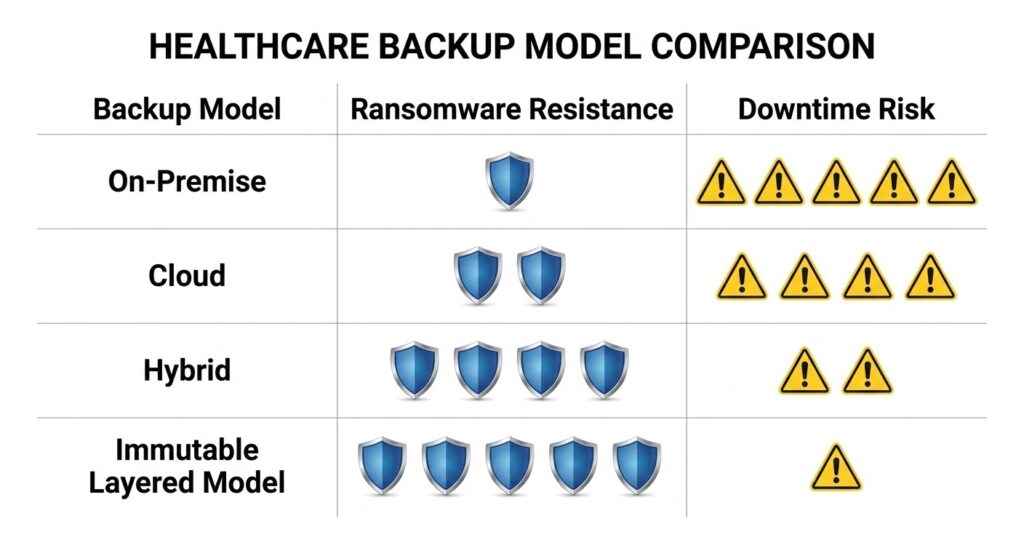
Not all backups are created equal; architectural controls determine your organization’s survivability.
| Backup Type | Storage Model | Ransomware Resistance | Restore Certainty | HIPAA Alignment | Downtime Risk |
| On-Premise | Local | Low | Moderate | Limited without offsite copy | High |
| Cloud | Offsite encrypted | Moderate | Moderate | Strong if encrypted & documented | Moderate |
| Hybrid | Local + Offsite | Moderate–High | High | Strong with testing | Lower |
| Immutable (Layered Model) | Write-locked isolated | High | High (if validated) | Strong | Lowest |
Key Takeaways
- On-premise alone lacks disaster resilience.
- Cloud improves redundancy but does not inherently prevent encryption.
- Hybrid reduces single-location risk.
- Immutable layered models provide strongest ransomware resistance when validated.
For organizations evaluating broader continuity planning, see our healthcare-focused disaster recovery strategy overview.
How CDS Solutions Align With These Models?
CDS solutions align with architectural tiers rather than generic backup categories:
- Unison Lite – Encrypted cloud-based backup with offsite redundancy
- Unison BDR – Hybrid architecture combining rapid local recovery with offsite replication
- Unison Complete – Layered architecture incorporating immutability, isolation, and verified recovery validation
Each solution reflects a recovery-first design.
Validate Healthcare Recovery Readiness Before an Incident
Backup configuration does not confirm recovery readiness.
Recovery readiness requires documented validation.
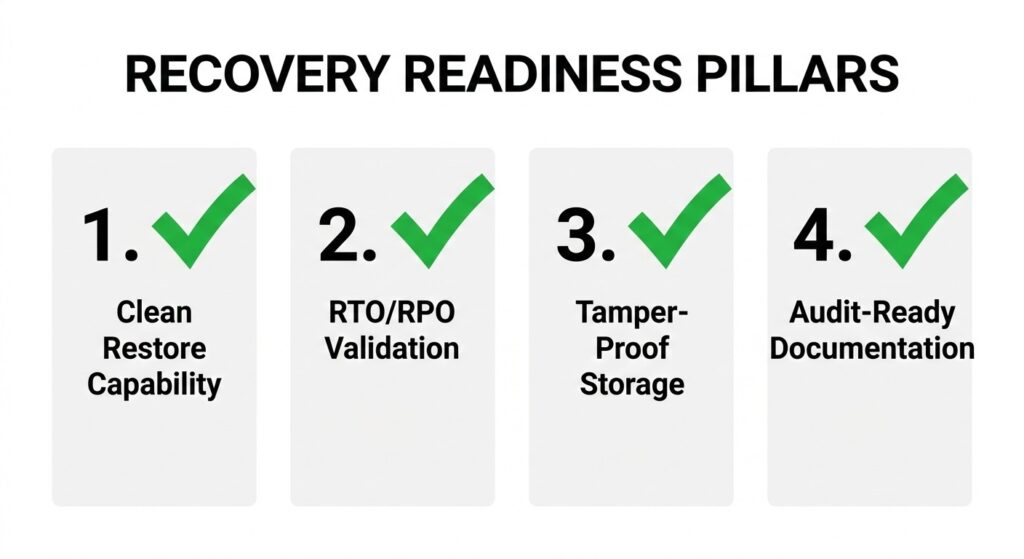
Use these four criteria to evaluate if your current backup strategy meets HIPAA and operational standards.
Healthcare organizations should confirm:
1. Confirm Clean Restore Capability
- Routine restore testing
- Malware scanning
- Application-level validation
2. Test Recovery Objectives Against RTO and RPO
- Documented RTO and RPO
- Recovery sequencing plan
- Assigned response roles
3. Secure Backup Storage from Tampering
- Immutable retention policies
- Isolated backup repositories
- Restricted administrative access
4. Maintain Audit-Ready Documentation
- Restore logs
- Retention policies
- Encryption documentation
- Contingency plans
If these elements are not documented, backup architecture may not withstand a ransomware event.
Recovery Readiness Assessment
If you are unsure whether your healthcare backup architecture can withstand a real-world ransomware incident, CDS offers recovery readiness evaluations aligned with:
- Immutable protection models
- Verified restore validation
- Hybrid resilience
- HIPAA-aligned documentation
Request a healthcare recovery assessment to determine whether your current environment meets operational and compliance recovery standards.
Healthcare Backup Types FAQs
What is the 3-2-1 backup rule in healthcare?
The 3-2-1 backup rule requires healthcare organizations to keep three copies of data, store two copies on different media, and maintain one offsite copy. This model reduces single-point failure and supports disaster recovery resilience.
How long should healthcare organizations retain backup data?
Healthcare organizations should retain backup data according to state medical record laws and HIPAA documentation requirements, often 6–10 years or longer. Retention policies must align with legal, regulatory, and operational recovery needs.
Can SaaS-based EHR systems eliminate the need for backup?
SaaS-based EHR systems do not eliminate backup responsibility. Healthcare providers remain responsible for data availability, recovery access, and business continuity, even when vendors host primary infrastructure.
What is the difference between RTO and RPO in healthcare recovery?
Recovery Time Objective (RTO) defines how quickly healthcare systems must be restored, while Recovery Point Objective (RPO) defines how much data loss is acceptable. Both metrics determine backup frequency and recovery architecture design.

Ed Conklin is a cybersecurity executive with deep experience in ransomware, cyber risk, and enterprise security strategy. He helps organizations – especially in the healthcare industry – understand how modern attacks impact systems and why recovery readiness matters as much as prevention. His insights focus on ensuring safe, reliable recovery after incidents, including approaches like verified backup recovery and resilient healthcare data protection strategies.
Last updated on March 2, 2026