What would happen if your dental clinic suddenly lost access to patient records, imaging files, and appointment schedules?
Imagine starting a busy morning only to find that your dental software cannot open patient charts. X-ray images for scheduled procedures are unavailable, staff cannot access appointment schedules, and billing or insurance claims cannot be processed. Within minutes, normal clinic operations begin to stall.
Modern dental practices rely heavily on digital systems to manage patient records, treatment plans, imaging data, and administrative tasks. When these systems become unavailable due to ransomware attacks, hardware failures, or accidental deletion, patient care and daily operations can quickly be disrupted.
Because dental clinics depend on continuous access to patient information, they must be able to restore critical systems quickly and minimize downtime when data loss occurs.
What is Data Recovery Software for Dental Clinics?
Data recovery software for dental clinics is a system designed to restore patient records, imaging files, and practice management databases after data loss caused by ransomware attacks, hardware failures, or accidental deletion. These solutions combine automated backups, secure storage, and rapid restoration capabilities so dental practices can recover systems and resume operations quickly.
Healthcare organizations are increasingly targeted by cyber threats. According to the Sophos State of Ransomware in Healthcare report, healthcare organizations experienced a 93% increase in ransomware attacks between 2018 and 2023, highlighting the need for reliable backup and recovery systems across medical and dental practices. [Source]
Why Do Dental Clinics Depend on Reliable Data Systems?
Dental clinics rely on multiple digital systems to manage patient care and administrative tasks. These systems store clinical records, diagnostic images, scheduling data, and billing information used throughout the day.
-
Patient Records and Practice Management Software
Practice management platforms organize patient records, treatment histories, appointment schedules, and insurance information.
Common dental practice management systems include Dentrix, Eaglesoft, and Open Dental, which allow clinics to centralize patient data and streamline daily operations. Because these platforms store large volumes of sensitive patient information, clinics often rely on specialized Dental backup solutions to ensure patient records can be restored if system failures or cyberattacks occur.
-
Dental Imaging and Diagnostic Systems
Dental clinics also rely on imaging systems that store digital X-rays and other diagnostic files. These records help dentists evaluate oral conditions and plan treatments.
If imaging data becomes unavailable, dentists may be unable to review diagnostic information needed for examinations or procedures.
Dental Software Systems That Store Critical Practice Data
Dental practices operate within a software ecosystem where multiple systems store essential information.
-
Practice Management Platforms Used by Dental Clinics
Practice management software manages patient charts, treatment plans, appointment scheduling, billing processes, and insurance documentation.
Systems such as Dentrix, Eaglesoft, Open Dental, and Curve Dental function as central databases for patient and operational data.
-
Dental Imaging and Diagnostic Data Systems
Imaging platforms store X-rays, scans, and other diagnostic records. These files are frequently integrated with practice management software.
Because imaging data supports diagnosis and treatment planning, losing access to these files can delay patient care.
Why Dental Software Data Must Be Protected
When access to dental software systems is disrupted, clinics may lose the ability to review patient histories, manage appointments, or process billing tasks. Reliable data protection and recovery systems ensure these platforms can be restored quickly after a failure.
Common Causes of Data Loss in Dental Clinics
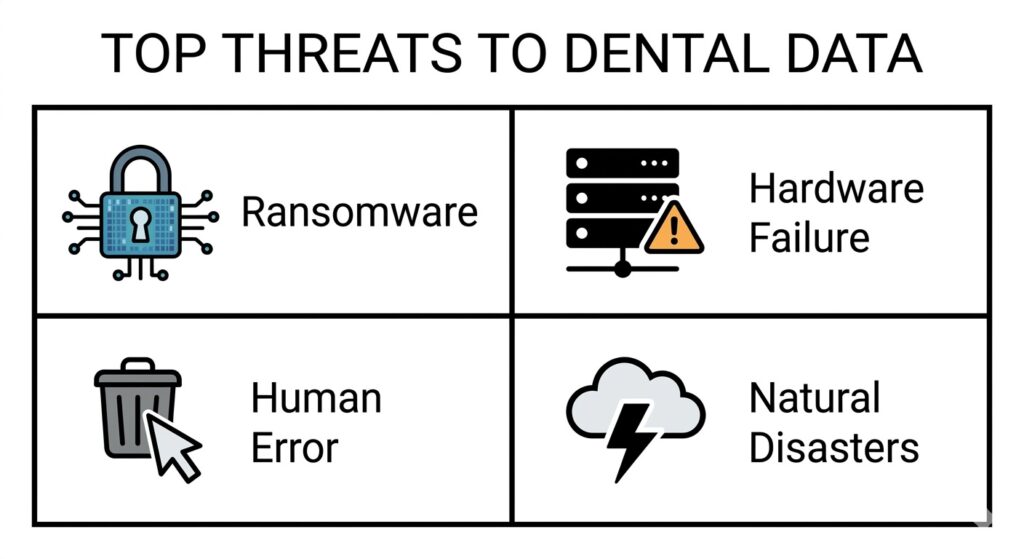
Understanding the primary risks to your practice’s digital infrastructure.
Dental clinics face several risks that can lead to data loss or system outages.
| Cause of Data Loss | Impact on Dental Clinics |
| Ransomware attacks | Patient records and imaging files become inaccessible |
| Server or hardware failure | Practice management systems stop functioning |
| Accidental file deletion | Patient histories or treatment data may be lost |
| Natural disasters | On-site servers and storage systems can be damaged |
- Ransomware Attacks Targeting Healthcare Practices
Ransomware encrypts files and prevents clinics from accessing critical data until a ransom is paid.
- Server Failures and Hardware Malfunctions
Dental practices often store data on local servers or network storage systems. Hardware failures, aging infrastructure, or power disruptions can make these systems temporarily unavailable.
- Accidental File Deletion and Database Corruption
Human error can also cause data loss. Files may be deleted, overwritten, or corrupted during software updates or database errors.
- Natural Disasters and Infrastructure Failures
Events such as floods, fires, or power outages can damage local servers and storage systems. Without secure backups, clinics may lose important patient information.
What Happens When a Dental Clinic Loses Access to Its Data
When dental systems become unavailable, both clinical care and administrative operations are affected.
- Disrupted Patient Care and Treatment Planning: Dentists rely on patient histories and treatment records to make informed decisions. Without access to these records, dentists may be unable to review previous diagnoses or ongoing treatments.
- Loss of Imaging and Clinical Records: Diagnostic imaging such as digital X-rays helps dentists evaluate oral conditions. If these records are inaccessible, examinations and treatment planning may be delayed.
- Appointment Scheduling and Billing Interruptions: Practice management systems control appointment scheduling, billing, and insurance processing. System outages can prevent clinics from managing appointments or submitting claims.
- Financial and Operational Downtime for the Practice: Extended outages can also affect revenue. Gartner estimates the average cost of IT downtime can reach approximately $5,600 per minute, depending on the organization and infrastructure involved. [Source] For dental clinics, even short outages may lead to cancelled appointments and delayed treatments.
Why Traditional Backup Systems Are Not Always Enough
Many clinics maintain backups, but backups alone do not guarantee successful recovery in healthcare .
- Backup Failures and Corrupted Recovery Points: Backup files may contain incomplete or corrupted data. If a damaged backup is restored, important records may still be missing.
- Ransomware Targeting Backup Systems: Some ransomware attacks attempt to delete or encrypt backup repositories before attacking primary systems, making recovery more difficult.
- The Importance of Verified Recovery Testing: Regular recovery testing ensures that backups can actually be restored when needed. Performing backup verification and recovery testing helps identify issues early and confirms that patient data can be recovered during an incident.
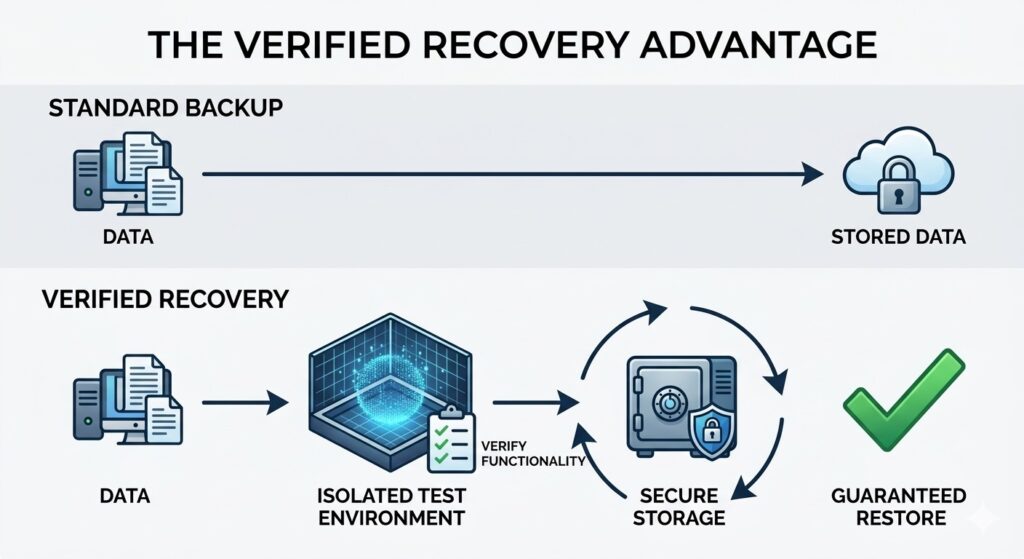
Verification testing is the difference between hoping your data is safe and knowing it is recoverable.
How Data Recovery Software Restores Dental Clinic Operations
Data recovery software helps dental clinics restore critical systems and patient information after data loss.
- Automated Backup and Recovery Systems
Automated systems create scheduled backups of patient records, imaging files, and databases. These backups provide recovery points that can be used if systems fail.
- Hybrid Backup: On-Site and Cloud Protection
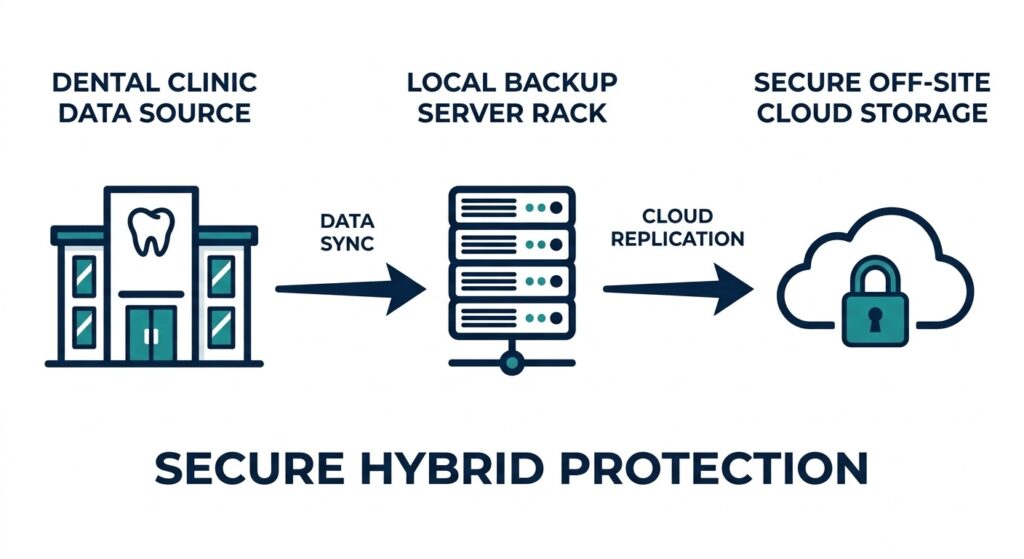
Hybrid backup systems ensure data is available both locally for speed and off-site for security.
Hybrid backup systems store data locally and in secure off-site environments. Local backups allow faster restoration, while off-site copies protect data if on-site infrastructure is damaged.
- Rapid System Restoration After Data Loss
Recovery platforms allow clinics to restore servers, databases, and applications from backup copies, reducing downtime.
Solutions such as UnisonBDR data recovery software provide automated backup protection and recovery capabilities designed to restore systems quickly after data loss incidents.
- Integration with Dental Practice Software
Recovery systems must support practice management platforms and imaging systems used by dental clinics so that restored environments function normally after recovery.
In addition to backup systems, organizations should also have access to specialized data recovery services that can restore systems after hardware failures, ransomware attacks, or database corruption.
Data Recovery Solutions for Dental Practices
Dental clinics vary in size and infrastructure requirements, so recovery solutions should support different operational environments.
| Solution | Best For | Key Benefit |
| UnisonBDR | Most dental clinics | Rapid backup and recovery with ransomware protection |
| Unison Lite | Smaller dental offices | Simplified automated backup protection |
| Unison Complete | Larger clinics or multi-location practices | Integrated recovery infrastructure |
- UnisonBDR – Data Recovery Platform for Dental Clinics
UnisonBDR provides automated backups, secure storage, and rapid recovery capabilities designed for healthcare environments. It helps clinics restore patient records, imaging files, and practice management databases after data loss incidents.
- Unison Lite – Backup Protection for Smaller Dental Offices
Unison Lite offers automated backup protection designed for smaller practices that require reliable data protection without complex infrastructure.
- Unison Complete – Recovery Infrastructure for Larger Clinics
Unison Complete combines backup, storage, and recovery capabilities within a dedicated system designed for larger practices or multi-location dental organizations.
Best Practices for Protecting Dental Clinic Data
Implementing preventive data protection strategies helps dental clinics reduce the risk of data loss.
-
Implement Regular Backup Verification
Backup verification confirms that stored backup files are complete and usable.
-
Use HIPAA-Compliant Backup Systems
Dental clinics manage protected health information (PHI). Implementing HIPAA-compliant data protection systems helps protect patient records and maintain regulatory compliance.
-
Maintain Secure Off-Site Backup Storage
Off-site backup storage protects data if local systems become compromised or damaged.
-
Perform Disaster Recovery Testing
Disaster recovery testing evaluates how quickly systems can be restored after a failure and helps clinics improve response procedures.
FAQs About Dental Data Recovery
What data recovery software do dental clinics use?
Dental clinics use backup and disaster recovery systems designed to protect patient records, imaging files, and practice management databases.
Can dental data be recovered after ransomware attacks?
Yes. If reliable backups exist, clinics can restore encrypted data from backup copies created before the attack occurred.
How do dental offices protect patient records?
Dental offices protect patient records using secure backups, encryption, access controls, and off-site storage.
What backup systems are best for dental practices?
Effective systems typically include automated backups, hybrid storage (local and cloud), and reliable recovery capabilities.
Protect Your Dental Practice with Reliable Data Recovery
Dental clinics rely on continuous access to patient records, imaging data, and scheduling systems. When these systems become unavailable due to cyberattacks, hardware failures, or human error, clinic operations can quickly be disrupted.
Reliable recovery systems allow clinics to restore critical systems and minimize downtime.
Learn how UnisonBDR helps dental practices protect patient data and recover quickly after unexpected incidents.
Last updated on March 13, 2026