Business Continuity and Disaster Recovery address one central challenge: how organizations maintain operations and recover systems when disruption occurs. These disruptions may include cyberattacks, hardware failures, human errors, cloud outages, or natural disasters.
Many organizations treat Business Continuity and Disaster Recovery as interchangeable terms. They are closely related but address different layers of resilience:
- Business Continuity (BC): Maintaining business operations during disruption
- Disaster Recovery (DR): Restoring IT systems, infrastructure, and data after failure
Understanding the difference allows organizations to design strategies that protect operations, data, and system availability at the same time.
The Operational Impact of IT Downtime and System Disruptions
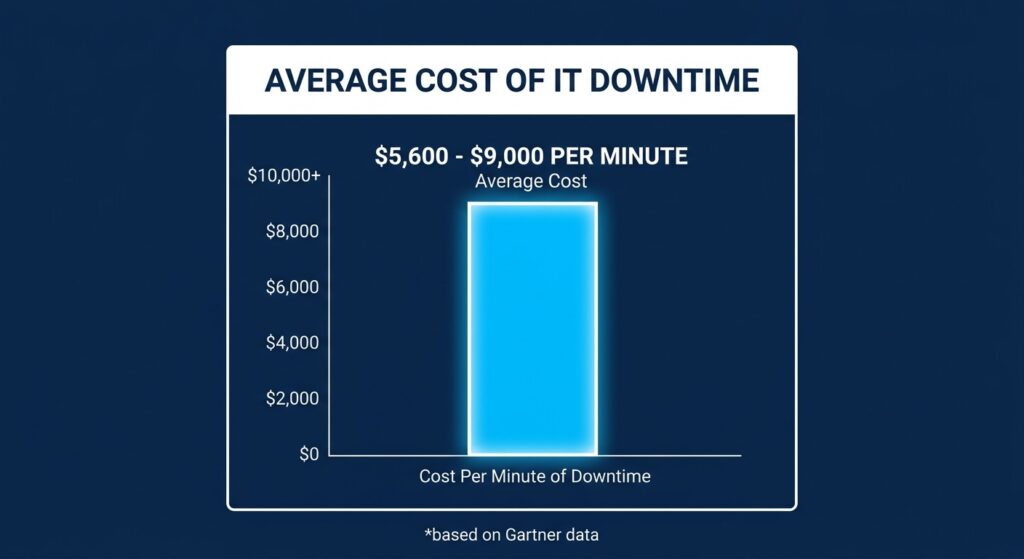
Every minute of system downtime represents a significant drain on corporate revenue and resources.
Downtime affects revenue, service availability, and customer trust. Industry studies consistently show that outages carry measurable financial and operational consequences.
| Operational Risk Indicator | Reported Data | Source |
| Average cost of IT downtime | $5,600–$9,000 per minute depending on industry | Gartner |
| Organizations experiencing ransomware-related downtime | 60%+ report operational disruption | Sophos State of Ransomware Report |
These numbers illustrate why resilience strategies now extend beyond simple backup systems.
Common Recovery Gaps Organizations Discover
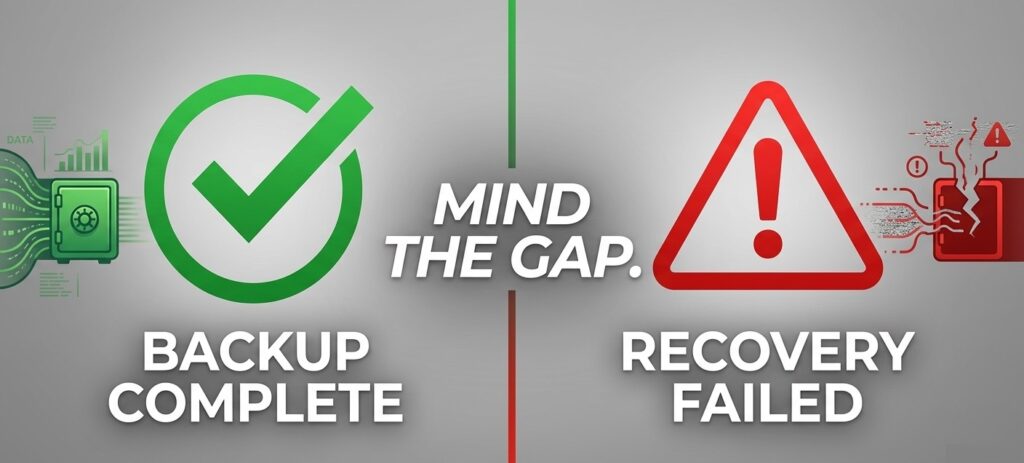
A split-screen visual showing a “Backup Success” notification on one side and a “Recovery Failure” error on the other to illustrate common gaps.
Organizations often believe they are protected because backups exist. Problems appear when systems must actually be restored.
Typical issues include:
- Backups that report success but contain corrupted or incomplete data
- Recovery procedures that were never tested
- Restore points infected with ransomware or malware
- Recovery processes that take hours or days longer than expected
These issues highlight the difference between having backups and being able to recover operations quickly.
Central Data Storage frequently encounters these gaps during recovery readiness assessments. Many organizations only discover them during a real incident.
Why Understanding the Difference Matters
Business Continuity and Disaster Recovery address different stages of disruption:
| Stage of Disruption | Focus |
| Before and during disruption | Business Continuity maintains operations |
| After systems fail | Disaster Recovery restores infrastructure and data |
Organizations that plan for both can maintain operations even when systems fail and restore services without extended downtime.
The next part explains how Business Continuity works and how it keeps critical operations running during disruptions.
What is Business Continuity (BC)? Definition and Key Concepts
Business Continuity (BC) is the ability of an organization to maintain essential operations during disruptive events such as cyberattacks, system outages, infrastructure failures, or natural disasters.
The objective is not to restore systems after failure. The objective is to keep critical business functions running while disruption occurs.
Business Continuity addresses operational questions such as:
- How will employees continue working if core systems fail?
- How will services remain available during outages?
- How will communication, scheduling, or transactions continue if infrastructure becomes unavailable?
When Business Continuity planning is effective, the organization continues operating even while IT systems are disrupted.
Primary Goals of Business Continuity
Business Continuity focuses on operational availability.
Typical objectives include:
- Maintaining access to critical applications
- Ensuring employees can perform core tasks
- Protecting service availability for customers or patients
- Preventing operational downtime
Organizations design continuity strategies around minimum operational interruption.
Core Components of a Business Continuity Strategy
A Business Continuity strategy normally includes operational, procedural, and infrastructure planning.
| Component | Purpose |
| Operational planning | Defines how essential activities continue during disruption |
| Workforce continuity | Ensures employees can continue working remotely or from alternate locations |
| Communication protocols | Maintains internal coordination and external communication |
| Technology redundancy | Provides alternate systems or failover infrastructure |
| Vendor coordination | Maintains service availability when third-party systems fail |
These elements allow organizations to continue operating even when parts of the environment fail.
Common Disruptions Addressed by Business Continuity Plans
Business Continuity planning prepares organizations for several operational threats:
- Cyberattacks and ransomware
- Power outages or infrastructure failures
- Cloud or vendor outages
- Data corruption or system malfunction
- Natural disasters affecting facilities
Many of these disruptions begin as technology failures. When IT systems fail, operational processes can stop immediately unless continuity planning exists.
This is where Disaster Recovery becomes critical, because restoring systems and data enables operations to fully return.
The next part explains Disaster Recovery and how it restores IT systems after a disruption occurs.
What is Disaster Recovery (DR)? Definition and Recovery Process
Disaster Recovery (DR) is the process of restoring IT systems, applications, and data after a disruption. While Business Continuity focuses on keeping operations running, Disaster Recovery focuses on returning technology systems to a functional state.
Disaster Recovery addresses situations where systems stop working due to events such as:
- ransomware attacks
- server failures
- data corruption
- cloud outages
- infrastructure damage
The goal is to restore systems quickly and safely so business operations can return to normal.
Primary Objectives of Disaster Recovery
Disaster Recovery focuses on technical restoration of systems and data.
Primary objectives include:
- restoring critical applications
- recovering lost or encrypted data
- rebuilding damaged infrastructure
- bringing systems back online within defined recovery targets
Without Disaster Recovery capabilities, organizations may experience extended downtime even if Business Continuity procedures are in place.
Core Components of a Disaster Recovery Plan
A Disaster Recovery Plan (DRP) defines how technology systems will be restored after failure.
| Component | Purpose |
| Data backups | Maintain copies of critical data for restoration |
| Recovery infrastructure | Alternate environments for restoring systems |
| Recovery procedures | Step-by-step processes to restore systems |
| Recovery testing | Ensures recovery procedures actually work |
| Recovery objectives | Defines acceptable recovery timelines |
These elements ensure that organizations can restore systems reliably when disruption occurs.
Core Components of a Disaster Recovery Plan
Disaster Recovery plans typically address technology failures such as:
- ransomware encrypting production data
- database corruption or accidental deletion
- server hardware failure
- cloud infrastructure outages
- network configuration failures
In many incidents, the ability to restore clean backup data determines how quickly systems return online.
Organizations often discover that backups alone do not guarantee successful recovery. If backup data is corrupted or infected, restoration may fail.
This is why recovery strategies often include backup validation and recovery testing to confirm that restore points are usable.
The next part explains the difference between Business Continuity Plans and Disaster Recovery Plans, and how each supports organizational resilience.
Business Continuity Plan (BCP) vs Disaster Recovery Plan (DRP)
Organizations use two structured plans to manage disruptions:
- Business Continuity Plan (BCP)
- Disaster Recovery Plan (DRP)
Both support resilience, but they address different layers of disruption response.
Scope of a Business Continuity Plan (BCP)
A Business Continuity Plan defines how an organization continues operating when normal systems or facilities are unavailable.
The focus is operational continuity. Typical BCP coverage includes:
| Area | Example Actions |
| Workforce continuity | Remote work procedures or alternate locations |
| Operational processes | Manual workflows when systems are unavailable |
| Communication plans | Internal and external communication protocols |
| Service continuity | Maintaining essential services during disruption |
| Vendor dependencies | Backup vendors or alternate service providers |
A Business Continuity Plan ensures core business activities continue even when technology fails.
Scope of a Disaster Recovery Plan (DRP)
A Disaster Recovery Plan focuses specifically on restoring IT systems and data after failure. The plan defines how technology infrastructure returns to a working state. Typical DRP coverage includes:
| Area | Example Actions |
| Data restoration | Recovering data from backup systems |
| System recovery | Rebuilding servers or virtual machines |
| Infrastructure recovery | Restoring networking and storage systems |
| Application restoration | Restarting critical applications |
| Recovery testing | Validating restore procedures |
A Disaster Recovery Plan ensures technology systems can be recovered reliably after disruption.
How Business Continuity Plans and Disaster Recovery Plans Work Together?
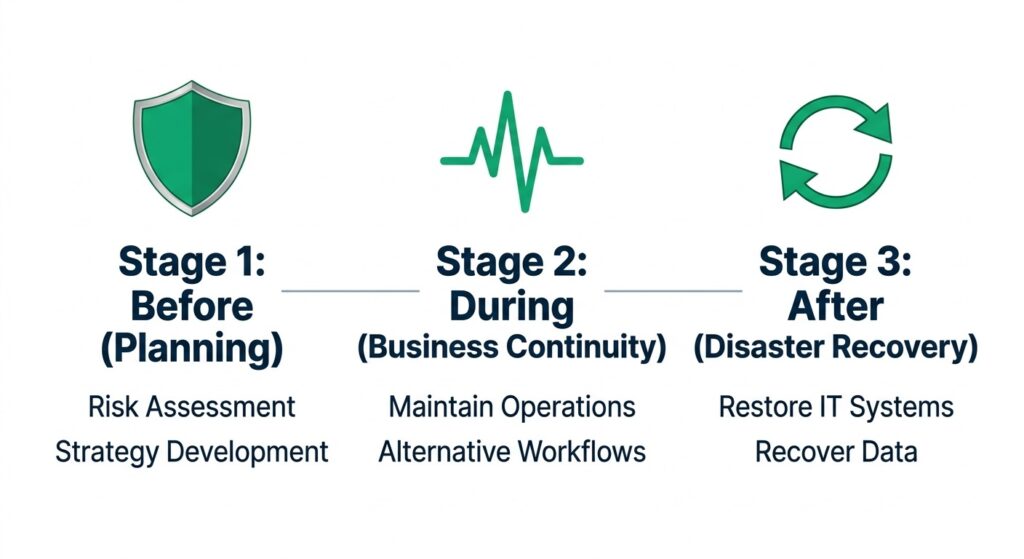
A coordinated response ensures that operations stay afloat while the technical recovery happens in the background.
Business Continuity and Disaster Recovery operate at different stages of disruption.
| Phase | Role |
| During disruption | Business Continuity maintains operations |
| After system failure | Disaster Recovery restores IT systems |
In practice:
- Business Continuity keeps the organization functioning
- Disaster Recovery returns systems to normal operation
Both plans must exist together. Operational continuity cannot last long without system recovery, and restored systems cannot support operations without continuity planning.
The next part explains the direct comparison between Business Continuity and Disaster Recovery, including their differences in scope, timing, and objectives.
Business Continuity vs Disaster Recovery: Core Differences
Business Continuity and Disaster Recovery address different aspects of organizational resilience. Both respond to disruptions, but they operate at different levels of response and responsibility.
- Business Continuity focuses on maintaining operations.
- Disaster Recovery focuses on restoring technology systems.
Understanding the distinction helps organizations plan how operations continue and how systems recover.
Scope of Protection
The primary difference lies in what each strategy protects.
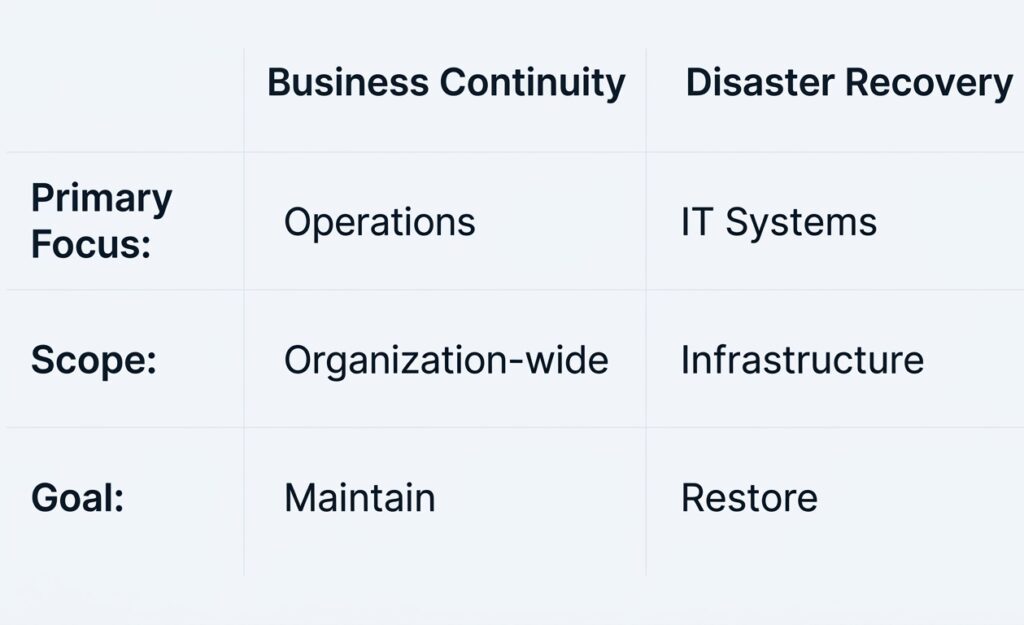
While often used interchangeably, BC and DR serve two distinct roles in organizational resilience.
Business Continuity protects processes, people, and service availability, while Disaster Recovery restores applications, infrastructure, and data.
Response Timing
Business Continuity and Disaster Recovery also operate at different points during a disruption.
| Stage of Disruption | Role |
| Before disruption | Continuity planning prepares operations |
| During disruption | Business Continuity maintains operations |
| After system failure | Disaster Recovery restores systems |
Business Continuity attempts to reduce operational interruption, while Disaster Recovery works to bring systems back online.
Strategy vs Technical Recovery
The two strategies differ in the type of planning they require.
| Strategy Type | Description |
| Business Continuity | Operational planning to maintain service delivery |
| Disaster Recovery | Technical processes for restoring infrastructure and data |
Business Continuity plans include workflow adjustments, communication protocols, and operational procedures.
Disaster Recovery plans include data restoration, system rebuilds, infrastructure recovery, and backup restoration.
Dependency Relationship
Business Continuity often depends on successful Disaster Recovery. For example:
- Operations may continue using temporary procedures.
- Critical systems must still be restored for full functionality.
Without reliable system recovery, operational workarounds cannot continue indefinitely.
The next part explains why organizations need both Business Continuity and Disaster Recovery to manage downtime, data loss, and system outages effectively.
Why Do Organizations Need Both Business Continuity and Disaster Recovery?
Organizations experience disruptions that affect operations and technology at the same time. Business Continuity and Disaster Recovery address these two layers of risk.
- Business Continuity maintains operational activity
- Disaster Recovery restores systems and data
Using only one approach leaves significant gaps in resilience.
Why Downtime is a Business Operations Problem
When systems become unavailable, business operations stop unless continuity procedures exist. Examples include:
- hospitals unable to access patient records
- financial systems unable to process transactions
- scheduling platforms becoming unavailable
- production systems halting manufacturing workflows
Business Continuity provides alternative procedures so operations can continue while systems are unavailable.
How Data Loss Disrupts Critical Business Functions
Many operational systems depend on real-time access to data. Examples include:
- patient records in healthcare systems
- financial transaction databases
- customer account platforms
- supply chain management systems
If data cannot be restored, operational continuity becomes impossible. Disaster Recovery ensures organizations can recover usable data and restore system functionality.
How Cyberattacks Disrupt Both Operations and Systems
Cyber incidents increasingly affect both infrastructure and operations. Typical ransomware incidents involve:
- System encryption or data destruction
- Application outages
- Service disruption for customers or internal users
Business Continuity allows organizations to maintain basic operations, while Disaster Recovery restores systems and clean data.
Compliance and Regulatory Requirements for Continuity and Recovery
Many industries require documented continuity and recovery capabilities. Examples include:
| Industry | Regulatory Focus |
| Healthcare | Protection of patient data and system availability |
| Finance | Transaction continuity and system resilience |
| Government | Operational readiness during infrastructure disruptions |
| Technology services | Service availability and data protection |
Organizations must demonstrate that they can continue operating and recover systems after disruption.
How the Two Strategies Work Together
Business Continuity and Disaster Recovery form a coordinated response to disruption.
| Response Layer | Role |
| Operational layer | Business Continuity maintains services |
| Technology layer | Disaster Recovery restores systems |
When both strategies exist, organizations can maintain operations during disruption and restore systems without extended downtime.
The next part explains how backup and recovery systems support both Business Continuity and Disaster Recovery.
How Backup and Recovery Systems Support Business Continuity and Disaster Recovery?
Backup and recovery infrastructure connects Business Continuity and Disaster Recovery. Backup systems preserve data, while recovery processes restore systems and applications when disruptions occur.
Without reliable backup and recovery capabilities, both continuity plans and disaster recovery plans become ineffective.
How Backup Systems Enable Disaster Recovery
Disaster Recovery depends on restorable copies of data and systems.
Backup systems create these recovery points by storing copies of:
- databases
- virtual machines
- application data
- configuration files
- system images
When systems fail or data is lost, Disaster Recovery uses these backup copies to restore services.
| Backup Function | Disaster Recovery Benefit |
| Scheduled backups | Maintain current data copies |
| Offsite storage | Protect against local disasters |
| Versioned backups | Recover previous data states |
| Immutable storage | Prevent ransomware modification |
These capabilities allow organizations to rebuild systems and restore data after disruption.
Why Verified Recovery Supports Business Continuity
Backup systems only support Business Continuity when restore operations work reliably.
Many organizations discover problems when they attempt restoration:
- incomplete backups
- corrupted files
- infected restore points
- missing configuration data
Recovery verification processes confirm that backup data can actually be restored.
Typical verification practices include:
- restore testing of critical systems
- validation of backup integrity
- confirmation of application startup after restoration
Verified recovery ensures that operational systems can return quickly after disruption.
How Clean Recovery Points Reduce Ransomware Risk
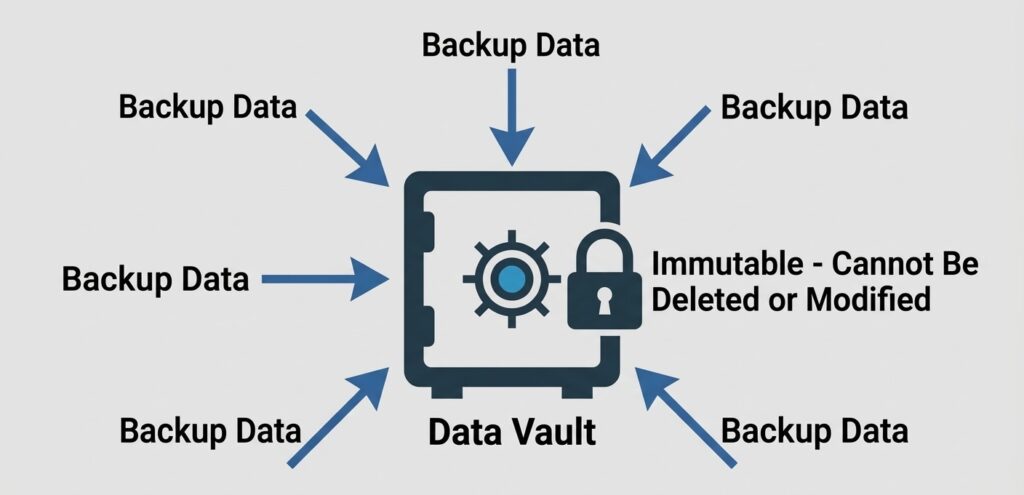
Immutable storage provides a “clean” recovery point that ransomware cannot encrypt or delete.
Modern cyberattacks often target backup systems. Ransomware groups attempt to:
- encrypt backup repositories
- delete recovery snapshots
- infect backup data with malware
Secure backup environments prevent this by maintaining protected recovery points. Common protections include:
- immutable backup storage
- isolated backup infrastructure
- offline backup copies
These protections ensure organizations can restore clean data after ransomware incidents.
Testing and Validation Prevent Failed Restores
Many recovery failures occur because backups were never tested under real recovery conditions.
Regular recovery testing verifies:
- system boot processes
- application functionality
- data integrity after restoration
- recovery timelines
Testing allows organizations to measure whether systems can be restored within expected timeframes.
Recovery testing also identifies problems early, allowing teams to fix them before an actual disruption occurs.
The next part explains how Central Data Storage helps organizations strengthen both Business Continuity and Disaster Recovery capabilities.
How Central Data Storage Supports Business Continuity and Disaster Recovery?
Central Data Storage (CDS) provides backup and recovery infrastructure designed to help organizations maintain operational availability and restore systems quickly after disruption.
These capabilities support both layers of resilience:
- Business Continuity — keeping services operational during disruption
- Disaster Recovery — restoring systems and data after failure
CDS solutions focus on verified recovery, secure backup storage, and rapid restoration of critical systems.
Verified Backup Infrastructure for Reliable Recovery
Reliable recovery begins with consistent and validated backup systems. CDS platforms protect critical data such as:
- application databases
- virtual machine environments
- system configurations
- application servers
Backup environments are designed to protect recovery points from corruption, accidental deletion, or ransomware attacks.
| Capability | Operational Benefit |
| Automated backup protection | Continuous data protection |
| Offsite backup storage | Protection from local infrastructure failures |
| Immutable backup repositories | Prevent ransomware from modifying backups |
| Backup monitoring | Detect backup failures early |
Rapid System Recovery with UnisonBDR
When systems fail, the speed of restoration determines how quickly operations can resume. CDS recovery platforms restore:
- virtual machines
- application servers
- databases
- storage environments
Recovery workflows are designed to bring systems online quickly while maintaining data integrity.
The UnisonBDR platform supports rapid restoration by allowing organizations to recover entire systems or individual workloads from protected backup environments.
Protection Against Ransomware and Data Corruption
Modern cyberattacks frequently target backup infrastructure to prevent recovery.
CDS protection strategies maintain secure recovery points that remain isolated from production systems.
Protection methods include:
- immutable backup storage
- isolated recovery environments
- clean recovery validation
Recovery Readiness and Validation
Recovery plans only work when restore processes are tested and verified. CDS recovery validation processes confirm:
- backup data integrity
- application startup after restoration
- system functionality after recovery
- recovery time targets
Organizations that regularly validate recovery processes reduce the risk of failed restoration during real incidents.
Frequently Asked Questions
Is Business Continuity the Same as Disaster Recovery?
No. Business Continuity focuses on maintaining operations during disruption, while Disaster Recovery focuses on restoring IT systems and data after failure.
Do Organizations Need Both Business Continuity and Disaster Recovery?
Yes. Business Continuity allows operations to continue temporarily, while Disaster Recovery restores systems required for full functionality.
Are Backups the Same as Disaster Recovery?
No. Backups store data copies, while Disaster Recovery includes the processes, infrastructure, and procedures required to restore systems and applications.
Building Organizational Resilience with Business Continuity and Disaster Recovery
Modern organizations face increasing risks from cyberattacks, outages, and infrastructure failures. Effective resilience requires both operational continuity and reliable system recovery.
Organizations that implement both Business Continuity and Disaster Recovery strategies are better prepared to maintain services, recover systems quickly, and minimize downtime.
If your organization is evaluating its recovery readiness, Central Data Storage provides solutions designed to help protect data, restore systems, and maintain operational resilience.
Explore CDS backup and recovery solutions or schedule a recovery readiness assessment to ensure your systems can recover when disruption occurs.

Ed Conklin is a cybersecurity executive with deep experience in ransomware, cyber risk, and enterprise security strategy. He helps organizations – especially in the healthcare industry – understand how modern attacks impact systems and why recovery readiness matters as much as prevention. His insights focus on ensuring safe, reliable recovery after incidents, including approaches like verified backup recovery and resilient healthcare data protection strategies.
Last updated on March 12, 2026