Healthcare organizations depend on backup systems to recover Electronic Health Records (EHR), imaging platforms, billing software, and virtual infrastructure after ransomware attacks.
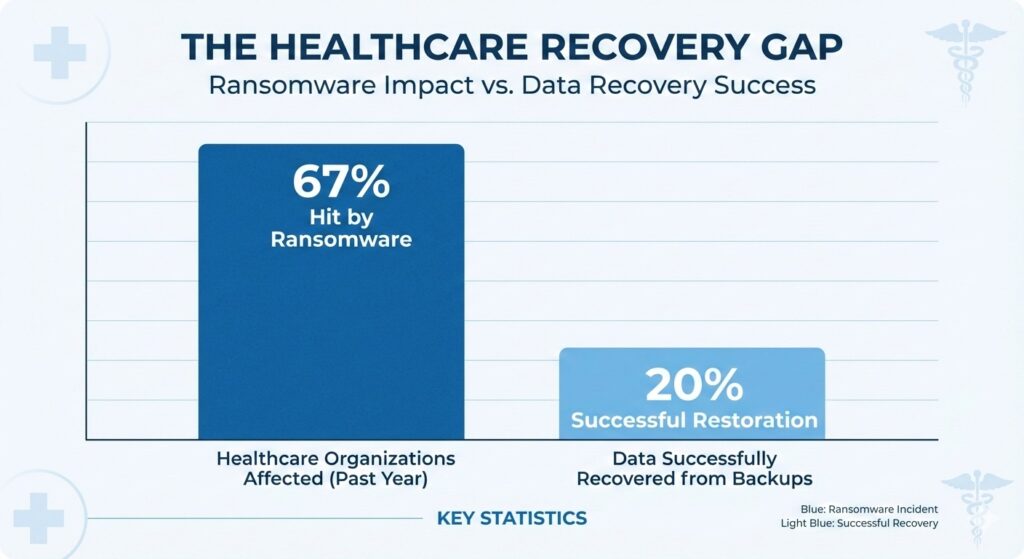
The disconnect between backup existence and recovery success in the healthcare sector.
According to Sophos’ State of Ransomware in Healthcare 2024, 67% of healthcare organizations were hit by ransomware in the past year. In other words, most providers will eventually rely on a restore point to recover operations.[source]
But here is the hidden risk:
Backup success does not guarantee recovery success.
Restore points can be silently infected long before encryption is detected. Understanding the difference between a clean and an infected restore point determines whether recovery restores operations — or restarts the attack.
Backup Success Does Not Guarantee Restore Integrity
Backup systems typically confirm:
- Job completed
- Data transferred
- Replication finished
- Storage synchronized
These confirmations only prove that data was copied. They do not confirm:
- Data integrity
- Absence of malware
- Operational functionality
A peer-reviewed study published in the National Library of Medicine found that only about 20% of healthcare organizations successfully restored data from backups after ransomware attacks.[source]
Backups existed.
Recovery still failed.
Often, the failure stemmed from contaminated restore points. This silent failure pattern is further explained in our analysis of silent data corruption in EHR systems, where backup success logs mask deeper integrity failures.
To understand why, we need to define what makes a restore point truly safe.
What is a Clean Restore Point in Healthcare Backup Systems?
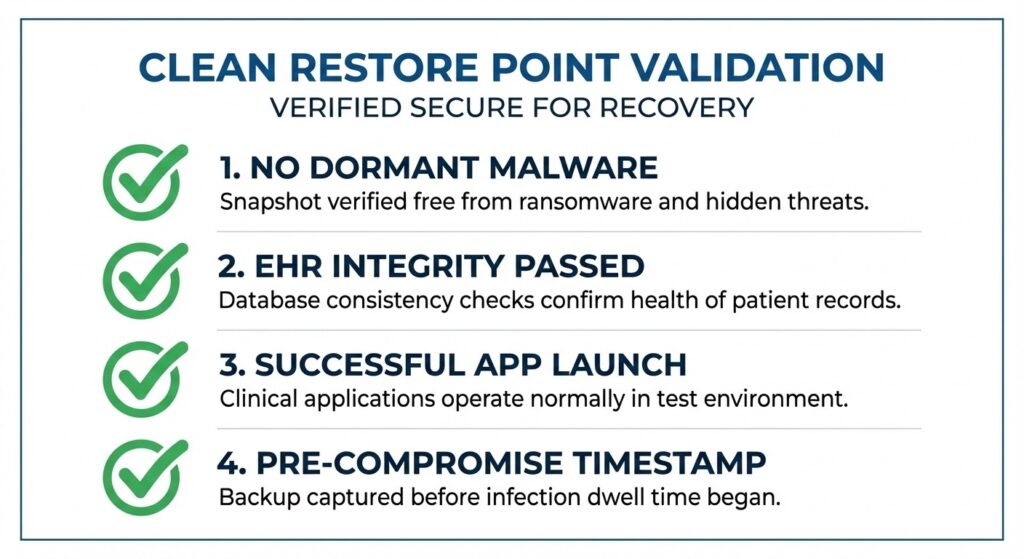
A restore point is only “clean” when it meets these specific operational standards.
A clean restore point is a backup snapshot verified free from malware and data corruption, and validated to restore healthcare systems safely into production.
A restore point is only “clean” when:
- It was taken before system compromise
- It does not contain dormant ransomware
- EHR databases pass integrity checks
- Applications launch successfully
- Validation results are documented
A clean restore enables operational system recovery — not just data restoration.
Identify Technical Markers of a Clean Restore Point
In healthcare environments, a clean restore point should meet these validation standards:
- Snapshot integrity verification confirms data consistency
- Malware scanning before restoration detects hidden persistence
- Database mount testing (EHR systems) confirms database health
- Application launch validation ensures operational readiness
- Logged restore test documentation records proof of verification
Without these markers, a restore point may only appear safe.
What is an Infected Restore Point?
An infected restore point is a backup snapshot containing dormant ransomware, hidden persistence mechanisms, or corrupted healthcare data.
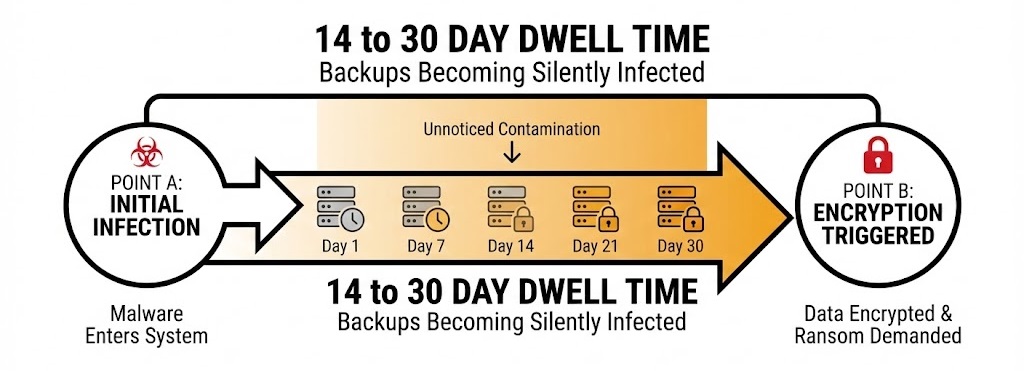
During the 14-30 day dwell time, your backup system is unknowingly capturing infected snapshots.
Restore points become infected because ransomware rarely encrypts immediately. Attackers often maintain dwell time of 14–30 days before triggering encryption.
During this period:
- Endpoints are compromised
- Malware remains undetected
- Backup jobs continue normally
- Snapshots capture infected system states
By the time encryption occurs, multiple restore points may already be contaminated.
How Restore Points Become Infected in Healthcare Environments?
Healthcare IT ecosystems amplify contamination risk because systems are interconnected:
- EHR databases
- PACS imaging platforms
- Laboratory integrations
- Billing systems
- Virtual server clusters
Infection spreads when:
- Endpoint compromise precedes encryption
- Backups capture latent malware
- Replication spreads infection across the backup chain
- Restore validation is not routinely performed
In 2023 alone, healthcare reported 725 data breaches exposing more than 133 million records, according to HIPAA Journal. Restore failures compound these breaches when infected snapshots are reused. [source]
Compare Clean vs Infected Restore Points in Healthcare
| Criteria | Clean Restore Point | Infected Restore Point |
| Malware Presence | No active malware or persistence | Contains dormant ransomware |
| Snapshot Timing | Taken before compromise window | Captured during attacker dwell time |
| Database Integrity | EHR databases pass integrity checks | Databases may be corrupted or partially encrypted |
| System Functionality | Applications launch and operate normally | Systems may fail or reinfect environment |
| Backup Chain Status | Verified safe snapshot | Infection replicated across chain |
| Recovery Outcome | Safe production restoration | Reinfection or prolonged downtime |
| Validation Status | Tested and documented | Assumed safe without confirmation |
The difference between clean and infected restore points is not visible in backup logs. It is revealed through validation.
How to Identify a Clean Restore Point After a Healthcare Ransomware Attack?
After detecting ransomware, healthcare organizations must determine which restore points were created before the compromise.
Key actions include:
- Mapping the likely infection timeline
- Isolating restore points taken before compromise
- Avoiding snapshots created during dwell time
- Validating restore points in an isolated test environment
Federal guidance from the U.S. Department of Health & Human Services recommends periodic testing of restoration procedures to ensure backups are accessible and usable. [source]
Restore integrity must be confirmed before production restoration.
Execute a Restore Validation Process Step by Step
- Isolate the infection window to determine earliest compromise
- Select a candidate restore point taken prior to compromise
- Perform a malware scan on the backup snapshot
- Mount the EHR database in a controlled environment
- Test application functionality and user access
- Log restore verification results for documentation
This process ensures restore points are proven safe before they are trusted.
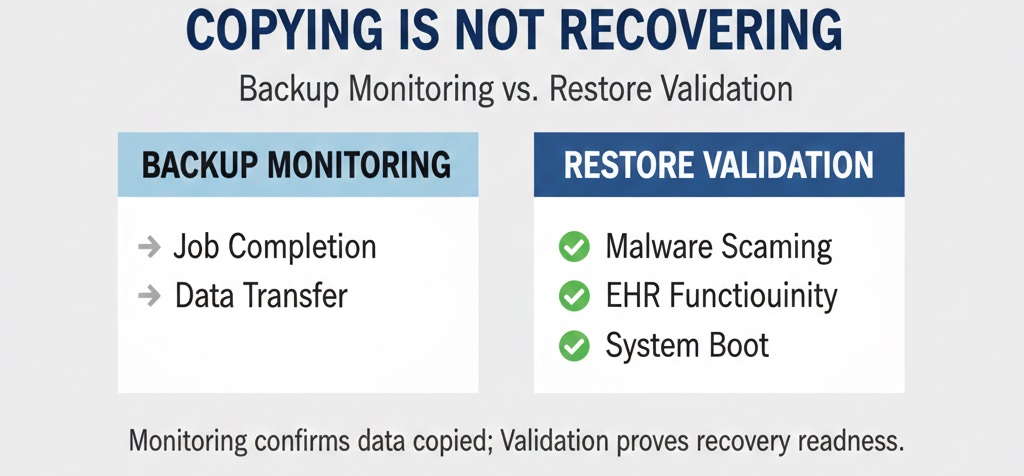
Knowing your data was copied is not the same as knowing it will work.
The broader distinction between backup monitoring and operational validation is explained in restore testing compared to backup monitoring.
Understand the Risks of Restoring from an Infected Backup
Restoring an infected restore point can:
- Reactivate ransomware
- Spread malware across systems
- Corrupt EHR databases
- Extend downtime
- Increase regulatory exposure
Rubrik’s Zero Labs research found that healthcare organizations lose approximately 20% of sensitive data during ransomware incidents, one of the highest sector impact rates[source].
If an infected restore point is selected:
- Encryption may retrigger
- Recovery timelines collapse
- Patient care disruptions intensify
Infected restore points turn backups into liabilities.
Use Restore Testing to Prove Recovery Integrity
Backup monitoring confirms that data was copied.
Restore testing confirms that systems can function safely after restoration.
Only restore validation confirms:
- Database opens correctly
- EHR functions normally
- Malware is absent
- System boot integrity is intact
Monitoring reduces operational surprises.
Validation proves recovery readiness.
Learn more in restore testing compared to backup monitoring.
Determine How Often Healthcare Providers Should Test Restore Points
Restore validation must be ongoing – not reactive.
Best practices include:
- Monthly restore sampling
- Quarterly full-system recovery testing
- Post-update restore validation
- Post-incident clean restore confirmation
For deeper guidance, see recommended restore testing frequency for healthcare providers.
Document Restore Testing to Support Compliance
Restore documentation should include:
- Restore test logs
- Verification timestamps
- Integrity confirmation records
- Evidence for contingency plan audits
Proper documentation strengthens compliance posture and recovery accountability.
Recovery Certainty Depends on Clean Restore Verification
Healthcare ransomware is common.
Restore failure rates remain high.
Data exposure affects millions of patient records.
Restore points are either:
- Verified and clean
- Or assumed and risky
Backup completion does not equal recovery proof.
Clean restore points require validation.
Infected restore points restart attacks.
Verified restore testing creates recovery certainty.
Building a Recovery-First Backup Strategy
Healthcare organizations typically operate at one of three recovery maturity levels:
- Unison Lite — Secure, encrypted offsite backups designed to ensure protected data storage.
- Unison BDR — Business continuity and disaster recovery with rapid system restoration capabilities.
- Unison Complete — Fully managed backup verification and recovery validation, including restore testing and integrity confirmation.
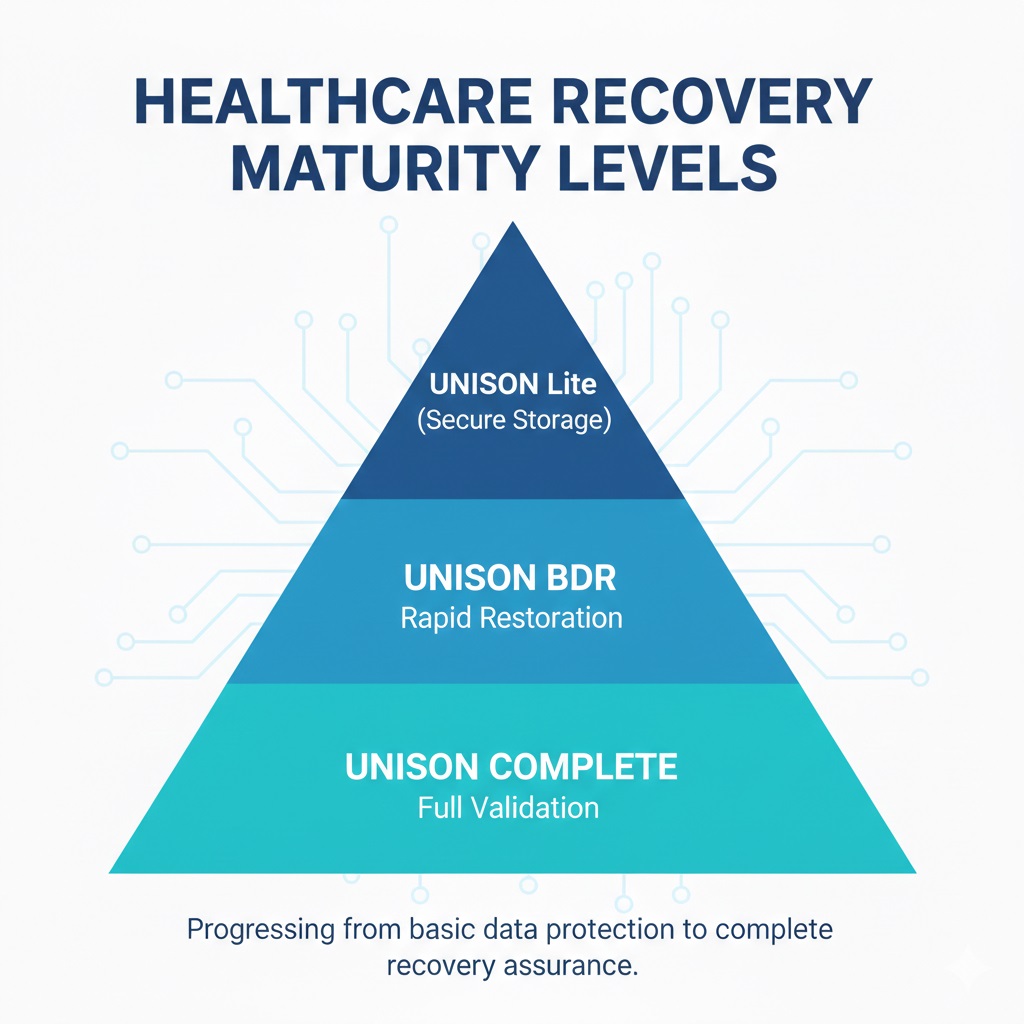
Moving from basic data protection to full recovery assurance.
Each level increases recovery assurance.
The critical shift is this:
Storage protects data.
Verification protects recovery.
Learn how our backup verification and recovery process ensures restore points are validated, documented, and ready before disaster strikes.
FAQs – Clean vs Infected Restore Points in Healthcare
Can ransomware infect immutable healthcare backups?
Ransomware can infect immutable backups if malware exists before the snapshot is locked. Immutability prevents deletion or modification, but it does not remove dormant malware captured during the attacker’s dwell time.
What is ransomware dwell time in healthcare systems?
Ransomware dwell time is the period attackers remain undetected before encryption. During this phase, backup systems capture infected snapshots, which can contaminate multiple restore points across the backup chain.
How do healthcare organizations verify EHR database integrity after restore?
Healthcare IT teams verify EHR integrity by mounting the database, running consistency checks, validating application functionality, and confirming patient records load correctly before production restoration.
What is the difference between backup retention and restore validation?
Backup retention stores historical snapshots. Restore validation tests whether those snapshots function safely. Retention preserves data copies; validation proves recovery readiness.
What happens if healthcare restores from a compromised backup?
Restoring from a compromised backup can reactivate ransomware, corrupt EHR databases, spread infection across systems, and extend downtime, increasing operational and regulatory risk.