Are Nonprofits at Risk of Data Loss Even With Backups?
Yes – because many backups are never tested for recovery. Nonprofit Organizations often discover too late that their data cannot be restored, is incomplete, or contains corrupted or infected files.
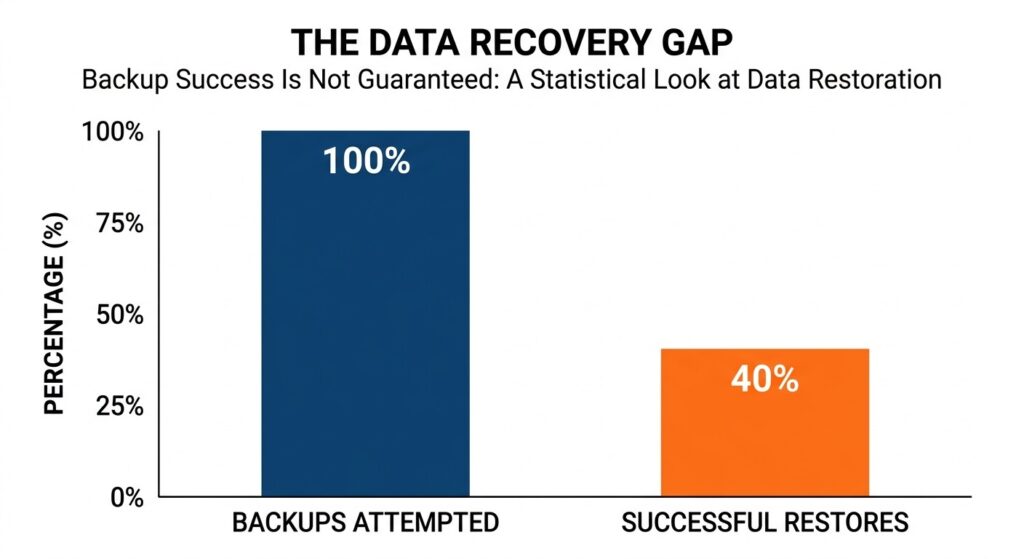
Statistics show a high percentage of backup restores fail when they are needed most.
Studies show that up to 60% of backups fail during restore attempts, meaning a large percentage of organizations may be relying on backups that won’t work when needed. [source]
Backups create a sense of security, but without verification, they do not guarantee protection. This is especially critical for nonprofits, where limited IT resources and reliance on cloud platforms increase the likelihood of unnoticed backup failures.
In many cases, organizations only realize their backup strategy is flawed during a real incident—when recovery becomes urgent and options are limited.
To understand why this happens, it’s important to look at how backup strategies fail in practice and where most nonprofits go wrong.
For a broader look at why nonprofits face higher risk, see why nonprofits are prime targets for ransomware attacks
Before identifying specific mistakes, it’s important to understand the underlying issue: why backups that appear successful often fail when recovery is actually needed.
The Hidden Problem: Why Most Backups Are Never Tested for Recovery
Many nonprofits believe their data is protected simply because backups are running. However, most backup strategies are never validated under real recovery conditions – creating a gap between perceived safety and actual recoverability.
To understand where things break down, let’s look at the actual issues that cause backups to fail when they’re needed most.
-
Why “Backup Completed” Doesn’t Mean Recoverable Data
Backup systems confirm that data was copied – but they do not guarantee that it can be restored.
In practice, backups can still fail during recovery due to corruption, missing dependencies, or system incompatibility. This creates a disconnect between what systems report as “successful” and what actually works when recovery is needed.
👉 For deeper context, see why “backup success” doesn’t always mean recoverable data
-
The Industry-Wide Blind Spot: Backup Recovery is Rarely Tested
Most organizations rely on automated backup reports instead of testing recovery in real conditions.
As a result, critical questions remain unanswered:
- Can systems be fully restored?
- How long will recovery take?
- Will the restored environment function properly?
These gaps are usually discovered only during an incident—when time and options are limited.
-
What Nonprofits Actually Need: Verified and Testable Recovery
A reliable backup strategy is not defined by how often data is stored, but by whether it can be restored without failure.
This means validating that:
- data is complete and usable
- recovery works under real conditions
- timelines align with operational needs
Approaches focused on backup verification and recovery readiness address this gap by ensuring that recovery is tested, not assumed.
Now that the underlying issue is clear, the next step is to examine the specific mistakes that lead to these failures.
Common Data Backup Mistakes Nonprofits Make
Most backup failures are not caused by a lack of tools, but by gaps in how those tools are used. The following mistakes are common across nonprofits and directly impact whether data can be recovered when needed.
Mistake# 1 – Assuming Backups Are Working Without Recovery Verification
Many organizations rely on backup status reports instead of confirming actual recoverability.
A backup may appear successful but still fail during restore due to incomplete data, configuration issues, or corruption. Without verification, these failures remain hidden until an incident occurs.
👉 To address this, see how to verify whether your backups are actually recoverable
Mistake# 2 – Relying on Cloud Storage Instead of True Backup Solution
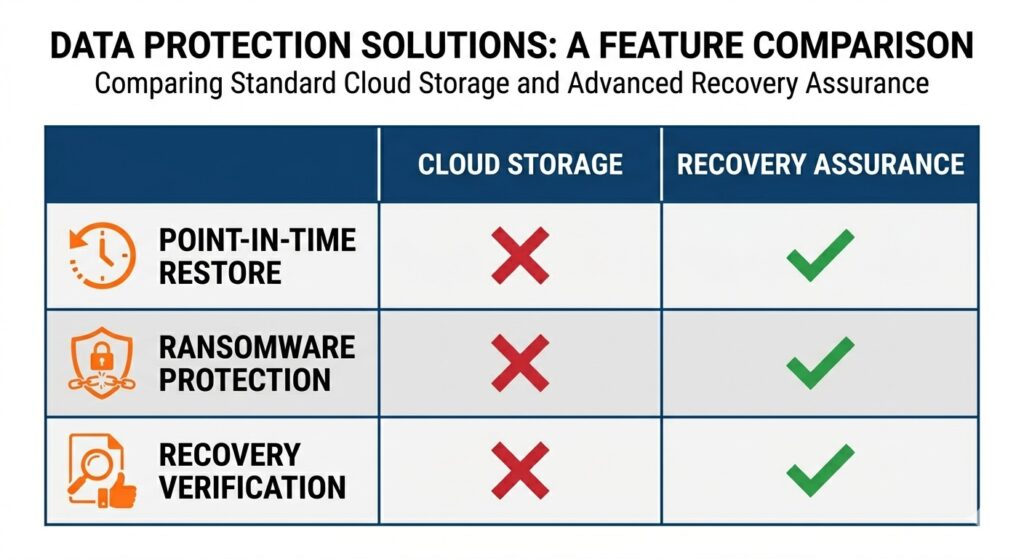
Understanding the gap between simple cloud storage and a comprehensive backup strategy.
Cloud platforms like Microsoft 365 or Google Workspace store data, but they do not guarantee full recovery.
They often lack:
- point-in-time restore flexibility
- protection against overwritten or synced deletions
- safeguards against ransomware propagation
This creates a false assumption that cloud data is fully protected.
Mistake# 3 – Storing Backups in the Same Environment as Production Systems
When backups are connected to the same network or system as live data, they are exposed to the same risks.
In the event of ransomware or system compromise, both production data and backups can be encrypted or deleted simultaneously—leaving no clean recovery point.
Mistake# 4 – Failing to Protect Backups from Ransomware Attacks
Modern ransomware attacks are designed to locate and target backup systems first.
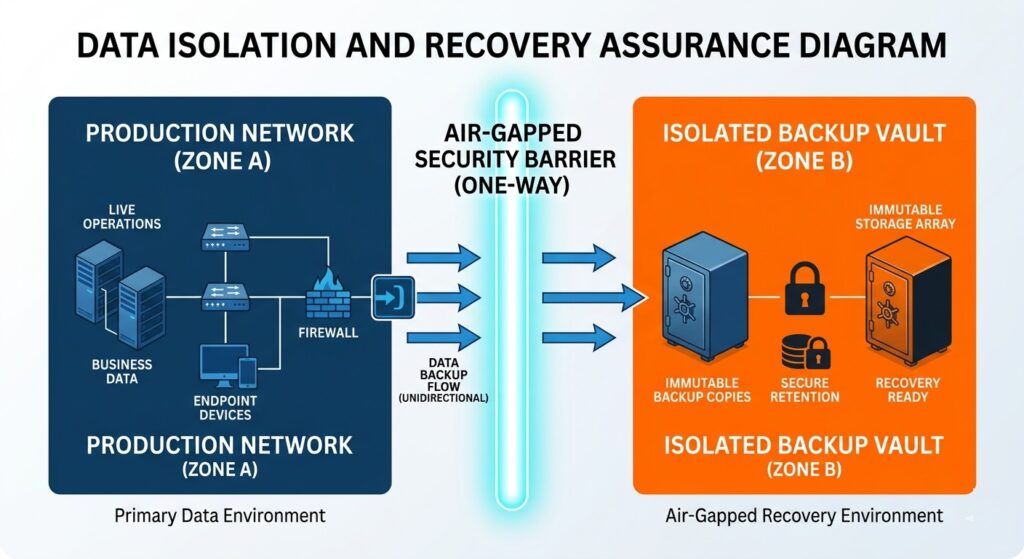
Isolating backups ensures that if your network is compromised, your recovery points remain safe.
If backups are not isolated or protected, attackers can:
- encrypt backup data
- delete recovery points
- disable backup processes
Approaches built for nonprofit data protection and ransomware resilience focus on preventing unauthorized access to backup environments.
Mistake# 5 – Failing to Test Full System Recovery Scenarios
Testing individual file restores is not the same as validating full system recovery.
During an actual incident, organizations need to restore:
- entire systems
- applications
- dependencies
Without testing full recovery scenarios, downtime and operational disruption increase significantly.
Mistake# 6 – Relying on Manual or Infrequent Backup Processes
Manual processes introduce inconsistency. Backups may be skipped, delayed or incomplete
This creates gaps in data coverage, especially in environments with frequent updates or transactions.
Mistake# 7 – Keeping Only One Backup Copy or Location (Single Point of Failure)
Storing backups in a single location increases risk.
Hardware failure, outages, or environmental events can make both primary data and backups unavailable at the same time. A resilient strategy requires separation across locations.
Mistake# 8 – Ignoring the Risk of Data Corruption in Backups
Data can become corrupted before or during backup without being detected.
If corrupted data is backed up repeatedly, recovery points may all contain the same issue—making restoration ineffective.
👉 For deeper insight, see silent data corruption and its hidden risks
These mistakes often go unnoticed until recovery is required. The next step is to understand how they lead to real-world backup failures—even when backups appear to be in place.
Why Backup Mistakes Lead to Data Loss (Even When Backups Exist)
Backup failures rarely come from a single issue. They happen when gaps in verification, protection, and recovery planning surface at the same time. As a result, organizations may have backups in place—but still be unable to restore their data when it matters.
Backups Exist but Cannot Be Restored During Recovery
Backups can appear complete but fail during restoration due to missing dependencies, misconfigured environments, or incomplete data capture.
These issues are not visible during routine operations. They only surface when recovery is attempted, turning a perceived safety net into a point of failure.
Recovery Takes Longer Than Expected During Incidents
Even when restoration is technically possible, the process may take longer than the organization can tolerate.
Without prior testing, recovery timelines are uncertain. Systems may need to be rebuilt, data revalidated, and dependencies reconfigured—delaying a return to normal operations and extending downtime.
Restored Backup Data Is Corrupted or Unusable
Backups can contain corrupted or inconsistent data without detection.
When this data is restored, systems may fail to function correctly or produce unreliable results. In some cases, every available backup contains the same issue, leaving no clean recovery point.
👉 This risk is often linked to silent data corruption where problems go unnoticed until recovery.
Restored Systems Reintroduce Security and Malware Risks
If backups are not validated, they may include compromised or infected data.
Restoring such data can reintroduce vulnerabilities or malware into the environment, creating a cycle where systems are repeatedly affected even after recovery attempts.
Backup Failures are Discovered During a Crisis
In most cases, recovery is only attempted when an incident occurs.
At that point, there is little room for error. Systems are already down, operations are disrupted, and decisions must be made quickly. Without prior validation, recovery becomes uncertain and often incomplete.
These outcomes show that having backups alone is not enough. The next step is to understand what a reliable approach looks like—and how nonprofits can move from storing data to ensuring it can be recovered when needed.
From Backup to Recovery Assurance – What Nonprofits Need Instead
Backups were designed for storage. Today’s threat landscape demands something different: proof that recovery will actually work.
This shift is not about adding more backup layers. It is about changing the goal—from storing data to ensuring it can be restored cleanly, quickly, and completely when systems fail.
Recovery Must Be Verified, Not Assumed
Traditional backup systems confirm that data was saved. They do not confirm that it can be restored in a usable state.
Recovery assurance changes that expectation. It requires validation before and after backup, ensuring that data is intact, complete, and free from hidden issues before it is ever relied on.
Clean Data Recovery Becomes the Priority
Modern threats often sit undetected inside systems for long periods. If backups capture that state, restoration simply brings the problem back.
A reliable approach focuses on clean recovery—ensuring that restored data is not corrupted, incomplete, or compromised. This aligns directly with the need to maintain integrity and availability of sensitive data under regulatory frameworks.
Recovery Time Must Align With Operational Needs
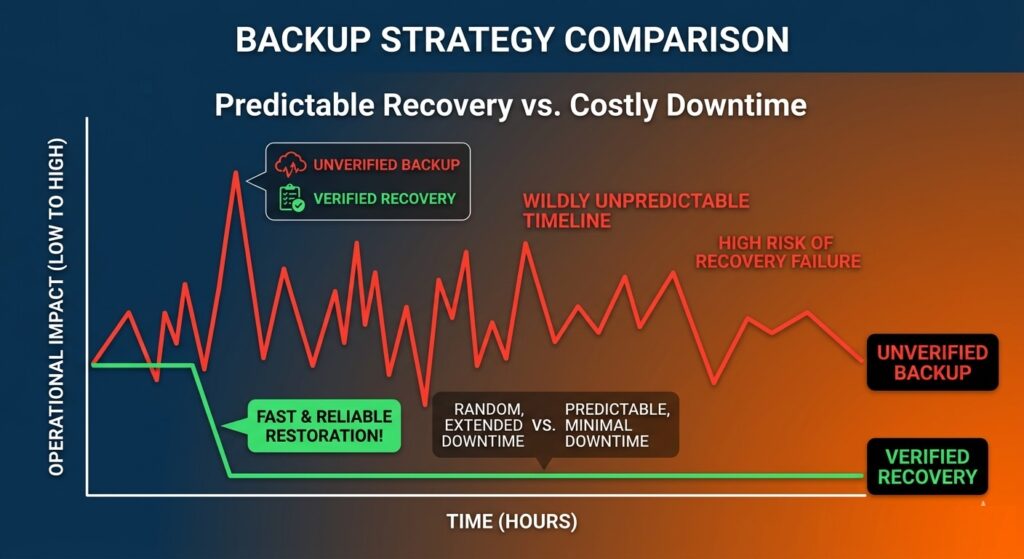
Verified recovery processes significantly reduce downtime compared to unverified assumptions.
Recovery is not only about success—it is about timing.
Organizations need systems restored within defined recovery windows, not hours or days later. Without validated recovery processes, timelines remain uncertain, and operations stay disrupted longer than expected.
Recovery Readiness Becomes a Continuous Process
Instead of being tested only during incidents, recovery readiness must be continuously evaluated.
This includes:
- validating backup integrity
- testing restore processes
- confirming system dependencies
The goal is to remove uncertainty before a failure occurs, not during it.
This shift changes how backup solutions should be evaluated. It is no longer about storage capacity or backup frequency—it is about whether recovery is clean, verified, and dependable when systems are under pressure.
This is where modern platforms like Unison begin to redefine what backup is expected to deliver—moving from passive storage to active recovery assurance.
How Modern Backup Solutions Ensure Reliable Data Recovery
Once the focus shifts to recovery assurance, the criteria for evaluating solutions also changes. The question is no longer how backups are created—but whether recovery is guaranteed under real-world conditions.
Verified Recovery Instead of Assumed Backup Success
Modern solutions prioritize validation at every stage of the backup process.
This means confirming that:
- data can be restored without errors
- recovery processes work as expected
- systems function after restoration
👉 Approaches built around backup verification and recovery readiness focus on eliminating uncertainty before an incident occurs.
Isolated and Protected Backup Environments for Recovery
To prevent backup compromise, recovery systems must be separated from production environments.
This reduces exposure to ransomware attacks, unauthorized access and system-wide failures
Solutions designed for nonprofit data protection emphasize controlled environments where backup data cannot be easily altered or deleted.
Clean Data Restoration Without Reinfection
Recovery is not complete if restored data introduces the same issue again.
Modern systems ensure that restored data is free from corruption, not carrying hidden threats and consistent across applications
This reduces the risk of repeated failures after recovery.
Predictable Recovery Time and Business Continuity
Reliable recovery requires defined and achievable timelines. Instead of uncertain restore processes, modern platforms are designed to:
- restore systems within expected timeframes
- prioritize critical operations
- minimize disruption to services
👉 Platforms like Unison BDR are built around this principle—ensuring recovery is both reliable and operationally viable.
Understanding what reliable recovery looks like is only part of the process. The next step is determining whether your current backup strategy meets these standards—or if gaps still exist.
How to Tell If Your Backup Strategy Will Actually Work
Most backup strategies appear reliable until they are tested under real conditions. The only way to determine if your approach is effective is to evaluate whether recovery is possible, complete, and timely.
– Can Your Backup Data Be Restored Without Errors?
A working backup must restore data in a usable state.
If restoration results in missing files, broken systems, or inconsistent data, the backup cannot be considered reliable. This is often the first point where hidden issues become visible.
– How Long Does Backup Recovery Actually Take?
Recovery time is rarely measured until an incident occurs.
If systems cannot be restored within an acceptable timeframe, operations remain disrupted. This makes recovery speed just as important as recovery success.
– Is Your Backup Environment Protected from Failure and Cyberattacks?
Backups must remain accessible and intact during an incident.
If they are stored in the same environment or lack protection, they can be compromised along with production systems—eliminating recovery options when they are needed most.
– Have You Tested Full Backup Recovery Scenarios?
Testing individual files does not reflect real-world recovery conditions.
Organizations need to confirm that entire systems—including applications and dependencies—can be restored without failure. Without this, recovery outcomes remain uncertain.
– Are You Relying on Backup Assumptions Instead of Validation?
If recovery has not been tested, it is being assumed.
Validating backup performance before an incident is the only way to remove uncertainty and ensure that recovery will work when required.
To evaluate this properly, see how to test and verify your backup recovery process
If these questions reveal gaps in your current approach, the next step is to take action before an incident occurs—while there is still time to address them.
What Nonprofits Should Do Next to Ensure Reliable Data Recovery
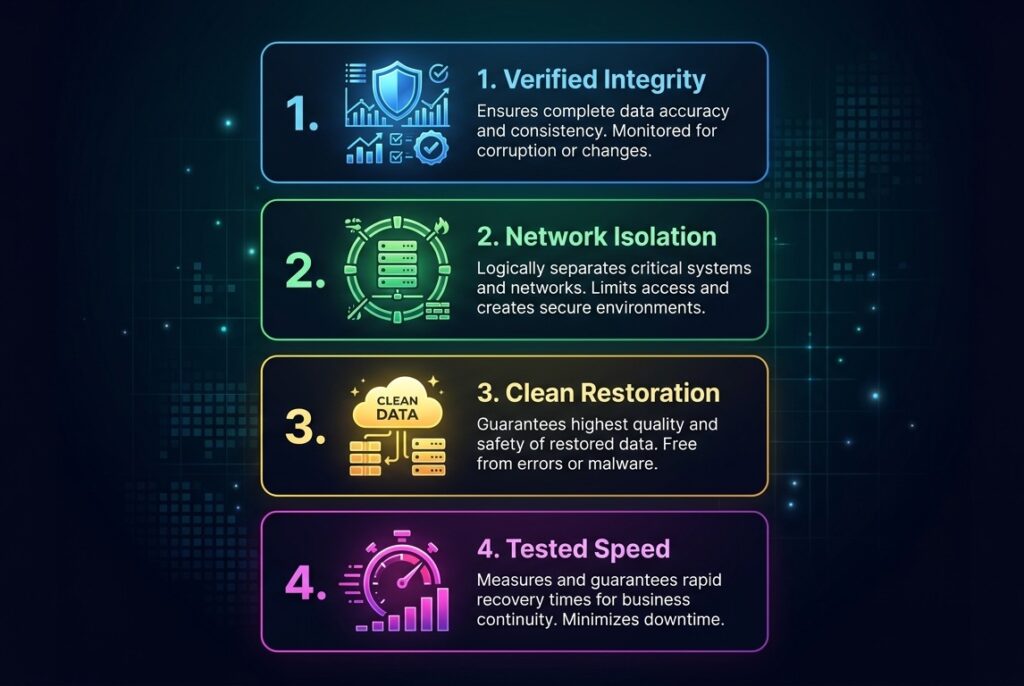
Move beyond storage- focus on these four pillars of recovery assurance.
Identifying backup gaps is only useful if action is taken before an incident occurs. The priority is to remove uncertainty and ensure recovery is not left to assumptions.
1. Evaluate Your Backup and Recovery Capabilities Today
Start by assessing whether your current setup can support full recovery under real conditions.
This means confirming that data can be restored without errors, systems function after restoration, and recovery timelines are acceptable. If any of these are unclear, the strategy is incomplete.
2. Validate Backup Recovery Before It’s Needed
Recovery should be tested proactively, not during a failure.
Validation ensures that backups are usable and recovery processes work as expected under pressure. Without this step, organizations rely on assumptions instead of evidence.
See backup verification and recovery readiness
3. Address Backup Risks Before They Become Incidents
Unverified backups, untested recovery processes, and unprotected environments increase exposure.
Addressing these issues early reduces disruption, protects data integrity, and ensures continuity when systems fail.
4. Get an Expert Backup and Recovery Assessment
If you are unsure whether your backups will work during a real incident, it is critical to validate your environment before a failure occurs.
You can speak directly with a specialist to review your current setup, identify risks, and understand what steps are needed to ensure reliable recovery.
Or, if you prefer, you can request a data assessment to get a structured evaluation of your backup and recovery readiness.
Nonprofit Data Backup Mistakes FAQs
Why is donor data backup critical for nonprofits?
Donor data backup protects contribution records and contact information. Loss of donor data disrupts fundraising, damages trust, and affects long-term engagement with supporters.
How does data loss impact nonprofit operations?
Data loss disrupts program delivery, reporting, and communication. Nonprofits rely on data for daily operations, and loss can delay services and reduce organizational effectiveness.
Do nonprofits need backup strategies for compliance requirements?
Nonprofits must maintain backup strategies to meet regulatory and audit requirements. Data protection ensures records are available for reporting, legal, and financial accountability.
Why are nonprofits more vulnerable to backup failures?
Nonprofits often operate with limited IT resources and rely on default systems. This increases the risk of untested backups and unsuccessful recovery during incidents.
How can nonprofits prioritize critical data for backup?
Nonprofits should identify critical data such as donor records, financial data, and program information. Prioritizing these ensures essential operations can be restored first during recovery.

Ed Conklin is a cybersecurity executive with deep experience in ransomware, cyber risk, and enterprise security strategy. He helps organizations – especially in the healthcare industry – understand how modern attacks impact systems and why recovery readiness matters as much as prevention. His insights focus on ensuring safe, reliable recovery after incidents, including approaches like verified backup recovery and resilient healthcare data protection strategies.
Last updated on April 6, 2026