Healthcare backup planning is not about storage.
It is about guaranteed recovery of patient data under pressure.
IBM trend data shows healthcare continues to have the highest average data breach cost of any industry, with recent analyses placing the average healthcare breach at approximately $7.42 million globally and close to $10.93 million in the U.S. context. [Source]
Recent ransomware studies show healthcare remains heavily targeted, with roughly two‑thirds of providers reporting ransomware attacks in the last year, but recovery timelines have improved—about 58% of healthcare organizations now report recovering within one week, up from just 21% the prior year. [source]
Recent breach summaries show individual healthcare cyber incidents still routinely affect hundreds of thousands to millions of patients; in 2025 alone, at least 642 large healthcare breaches were reported, impacting more than 57 million individuals [source]
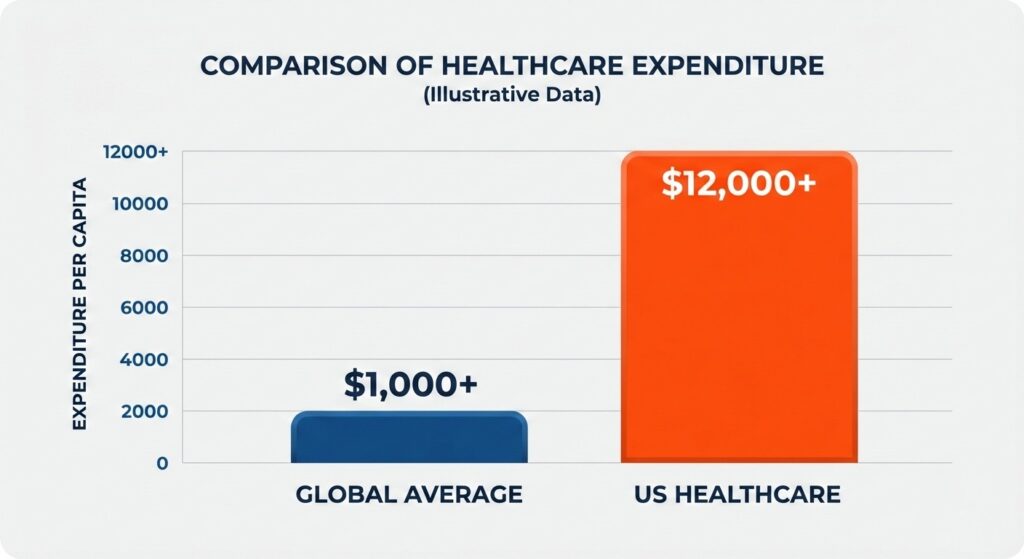
Healthcare continues to lead all industries in the financial impact of data breaches.
A healthcare backup and recovery plan must answer one operational question:
If ransomware or system failure happens at 2 a.m., how quickly can we restore clean, usable patient data?
This guide provides a structured framework to build a recovery-ready strategy aligned with clinical continuity, regulatory requirements, and ransomware resilience.
Healthcare Backup Planning Is a Clinical Risk Strategy — Not Just IT Policy
In healthcare, downtime affects patient safety.
A complete backup and recovery plan must protect:
- Electronic Health Records (EHR)
- Imaging systems (PACS, radiology)
- Scheduling and practice management platforms
- Billing and revenue cycle systems
- Cloud-based healthcare SaaS applications
- All systems storing ePHI
Downtime Directly Impacts Patient Care
HHS reporting confirms that cyber incidents have led to:
- Ambulance diversion
- Procedure cancellations
- Delayed lab results
- Manual documentation fallback
Recovery planning is therefore part of clinical risk management.
Backup Success Does Not Equal Recoverability
Industry research shows that more than 50% of organizations experience restore failures when backups are tested (source).
Common causes include:
- Corrupted backup chains
- Configuration drift
- Infected restore points
- Incomplete data dependencies
Healthcare organizations must implement a structured backup restore validation process, not just monitor job completion.
With the risk defined, the first step is identifying what must be restored first.
Step 1: Identify Critical Healthcare Systems and Data
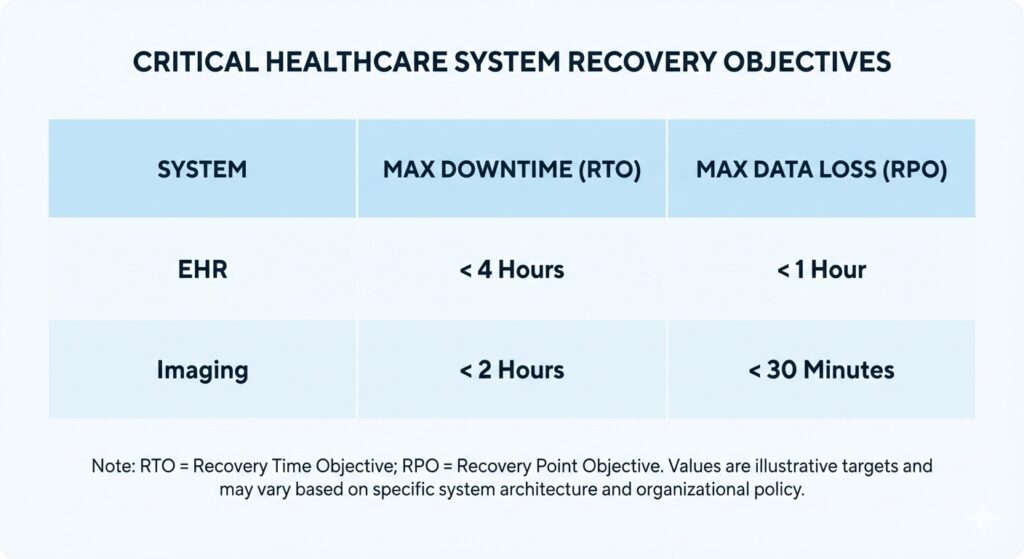
Defined RTO and RPO targets are essential for clinical continuity.
Build recovery around patient impact.
Start by classifying systems based on:
- Clinical dependency
- Regulatory exposure
- Operational importance
1. Electronic Health Records (EHR)
EHR platforms store patient charts, medication records, clinical documentation and audit logs. Downtime tolerance is low. Most organizations require:
- RTO: 2–8 hours
- RPO: 15 minutes or less
2. Imaging and Diagnostic Systems
Imaging platforms support diagnosis and treatment decisions. Outages cause:
- Delayed interpretation
- Treatment postponement
- Diagnostic workflow disruption
These systems require high-bandwidth restore planning and clear sequencing.
3. Scheduling and Revenue Systems
Although not immediately life-critical, prolonged outages affect:
- Appointment continuity
- Claims submission
- Cash flow stability
4. Cloud and SaaS Applications
Cloud vendors may guarantee uptime — not data recoverability. Document:
- Backup responsibility boundaries
- Export procedures
- Recovery timelines
Cloud reliance does not eliminate accountability for protecting PHI backups.
System Prioritization Table
| System | Patient Impact | Recommended RTO | Recommended RPO |
| EHR | Direct | ≤ 8 hrs | ≤ 15 mins |
| Imaging | Diagnostic | ≤ 12 hrs | ≤ 30 mins |
| Scheduling | Operational | ≤ 48 hrs | ≤ 1 hr |
| Billing | Financial | ≤ 72 hrs | ≤ 4 hrs |
This prioritization supports structured disaster recovery sequencing.
With systems ranked, define measurable recovery objectives.
Step 2: Define Recovery Objectives (RTO and RPO)
Healthcare organizations without defined objectives often experience prolonged outages. The Sophos State of Ransomware report shows healthcare entities frequently take weeks or months to fully recover from ransomware when planning is unclear.
Recovery Time Objective (RTO)
RTO defines maximum acceptable downtime. Shorter RTOs require:
- Faster infrastructure
- Predefined restore sequencing
- Tested recovery workflows
RTO planning must align with broader healthcare business continuity planning.
Recovery Point Objective (RPO)
RPO defines maximum acceptable data loss measured in time. Low RPO is critical in healthcare because:
- Medication updates cannot be recreated reliably
- Clinical notes may not be reproducible
- Audit logs must remain intact
High-frequency backups without validation do not guarantee usable restore points.
Once RTO and RPO targets are defined, build architecture capable of meeting them.
Step 3: Architect a Healthcare-Grade Backup Strategy
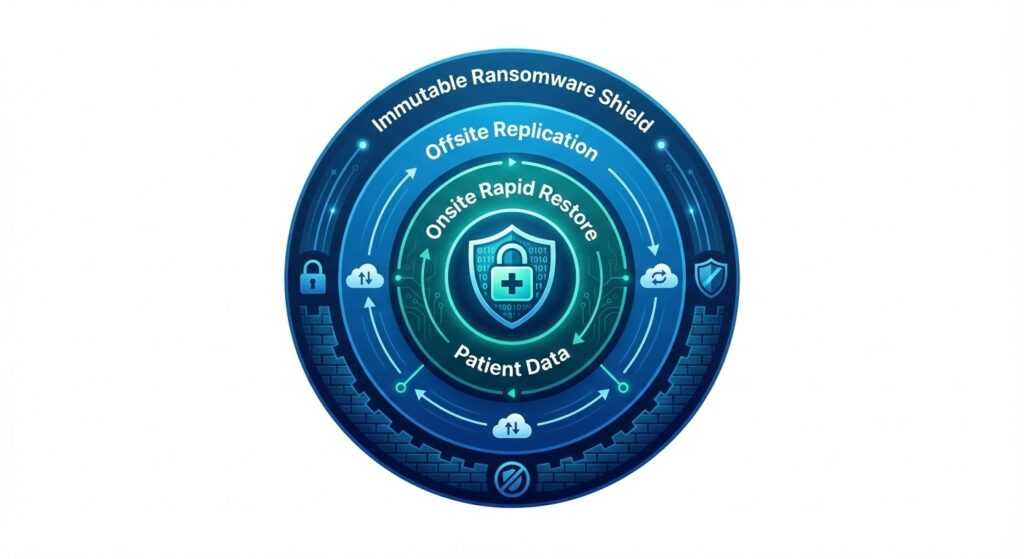
A multi-layered architecture protects against both hardware failure and ransomware.
Assume compromise.
Ransomware frequently targets backup repositories before encrypting production systems. Architecture must prevent deletion or tampering.
1. Layered Backup Architecture
Deploy:
- Onsite backup for rapid restore
- Offsite replication for disaster scenarios
- Immutable storage for ransomware resistance
Segment backup networks to prevent lateral movement. For deeper architectural design guidance, see our overview of healthcare-grade backup architecture within our healthcare infrastructure framework.
2. Immutable and Isolated Storage
Enable:
- Write-once retention policies
- Role-based access controls
- Logical or physical isolation
Immutable copies support restoring after a ransomware attack without negotiating payment. For structured ransomware response planning, review our guidance on recovering from healthcare ransomware.
3. Encryption Controls
Protect ePHI through:
- AES-256 encryption at rest
- TLS encryption in transit
- Restricted key management
These controls support HIPAA technical safeguard alignment.
4. Retention and Versioning
Versioning protects against:
- Silent corruption
- Accidental deletion
- Undetected ransomware dwell time
Architecture alone does not guarantee recovery. Restore validation confirms it.
Step 4: Implement Verified Restore Testing
Testing restores validates system usability.
More than half of backup restores fail during testing across industries (Veeam Data Protection Trends Report). Failures result from corruption, dependency gaps, or misconfiguration.
Monitoring vs. Validation
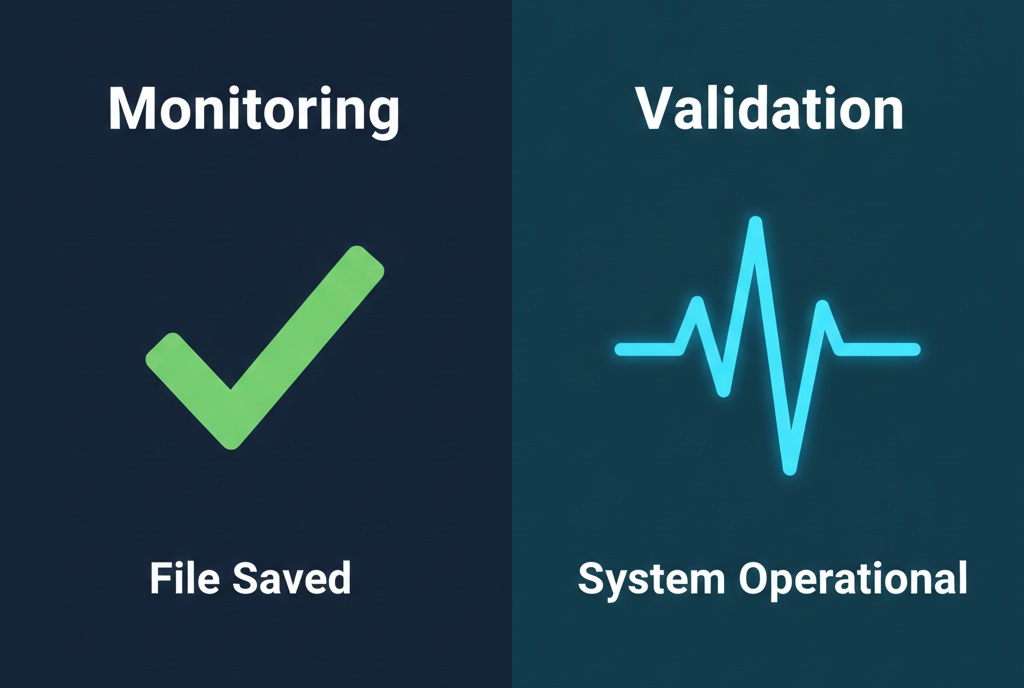
Monitoring confirms the job finished; validation confirms the system actually works.
| Monitoring | Validation |
| Confirms job completion | Confirms operational readiness |
| Tracks storage success | Verifies application startup |
| Reports errors | Detects corruption |
Testing must confirm:
- Database integrity
- Authentication functionality
- Interface connectivity
- Clean system startup
Quarterly restore validation for core systems is recommended.
Maintain documentation to support audit-ready restore documentation and alignment with HIPAA contingency requirements.
Restore capability is proven only when systems boot successfully in a clean environment.
With recovery confirmed technically, define how restoration is executed operationally.
Step 5: Build a Healthcare Incident Response and Recovery Workflow
Execution discipline reduces downtime. Define:
- Incident classification triggers
- Escalation procedures
- Restore authorization roles
- Communication cadence
Restore Sequencing Example
- Identity infrastructure
- Core network services
- EHR platform
- Imaging systems
- Administrative systems
Structured disaster recovery sequencing prevents reinfection and bandwidth congestion.
Track:
- Detection time
- Isolation time
- Restore initiation
- System validation
- Total downtime
Healthcare organizations often require extended recovery periods without structured workflow. Defined processes compress recovery timelines.
With operational workflow defined, align with regulatory obligations.
Step 6: Align With HIPAA Contingency Requirements
Under 45 CFR §164.308(a)(7), HIPAA requires a documented contingency plan that covers data backup, disaster recovery, emergency operations, and periodic testing and revision. [source]
A compliant plan includes:
- Data Backup Plan: Maintain retrievable exact copies of ePHI.
- Disaster Recovery Plan: Define restore sequencing and responsible personnel.
- Emergency Mode Operations: Maintain critical operations during system outage.
- Testing and Revision: Conduct periodic restore testing and update procedures.
HIPAA penalties range from $100 to $2 million per violation depending on severity. [source]
If third-party vendors manage recovery systems, ensure Business Associate Agreements clearly define responsibilities.
Regulatory alignment strengthens operational resilience.
Common Backup Plan Mistakes in Healthcare
Eliminate structural weaknesses.
Studies indicate that up to 90% of data loss incidents involve human error or misconfiguration. [source]
Common failures include:
- Set-and-forget backup configurations: Backups are configured once and never reviewed, allowing silent failures, misconfigurations, or corruption to go undetected.
- Backups stored on the same network: Backup systems share the same domain or network as production, enabling ransomware to encrypt or delete backup copies during an attack.
- No immutable storage: Backup data can be modified or deleted because retention policies do not enforce write-once, tamper-resistant protection.
- Undefined restore sequencing: Systems are restored randomly instead of in a prioritized order, causing delays, dependency failures, and prolonged downtime.
- No documented testing: Restore procedures are not regularly tested or recorded, leaving organizations unable to prove recoverability or meet audit requirements.
- Overreliance on cloud vendor assurances: Organizations assume cloud providers fully protect and restore data, without verifying backup ownership, retention policies, or recovery timelines.
Each weakness increases downtime risk.
Conclusion: Build a Recovery-First Strategy
Healthcare faces:
- The highest average breach cost in any industry
- Persistent ransomware targeting
- Direct patient safety impact during downtime
- Restore failure rates exceeding 50% without testing
A recovery-ready healthcare backup plan must integrate:
- System prioritization
- Defined RTO and RPO
- Layered architecture
- Immutable protection
- Verified restore testing
- Structured recovery workflow
- HIPAA contingency alignment
If your organization has not validated recoverability against defined RTO and RPO targets, conduct a structured healthcare recovery risk assessment to identify gaps before the next incident.
Backup protects data. Validated recovery protects patient care.
Top FAQs About Healthcare Backup & Recovery Planning
How does clean recovery verification improve ransomware resilience in healthcare environments?
Clean recovery verification scans backup data before restore to confirm it is malware-free and uncorrupted. This process ensures healthcare organizations restore safe ePHI.
Can government or highly regulated healthcare systems fully deploy UnisonBDR internally?
Yes. UnisonBDR supports on-prem or private infrastructure deployment, allowing healthcare and government entities to retain full data control.
How does a healthcare recovery risk assessment improve backup reliability?
A healthcare recovery risk assessment evaluates restore integrity, ransomware exposure, backup isolation, and RTO/RPO alignment. The process identifies recoverability gaps before incidents occur.
Does Unison Complete replace traditional cybersecurity tools in healthcare?
No. Unison Complete validates security posture and integrates vulnerability intelligence with backup readiness. It strengthens recovery assurance but complements firewalls and endpoint protection.

Ed Conklin is a cybersecurity executive with deep experience in ransomware, cyber risk, and enterprise security strategy. He helps organizations – especially in the healthcare industry – understand how modern attacks impact systems and why recovery readiness matters as much as prevention. His insights focus on ensuring safe, reliable recovery after incidents, including approaches like verified backup recovery and resilient healthcare data protection strategies.
Last updated on February 13, 2026