
What would happen to your organization if you suddenly lost access to your data?
Not just files — but production systems, customer records, billing platforms, communications, and operational workflows.
Whether caused by ransomware, infrastructure failure, insider error, or natural disaster, data disruption does not just impact IT. It disrupts revenue, compliance posture, customer trust, and operational continuity.
Backup and Disaster Recovery (BDR) is not simply about storing copies of data. It is about engineering recoverability — the ability to restore systems predictably, cleanly, and within defined time objectives.
A mature disaster recovery framework ensures that when disruption occurs, recovery is controlled, measurable, and aligned with business risk tolerance.
In this guide, we move beyond basic backup advice and outline an enterprise-grade disaster recovery structure — from architecture design to restore validation and governance alignment.
What is Backup and Disaster Recovery?
Before discussing recovery strategy, it is critical to understand how backup and disaster recovery function together.
- Backup protects data assets.
- Disaster recovery restores operational capability.
Together, they support business continuity.
What is Backup?
Backup is the controlled replication of critical data into secure, isolated storage environments so that it can be restored in the event of corruption, deletion, or compromise.
Common Backup Types:
- Full Backup: Complete dataset replication.
- Incremental Backup: Captures changes since the last backup.
- Differential Backup: Captures changes since the last full backup.
However, backup type alone does not determine resilience. Architecture does.
Want to know more? Check out our data backup service.
What is Disaster Recovery?
Disaster recovery is the structured restoration of systems, applications, and infrastructure after disruption.
It includes:
- Defined recovery sequencing
- Recovery Time Objectives (RTO)
- Recovery Point Objectives (RPO)
- Restore testing and validation
- Documentation and audit evidence
Backup creates recoverable copies.
Disaster recovery ensures those copies restore operations.
For more information on disaster recovery, check out our Disaster Recovery Solutions.
Key Tips for Disaster Recovery to Protect Your Business and Data
An effective recovery strategy requires architecture, testing, and governance — not just storage capacity.
1. Conduct a Business Impact Analysis Before Designing Recovery
Before defining backup frequency or storage locations, organizations must:
- Identify mission-critical systems
- Map application dependencies
- Quantify downtime impact per hour
- Classify data sensitivity levels
Recovery architecture should be driven by business risk — not convenience.
2. Define Clear RTO and RPO Targets
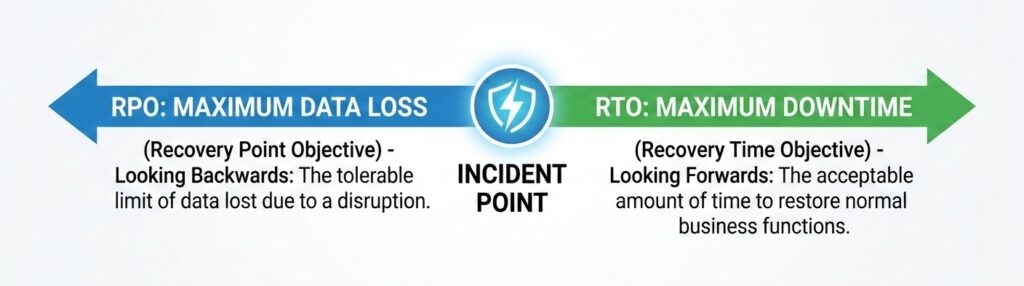
Understanding the two most critical metrics in your disaster recovery plan: how much data you can afford to lose and how long you can afford to be down.
Every enterprise disaster recovery plan must define:
- Recovery Time Objective (RTO): Maximum acceptable downtime before operational impact becomes critical.
- Recovery Point Objective (RPO): The maximum amount of data loss your organization can tolerate, indicating how frequently backups should be taken.
Without measurable targets, recovery performance cannot be evaluated.
3. Follow the 3-2-1 Rule (Yes, It Still Works)
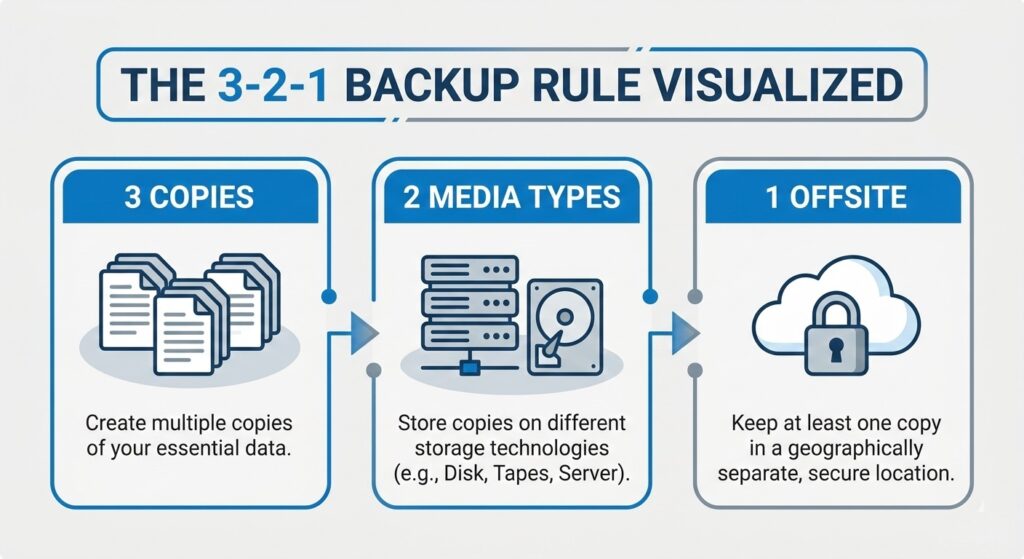
The 3-2-1 rule is the industry standard for ensuring your data is never centralized in a single failure domain.
There’s a reason this rule remains foundational:
- Keep 3 copies of your data
- Use 2 different storage media
- Store 1 copy offsite, ideally in the cloud
Simple. Proven. Effective.
This ensures data is not centralized in a single failure domain. If primary systems are compromised or destroyed, isolated copies remain recoverable.
Enterprise environments often expand this to include immutable storage and restore verification – but 3-2-1 remains the baseline resilience model.
4. Implement Immutable and Isolated Backup Architecture

Immutable storage ensures that once a backup is created, it cannot be encrypted or deleted by attackers.
Ransomware increasingly targets backup repositories. Enterprise-grade protection requires:
- Immutable backup storage
- Object-lock retention policies
- Network segmentation
- Separate administrative credentials
- Multi-factor authentication
Assume breach. Design for containment. Immutable storage ensures recovery copies cannot be altered, encrypted, or deleted after creation.
5. Automate, Monitor, and Verify Backup Operations
Manual processes introduce failure risk. Mature backup operations require:
- Automated scheduling
- Real-time failure alerts
- Centralized monitoring dashboards
- Capacity tracking
- Anomaly detection
However, monitoring is not enough. Backup success does not equal restore success.
Organizations must perform:
- Quarterly restore testing
- Application-level recovery validation
- Malware scanning before restore
- Documented recovery verification
Verification transforms backup from assumption into assurance.
6. Map the Human Element in Recovery Execution
Technology restores systems. People restore operations. Disaster recovery plans must define:
- Incident response lead
- Recovery execution owner
- Vendor contact protocol
- Internal communications authority
- External notification procedures (if required)
Write it down. Assign roles. Conduct tabletop exercises.
The strongest Backup and Disaster Recovery plans do not just protect servers — they define governance and decision-making under pressure.
7. Use Offsite and Cloud Backup Solutions Strategically
Onsite-only backups create exposure to localized disasters. Cloud-based architecture strengthens resilience by:
- Providing geographic redundancy
- Supporting remote restore capabilities
- Reducing single-site dependency
- Enabling hybrid recovery models
Cloud backup is not merely a convenience — it is a structural resilience requirement.
Ensuring HIPAA Compliance in Backup and Disaster Recovery for Healthcare
For healthcare organizations, recovery planning must align with regulatory requirements. Under HIPAA’s Security Rule, organizations must implement:
- Data backup plans
- Disaster recovery procedures
- Emergency mode operations
- Testing and revision procedures
ePHI must remain protected during storage and restoration.
HIPAA Security Requirements in Disaster Recovery
Compliant recovery environments must include:
- Encryption (in transit and at rest)
- Access controls with least-privilege enforcement
- Audit logging of backup and restore activity
- Integrity controls to prevent alteration
- Documentation for audit and investigation scenarios
Recovery without documentation does not satisfy compliance obligations.
Testing Your Disaster Recovery Plan
A recovery plan untested is a plan unproven. Recommended enterprise testing methods include:
- Full infrastructure restore simulation
- Targeted workload recovery tests
- Ransomware scenario simulation
- Executive tabletop exercises
Testing frequency should reflect operational criticality — quarterly at minimum for most organizations. Testing validates both infrastructure and governance processes.
Enterprise Recovery Requires More Than a Written Plan
A documented disaster recovery plan is essential — but documentation alone does not guarantee recoverability.
Many organizations discover during an incident that:
- Backup jobs completed — but restores fail
- Restore points contain corrupted or infected files
- Recovery timelines exceed RTO targets
- Backup storage was exposed to the same ransomware attack
In healthcare and other regulated environments, disaster recovery must be verifiable — not assumed. This is where recovery-first architecture becomes critical.
Where Traditional Backup Stops — Verified Recovery Begins?
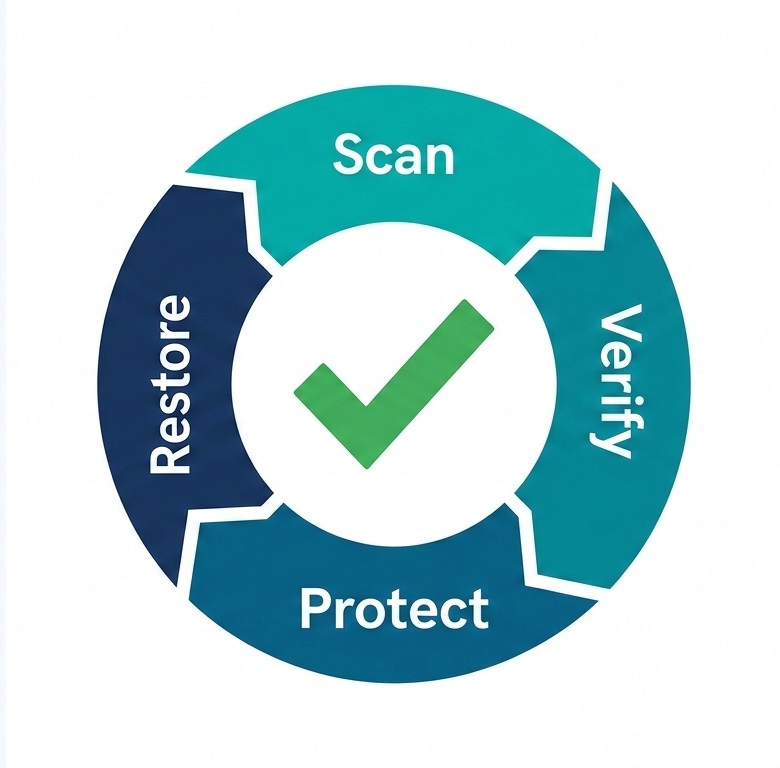
Traditional backup stops at the copy; verified recovery ensures the data is clean and functional before it touches your network.
Most backup providers focus on successful job completion. Few validate whether recovery will be clean, safe, and complete.
Central Data Storage addresses this gap through:
UnisonBDR — Clean, Verified Restore Architecture
UnisonBDR is designed around one core principle: recovery integrity.
It provides:
- Clean restore validation (pre-restore scanning and verification)
- Immutable backup protection
- Flat-rate pricing with no egress or retrieval surprises
- Deployment flexibility: managed, self-hosted (Docker), or licensed environments
This ensures that recovery does not introduce infection, corruption, or compliance exposure.
Unison Complete – Unified Cybersecurity + Recovery
For organizations requiring deeper resilience, Unison Complete integrates:
- Pre-backup integrity scanning
- Continuous vulnerability intelligence
- Security control validation
- Compliance-aligned reporting (HIPAA, ISO, SOC frameworks)
- Verified recovery across the full backup lifecycle
This unified model reduces the risk of silent data corruption, misconfiguration exposure, and ransomware persistence inside backup chains.
Disaster recovery becomes proactive — not reactive.
Data Integrity and Clean Recovery
Restoring compromised data reintroduces risk. Recovery validation must confirm:
- Data completeness
- File integrity
- Application functionality
- Absence of malware or corruption
Immutable storage combined with restore validation ensures operational stability post-recovery.
Selecting the Right Backup and Disaster Recovery Partner
When evaluating recovery solutions, assess beyond storage capacity.
Key enterprise criteria:
- Verified restore capability
- Immutable architecture
- Isolation controls
- Compliance alignment (HIPAA, SOC 2)
- Monitoring transparency
- Recovery service-level expectations
- Incident response integration
Storage vendors store data.
Recovery partners restore operations.
Start With a Data Risk & Recovery Assessment
Before the next incident tests your recovery plan, leadership should be able to answer:
- Are our backups actually recoverable?
- Are restore points verified as clean?
- Are there misconfigurations exposing backup infrastructure?
- Would our recovery meet defined RTO and RPO objectives?
- Are we audit-ready under HIPAA and related frameworks?
Central Data Storage provides structured assessment pathways including:
- Data Risk & Recovery Assessment
- Internal Network Vulnerability Check
- External & Perimeter Check
- Email Security Health Check
Each assessment includes:
- Vulnerability heatmap
- Ranked remediation roadmap
- Executive-ready summary
- Compliance alignment review
- Live review session with CDS recovery specialists
This transforms disaster recovery from a theoretical plan into a measurable, validated resilience strategy.
Protect Your Organization Before Recovery Is Tested
Disaster recovery is not defined by documentation — it is defined by recoverability. Whether you require:
- Healthcare-aligned backup architecture
- Verified restore validation
- Ransomware recovery planning
- Compliance-ready documentation
- Or a structured risk assessment
CDS delivers recovery-first solutions designed for operational continuity.
Contact Central Data Storage or begin a Data Risk & Recovery Assessment to validate your resilience before the next incident forces the test.
FAQs
What is the difference between disaster recovery and incident response?
Disaster recovery restores systems and data after disruption. Incident response identifies, contains, and investigates cyber events. Incident response manages the threat; disaster recovery restores operations and data availability.
Does cyber insurance require a disaster recovery plan?
Most cyber insurance providers require documented backup policies, tested restore procedures, and defined RTO/RPO targets. Insurers evaluate disaster recovery maturity before approving coverage or processing ransomware claims.
Are cloud backups automatically protected from ransomware?
Cloud backups are not automatically ransomware-safe. Attackers often target cloud storage and admin credentials. Ransomware can encrypt or delete backups unless immutability, access controls, and verification protections are enforced.
How often should a business update its disaster recovery plan?
Organizations should review and update disaster recovery plans annually or after major infrastructure changes, security incidents, or compliance updates. Plan updates must align with system changes and evolving threat risks.
What role does executive leadership play in disaster recovery planning?
Executive leadership defines risk tolerance, approves RTO/RPO targets, allocates recovery budget, and enforces governance oversight. Disaster recovery is a business decision, not only an IT responsibility.